{
"version": 1,
"slug": "find-instagram-profiles-with-google-operators",
"title": "How to Use Google Search Operators to Find Instagram Profiles",
"excerpt": "Native Instagram search limits your results. Learn how to use Google search operators to uncover thousands of hidden Instagram profiles for your lead generation campaigns.",
"cover": {
"src": "/howto_images/google-to-search-instagram/google-operstor-instagram-cover.png",
"optimized": "https://www.datablist.com/_next/image?url=%2Fhowto_images%2Fgoogle-to-search-instagram%2Fgoogle-operstor-instagram-cover.png&w=1200&q=75"
},
"url": "https://www.datablist.com/how-to/find-instagram-profiles-with-google-operators",
"contentMarkdown": "\nNative Instagram search limits your ability to find targeted profiles. You type a keyword into the app. The search engine yields a few dozen results before hiding valuable accounts. You can bypass these restrictions using Google search operators. Google indexes millions of Instagram pages. You can use specific commands to filter the web and extract exactly what you need. \n\nThis guide explains how to combine Google operators to build highly targeted profile lists. You will learn the exact formulas to identify influencers, local businesses, and niche creators. We will explore how to scale this process using automation tools to generate thousands of leads. \n\n**Quick links to sections:**\n- [Why Native Instagram Search Fails](#why-native-instagram-search-fails)\n- [Essential Google Search Operators](#essential-google-search-operators)\n- [Building the Perfect Search Query](#building-the-perfect-search-query)\n- [Scaling Your Search With AI](#scaling-your-search-with-ai)\n- [Step-by-Step Guide to Data Extraction](#step-by-step-guide-to-data-extraction)\n\n## Why Native Instagram Search Fails {#why-native-instagram-search-fails}\n\nInstagram designs its search function for casual browsing. The application prioritizes accounts you follow, popular hashtags, and viral content. The native search engine ignores complex queries and hides valuable business data. The algorithm optimizes for user engagement. The company wants users watching videos and clicking ads. They do not build tools for B2B data extraction.\n\nImagine you run a B2B SaaS company selling scheduling software. You need to connect with independent \"yoga instructors\". You open the Instagram app and type the keyword. The app shows you five relevant profiles. Then, the algorithm shows you viral videos of people performing complex yoga poses. The results focus on visual entertainment. You scroll for ten minutes and find nothing useful for your sales pipeline. \n\nFurthermore, Instagram blocks bulk data extraction. You cannot easily export the results into a spreadsheet. The interface traps your data inside the mobile screen. You hit a brick wall quickly. Manual copy-pasting takes hours. Human error ruins manual spreadsheets. \n\nConsider another example. Sarah runs a boutique digital marketing agency. She needs to pitch local dentists in Chicago. She searches \"Chicago dentist\" on Instagram. The app shows a few top accounts, mostly massive corporate clinics with huge marketing budgets. The app hides the independent, single-practitioner clinics Sarah wants to target. \n\nGoogle operates differently. Google crawls the web constantly. Its bots read the text inside Instagram bios, categorize page titles, and index follower counts. By querying Google, you turn a broad search engine into a surgical lead discovery tool. Google allows you to specify exact parameters. You dictate the rules. You force the search engine to show only pages matching your strict criteria. \n\n## Essential Google Search Operators {#essential-google-search-operators}\n\nSearch operators act as special commands. They tell Google exactly where to look and what to ignore. Mastering these symbols unlocks deep web extraction capabilities. You transform from a casual browser into a precise data miner. \n\n### The Site Operator\nThe `site:` operator restricts results to a specific domain. To find Instagram pages, type `site:instagram.com`. Google ignores Facebook, TikTok, LinkedIn, and millions of other websites. This command forms the foundation of our strategy. Without it, you search the entire internet and receive random blog articles. With it, you trap the search spider inside the Instagram domain. \n\n### The Inurl Operator\nThe `inurl:` command tells Google to look for specific words inside the web address. A standard profile URL looks like `instagram.com/username/`. A post URL looks like `instagram.com/p/something/`. We use this operator to filter URL structures. It helps us distinguish a user profile from a random picture upload. A profile page contains contact data. A picture page contains useless comments.\n\n### The Minus Sign \nThe minus sign `-` excludes terms. Instagram hosts billions of photos and videos. If you search for profiles but want to remove posts, you combine the minus sign with the `inurl` operator. Typing `-inurl:/p/` forces Google to remove individual photo posts from your results. This cuts out massive amounts of noise and leaves the pure profiles. You must eliminate the noise to find the signal.\n\n### Quotation Marks\nQuotes `\" \"` force an exact match. If you search for `\"fitness coach\"`, Google only returns pages containing this exact phrase. Without quotes, Google might return pages containing \"fitness\" in the title and \"coach\" in the footer. Quotes guarantee precision. Use them to target specific job titles or niche bio descriptions. \n\nIf John searches for `real estate agent` without quotes, Google shows profiles of people talking about real estate and travel agents. John wastes time filtering bad leads. If John uses `\"real estate agent\"`, he gets a clean list of professionals.\n\n### The OR Command\nThe `OR` command broadens your search horizontally. You can look for multiple keywords simultaneously. Typing `\"fitness coach\" OR \"personal trainer\"` tells Google to return pages containing either phrase. This saves time. You combine similar intents into a single powerful query. Use uppercase letters for the OR command. \n\n## Building the Perfect Search Query {#building-the-perfect-search-query}\n\nTo find true profiles, you must eliminate the noise completely. Instagram generates millions of URLs daily. Posts, reels, tags, and explore pages clog the search engine index. If you perform a basic search, you get garbage data. \n\nLet us look at a failing query first. Suppose you search for `site:instagram.com \"concept store\"`. Google returns 10,000 results. However, 9,500 of those results point to individual photos of shoes or store interiors. You cannot extract emails from a photo post. You need profiles. \n\nYou need a strict formula. Use this exact pattern to isolate profiles:\n\n`\"Your Keyword\" -inurl:/p/ -inurl:/reel -inurl:/channel -inurl:/guides -inurl:/explore site:instagram.com`\n\nLet us break down the logic behind this formula.\n\n`\"Your Keyword\"` targets the text written in the user bio. You replace this with your target niche. If you sell marketing services to dentists, you write `\"dentist\"`. \n\n`-inurl:/p/` removes standard image posts. Instagram categorizes all single photo uploads under the `/p/` path.\n`-inurl:/reel` removes video reels. Short-form video pages ruin your data extraction efforts. \n`-inurl:/channel` removes broadcast channels. \n`-inurl:/guides` removes curated guides.\n`-inurl:/explore` removes the explore feed pages.\n\n`site:instagram.com` keeps the results strictly on the designated platform. \n\nYou can modify the keyword to fit any industry, profession, or geographical location. Add a city name inside quotes to find local prospects. `\"dentist\" \"London\"` targets specific local professionals. \n\nLet us examine a practical use case. Michael runs a logistics company. He wants to partner with e-commerce brands selling handmade jewelry. He builds this query:\n\n`\"handmade jewelry\" \"link in bio\" -inurl:/p/ -inurl:/reel -inurl:/channel site:instagram.com`\n\nMichael adds `\"link in bio\"` because business accounts usually direct traffic to a Shopify store. This small addition filters out hobbyists and isolates serious business owners. Small tweaks to the query drastically change the lead quality.\n\n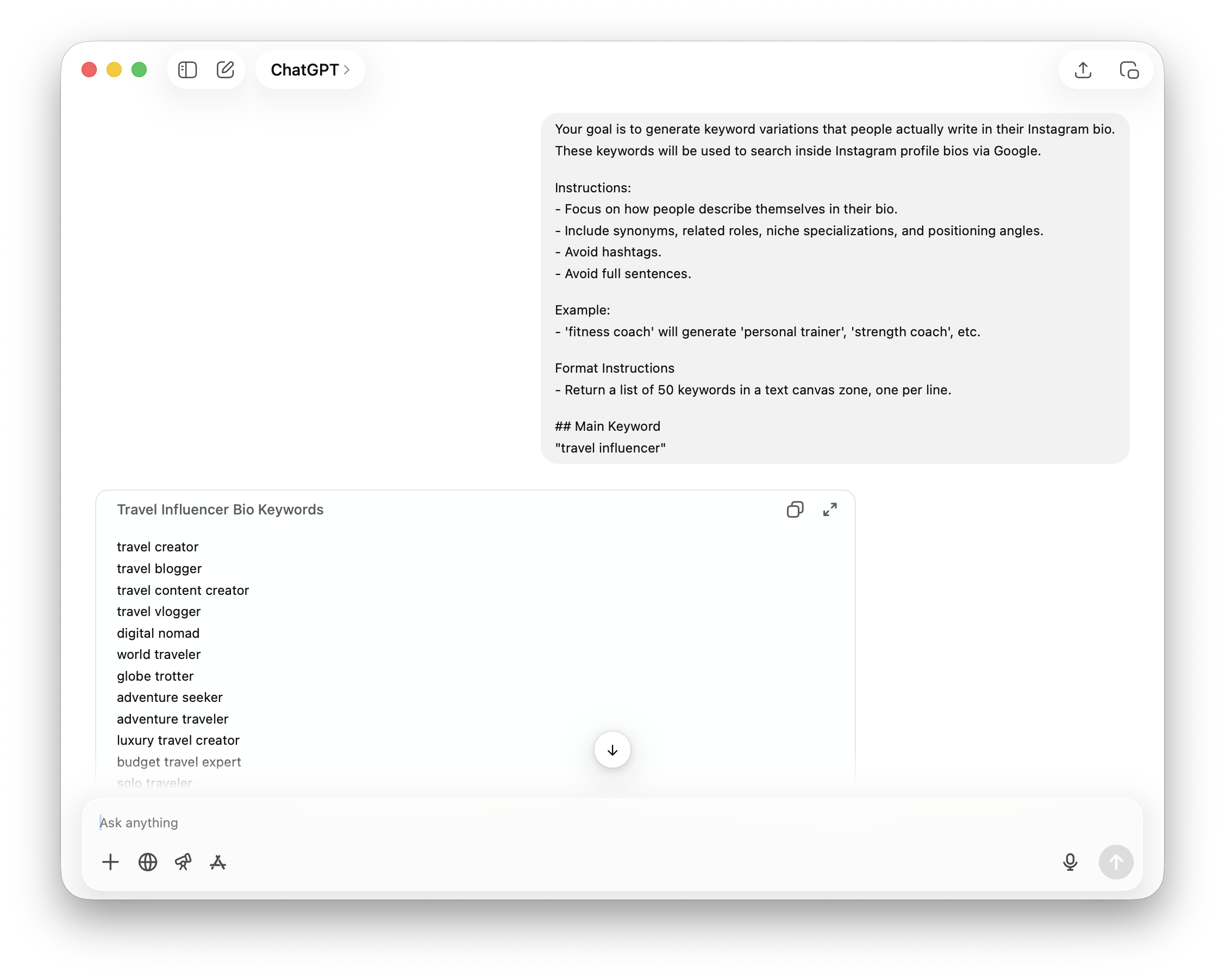\n\n## Scaling Your Search With AI {#scaling-your-search-with-ai}\n\nGoogle protects its servers. The search engine limits results to around 300 items per query. Running one perfect query gives you a small list. You hit a ceiling quickly. You want 5,000 leads, but Google stops showing pages at row 300. \n\nTo build a massive list, you must run hundreds of variations. Generating 100 manual variations takes hours of typing. Language models solve this problem instantly. You can generate query variations using an AI tool like ChatGPT, Claude, or Gemini. Ask the AI for synonyms, related categories, and niche terms. \n\nImagine a user named Emily. Emily runs a PR agency for wellness brands. She needs 5,000 Instagram influencers for a massive campaign. She runs one query for \"wellness influencer\" and gets 250 results. The manual process fails her scale requirements. \n\nEmily then uses ChatGPT to generate 100 related terms. She asks the AI for variations like \"holistic health creator\", \"yoga enthusiast\", \"organic lifestyle blogger\", and \"mindfulness guide\". She asks the AI to wrap these keywords into our exact Google search formula. \n\nShe turns 250 leads into 15,000 unique prospects in ten minutes. The AI does the heavy lifting. \n\n\nI am building a list of Google Queries based on Instagram keywords.
\nUse the given pattern.
\nEx: \"travel influencer\" -inurl:/p/ -inurl:/reel -inurl:/channel -inurl:/guides -inurl:/explore site:instagram.com
\nReturn the list of queries in a text canvas zone, one per line.
\n## Pattern
\n\"keyword\" -inurl:/p/ -inurl:/reel -inurl:/channel -inurl:/guides -inurl:/explore site:instagram.com\n
\n\n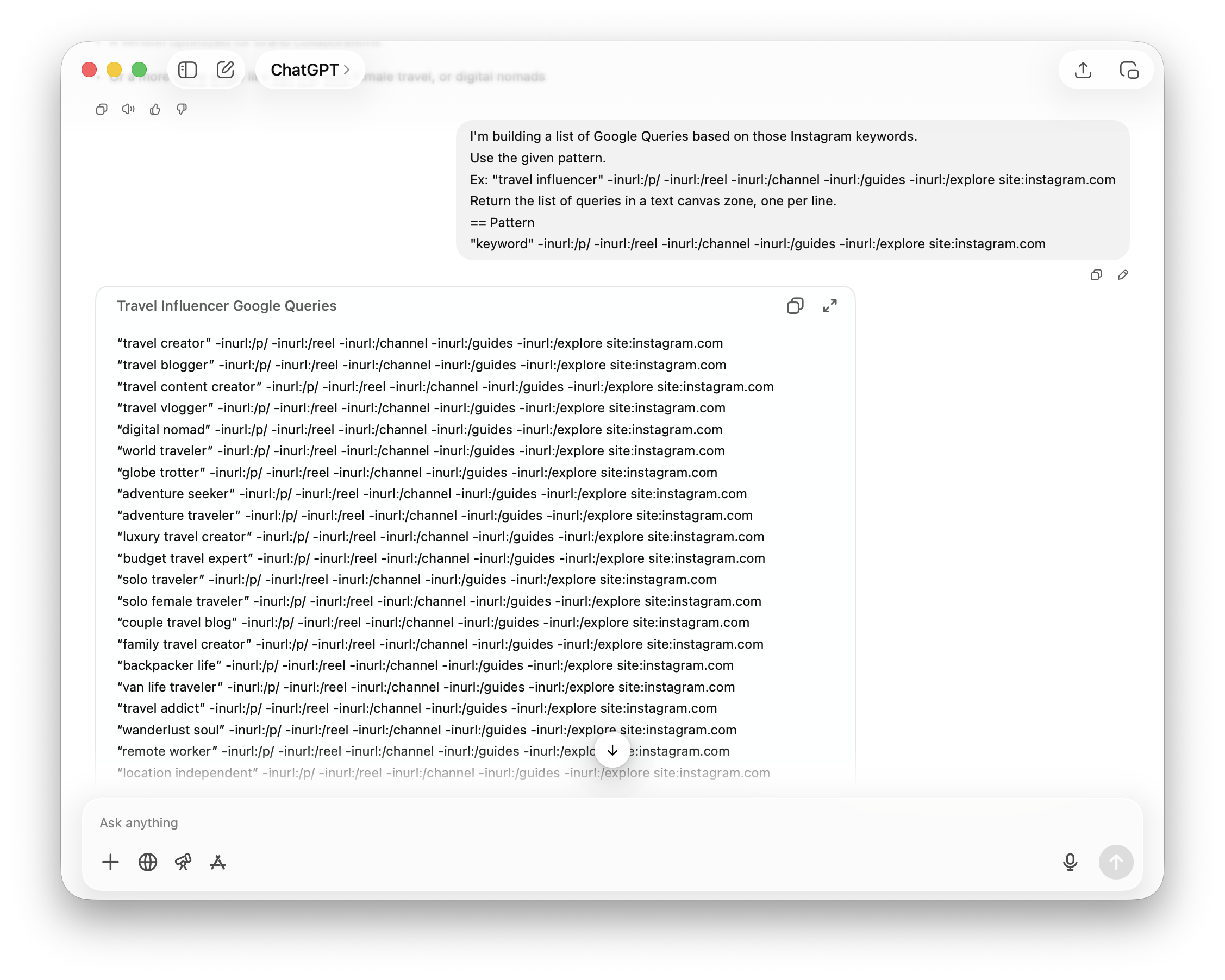\n\nProvide the AI with a seed keyword. The system generates a comprehensive list of search commands. You now possess dozens of search angles targeting creators in your specific niche. \n\nAnother use case involves targeting by location. Instead of varying the job title, you vary the city. If you need plumbers across the United States, you ask the AI to generate queries for the top 200 cities. \n\n\n\"plumber\" \"New York\" -inurl:/p/ -inurl:/reel site:instagram.com
\n\"plumber\" \"Los Angeles\" -inurl:/p/ -inurl:/reel site:instagram.com
\n\"plumber\" \"Chicago\" -inurl:/p/ -inurl:/reel site:instagram.com
\n
\n\nEach city variation yields a fresh batch of 300 results. By changing one variable, you multiply your scraping potential exponentially.\n\n## Step-by-Step Guide to Data Extraction {#step-by-step-guide-to-data-extraction}\n\nOnce you have your generated queries, you need a way to execute them in bulk. Performing 100 searches manually involves tedious copying and pasting. You copy a URL, paste it into a spreadsheet, copy the title, and repeat. Humans hate this repetitive work. \n\nWriting custom Python code causes different problems. Google blocks IP addresses running automated scripts. You must buy expensive residential proxies. You must solve complex captchas. You must maintain the code when Google changes its page structure. \n\nDatablist provides a dedicated no-code tool for this task. The platform automates the search process and extracts the URLs directly into a structured table. You give it the queries. It handles the proxies, the captchas, and the extraction. It gives you a clean database. \n\nOpen Datablist and click on \"Start from data source\" in the sidebar menu.\n\n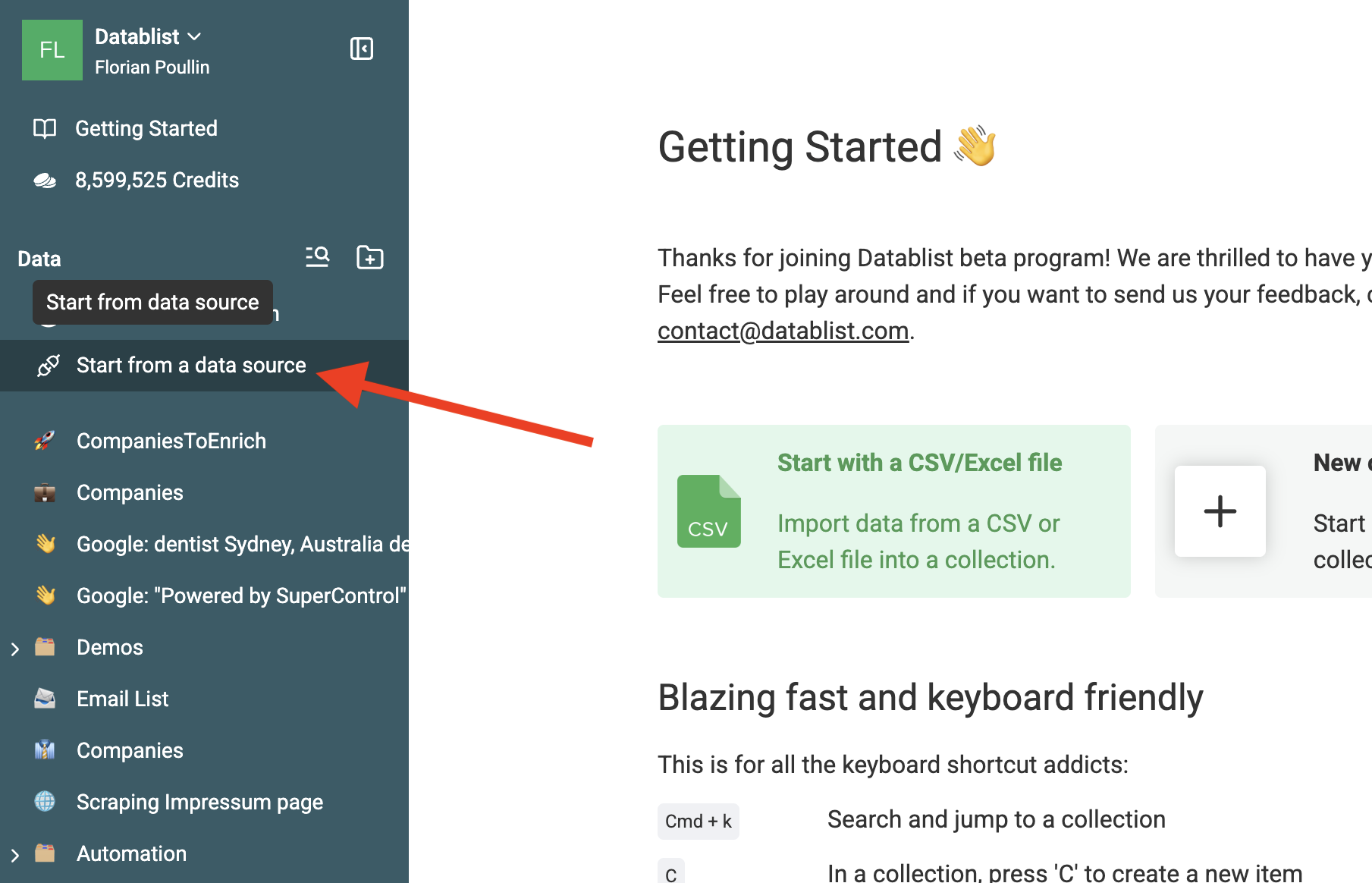\n\nSelect the [Google Search Queries](/sources/multi-google-queries-scraper) data source. This specialized scraper handles large volumes of queries automatically. It manages the complex background navigation. It handles the pagination steps. \n\n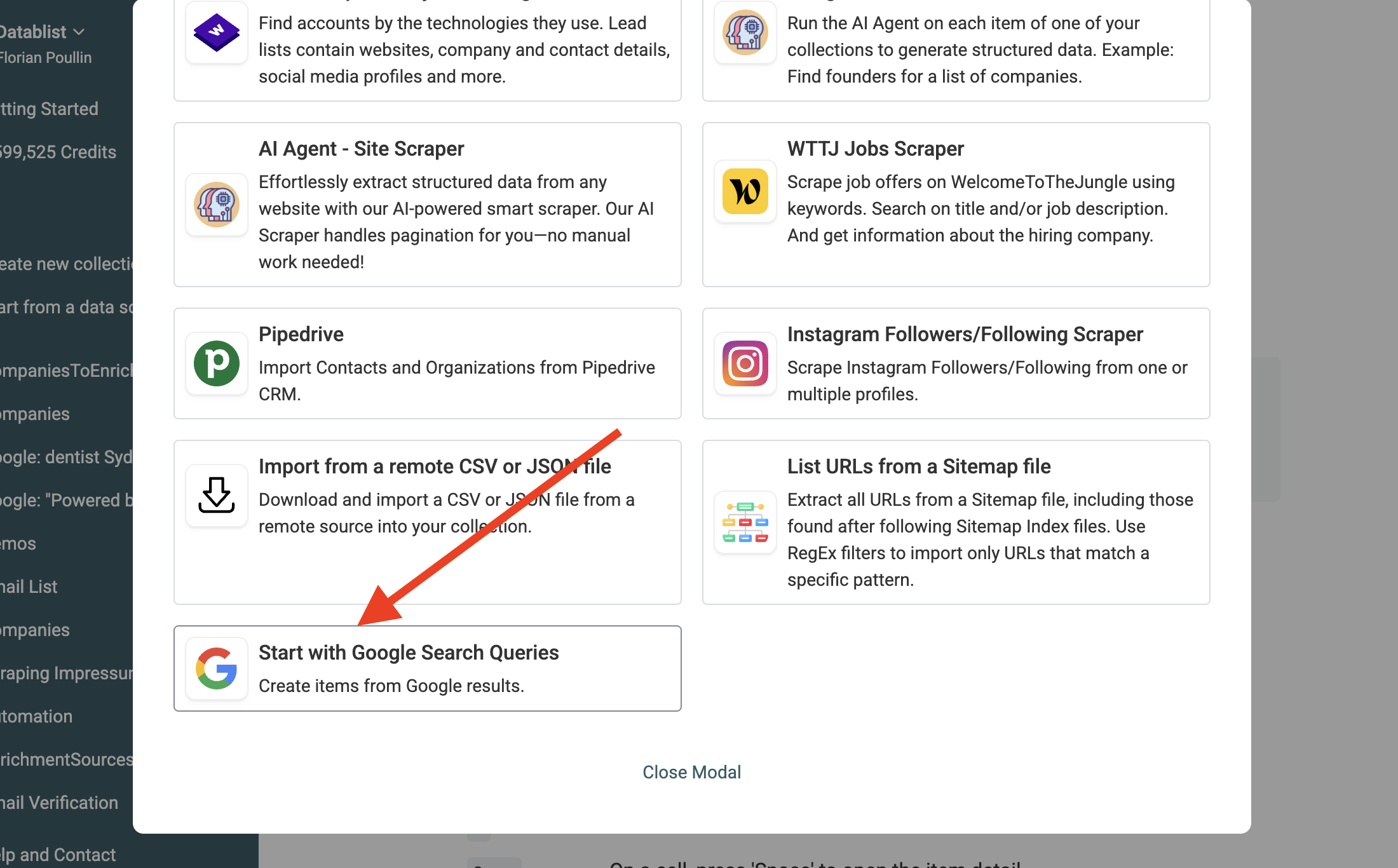\n\nPaste all your AI-generated queries into the input box. You can paste hundreds of lines simultaneously. Do not worry about complex formatting. The tool reads each line as a distinct search command. \n\n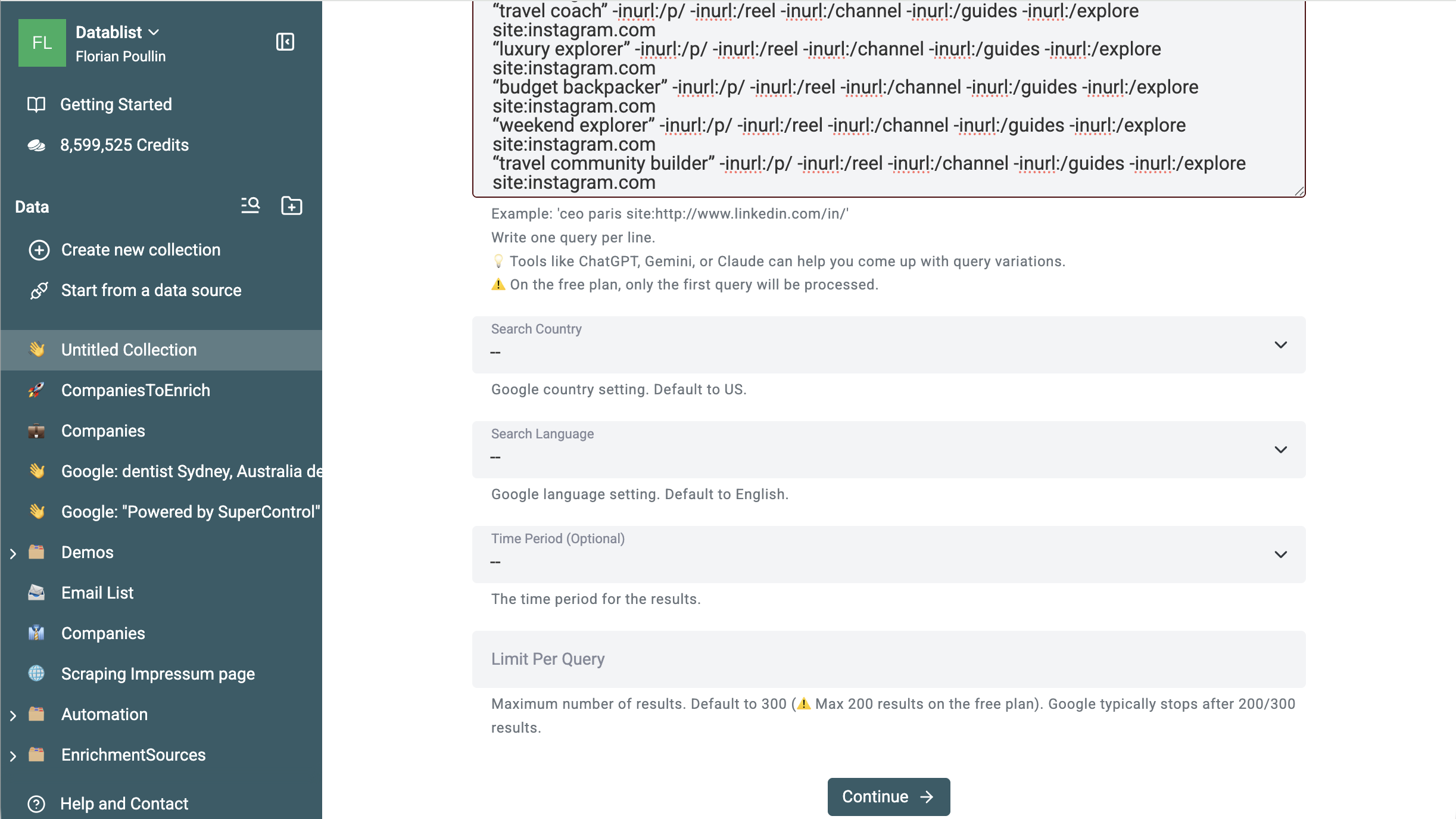\n\nConfigure your target location and language settings. If you target local businesses in London, set the region to the United Kingdom. If you want Spanish influencers, set the language to Spanish. This localization forces Google to prioritize regional Instagram accounts. You get higher quality leads matching your geographic needs.\n\nRun the extraction process. Datablist navigates Google, performs the searches, bypasses restrictions, and populates your collection with fresh data. You watch the rows fill your screen automatically. The software organizes the raw data into neat columns.\n\n## Cleaning Your Extracted Data {#cleaning-your-extracted-data}\n\nYour initial dataset will contain noise. Search engines occasionally return unexpected results. If your team treats raw scraped data as a finished product, you waste time and money. You must clean the list before using it in any sales or marketing campaign.\n\n### Step 1: Remove Non-Profile URLs\n\nExpand your result column and inspect the raw URLs. Look for patterns failing to match standard profile structures. You might see URLs containing `/popular`, `/tags/`, `/reels/`, or localized language markers like `?hl=en`.\n\nConsider Emily, who runs a PR agency for wellness brands. She scraped 15,000 URLs using the location strategy. Upon inspection, she found 2,000 URLs pointing to Instagram hashtag pages instead of user accounts (e.g., `instagram.com/explore/tags/yoga`). You cannot send a direct message or an email to a hashtag. \n\nUse built-in filtering tools to isolate these unwanted rows. \n\n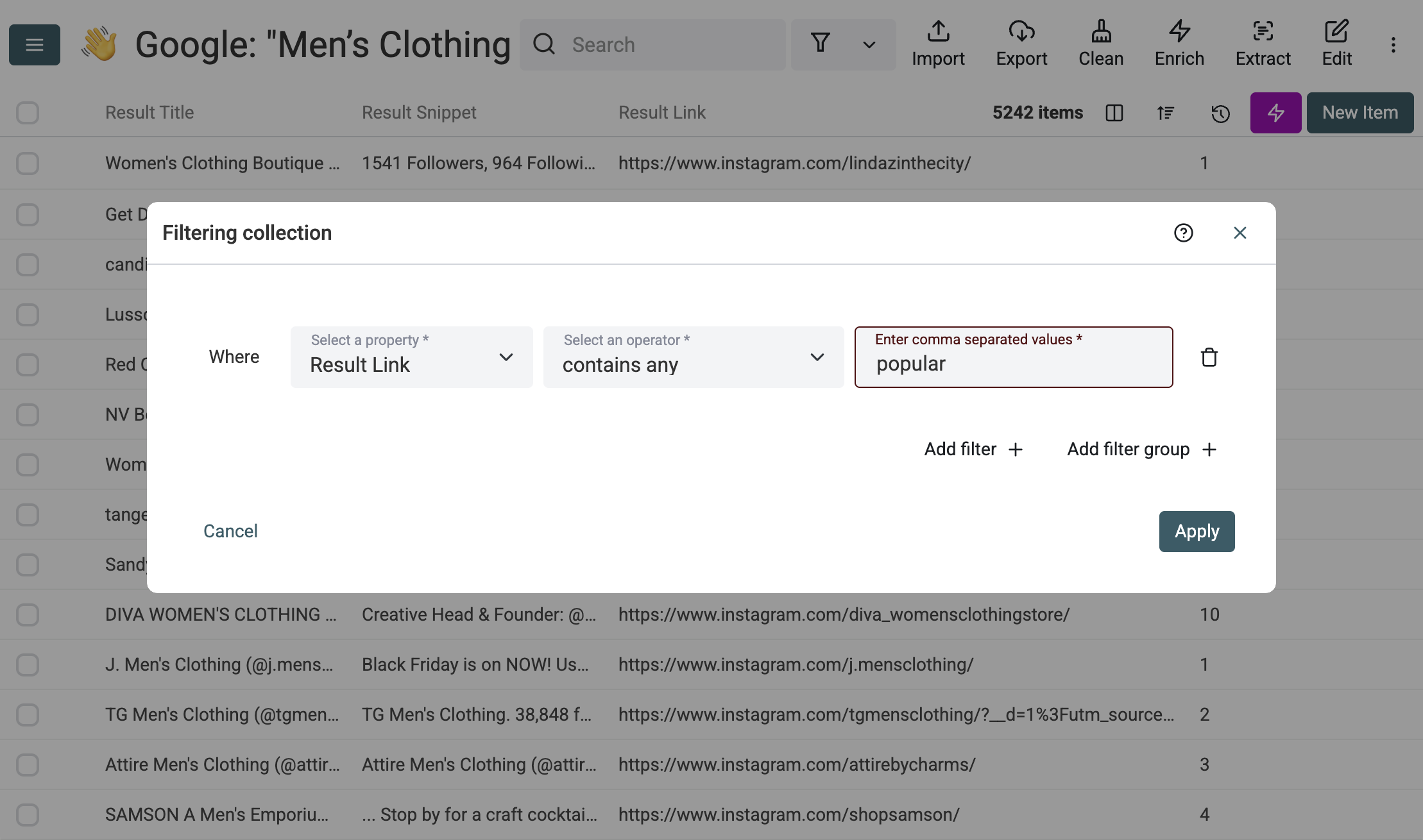\n\nSelect the filtered items containing `/explore/` or `/tags/` and delete them entirely.\n\n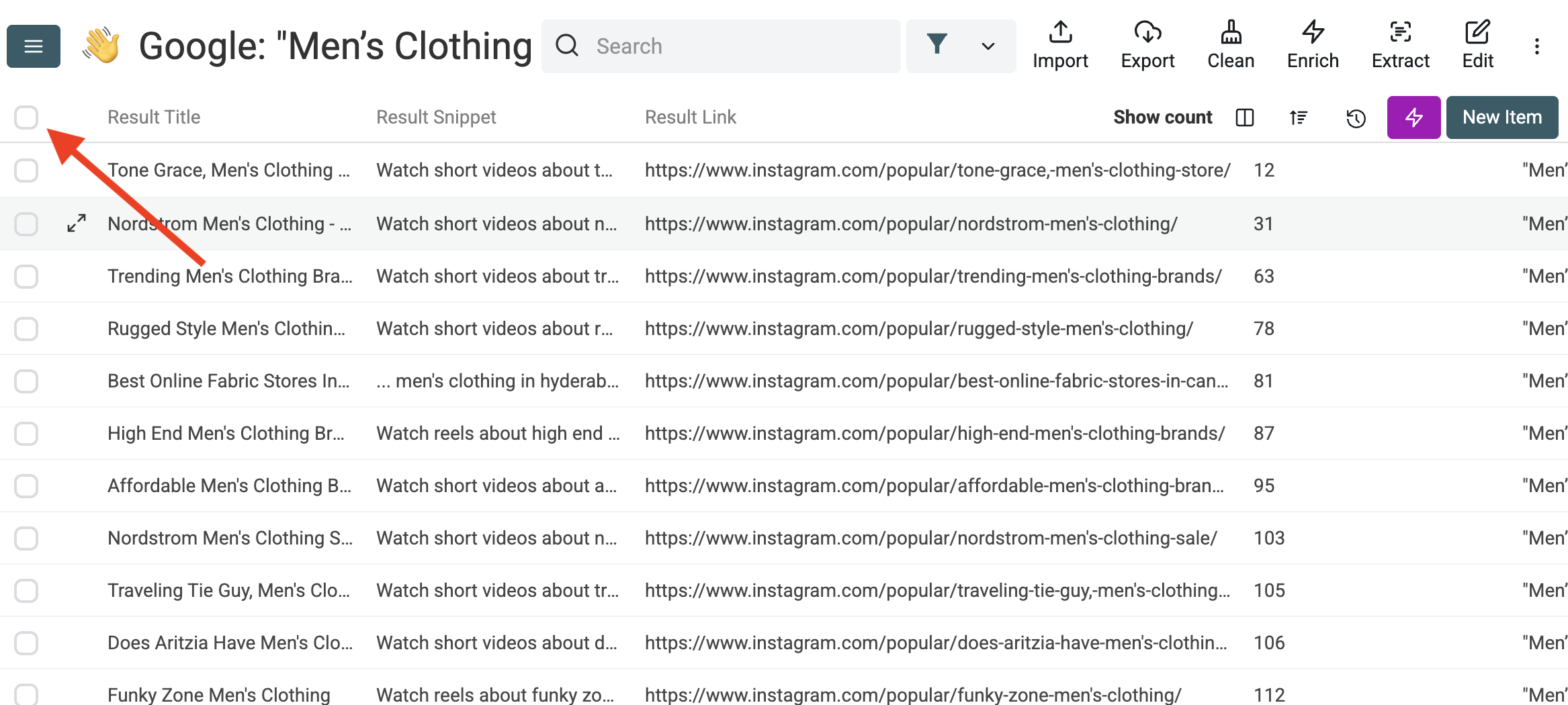\n\nSometimes, valid profile URLs append extra tracking parameters at the end, such as `?igshid=12345`. You must strip these extensions to retrieve the pure profile link. A clean URL ensures your data enrichment tools work properly and prevents issues during deduplication. \n\nOpen the Find & Replace tool. Search for the tracking parameters and replace them with an empty string. Alternatively, use a regular expression like `\\?.*$` to wipe out everything after the question mark.\n\n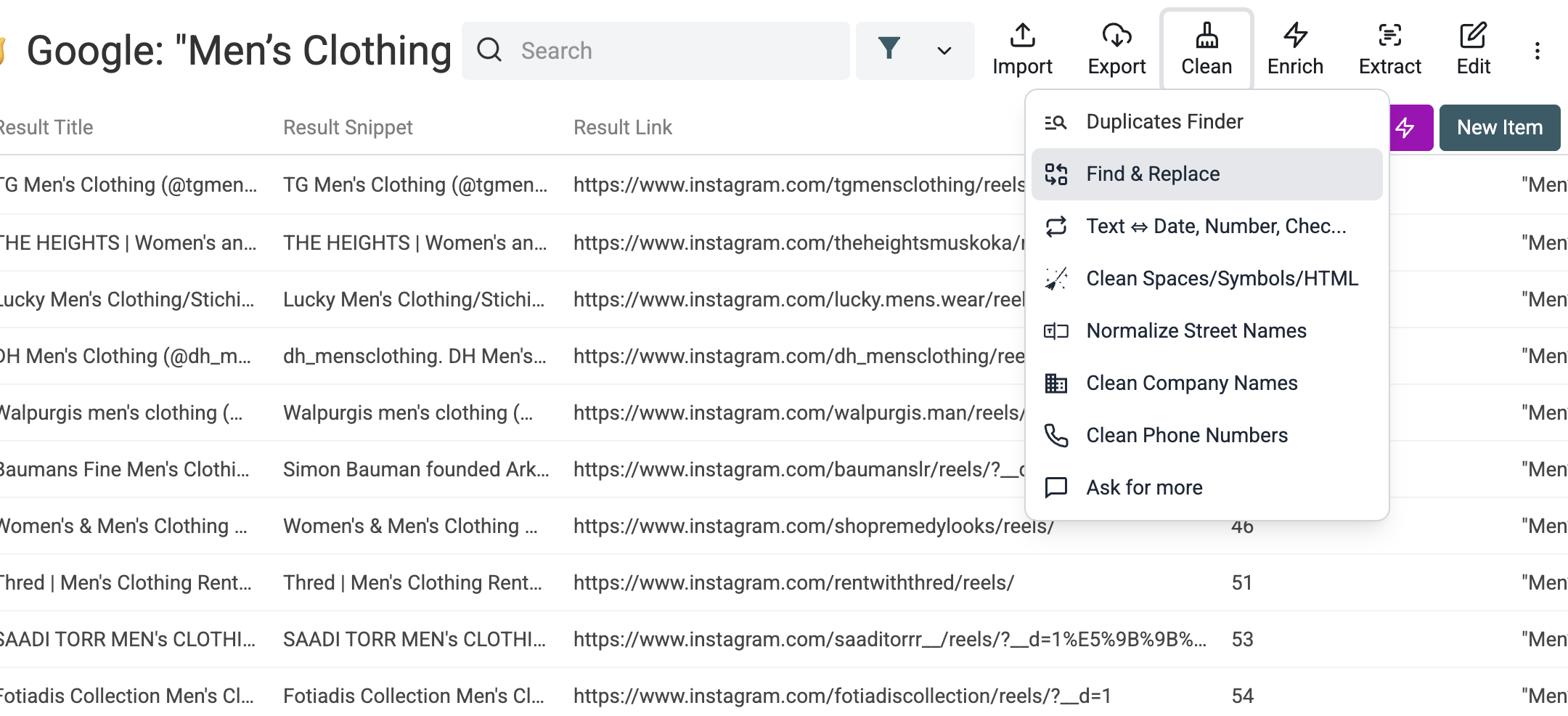\n\n### Step 2: Remove Duplicates\n\nData deduplication is a process that eliminates redundant copies of data. When you run multiple query variations, overlap occurs naturally. A popular profile ranking for \"fitness coach\" likely ranks for \"personal trainer\" too. Deduplication ensures you retain a single, clean copy of each prospect.\n\nLet us look at John, a real estate agent building a network of mortgage brokers. He scraped Google using city variations: \"mortgage broker\" \"Miami\", \"mortgage broker\" \"Fort Lauderdale\", and \"mortgage broker\" \"Boca Raton\". Because these cities sit close together, many high-performing brokers rank for all three searches. John's raw list showed 3,000 results, but 800 were duplicates.\n\nIf John skips deduplication, he will email the same broker three times in one day. The broker will mark John as spam, ruining his sender reputation. \n\nOpen the Duplicates Finder tool inside the Clean menu. Select the \"Result Link\" property as your core identifier.\n\n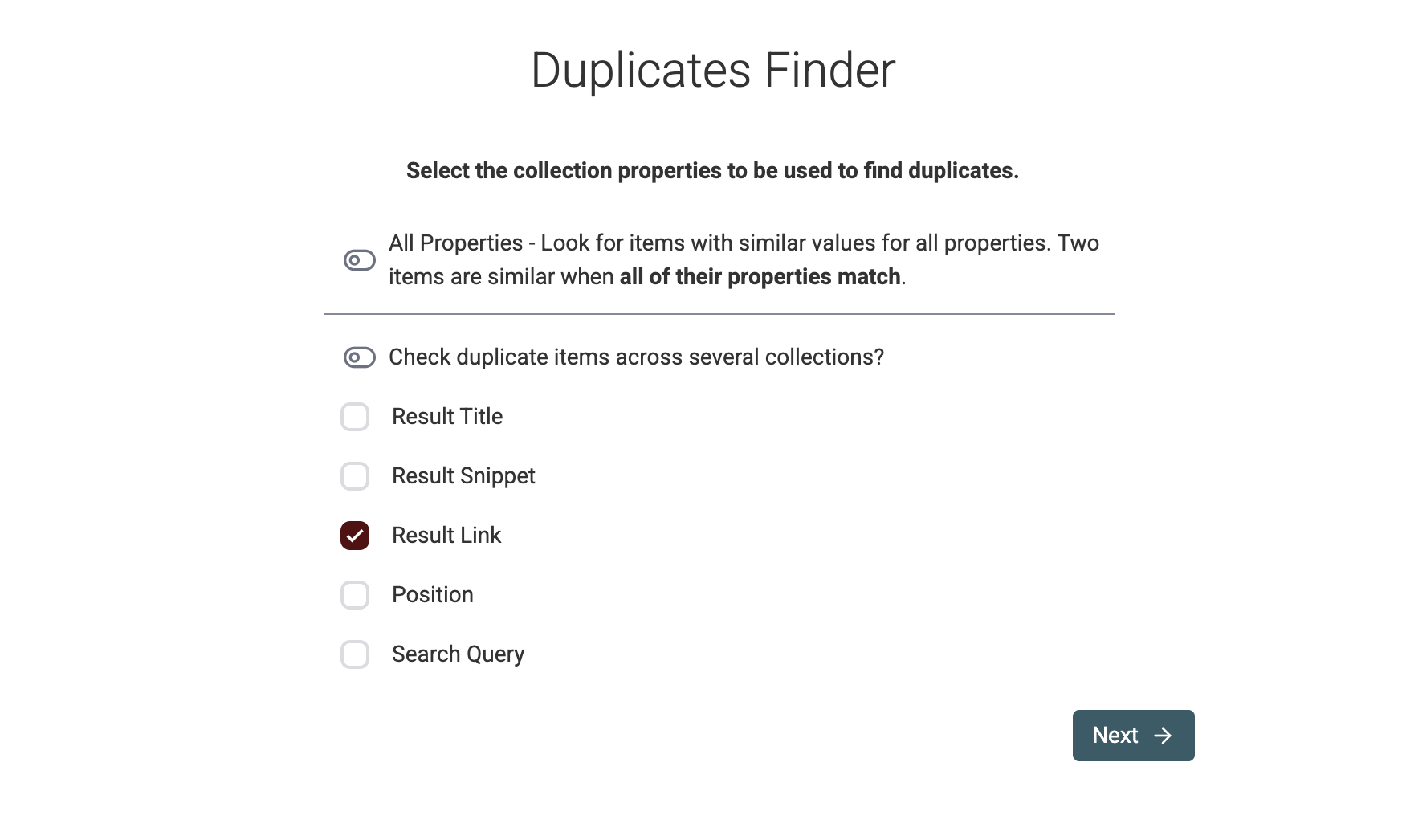\n\nEnable the URL preprocessor. Select the option to ignore query parameters. This step prevents identical profiles with different tracking codes from bypassing the duplicate check.\n\n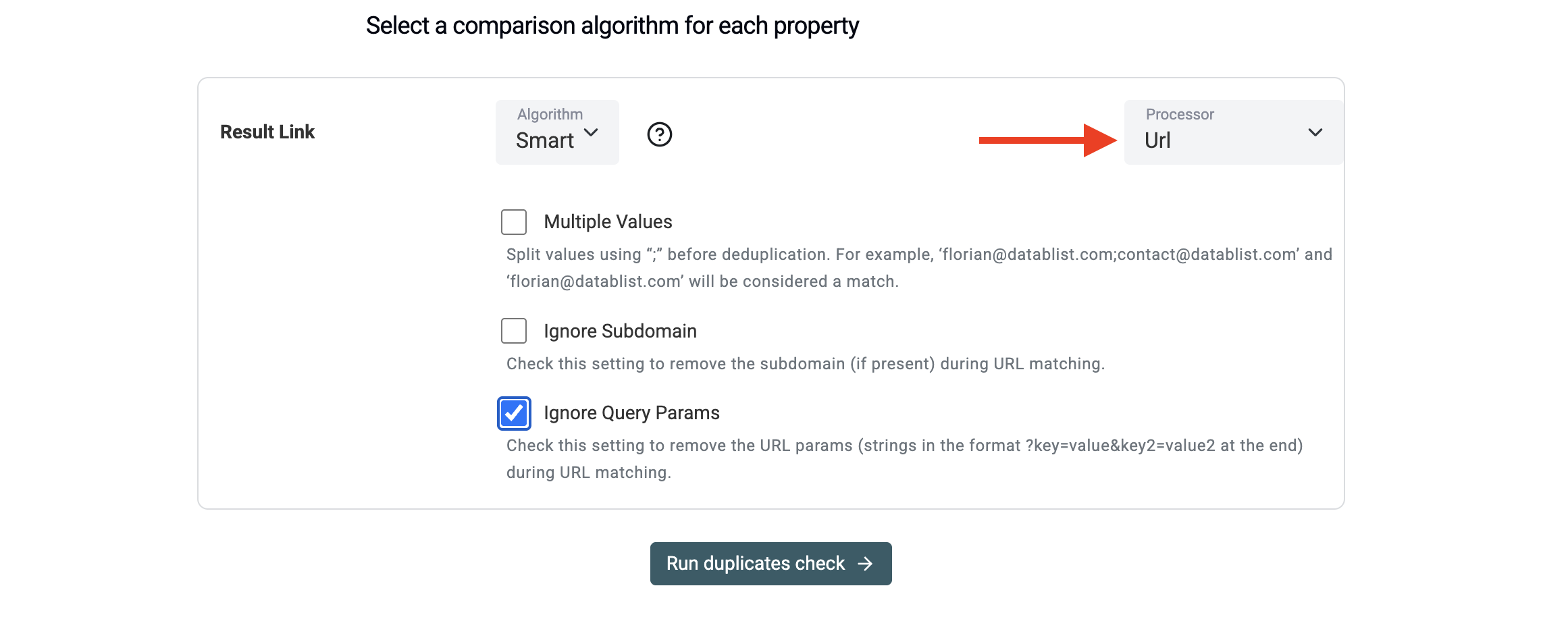\n\nReview the matching groups. Click the auto-merge button. The system consolidates the rows, leaving you with a clean list of unique Instagram URLs ready for the next phase.\n\n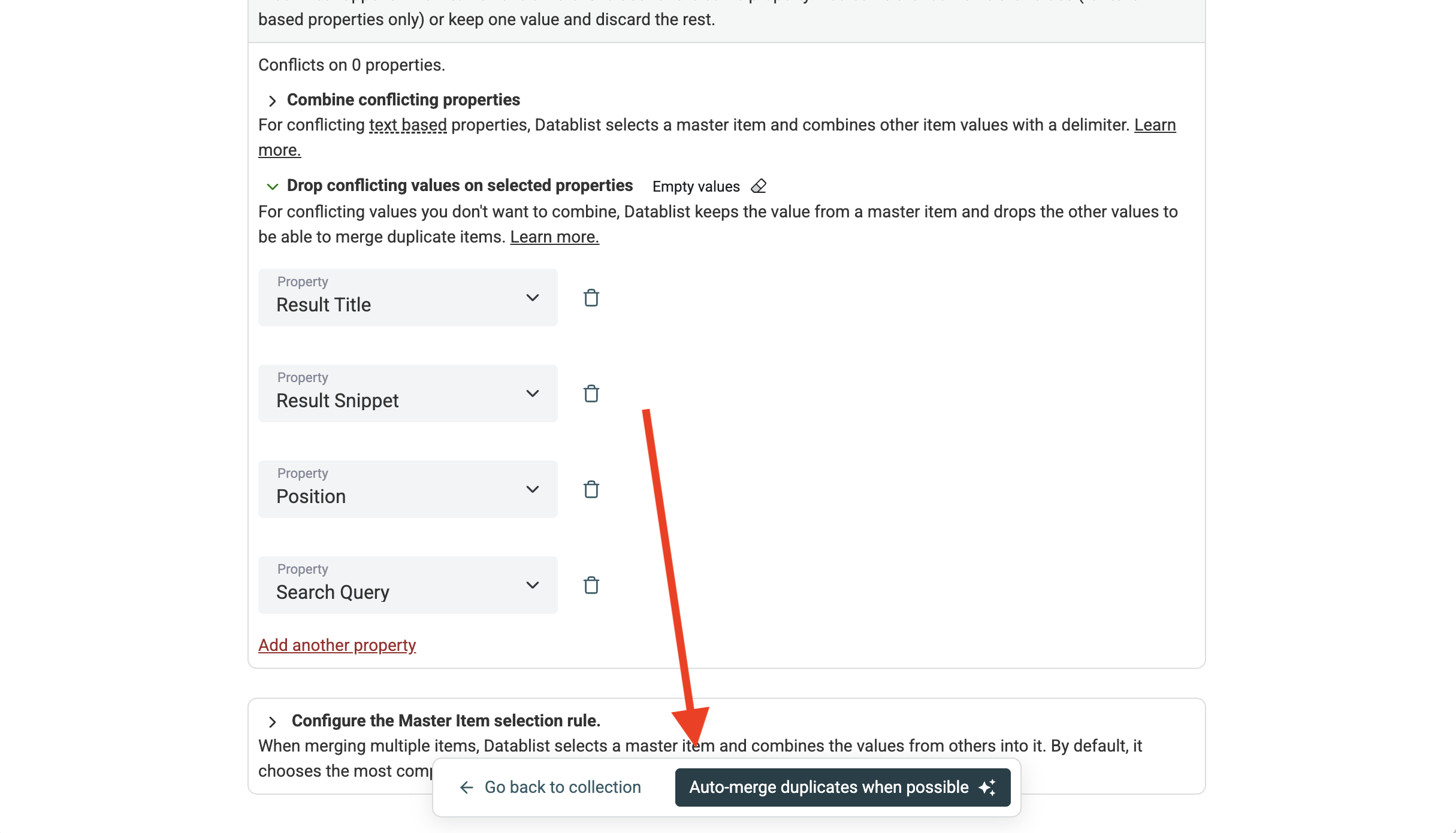\n\n## Enriching Your Profile List {#enriching-your-profile-list}\n\nThe initial extraction yields URLs, page titles, and brief descriptions. To run a successful outbound campaign, you need structured, actionable data. You need exact follower counts, verified email addresses, and comprehensive biographies.\n\nEnrichment bridges the gap between a raw URL and a qualified lead. It connects directly to the profile URL and extracts the necessary data points. \n\nThink back to Michael, the logistics company owner targeting handmade jewelry brands. He has a clean list of 4,000 Instagram profile URLs. He cannot send direct messages to 4,000 accounts manually. He needs their business email addresses to run an automated cold email campaign. \n\nMichael clicks the Enrich button and searches for the Instagram Profile Scraper.\n\n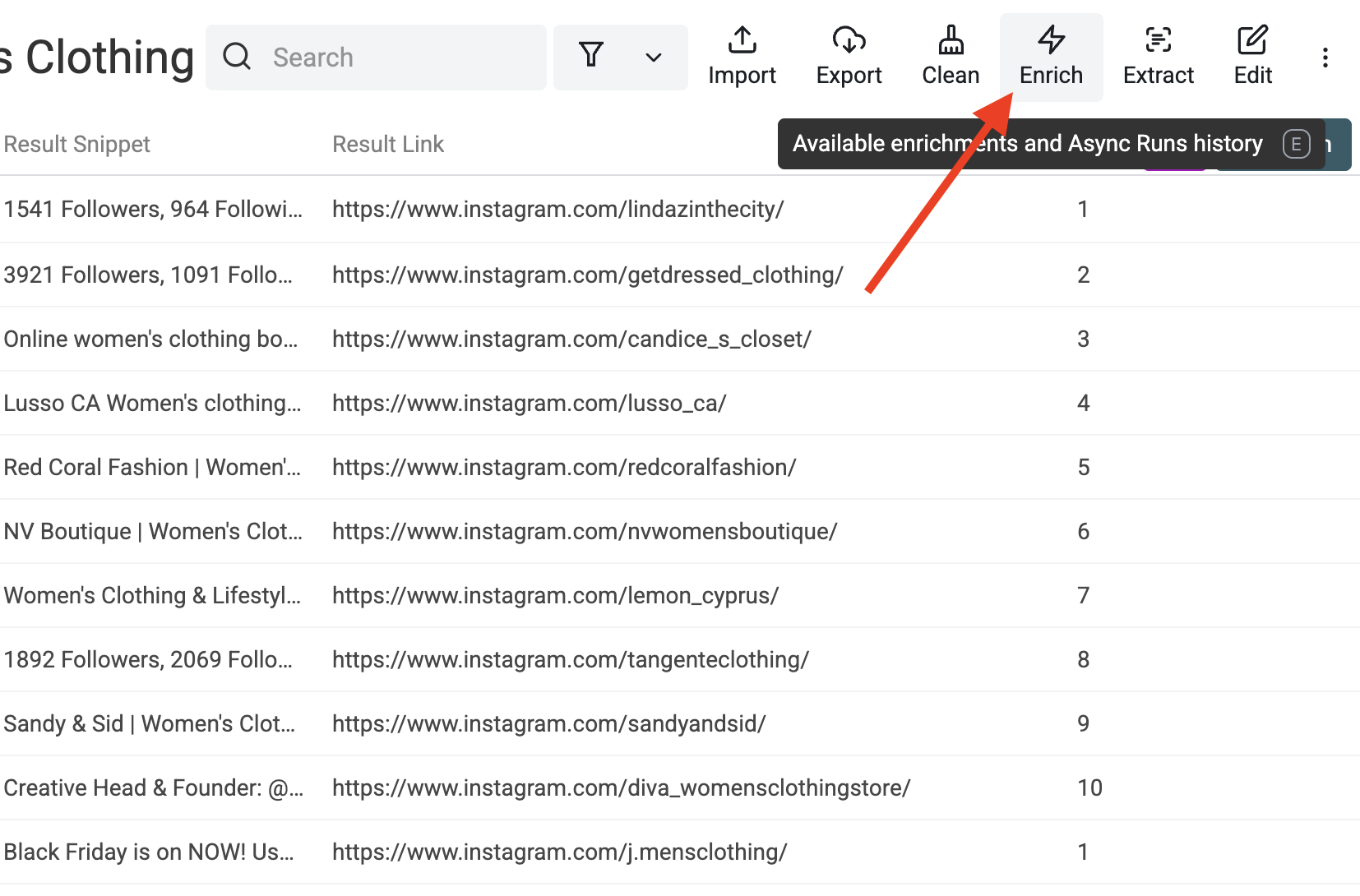\n\nHe selects the appropriate enrichment tool from the list. \n\n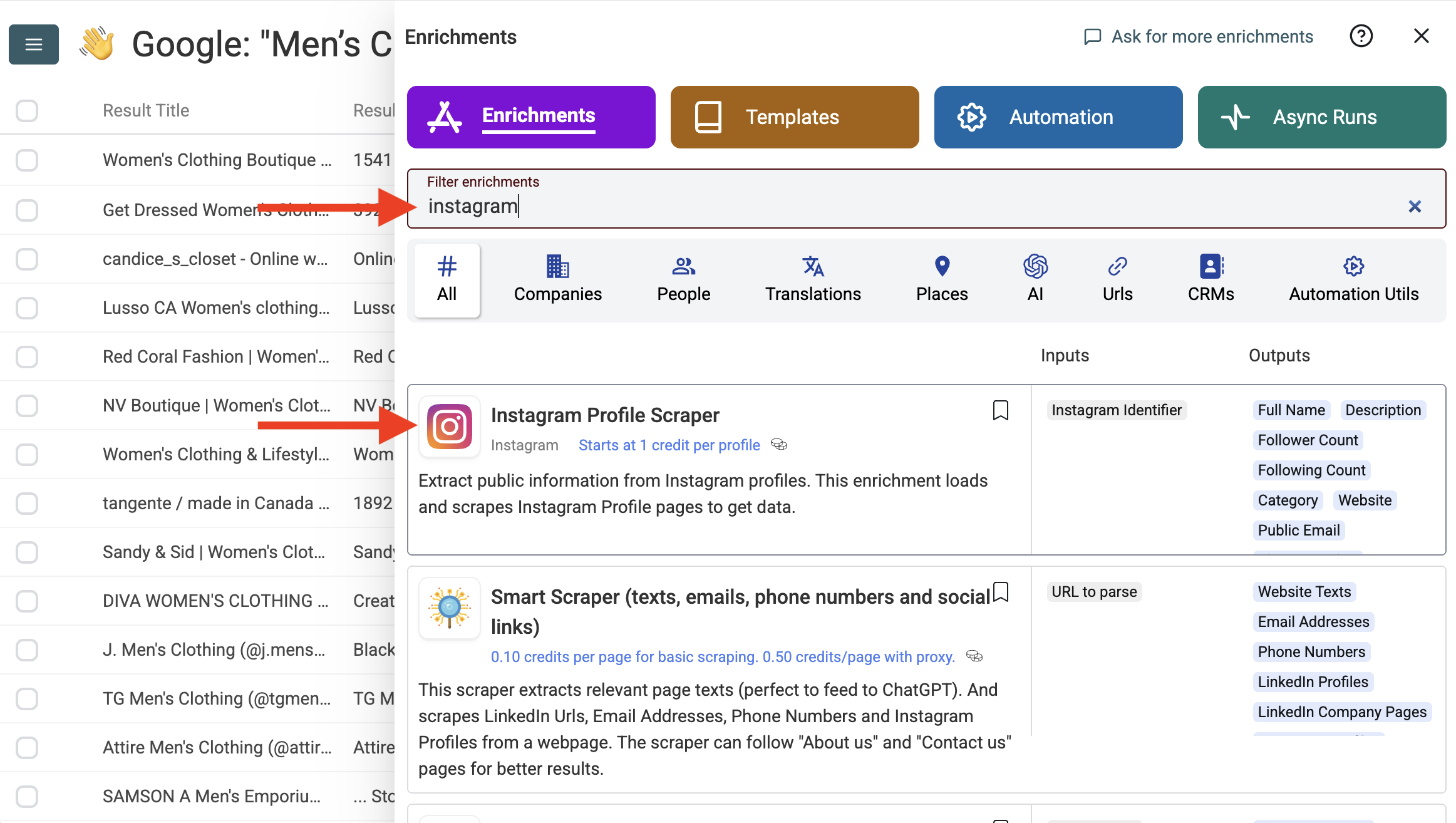\n\nHe maps his \"Result Link\" column to the enrichment input field. He tells the system to process the URLs. \n\n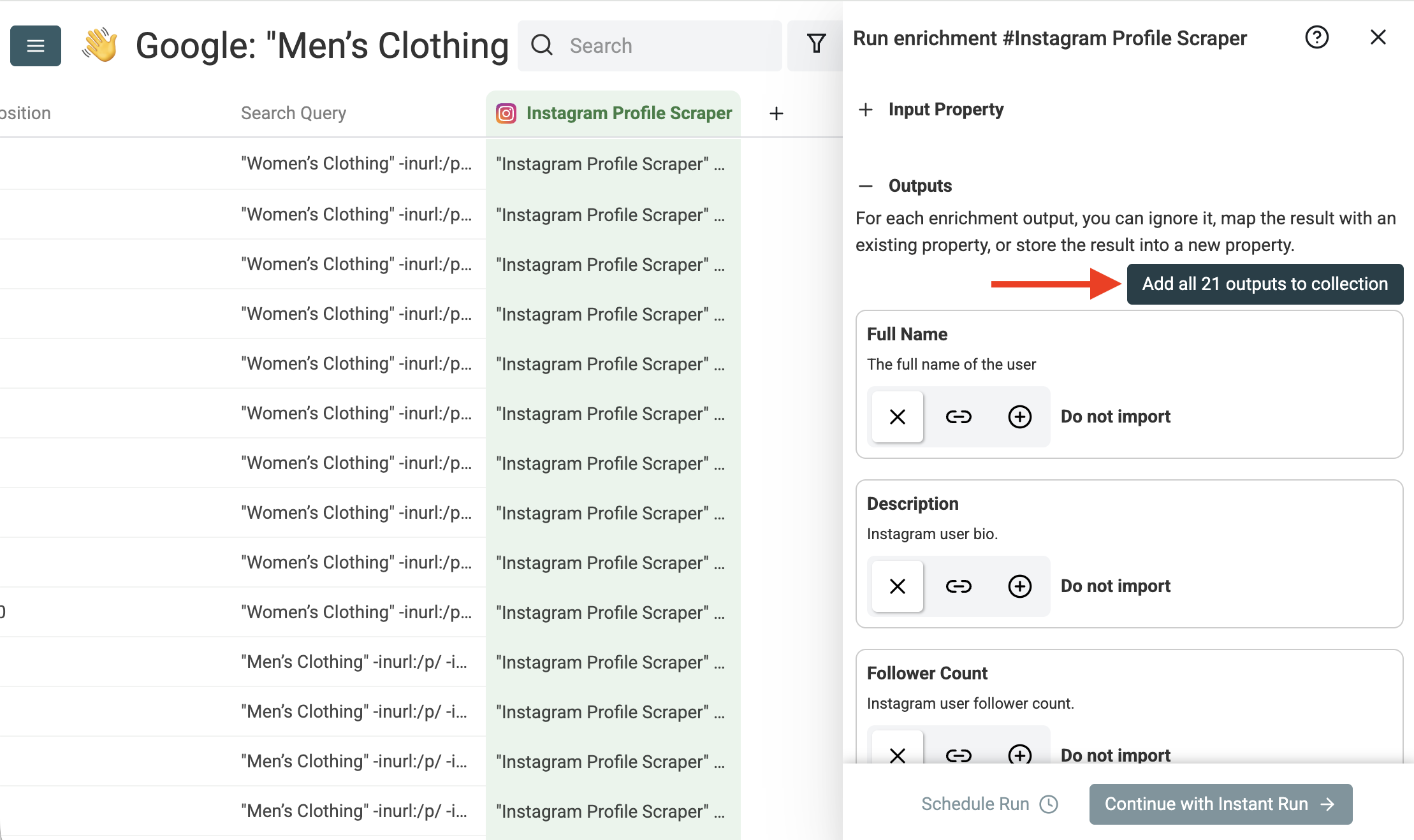\n\nThe tool visits each profile programmatically. It pulls the public email, the exact follower count, the external website link, the business category, and the bio text into new columns. \n\nMichael now possesses a fully qualified lead list. He filters out accounts with fewer than 2,000 followers to avoid hobbyists who do not ship enough volume. He filters the list to show only profiles containing a public email. He exports a targeted list of 1,200 verified e-commerce owners and uploads them into his CRM.\n\n> 💡 **Pro Tip: Verify Before Sending**\n> After extracting public emails from Instagram profiles, always run them through an email verification tool. Some creators abandon their accounts or change domains, resulting in bounced emails that harm your sender reputation.\n\n## Use Cases {#use-cases}\n\nThis method applies to numerous business models. Here are practical examples showing how different professionals use Google operators to build massive pipelines.\n\n### Local Business Outreach\nSarah runs a boutique digital marketing agency. She needs to pitch independent dentists in Chicago. Native search fails her because it only shows massive corporate clinics with huge advertising budgets.\n\nShe builds the following queries:\n\n\n\"dentist\" \"Chicago\" -inurl:/p/ -inurl:/reel site:instagram.com
\n\"cosmetic dentistry\" \"Chicago\" -inurl:/p/ -inurl:/reel site:instagram.com
\n\"teeth whitening clinic\" \"Chicago\" -inurl:/p/ -inurl:/reel site:instagram.com\n
\n\nShe runs 50 niche variations. She extracts hundreds of unique dental practices in minutes. Following the enrichment step, she filters out accounts with over 50,000 followers (likely large national chains) and focuses her outreach on independent owners who need her specialized marketing services.\n\n### Recruiting Niche Talent\nA technical recruiter needs UI/UX designers sharing their portfolios online. Traditional job boards prove ineffective for this specific creative role, as the best designers showcase their work visually on social media.\n\nThe recruiter uses the following query structure:\n\n\n\"UI/UX designer\" \"link in bio\" -inurl:/p/ -inurl:/reel site:instagram.com
\n\"product designer\" \"portfolio\" -inurl:/p/ -inurl:/reel site:instagram.com
\n\"app designer\" \"Dribbble\" -inurl:/p/ -inurl:/reel site:instagram.com\n
\n\nThey scrape the profiles, remove duplicates, and run the enrichment tool. They extract the external links pointing to the designers' Dribbble or personal portfolio websites. The process uncovers hidden talent pools ignoring standard recruitment channels.\n\n### Finding Micro-Influencers for E-commerce\nEmily, the PR agency owner, seeks micro-influencers for an organic skincare product launch. She needs accounts with 5,000 to 20,000 followers focusing on natural beauty. \n\nShe creates niche queries:\n\n\n\"clean beauty creator\" -inurl:/p/ -inurl:/reel site:instagram.com
\n\"cruelty free skincare\" -inurl:/p/ -inurl:/reel site:instagram.com
\n\"vegan makeup enthusiast\" -inurl:/p/ -inurl:/reel site:instagram.com\n
\n\nAfter extracting the URLs and cleaning the data, she runs the enrichment tool. She uses the follower count column to filter out massive celebrities who charge too much and accounts under 1,000 followers lacking reach. She identifies 500 perfect candidates displaying public email addresses and launches her outreach sequence.\n\n## Conclusion {#conclusion}\n\nGoogle search operators transform how you discover Instagram profiles. Combining exact match keywords with strict exclusion parameters bypasses native platform limits entirely. You stop relying on a restricted algorithm and start mining the web directly.\n\nBy generating query variations with AI, you multiply your scraping potential. Automating the extraction process builds massive datasets quickly. Pair this method with a reliable cleaning and deduplication workflow. Finally, enrich the raw URLs to extract actionable contact data. This end-to-end system scales your lead generation efforts efficiently and keeps your sales pipeline full.\n\n## FAQ {#faq}\n\n### Are Google search operators free to use?\nYes. Anyone can type these commands into the Google search bar without paying a dime. However, to automate the process at scale across hundreds of queries, you require a specialized data extraction tool like Datablist.\n\n### Why do I see posts instead of profiles in my results?\nYou likely omitted the exclusion parameters. Always include `-inurl:/p/` and `-inurl:/reel` in your query strings. These negative commands force Google to hide individual content pieces and show only the main user pages.\n\n### How many profiles can I extract at once?\nOne individual query yields approximately 250 to 300 results. Running 100 distinct variations yields tens of thousands of raw URLs. Creating more variations continuously expands your dataset. The only limit is your creativity in generating targeted keywords.\n\n### Is data deduplication really necessary?\nAbsolutely. If you run 50 similar search queries, top-ranking profiles will appear in multiple searches. Skipping deduplication means you will import duplicate leads into your CRM, resulting in embarrassing double-emails and a damaged brand reputation.\n\n### Can I automate the data extraction process?\nYes. Using a no-code scraper lets you run hundreds of parallel searches automatically. The software handles the complex navigation, rotates IP addresses, and bypasses captchas. You focus on the strategy while the tool handles the manual labor.\n\n### Do I need an Instagram account for this method?\nNo. Google acts as the primary intermediary. You never log into the social platform to perform the initial searches. The extraction relies entirely on public search engine indexes, keeping your personal accounts safe from bans.\n\n### Can I export the final list to a spreadsheet?\nYes. After running the enrichment and deduplication processes, you export the clean collection directly to a CSV or Excel file. You can upload this file directly into HubSpot, Salesforce, or your preferred cold email software."
}