Finds the founder, CEO, or owner of a company by visiting their website and extracting leadership information
كيف تستخدم هذا prompt على ملف CSV؟
تمكّنك Datablist من أخذ ملف CSV كامل وتشغيل prompts مباشرةً على كل سطر.
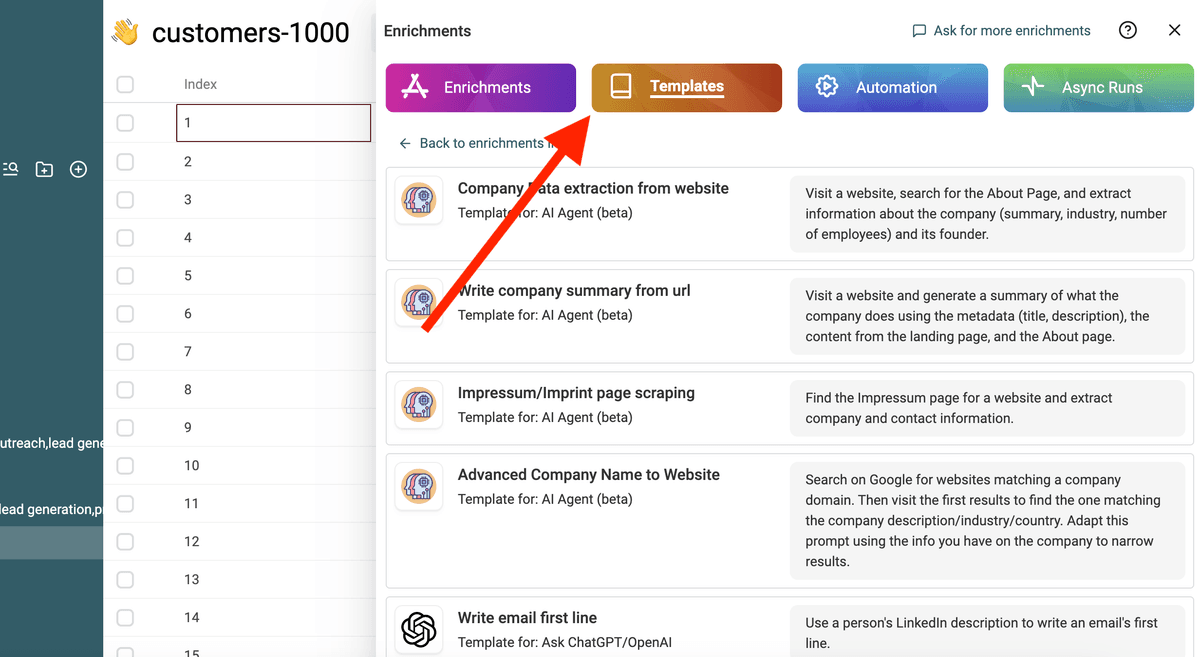
الخبر السار هو أن الـprompt الذي تحتاجه متاح بالفعل في Datablist ضمن قسم "Templates". لا حاجة للبدء من الصفر! ما عليك سوى اختيار القالب المناسب لمهمتك، وسيكون جاهزًا للتشغيل على كل سطر من ملف CSV لديك. هذا يجعل تحويل بياناتك أسهل بكثير ببضع نقرات فقط.
استورد ملف CSV الخاص بك في Datablist. ثم اختر "Enrich" من الشريط العلوي.
اختر القالب: Business Owner Finder
استبدل المتغيرات في prompt بخصائص مجموعتك باستخدام / أو '{{'.
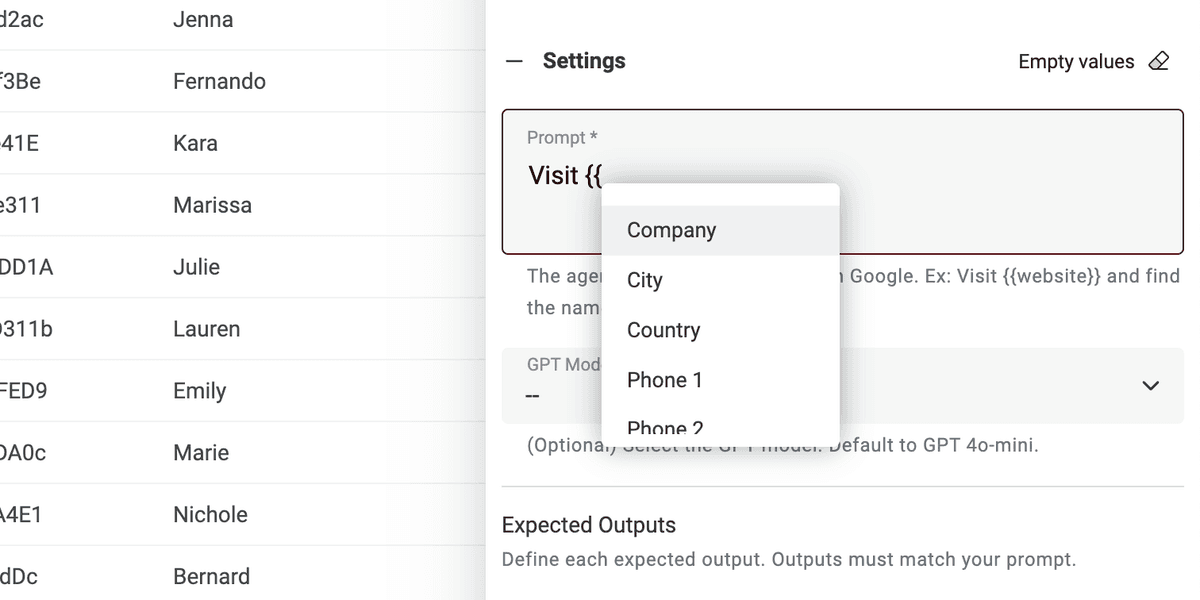
إذا لم تتوفر لديك جميع المتغيرات، فقط حرّر prompt.
انتهينا! يمكنك الآن تشغيل prompt على كل سطر من ملف CSV والحصول على النتائج في عمود جديد. 🚀
ملاحظة حول AI Agent prompts
هذا الـprompt مُصمم لإثراء Datablist AI Agent. الـAI Agent هو أداة ذكية تستخدم AI لتنفيذ المهام نيابةً عنك. يمكنه تصفح المواقع، واستخدام Google للعثور على المعلومات، والتفاعل مع خدمات مختلفة عبر الإنترنت. هذا يعني أنه يساعدك ببيانات فورية وإجابات مُحدّثة.
من ناحية أخرى، يمكن لـChatGPT API فقط تحليل نص الإدخال والرد بناءً على معرفته الحالية. ولا يمتلك القدرة على الوصول إلى الإنترنت أو جمع معلومات جديدة بنفسه.
يوفّر AI Agent تجربة أكثر ديناميكية عبر جلب البيانات اللحظية، بينما يعتمد ChatGPT API على المعرفة الموجودة مسبقًا للرد على الاستفسارات.
عند تفاعلك مباشرةً على https://chatgpt.com/، فأنت تتفاعل مع Agent. أحيانًا يذهب إلى الإنترنت لتقديم معلومات إضافية لِـprompt الخاص بك (لكن ليس دائمًا). أما الأدوات الأخرى المتصلة بـChatGPT فتستخدم الـAPI. لذا تذكّر أن هذا الـprompt لا يمكن استخدامه في أداة أخرى تستدعي ChatGPT API.
يشغّل Datablist AI Agent وكيلاً على كل سطر من ملف CSV لديك.