واجهة API لاستخراج بيانات ملفات LinkedIn
احصل على تفاصيل الوظيفة والشركة والتعليم من روابط ملفات LinkedIn، باستخدام مساعد AI أو workflow بلا كود أو الكود الخاص بك.
- ابتداءً من $0.014 لكل ملف
- لا يلزم تسجيل الدخول إلى LinkedIn
- 10,000 ملف لكل مهمة
| رابط ملف LinkedIn |
|---|
| linkedin.com/in/maya-lindqvist |
| linkedin.com/in/tom-okafor |
| linkedin.com/in/lea-moreau |
موثوق به من أكثر من 38,000 مستخدم في الشركات الناشئة وفرق Fortune 500





يعمل مع أي أداة يمكنها إرسال طلبات HTTP
 Claude
 Cursor
 Codex
Codex Make
Make n8n
n8n Zapier
- الكود الخاص بك
اختر طريقتك للبدء
دع مساعد AI أو أداة الأتمتة تتولى الإعداد، أو استدعِ REST API من الكود الخاص بك.
الصق prompt الإعداد
انسخ prompt الخاص بـ Claude Code أو Codex أو Cursor، أو الخاص بـ Make أو n8n أو Zapier، ثم الصقه. سينشئ AI مجلد Datablist على جهازك ويُعِدّ كل شيء.
الصق مفتاح API الخاص بك
عندما يطلب AI ذلك، انسخ مفتاح API من تطبيق Datablist والصقه في ملف .env الذي فتحه. لا تلصقه في المحادثة مطلقًا.
احصل على نتائجك
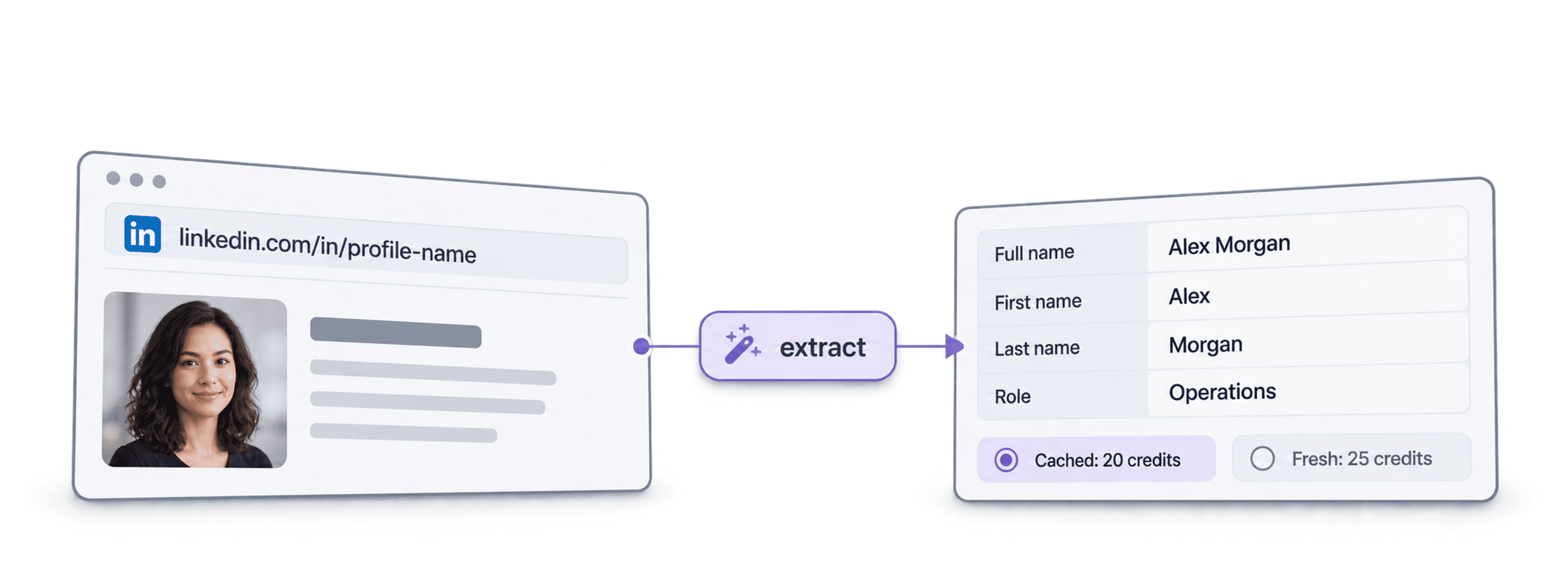
أرسل قائمة روابط ملفات LinkedIn واحصل على صف واحد لكل ملف يتضمن الاسم والعنوان التعريفي والموقع والوظيفة الحالية والشركة، جاهزًا لجدولك أو CRM.
عرض نموذج للنتيجةهل تستخدم Make أو n8n أو Zapier؟ إليك جميع حقول طلب HTTP
استخدم وحدة أو عقدة طلب HTTP التي توفرها أداتك. تحتاج إلى ثلاث خطوات: إرسال القائمة، والانتظار، ثم قراءة النتائج.
1. أرسل قائمتك (طلب HTTP)
- الطريقة
POST- الرابط
https://api.datablist.com/v1/enrichments/tasks- الترويسات
X-API-Key= مفتاح API الخاص بكContent-Type=application/json- المحتوى (JSON)
- json{"enrichmentId": "linkedin-profile-scraper","uniqueId": "linkedin-profile-scraper-import-1","settings": {"experiencesNb": "3","educationsNb": "1"},"inputs": [{"inputId": "row-1", "data": {"profileUrl": "https://www.linkedin.com/in/maya-lindqvist/"}},{"inputId": "row-2", "data": {"profileUrl": "https://www.linkedin.com/in/tom-okafor/"}},{"inputId": "row-3", "data": {"profileUrl": "https://www.linkedin.com/in/lea-moreau/"}}]}
- احتفظ بـ
- قيمة
@idمن الاستجابة. إنها معرّف مهمتك.
2. انتظر حتى تكتمل
أضف فترة انتظار أو تأخير قصيرة، ثم أرسل طلب GET إلى https://api.datablist.com/v1/enrichments/tasks/TASK_ID باستخدام ترويسة X-API-Key نفسها. كرر حتى تصبح قيمة status هي completed.
3. اقرأ النتائج
GET https://api.datablist.com/v1/enrichments/tasks/TASK_ID/results?limit=50. اربط outputs بأعمدتك. إذا لم تكن nextCursor فارغة، فأعِد الاستدعاء مع &cursor= متبوعًا بتلك القيمة.
لمحة سريعة
بيانات عامة حديثة للملف من رابط LinkedIn: هوية الشخص ومكان عمله ودراسته. لا حاجة إلى مساحة عمل أو مجموعة أو استيراد في Datablist.
ما تقدمه
- روابط ملفات LinkedIn: روابط الملفات القياسية أو روابط leads في Sales Navigator
- حجم السجل المطلوب (اختياري): 3 أو 5 أو 10 وظائف سابقة، ومدرسة واحدة أو 3 أو 5 مدارس
- الملفات المخزنة مؤقتًا (اختياري): اقبل نسخة حديثة محفوظة لتدفع أقل
ما تحصل عليه
- الشخص: الاسم والعنوان التعريفي والنبذة والموقع واللغات والاتصالات
- الوظيفة الحالية: المسمى وتاريخ البدء والشركة وموقعها الإلكتروني والقطاع والحجم
- الوظائف السابقة والتعليم: بالعدد الذي طلبته
التكلفة
- ملف حديث: 25 رصيدًا لكل ملف
- ملف مخزن مؤقتًا: 20 رصيدًا عند قبول نسخة محفوظة
- 1,000 رصيد = $1: مشتركة مع تطبيق Datablist
ما الذي تبنيه الفرق باستخدامه
أضف LinkedIn Profile Scraper إلى أي موضع تتدفق فيه بياناتك بالفعل.
ابحث عن leads قبل outreach
- رابط LinkedIn من قائمة leads
- المسمى والشركة والموقع
استخرج الدور الحالي والشركة لكل lead، لتبدأ سلسلتك مع الشخص المناسب وبسطر افتتاحي ملائم.
أنشئ ملفات المرشحين
- رابط LinkedIn للمرشح
- الوظائف والتعليم في نظام ATS لديك
احصل على الوظائف السابقة والتعليم لكل مرشح، وحافظ على تحديث نظام ATS أو جدولك من دون نسخ ولصق.
اكتشف تغييرات الوظائف
- جهات الاتصال في CRM
- تمييز الشركة الجديدة
أعِد تشغيل جهات اتصالك وقارن الشركة الحالية بالبيانات في CRM لاكتشاف الداعمين الذين انتقلوا إلى حساب جديد.
كم سيكلفك ذلك؟
ادفع لكل عملية بحث باستخدام الأرصدة. يبدأ الوصول إلى API من خطة Growth.
كم سيكلفك ذلك؟
أخبرنا بعدد ملفات LinkedIn التي تحتاج إليها وسنعرض لك أرخص طريقة للحصول عليها.
= 25,000 رصيدًا بمعدل 25 رصيدًا لكل ملف حديث
كيفية عمل الأرصدة
1,000 رصيد = $1، لذا تبلغ تكلفة كل رصيد عُشر سنت. يكلف الملف الحديث 25 رصيدًا، والملف المخزن مؤقتًا 20 رصيدًا. قد تظل هناك تكلفة أرصدة للملف الذي يتعذر العثور عليه، لأن عملية البحث قد أُجريت. تُرجع كل نتيجة قيمة creditsUsed، لتتمكن من تتبع التكلفة الفعلية لكل صف. تتجدد أرصدة الخطة شهريًا وتُصفّر إذا لم تُستخدم. لا تنتهي صلاحية الأرصدة الإضافية.
ادمجه في الكود الخاص بك
كل ما تحتاج إليه لاستدعاء REST API مباشرةً: الكود والاستجابات ونقاط النهاية والحقول والمصادقة والحدود.
datablist/linkedin-profile-scraper-api
أمثلة رسمية: cURL وPython باستخدام Requests أو HTTPX غير المتزامن، وTypeScript. ضع مفتاحك في DATABLIST_API_KEY وشغّل الكود.
انسخ والصق وشغّل
سكربت كامل ينشئ مهمة وينتظرها ويطبع كل نتيجة. استبدل YOUR_PERSONAL_API_KEY بمفتاحك.
# 1. Create the task (returns 202 Accepted and the task "@id")
curl --request POST 'https://api.datablist.com/v1/enrichments/tasks' \
  --header 'X-API-Key: YOUR_PERSONAL_API_KEY' \
  --header 'Content-Type: application/json' \
  --data '{
    "enrichmentId": "linkedin-profile-scraper",
    "uniqueId": "linkedin-profile-scraper-import-1",
    "settings": {
      "experiencesNb": "3",
      "educationsNb": "1"
    },
    "inputs": [
      {"inputId": "row-1", "data": {"profileUrl": "https://www.linkedin.com/in/maya-lindqvist/"}},
      {"inputId": "row-2", "data": {"profileUrl": "https://www.linkedin.com/in/tom-okafor/"}},
      {"inputId": "row-3", "data": {"profileUrl": "https://www.linkedin.com/in/lea-moreau/"}}
    ]
  }'
# 2. Poll every few seconds until status is completed, failed or stopped
curl 'https://api.datablist.com/v1/enrichments/tasks/TASK_ID' \
--header 'X-API-Key: YOUR_PERSONAL_API_KEY'
# 3. Read the results, then follow nextCursor until it is null
curl 'https://api.datablist.com/v1/enrichments/tasks/TASK_ID/results?limit=50' \
--header 'X-API-Key: YOUR_PERSONAL_API_KEY'ما الذي تُرجعه API
نتيجة واحدة لكل إدخال، تتضمن inputId الخاص بك والحالة والمخرجات والأرصدة المستخدمة. بيانات نموذجية.
{
  "taskId": "00000000000040008000000000000001",
  "results": [
    {
      "inputId": "row-1",
      "status": "success",
      "outputs": {
        "profileUrl": "https://www.linkedin.com/in/maya-lindqvist/",
        "firstName": "Maya",
        "lastName": "Lindqvist",
        "fullName": "Maya Lindqvist",
        "linkedInHeadline": "Head of Sales at Brightwave Analytics",
        "linkedInCity": "Stockholm",
        "linkedInCountryCode": "SE",
        "linkedInLocation": "Stockholm, Sweden",
        "linkedInlastExpTitle": "Head of Sales",
        "linkedInlastExpStartsAt": "2023-02-01",
        "linkedInlastExpCompany": "Brightwave Analytics",
        "linkedInlastExpCompanyWebsite": "https://www.brightwaveanalytics.com",
        "linkedInlastExpCompanyIndustry": "Software Development",
        "linkedInlastExpCompanyRange": "51-200",
        "linkedInlastEduSchool": "Example University",
        "linkedInLanguages": "English, Swedish",
        "linkedInConnections": "500"
      },
      "creditsUsed": "25",
      "error": null
    }
  ],
  "nextCursor": null
}
نقاط النهاية والحقول
جميع المسارات مرتبطة بـ https://api.datablist.com. تأتي تعريفات الحقول من GET /v1/enrichments/linkedin-profile-scraper (حُدّثت الوثائق في 21 أكتوبر 2026). إصدار المخطط: 2026-09-12.
عرض مخطط API بصيغة JSON (يفتح في علامة تبويب جديدة)
- /v1/enrichments/linkedin-profile-scraper
- قراءة المخطط، لا يلزم مفتاح
- POST
- /v1/enrichments/tasks
- إنشاء مهمة
- /v1/enrichments/tasks/{taskId}
- الاستعلام دوريًا عن الحالة والتقدم
- /v1/enrichments/tasks/{taskId}/results
- قراءة النتائج، من 1 إلى 100 لكل صفحة
- POST
- /v1/enrichments/tasks/{taskId}/stop
- إلغاء مهمة قيد التشغيل
- /v1/enrichments/tasks
- سجل المهام، الأحدث أولًا
مرجع المخطط
أرسل settings مرة واحدة لكل مهمة، وكائن data واحدًا لكل إدخال. قد تتضمن النتائج حقولًا إضافية مع تطور الإثراء، لذا احتفظ بالمفاتيح غير المعروفة عند تحليل outputs.
عرض جميع الإعدادات والمدخلات والمخرجات
الإعدادات
includeUrnInclude LinkedIn Internal ID (URN) | Boolean | Include the LinkedIn internal identifier (URN), for example: ACoAAAIJflYBlveEKEKWvVsjTP4QeXHK8KfcKHg. This ID can be used to build Sales Navigator URLs, like https://www.linkedin.com/sales/lead/XXXX. يُفعّل عندما: |
|---|---|---|
includePicturesInclude Pictures | Boolean | Include the LinkedIn profile picture and the company logo URL. ⚠️ These URLs expire fast. Download the images to avoid broken links. يُفعّل عندما: |
acceptCachedProfilesAccept cached profiles | Boolean | Default behavior is to fetch fresh LinkedIn profile data. Enable this option to use cached profiles when available. Cached profiles cost 20 credits per profile. يُفعّل عندما: |
experiencesNbExperiences to return | Text | How many work experiences to return. Default to 3.القيم المسموح بها: |
educationsNbEducations to return | Text | How many educations to return. Default to 1.القيم المسموح بها: |
المدخلات (البيانات)
profileUrlمطلوبPerson's LinkedIn Profile | Text | LinkedIn Profile Identifier. Works with standard profile URLs (https://linkedin.com/in/xxx) and Sales Navigator URLs (https://www.linkedin.com/sales/lead/xxxx). |
|---|
المخرجات
linkedInInternalIdentifierLinkedIn Internal ID (URN) | Text | The unique internal LinkedIn identifier (URN). Example: ACoAAAIJflYBlveEKEKWvVsjTP4QeXHK8KfcKHg. Use it to build Sales Navigator URLs like https://www.linkedin.com/sales/lead/XXXX. يُفعّل عندما: |
|---|---|---|
profileUrlLinkedIn Profile URL Normalized | Text | The clean and standardized LinkedIn Public Profile URL. In the format: https://www.linkedin.com/in/xxxالتنسيق: |
firstNameFirst Name | Text | The first name of the profile |
lastNameLast Name | Text | The last name of the profile |
fullNameFull Name | Text | The full name of the profile |
linkedInHeadlineHeadline | Text | The tagline on the user profile. |
linkedInSummarySummary | Text | A blurb (longer than the tagline) written by the user for his profile. |
linkedInCityCity | Text | The city of the profile |
linkedInStateState | Text | The state of the profile |
linkedInCountryCodeCountry | Text | The country code of the profile. 2-letter country code (ISO 3166-1 alpha-2). |
linkedInCountryNameCountry Name | Text | The profile's country of residence, in English words. |
linkedInLocationLocation | Text | Full Location text |
linkedInProfilePictureLinkedIn Profile Picture | Text | These URLs expire fast. Download the images to avoid broken links. يُفعّل عندما: |
linkedInlastExpTitleTitle (Current or last experience) | Text | The title of the current (or last) experience |
linkedInlastExpEmploymentTypeEmployment Type (Current or last experience) | Text | The employment type of the current (or last) experience. |
linkedInlastExpDescriptionDescription (Current or last experience) | Text | The description of the current (or last) experience |
linkedInlastExpStartsAtStart Date (Current or last experience) | Text | The start date of the current (or last) experience.التنسيق: |
linkedInlastExpEndsAtEnd date (Current or last experience) | Text | The end date of the last experience. None if still active.التنسيق: |
linkedInlastExpLocationLocation (Current or last experience) | Text | The location of the current (or last) experience |
linkedInlastExpCompanyCompany Name (Current or last experience) | Text | The company name of the current (or last) experience. |
linkedInlastExpCompanyPageCompany page URL (Current or last experience) | Text | LinkedIn company's profile URL of the current (or last) experience. |
linkedInlastExpCompanyWebsiteCompany website (Current or last experience) | Text | Company Website of the current (or last) experience. |
linkedInlastExpCompanyDescriptionCompany description (Current or last experience) | Text | The company description from the LinkedIn company page of the current or last experience. |
linkedInlastExpCompanyIndustryCompany Industry (Current or last experience) | Text | Company Industry of the current (or last) experience. |
linkedInlastExpCompanyRangeCompany employee range (Current or last experience) | Text | Size of the company. In the form: 1, 2-10, 11-50, etc. |
linkedInlastExpCompanyLogoCompany Logo (Current or last experience) | Text | These URLs expire fast. Download the images to avoid broken links. يُفعّل عندما: |
linkedIn2ExpTitleTitle (Experience #2) | Text | The title from the second most recent work experience. If available. |
linkedIn2ExpEmploymentTypeEmployment Type (Experience #2) | Text | The employment type from the second most recent work experience. If available. |
linkedIn2ExpDescriptionDescription (Experience #2) | Text | The description from the second most recent work experience. If available. |
linkedIn2ExpStartsAtStart Date (Experience #2) | Text | The start date from the second most recent work experience. If available.التنسيق: |
linkedIn2ExpEndsAtEnd date (Experience #2) | Text | The end date from the second most recent work experience. If available.التنسيق: |
linkedIn2ExpCompanyNameCompany Name (Experience #2) | Text | The company name from the second most recent work experience. If available. |
linkedIn2ExpLogoCompany Logo (Experience #2) | Text | These URLs expire fast. Download the images to avoid broken links. يُفعّل عندما: |
linkedIn3ExpTitleTitle (Experience #3) | Text | The title from the third most recent work experience. If available. |
linkedIn3ExpEmploymentTypeEmployment Type (Experience #3) | Text | The employment type from the third most recent work experience. If available. |
linkedIn3ExpDescriptionDescription (Experience #3) | Text | The description from the third most recent work experience. If available. |
linkedIn3ExpStartsAtStart Date (Experience #3) | Text | The start date from the third most recent work experience. If available.التنسيق: |
linkedIn3ExpEndsAtEnd date (Experience #3) | Text | The end date from the third most recent work experience. If available.التنسيق: |
linkedIn3ExpCompanyNameCompany Name (Experience #3) | Text | The company name from the third most recent work experience. If available. |
linkedIn3ExpLogoCompany Logo (Experience #3) | Text | These URLs expire fast. Download the images to avoid broken links. يُفعّل عندما: |
linkedInlastEduSchoolSchool (Current or last education) | Text | The school name of the current (or last) education |
linkedInlastEduDegreeDegree (Current or last education) | Text | The degree of the current (or last) education |
linkedInlastEduFieldField of Study (Current or last education) | Text | The field of study of the current (or last) education |
linkedInlastEduStartsAtStart Date (Current or last education) | Text | The start date of the current (or last) educationالتنسيق: |
linkedInlastEduEndsAtEnd date (Current or last education) | Text | The end date of the current (or last) educationالتنسيق: |
linkedInlastEduLogoLogo URL (Current or last education) | Text | These URLs expire fast. Download the images to avoid broken links. يُفعّل عندما: |
linkedInSkillsSkills | Text | Comma-separated list of skills listed on the LinkedIn profile. |
linkedInLanguagesLanguages | Text | Comma-separated list of spoken languages of the LinkedIn profile. |
linkedInConnectionsConnections | Text | The number of connections of the profile |
ترويسة واحدة وحدود واضحة
أنشئ مفتاح API شخصيًا في حساب Datablist وأرسله مع كل طلب يتطلب المصادقة.
المصادقة
أرسل مفتاحك في ترويسة X-API-Key. يتولى Datablist تبادل رموز الوصول وتجديدها نيابةً عنك.
- الترويسة:
X-API-Key: YOUR_PERSONAL_API_KEY - اختياري: أدر الرموز بنفسك باستخدام
Authorization: BearerمنPOST /v1/account/token - أحدهما فقط: يؤدي إرسال الترويستين معًا إلى إرجاع
400 AmbiguousCredentials - على الخادم فقط: أبقِ المفاتيح خارج الروابط وكود المتصفح والسجلات
الحدود
- المدخلات لكل مهمة: من 1 إلى 10,000
- الحجم: 16 KiB لكل إدخال، و10 MiB لكل طلب
- مدة التشغيل: حتى 24 ساعة لكل مهمة
- إنشاء المهام: 10 طلبات لكل 60 ثانية لكل حساب
- الاستعلام الدوري والنتائج: 120 طلبًا لكل 60 ثانية لكل عملية
- المهام النشطة: نحو 20 مهمة في الوقت نفسه لكل حساب
- الاحتفاظ: يُحتفظ بالمهام والنتائج لمدة 90 يومًا
دروس ذات صلة
تعلّم أحدث workflows من خلال أدلة مفصلة خطوة بخطوة.
الأسئلة الأكثر شيوعًا
كل ما تحتاج إليه أنت أو وكيل AI البرمجي لديك لدمج LinkedIn Profile Scraper API: المصادقة والطلب والاستعلام الدوري والنتائج والحدود وإعادة المحاولة.
واجهات API وعمليات الإثراء والأدوات المجانية ذات الصلة
اربط LinkedIn Profile Scraper بعمليات إثراء أخرى في الكود الخاص بك أو تطبيق Datablist أو مجانًا.
واجهات API للإثراء
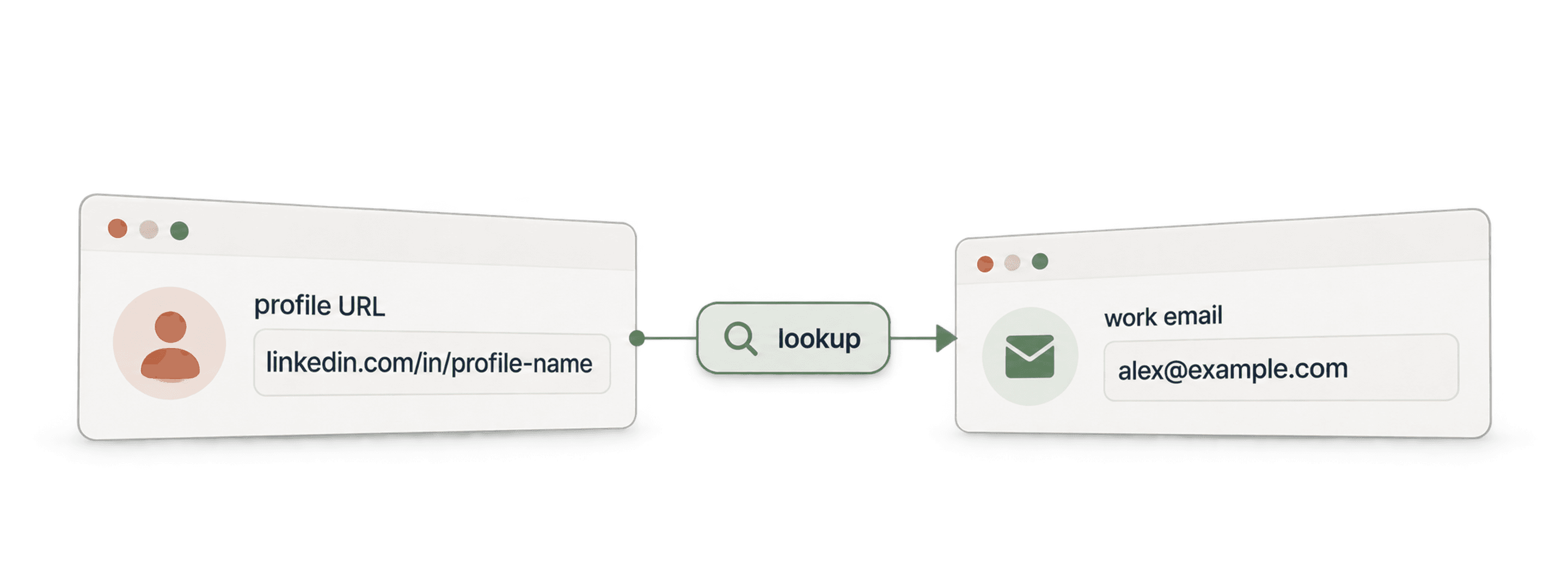
- واجهة Waterfall Email Finder APIاعثر على email عمل موثّق باستخدام الاسم ونطاق الشركة.
- واجهة Waterfall Phone Finder APIاعثر على رقم هاتف باستخدام رابط ملف LinkedIn. ادفع فقط عند العثور عليه.
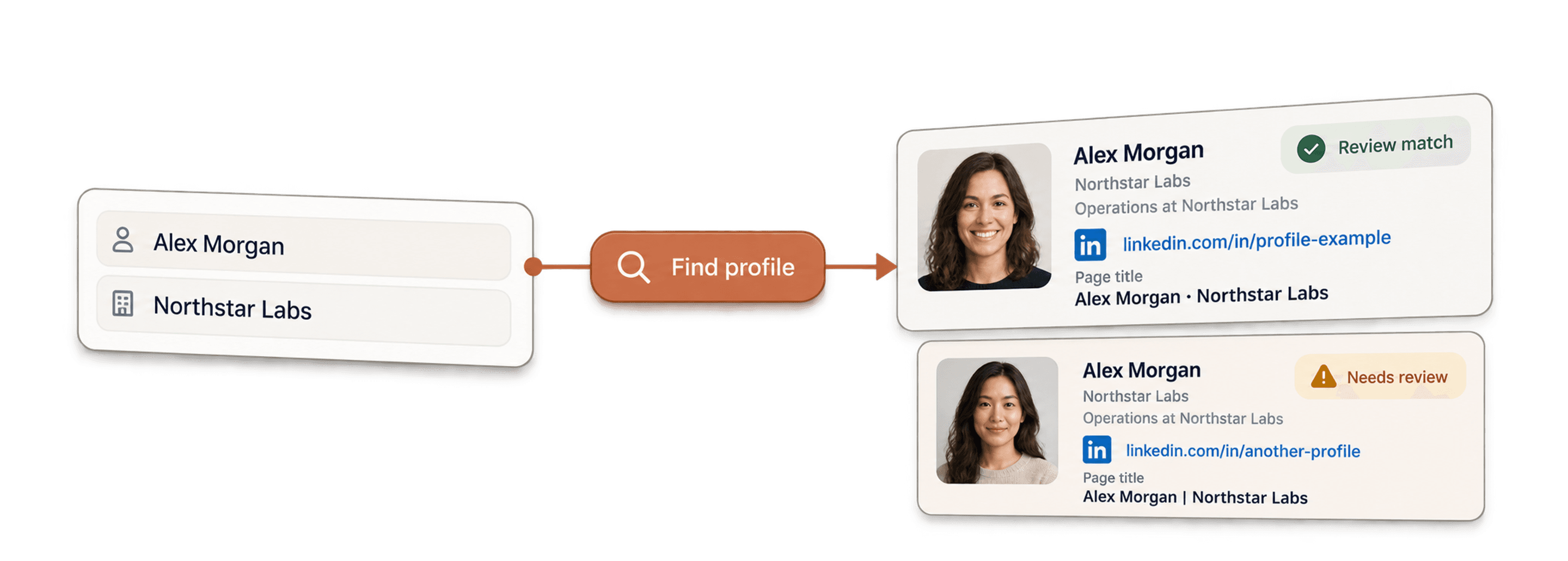
- واجهة LinkedIn Profile Finder APIاعثر على رابط ملف LinkedIn لشخص باستخدام اسمه.



عمليات إثراء بلا كود
- Waterfall Email Finderاعثر على عناوين email موثّقة من رابط LinkedIn باستخدام أكثر من 20 مزودًا في الوقت نفسه.
- Waterfall Phone Finderاحصل على أرقام الهواتف المحمولة المباشرة من روابط ملفات LinkedIn نفسها.
- LinkedIn Company Page Scraperاستخرج بيانات الشركات العامة من روابط صفحات الشركات على LinkedIn.
أدوات مجانية
- أداة LinkedIn Profile Scraper مجانيةاستخرج نقاط البيانات العامة من رابط ملف. لا حاجة إلى تسجيل الدخول أو ملفات تعريف الارتباط أو معرّف الجلسة.
- أداة Email Finder مجانيةاعثر على email عمل باستخدام الاسم والشركة. التجربة مجانية.
- أداة البحث عن نطاقات الشركاتاعثر على نطاقات المواقع الإلكترونية انطلاقًا من قائمة بأسماء الشركات.
