
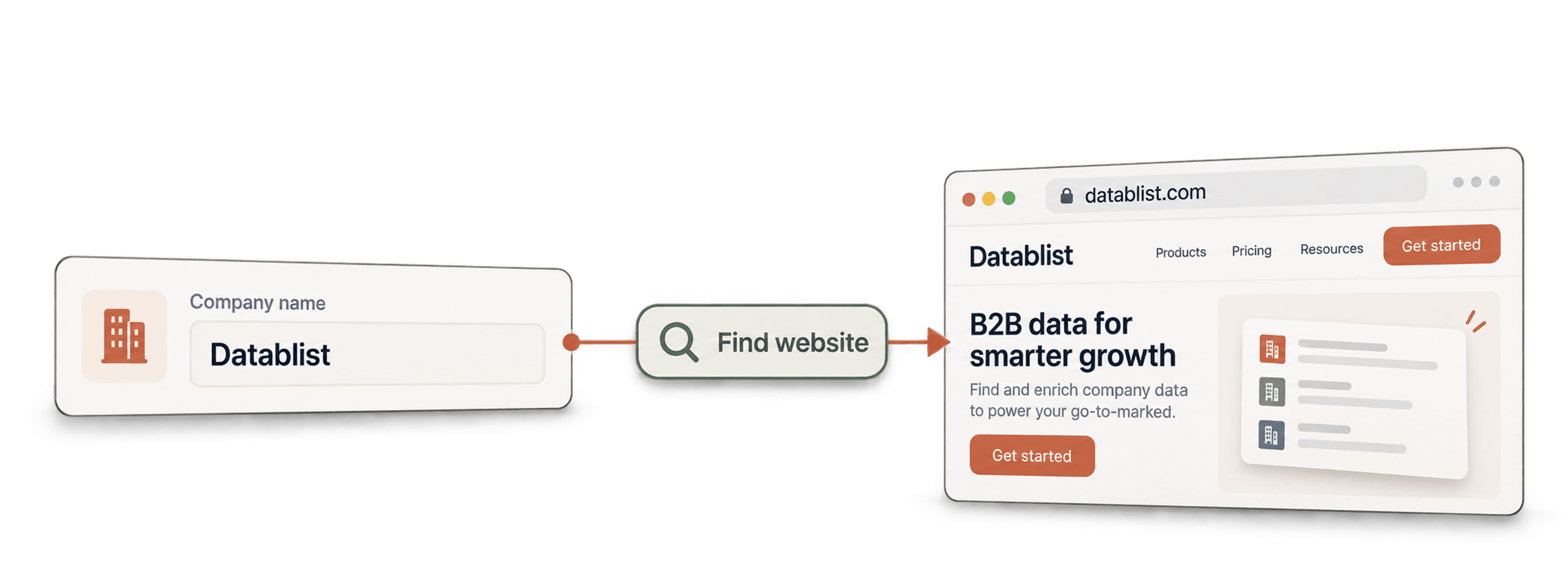
To run a company name to domain workflow in bulk, import your list into Datablist and run the Find Company Domain from Company Name enrichment. Start with the company dataset and use Google as a fallback. Review the confidence column, then send only ambiguous or unresolved names to an AI Agent template with extra context.
The result is a table with one company domain and full website URL next to each matched company name. You also get a confidence level, while Datablist tracks the run status automatically. If you are comparing providers first, the company name to domain finder comparison shows how to count returned and accepted matches separately.
For a short list, try the free company name to domain finder first. Paste up to ten names, review the returned domains and confidence levels, then copy or download the results before moving to the bulk workflow below.
For an automated workflow, explore the Company Name to Domain API for setup options and code examples, or follow the Python API guide for finding company websites.
📌 Workflow summary
Input: company name, plus country when available
Output: company domain, full URL, confidence, and automatic run status
Recommended sequence: company dataset → Google fallback → AI Agent for ambiguous rows
Verified enrichment cost: 1 credit for a successful dataset lookup or 2.5 credits when Google is used. AI Agent cost varies with the research needed.
If CUFinder is also on your shortlist, the Datablist vs. CUFinder comparison explains how to compare the same company sample without equating returned domains with accepted matches.
Quick links
- See the expected result
- Prepare the input table
- Run the bulk workflow
- Handle ambiguous company names
- Check the measured example
- Validate the websites
Expected result
Suppose you start with three company names and their countries:
| Company Name | Country |
|---|---|
| Drooms | Germany |
| EVACO GmbH | Germany |
| tanner ag | Switzerland |
After the enrichment, the same rows contain the fields you need for email finding, company enrichment, deduplication, or CRM import:
| Company Name | Company Domain | Company Full URL | Domain Confidence |
|---|---|---|---|
| Drooms | drooms.com | http://www.drooms.com | High |
| EVACO GmbH | evaco.de | http://www.evaco.de | High |
| tanner ag | mtannerag.ch | https://mtannerag.ch/en/ | High |
These examples come from the run shown later in this guide. The domain is the clean identifier you normally pass to other enrichments. The full URL is useful when you need to visit or scrape the website.
Confidence is a review signal, not proof. A high-confidence match can still be wrong when two companies share a name, so I always inspect a sample before using the domains downstream.
Prepare your input table
The enrichment only requires a company name. A country helps separate businesses with similar names and improves local Google results.
I prefer this input shape:
| Column | Required? | Example | Why it helps |
|---|---|---|---|
| Company Name | Yes | Summit Logistics GmbH | Main lookup value |
| Country | Recommended | Germany | Narrows dataset and Google results |
| City | Optional for AI | Hamburg | Helps resolve common names |
| Industry | Optional for AI | Freight forwarding | Confirms the website content |
| Description | Optional for AI | Cold-chain logistics provider | Gives the AI Agent more context |
Clean obvious noise before the lookup. Remove notes, phone numbers, and legal text unrelated to the name. Keep legal suffixes such as GmbH or Ltd when they help distinguish the business. If your source is messy, follow the company name cleaning workflow first.
Weak inputs include generic labels such as Marketing Agency, branch names without the parent company, and names copied with addresses in the same cell. No lookup method can identify the right business from context it never received.
Download the 50-company benchmark CSV. It contains real niche companies from eight countries, with industry and description fields ready for the AI fallback. It does not contain expected domains, so you can test the workflow without giving the answer to the lookup.
Choose the right lookup method
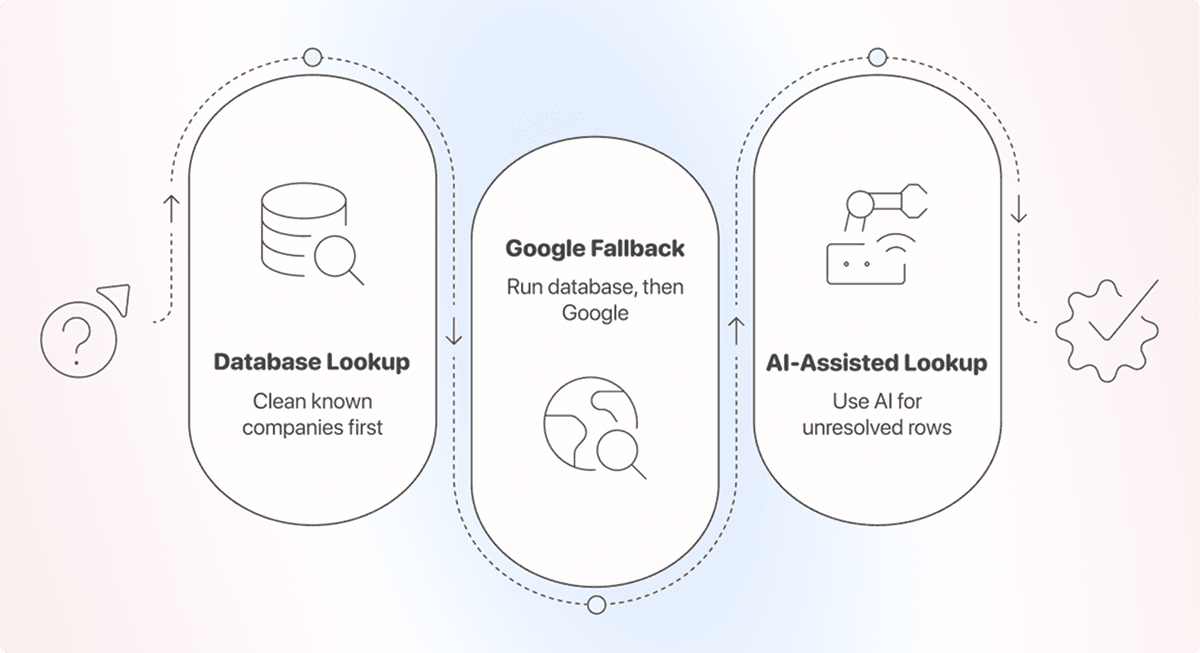
This task works best as a waterfall. Run the cheapest method first, then spend more only on rows that need it.
| Method | Best for | Cost | Main limitation |
|---|---|---|---|
| Find Company Domain from Company Name enrichment | Companies with online presence | 1 credit for a dataset match, 2.5 credits when Google is used | Search may select the wrong company for ambiguous names |
| AI Agent | Ambiguous names with country, city, industry, or description | Usage-based | Slower and still requires review |
For most lists, I use the Find Company Domain from Company Name enrichment. It handles easy rows cheaply and searches the web only when the dataset has no match.
The domain finder returns High, Medium, Low, or Very Low confidence. Multiple sources agreeing on a domain can produce high confidence. Google title matches and fuzzy name similarity also affect the score. Use the value to decide which rows you accept, review, or research again.
Find company websites in bulk with Datablist
Step 1: Import the company list
Create a Datablist account, start a collection, and import your CSV or Excel file.
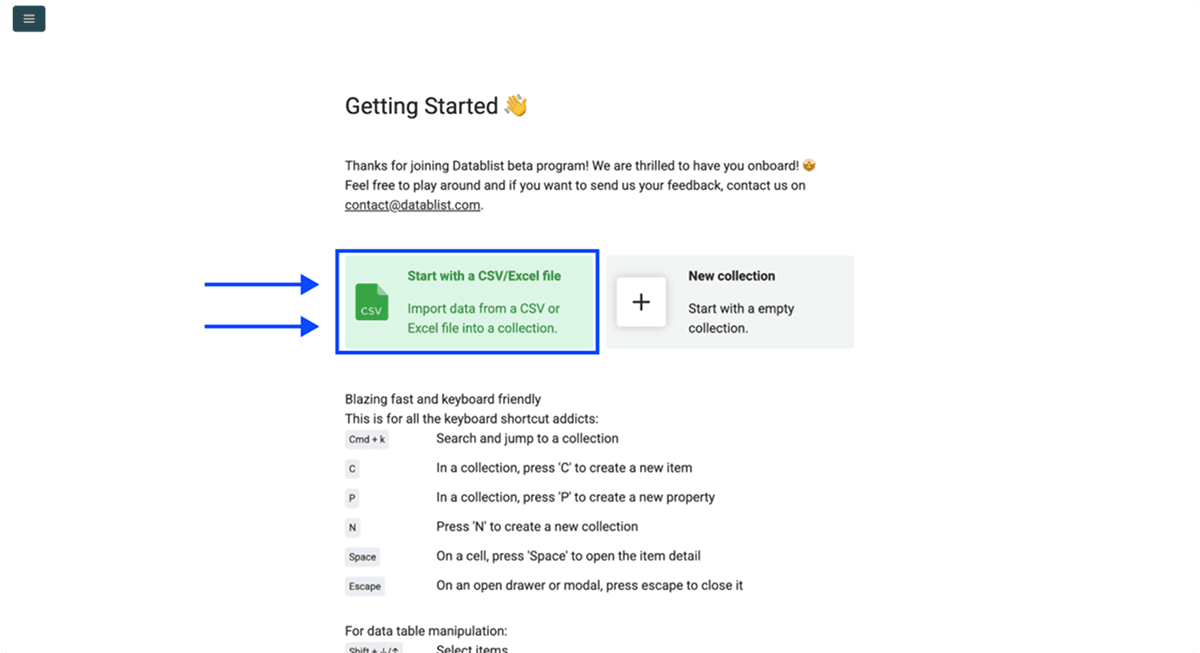
Check the imported columns before running anything. The company name should be a text property. Keep the country in its own property if each row can have a different country.
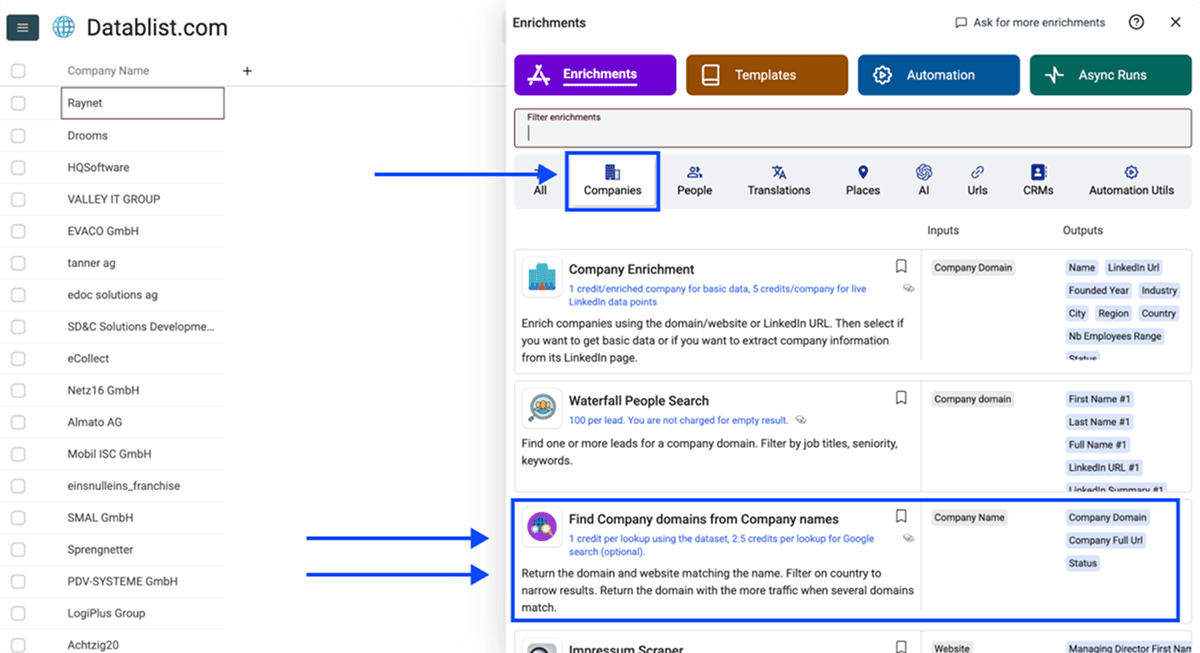
Step 2: Open the domain finder
Click Enrich, open the Companies category, and select Find Company Domain from Company Name.
Step 3: Configure the lookup workflow
Choose one of these workflow settings:
- Use Companies Dataset + Fallback on Google: my default for a mixed list
- Use only Companies Dataset: the lowest-cost first pass
- Use only Google: live search on every row
Set Target Country when the whole list covers one country. Enable Define target country per item when your file already has a country column.
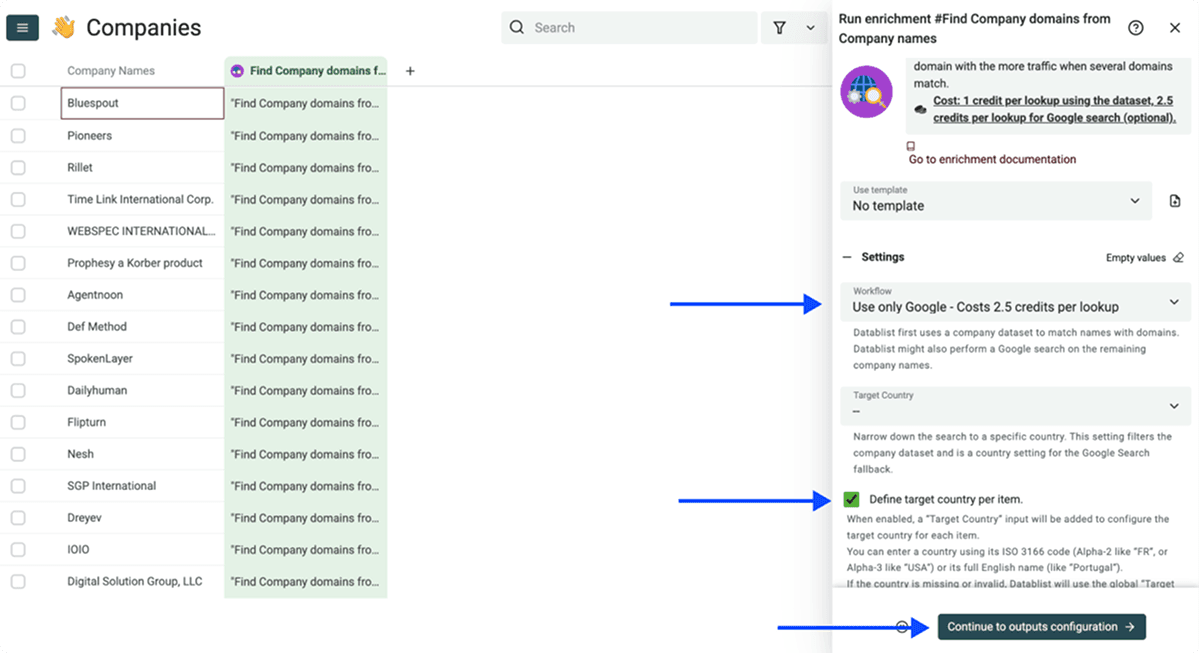
When Google is enabled, two settings can improve difficult searches:
- Accept non-root websites: allow results such as
platform.com/company-name. Leave this off unless company sites are hosted on a shared platform. - Skip following domains: exclude an industry directory that keeps appearing. Datablist already skips common directories and social networks when scoring results.
Datablist searches with the selected country and scores the top results using factors such as result position and title similarity. If you leave the country empty, Google uses the United States location by default.
Step 4: Map the input and outputs
Map Company Name to the property containing your names. If you enabled a country per row, map Target Country too.
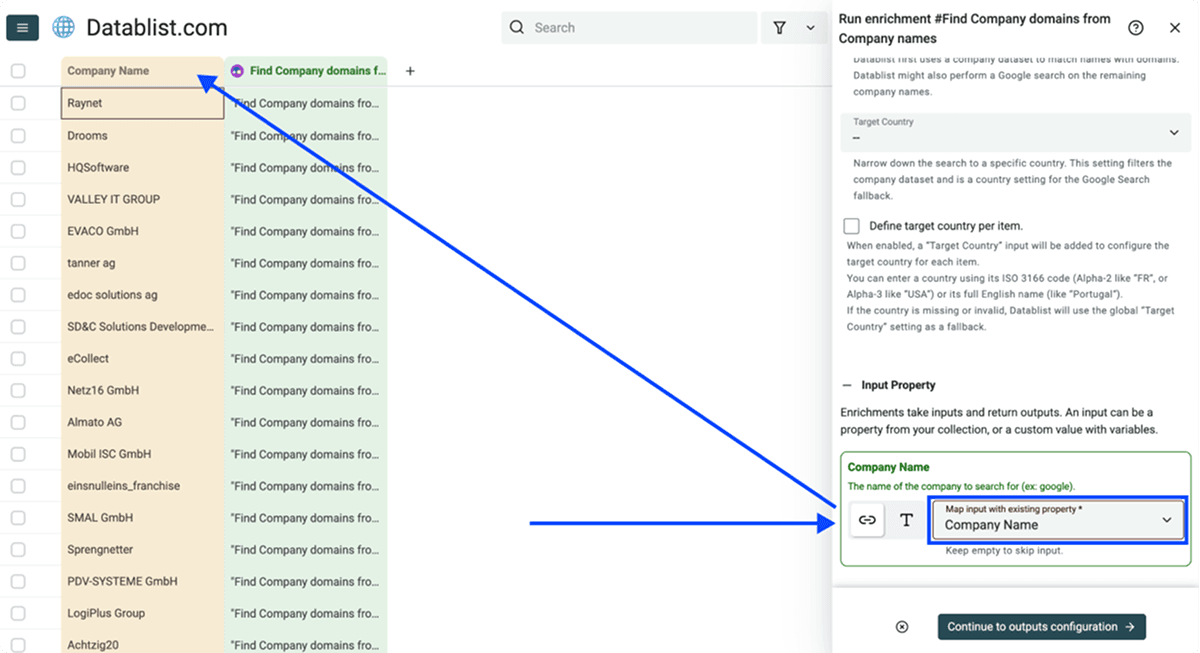
Add these three enrichment output properties:
- Company Domain
- Company Full URL
- Domain Confidence
Datablist also adds a run-status column automatically. It shows whether the row is queued, running, or finished and keeps the completion time after the run.
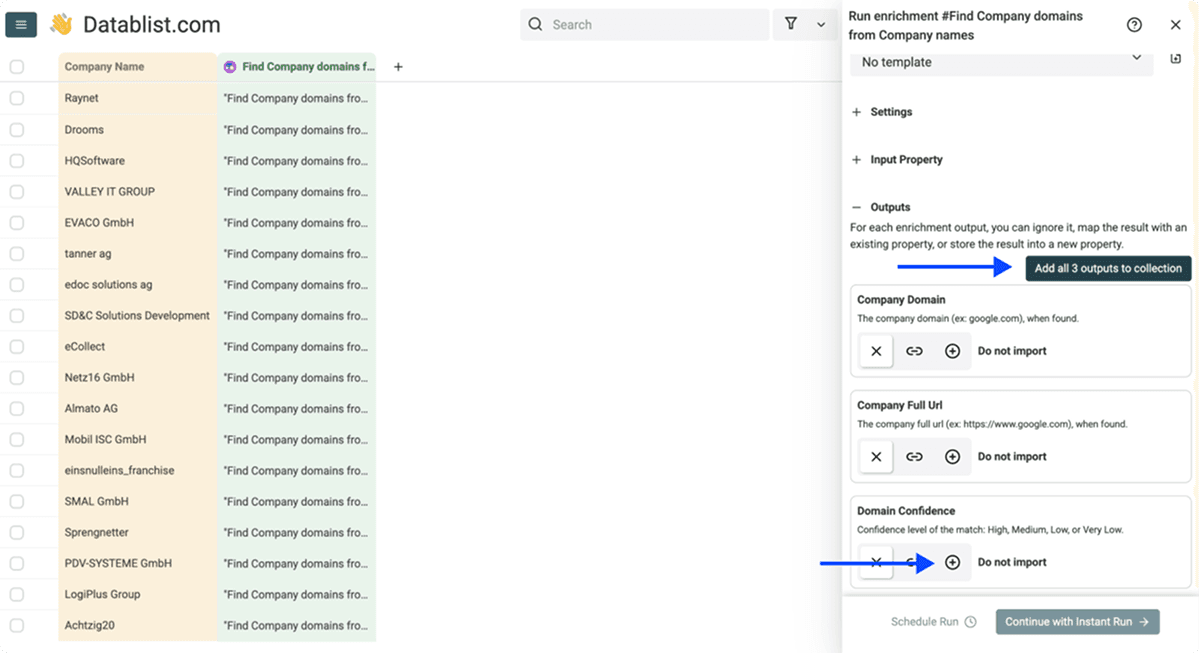
I keep both domain and full URL. The domain is better for matching and deduplication, while the full URL preserves the exact page selected by the enrichment.
Step 5: Test a sample, then run the list
Run the enrichment on the first 10 rows. Check whether the websites belong to the intended companies, especially for short or common names. If the sample looks good, run it on the remaining view.
For a web-design campaign, review the accepted websites with the outdated-site checklist before qualifying them for outreach. Finding the right domain does not show whether its design or content needs work.
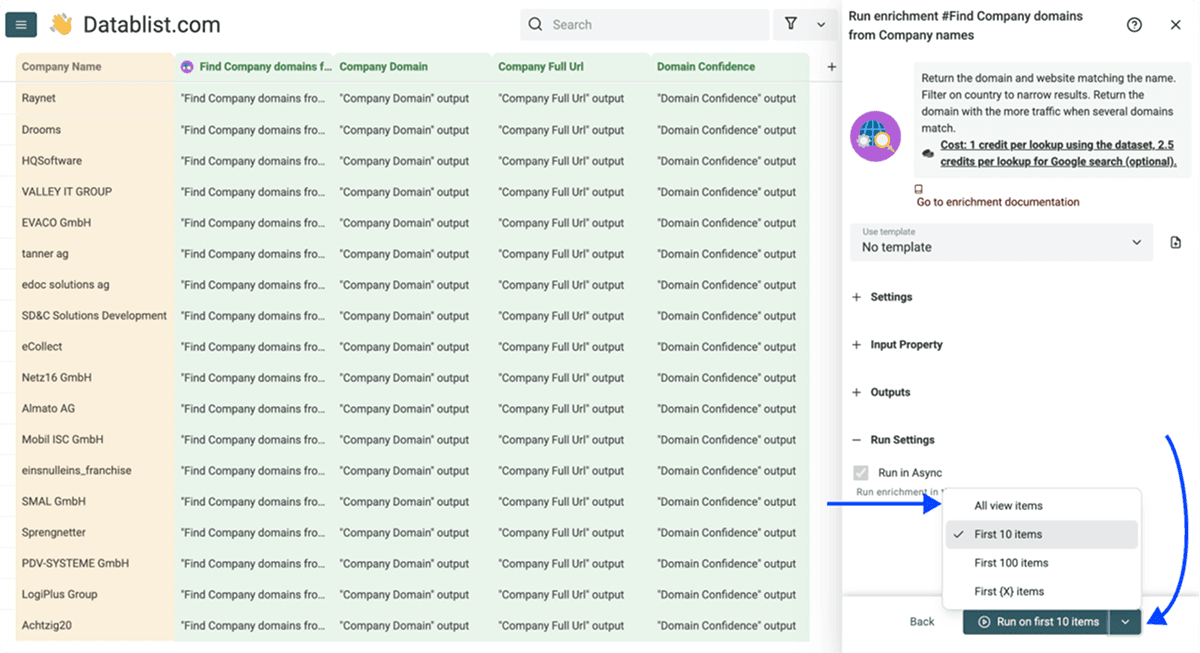
Use filters to control the waterfall. For example, filter for an empty website before a second pass, or filter for Low and Very Low confidence before AI research. This prevents you from paying to process rows that already have an acceptable result.
Use AI for ambiguous company names
Google can find a plausible website and still pick the wrong company. Short names and brand names shared by several businesses need more context.
Filter the collection to rows with an empty domain or Low and Very Low confidence. Open Enrich, choose AI Agent, and load the Advanced Company Name to Website template.
📌 Notes
Use the AI Agent as your primary method when you have context such as industry, country, or a company description, especially if some companies may not have a website. Unlike a standard domain lookup, the AI Agent can compare what a candidate company does with your context, reject false positives, and return no website when it cannot verify a match.
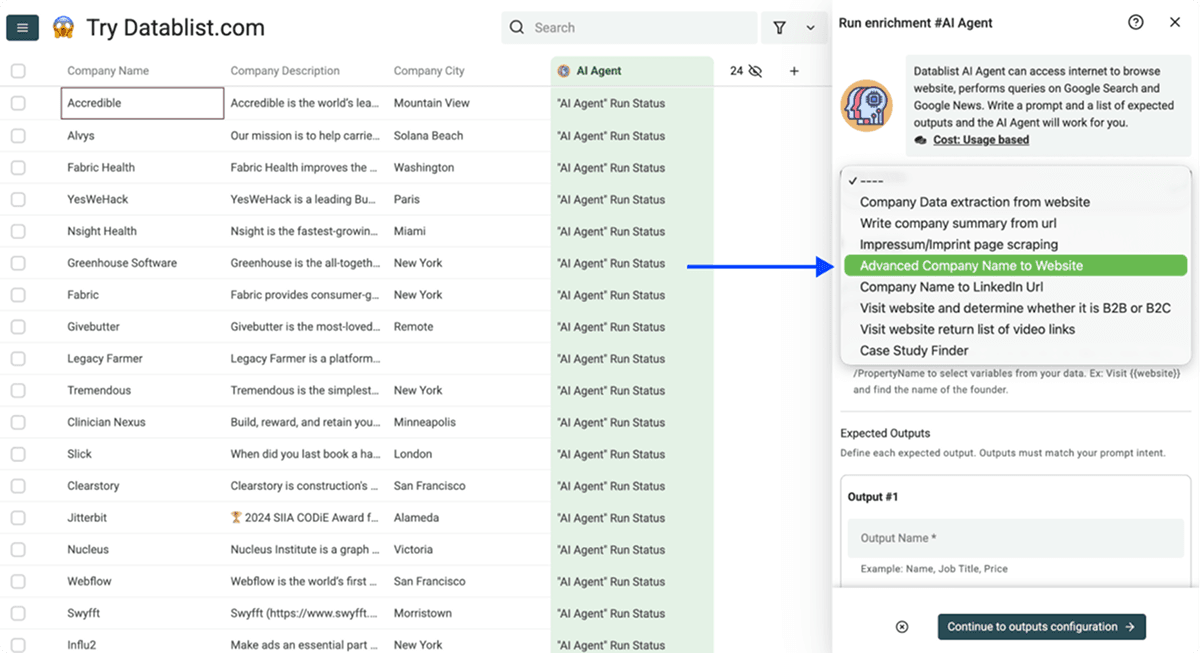
In the prompt, select each slash placeholder and bind it to the matching collection property:
/Nameto the company name;/Industryto the industry;/Countryto the country;/Descriptionto a short description of the company.
The template searches for candidates, visits likely websites, and checks them against the supplied context. It excludes directories, legal listings, maps, shops, and social networks. It also allows an empty result when the evidence is not strong enough.
The template returns three research outputs, plus the AI Agent's automatic numeric confidence score:
- Website: the selected root website URL;
- Company Summary: a short description of the matched business;
- Result Explanation: the evidence linking the website to the row;
- Confidence Score: a value from 0 to 100.
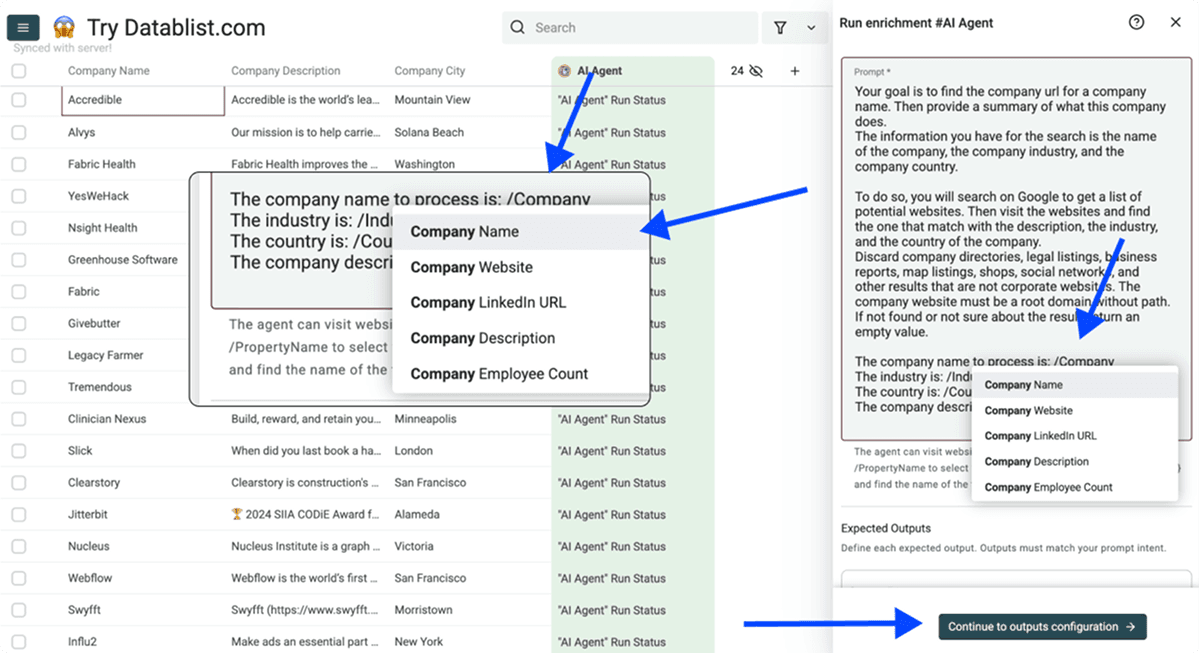
Run the template only on unresolved or uncertain rows. AI research costs vary because one company may require more searches and page visits than another. Set a research-iteration limit before the run to control spend.
Check the company against its address
When two businesses share a name, a street address or city can be more useful than another broad search. I recommend adding that context to the AI prompt and keeping the proposed website separate from your accepted website column until it passes review.
Adapt the template with these instructions. Bind the slash placeholders to your collection properties; remove any input you do not have.
Find the official website for the company described below. Search for candidates, then visit their About, Contact, or legal-notice pages to compare the company name, business activity, country, and address.
Return Website, Company Summary, and Result Explanation. In Result Explanation, include the page URL supporting the identity match and state any conflicting details. Prefer the company's own root website. Do not return a directory, social profile, or news article as the official website. If only a parent-company website is found, explain that relationship rather than claiming it is the subsidiary's own site. Leave Website empty when the evidence is insufficient. Do not guess a domain from the name.
Company name: /Name
Country: /Country
City or address: /Address
Industry: /Industry
Description: /Description
Keep Result Explanation in your output mapping. Check its supporting URL and mark the row as accepted, rejected, or needing review in a separate property before copying the proposed URL into your final website column.
Starting with an email address or a news article
A business email domain gives you a candidate website to check. A Gmail, Outlook, or other shared email-provider domain does not identify the sender's company. For those rows, gather a company name and matching context before running this workflow.
If the company name came from a news article, isolate the business being discussed rather than the publisher, investor, or parent company. Save the article URL as context and compare the candidate site's activity and address with that evidence. Several companies mentioned on the same page should become separate input rows.
Use an employee to identify the right company
Sometimes you know a person's name but have little useful company context. The employee can act as a second identity signal.
Load the Find Company Domain from Company and Employee Names AI Agent template. Map:
/Nameto the company name;/FirstNameto the employee's first name;/LastNameto the employee's last name.
Select each property from the slash-variable menu. Confirm that Name, FirstName, and LastName appear as highlighted chips in the prompt. Typing the placeholder as plain text does not bind the property value.
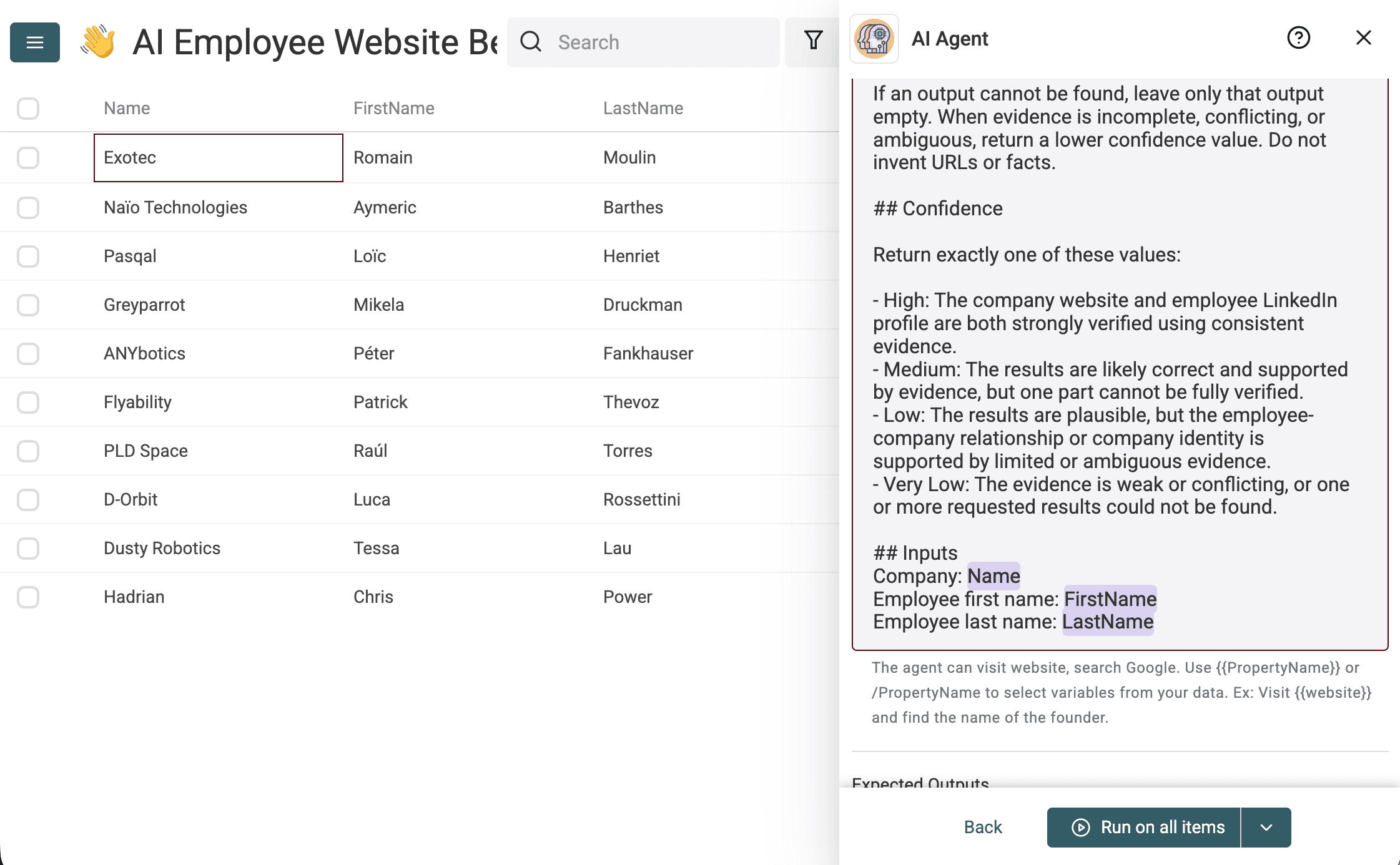
The agent verifies the website against the requested company and checks that the public LinkedIn profile matches both the employee name and company. It returns:
- Company Website: the official root website;
- Company Summary: a short factual description;
- Employee LinkedIn Url: the matching public profile when found;
- Confidence:
High,Medium,Low, orVery Low.
The AI Agent also adds an automatic numeric Confidence Score from 0 to 100.
I tested the template on ten niche companies with a verified founder or executive. It returned 9 correct official websites and all 10 matching public LinkedIn profiles. Regional LinkedIn hosts, URL encoding, and language paths were normalized before comparing profile identities.
The miss was Hadrian. The agent found Chris Power's correct profile and wrote a summary of the aerospace manufacturer, but returned hadrian.io, an unrelated cybersecurity company, instead of hadrian.co. It still marked the row High with a numeric score of 100. Across the full run, all categorical values were High, nine numeric scores were 100, and one was 95.
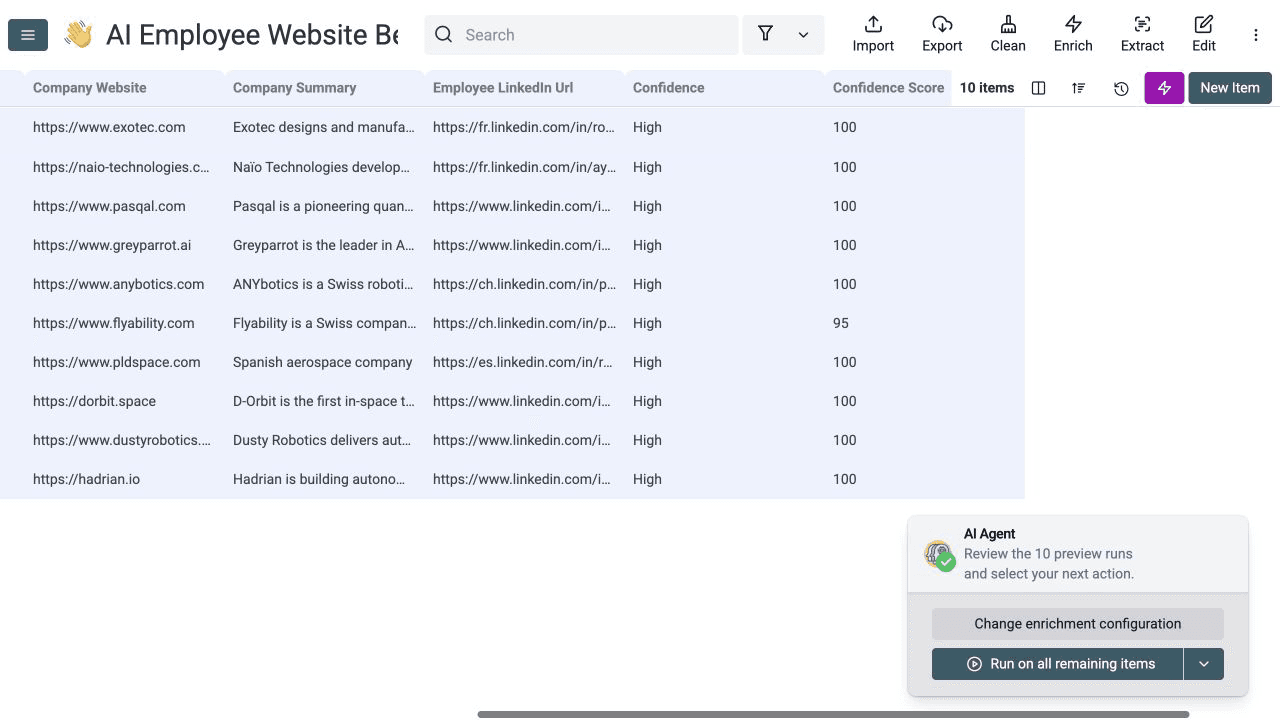
Use this template when a name maps to several businesses, when the company uses a generic brand, or when a person's public work history is your strongest clue. A correct employee profile does not prove that the returned website belongs to the same company, so review each output separately.
Measured result from a 50-company run
I ran the downloadable benchmark on August 3, 2026. It contains 50 real niche companies from eight countries, including numeric brands, accented names, short names, and domains that differ from the brand.
- Input rows processed: 50
- Domains returned: 50, for 100% coverage
- Exact canonical domains: 48 of 50
- Accepted official websites after following redirects: 49 of 50
- Clear false positives: 1
- Credits used by the dataset and Google waterfall: 59
- Displayed Domain Confidence: High for all 50 rows
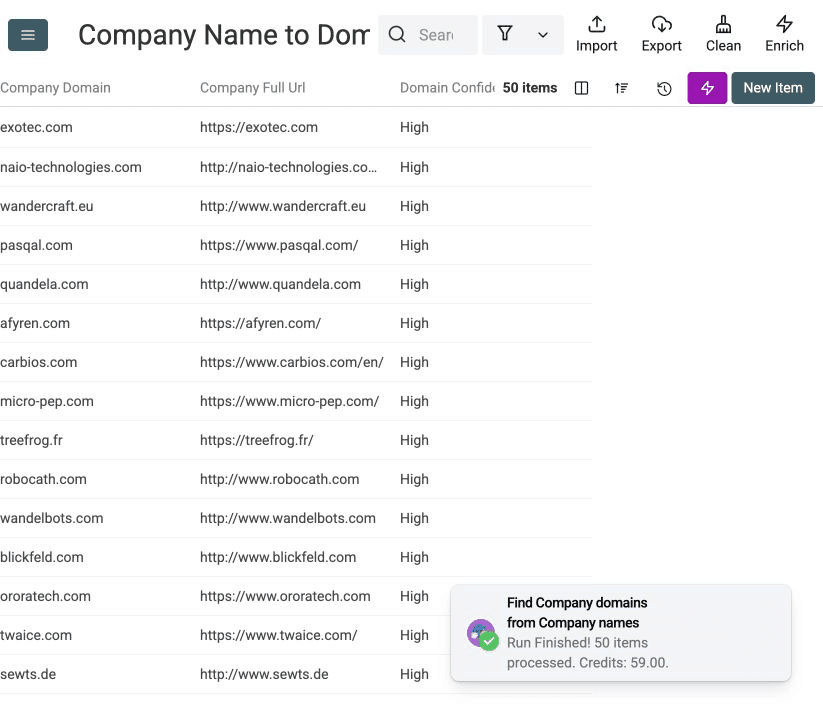
The false positive was useful: 9T Labs matched a Venturelab directory page even though the result was marked High confidence. sewts.de was a valid company-owned result that redirected to the canonical sewts.com domain, so I counted it as accepted but not exact.
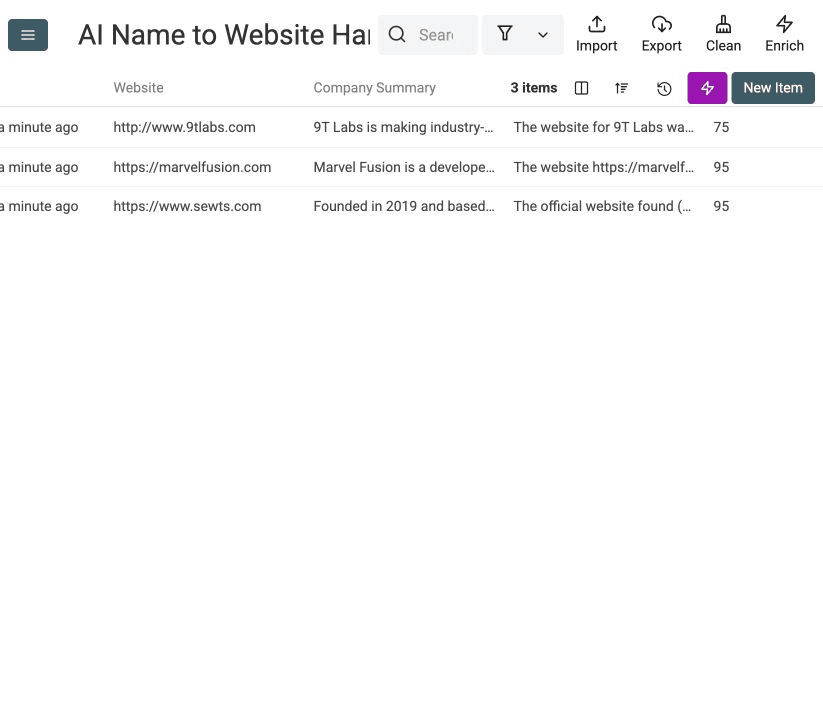
I then sent only the three disputed rows to the AI Agent. It returned the current official root websites for all three, including 9tlabs.com, which fixed the standard enrichment's false positive. The automatic confidence scores were 75, 95, and 95.
| Company | Standard result | AI result | Review |
|---|---|---|---|
| 9T Labs | venturelab.swiss/9t-labs | 9tlabs.com | AI fixed a directory false positive |
| Marvel Fusion | marvelfusion.com | marvelfusion.com | Exact current domain |
| sewts | sewts.de | sewts.com | Country-code domain redirects to the canonical domain |
This is a measured example, not an accuracy guarantee. Review ambiguous brands, directory-looking URLs before using the domains downstream.
For your own run, record four numbers:
- Coverage: rows with a non-empty website divided by processed rows
- High-confidence coverage: rows marked High divided by processed rows
- Sample accuracy: correct websites divided by manually checked websites
- Cost per accepted website: credits spent divided by websites that passed review
These measurements let you compare workflow changes without confusing a returned URL with a correct result.
Failure cases and limitations
No company name lookup is perfect. Watch for these cases:
- Several companies share the same name. Add country, city, industry, or a description and use the AI Agent.
- The company has no website. Google may still return a directory or a similarly named business. Accept an empty result instead of forcing a match.
- The website uses another brand name. The domain may look unrelated to the legal company name. Check the site footer, About page, address, or legal notice. For German websites, you can then extract Impressum details with Python.
- A regional page ranks above the main site. Set the target country and decide whether you need the local or global domain.
- The company lives on a shared platform. Enable non-root websites only when you expect URLs with a path.
- Directories dominate the results. Add the recurring directory domains to the skip list and rerun the uncertain rows.
- The source name is dirty. Clean names mixed with locations, notes, or registration text before lookup.
- Confidence is not verification. The standard enrichment scores name and search signals. It does not prove ownership of the website.
Google results are cached for 48 hours. If you change Google scoring settings during that period, Datablist can reuse the saved results. This is useful for testing exclusions, but a rerun may not reflect a new live search.
Validation checklist
Before exporting or running another enrichment, check the following:
- The company domain opens a live website.
- The site name, products, or services match the company in the row.
- The country, city, address, or legal details match when available.
- The result is an official website, not a directory, marketplace, social profile, or news article.
- High-confidence rows passed a manual sample check.
- Medium, Low, and Very Low rows were reviewed or sent to the AI Agent.
- Empty results stayed empty when no reliable official website was found.
- Duplicate domains were checked for parent companies, subsidiaries, or wrong matches.
- Coverage, sample accuracy, runtime, and credits were recorded.
Once the website column passes review, you can use it for an email finder, company enrichment, or a clean CRM import.
When you still need a contact name, use the reviewed domain to research the business owner or operating manager. Retain the page supporting that role before using the name in a separate email lookup. If your starting point is a LinkedIn company URL instead of a name, use the LinkedIn company page to website workflow.
For one contact, enter their first and last name with the reviewed company domain in the free Email Finder. A domain identifies the employer; you still need the person's name to search for their work email.
Frequently asked questions
What is the minimum input needed to find a company website?
A company name is enough to run the domain finder. Add a country whenever possible. For ambiguous names, city, industry, address, or a short description improves the AI research step.
What does the domain finder return?
It returns the company domain, the full website URL, and a Domain Confidence value. Datablist also creates a run-status column automatically so you can see whether each row is queued, running, or finished.
How much does a company name lookup cost?
The company dataset costs 1 credit per successful lookup. Google costs 2.5 credits per lookup, including searches with no returned website. AI Agent usage depends on the research performed, so reserve it for rows that need context.
Should I accept every high-confidence result?
No. High confidence means the available matching signals are strong. Review a sample and check ambiguous names before sending the websites into outreach, CRM, or further enrichment workflows.