
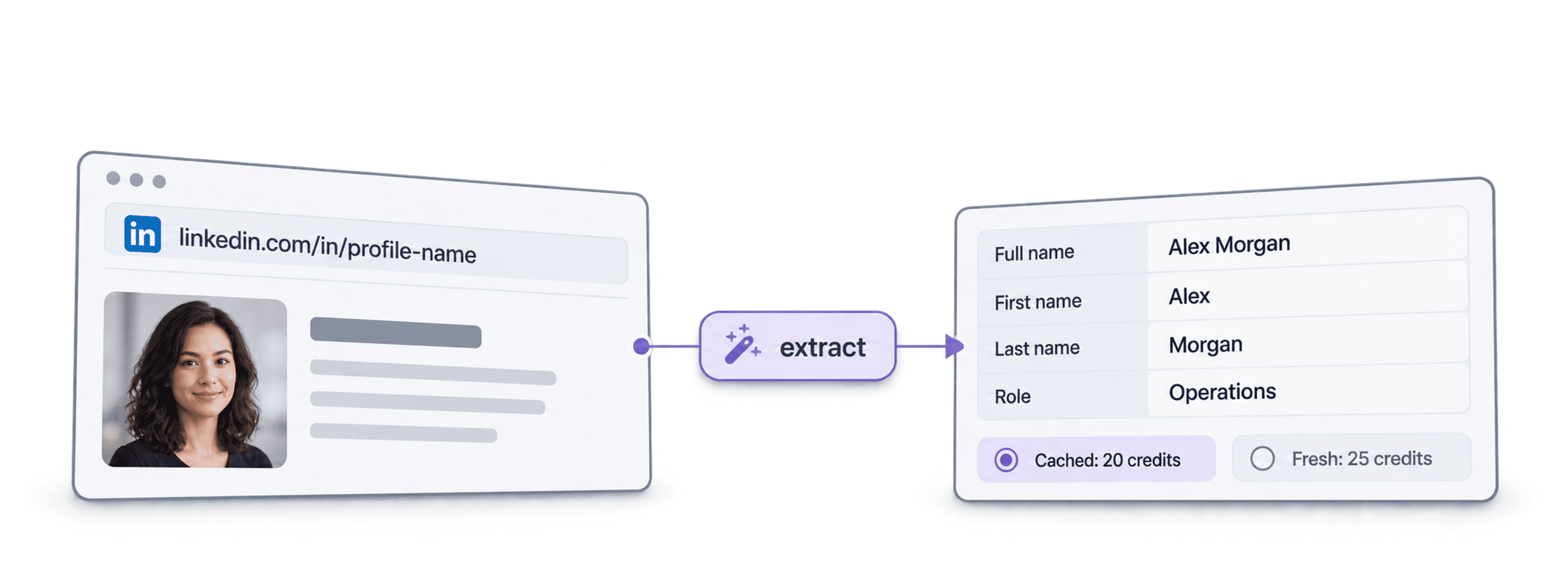
To extract a person's full name from a LinkedIn profile URL, put the URL in a Datablist collection, run the LinkedIn Profile Scraper, and map its Full Name, First Name, and Last Name outputs to columns. Do not treat the text after /in/ as a verified name: profile slugs can be abbreviated, changed, or unrelated to a person's displayed name. Check the returned profile and leave missing names blank.
This workflow also returns available job, location, and education details. Datablist does not ask you to connect your LinkedIn account for this enrichment, which avoids sharing your login or automating your own session. It does not guarantee any particular account or platform outcome.
For a single profile, use the free LinkedIn Profile Scraper. Paste the person’s URL, review the available name, headline and experience fields, then copy or download CSV or JSON. Developers can also scrape LinkedIn profile details in Python with the API. Use the bulk workflow below for a list of profiles.
📌 Summary For Those In a Rush
Input: a column of standard LinkedIn profile URLs or Sales Navigator lead URLs.
Output: full, first, and last names when returned, plus other selected profile fields.
Review: match names to the returned profile URLs and inspect empty or unexpected values before using the list.
Credits: 25 per fresh profile; 20 when a cached profile is available and the cached option is enabled.
The name fields come from the enrichment result, not from splitting the URL slug.
What This Guide Will Cover
- What Is Datablist?
- Why Login-Based Scrapers Create Account Risk
- How to Extract Details From LinkedIn Profile URLs
- Cost Breakdown
- Frequently Asked Questions
What Is Datablist?
Datablist is a platform for lead generation workflows. You can upload a list of profile URLs, run the LinkedIn Profile Scraper, and map returned fields to your collection.
Think of it as a data enrichment hub where you can upload a CSV or Excel file and run various enrichments on it. You don't need to switch between multiple tools or build complex integrations. Everything happens in one place.
The scraper does not require your LinkedIn credentials. Review the information it returns and follow applicable platform and privacy rules when using it.
Why Login-Based Scrapers Create Account Risk
Some LinkedIn scraping tools ask for a login or automate a signed-in browser session. That gives the tool access to your account and can expose the account to platform restrictions.
Before using a login-based tool, check whether it:
- Stores your credentials or session cookies
- Sends requests through your account
- Automates actions that breach platform rules
Datablist's profile enrichment does not require your LinkedIn login. That removes the need to share your credentials for this workflow, but it is not a promise of zero risk.
How to Extract Details From LinkedIn Profile URLs
Now let's get into the actual process of scraping a LinkedIn profile. Below, you'll find what data you can extract, the step-by-step workflow, and a breakdown of costs.
If your Python input contains names rather than profile URLs, start with the LinkedIn profile lookup API example. Confirm the candidate person before submitting that URL for profile details.
The Data You Get
The LinkedIn Profile Scraper returns a wide range of data points. Here's what you can expect to get, organized by category:
| Category | Data Points |
|---|---|
| Basic Info | First Name, Last Name, Full Name, Headline, Summary |
| Location | City, State, Country, Country Name |
| Current/Last Job | Title, Company Name, Start Date, End Date, Description, Location |
| Company Details | Company Page URL, Company Website, Industry, Employee Range |
| Work History | Up to 9 previous work experiences (up to 10 in total) |
| Education | School, Degree, Field of Study, Start/End Dates (up to 5) |
| Other | Languages, Number of Connections, LinkedIn Profile URL (normalized) |
💡 Sales Navigator Compatibility
Datablist works with both standard LinkedIn URLs and Sales Navigator URLs. If you input a Sales Navigator URL, the scraper will also return the normalized public LinkedIn profile URL.
Scraping LinkedIn Profile Details: The Step-by-Step
Here's exactly how to set up and run the LinkedIn Profile Scraper.
Step 1: Sign Up and Upload Your Data
- Sign up for Datablist at datablist.com
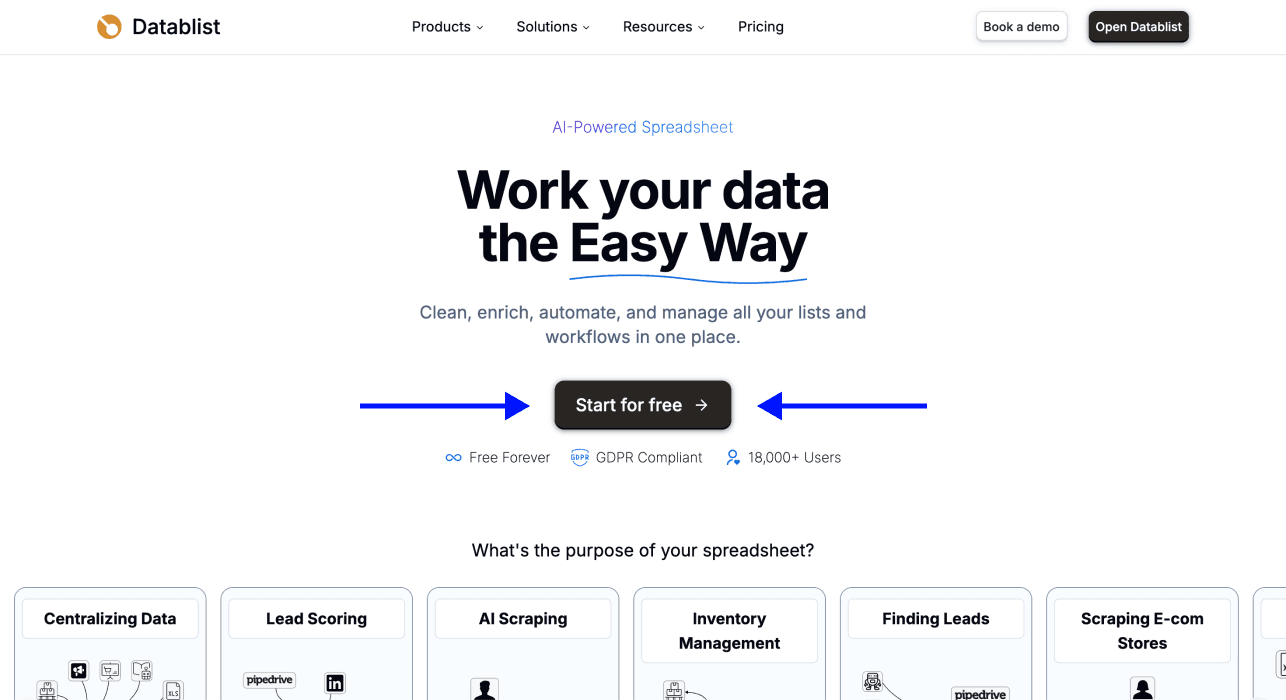
- Upload your CSV or Excel file containing LinkedIn profile URLs
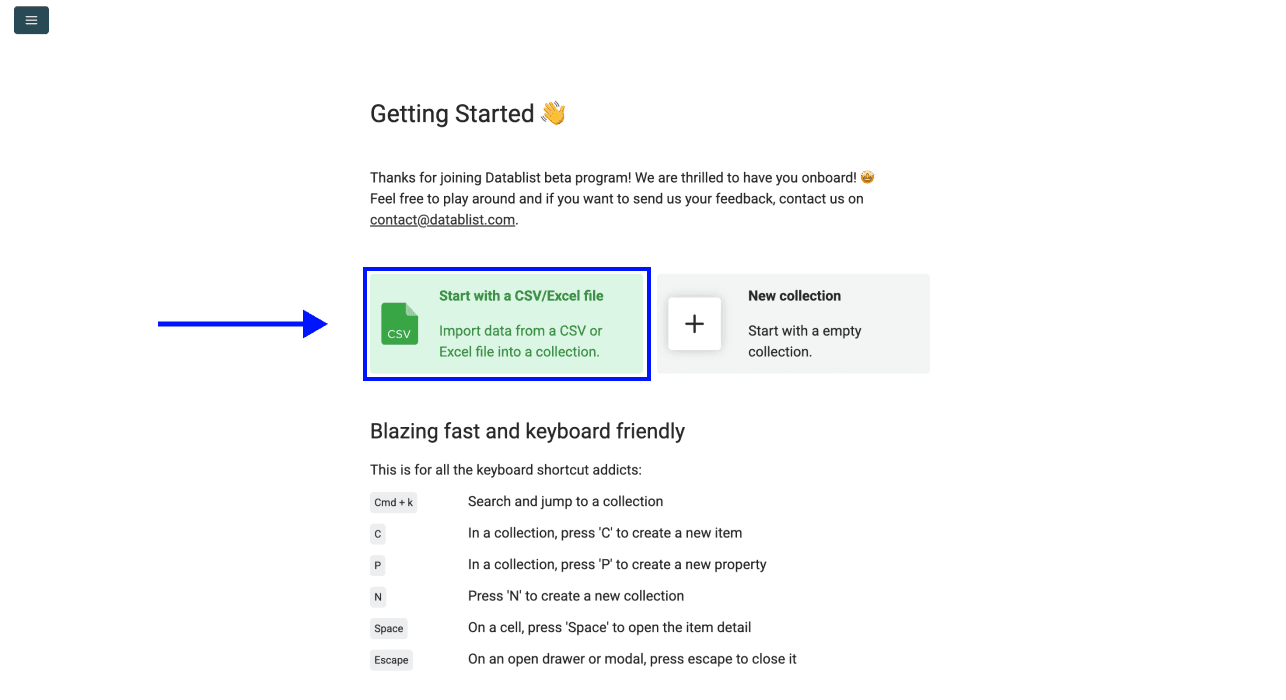
Step 2: Navigate to the Enrichment
- Click on Enrich in the top menu
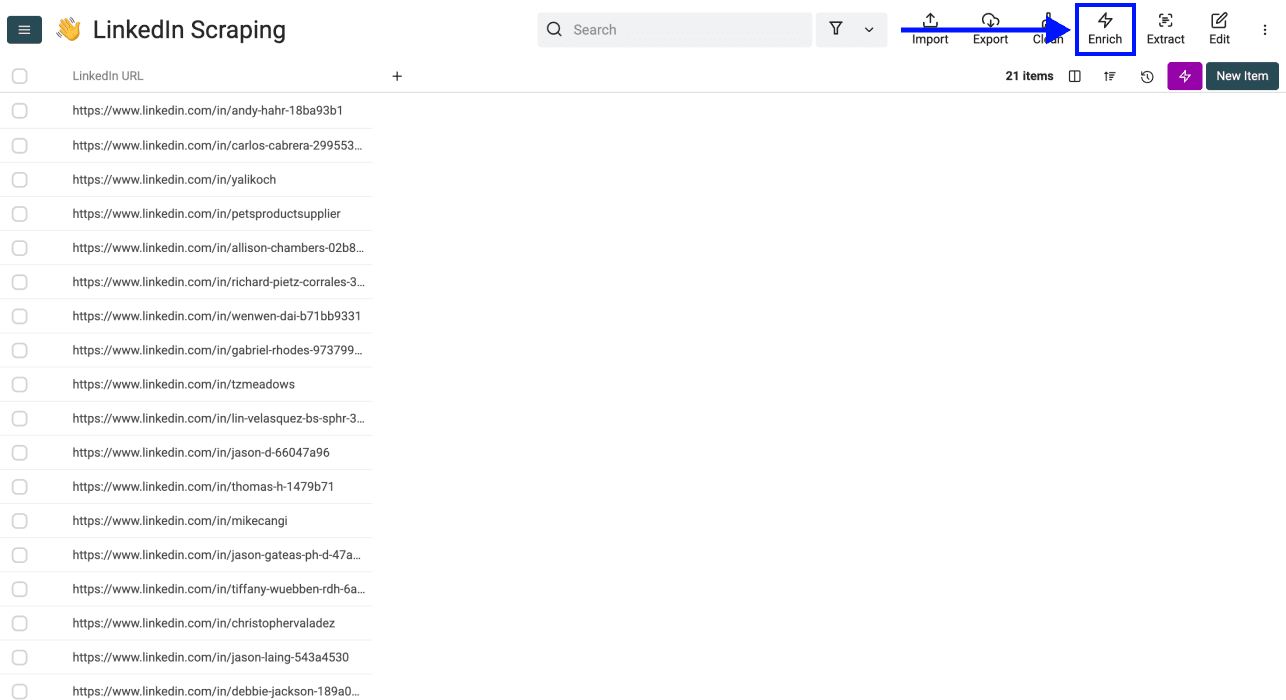
- Go to the People section and select LinkedIn Profile Scraper
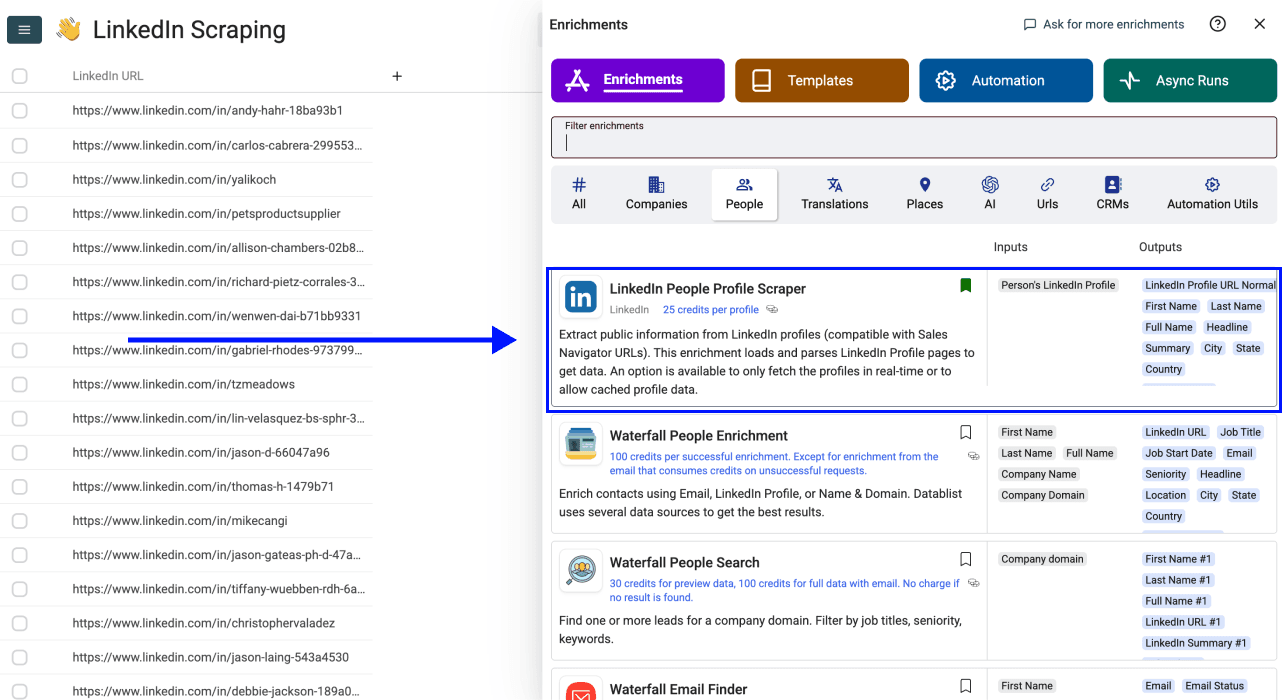
Step 3: Set Up the Enrichment
Once you select the LinkedIn Profile scraper, a drawer opens with settings. You'll see the following options:
- Accept Cached Profiles (if available): Default behavior scrapes fresh LinkedIn profile data. Enable this to use cached profiles when available. Cached profiles cost 20 credits instead of 25.
- Include LinkedIn Internal ID (URN): Returns the LinkedIn internal identifier (e.g., ACoAAAIJflYBlveEKEKWvVsjTP4QeXHK8KfcKHg). Useful for building Sales Navigator URLs.
- Experiences to return: Choose how many work experiences to scrape (3, 5, or 10).
- Educations to return: Choose how many education records to scrape (1, 3, or 5).
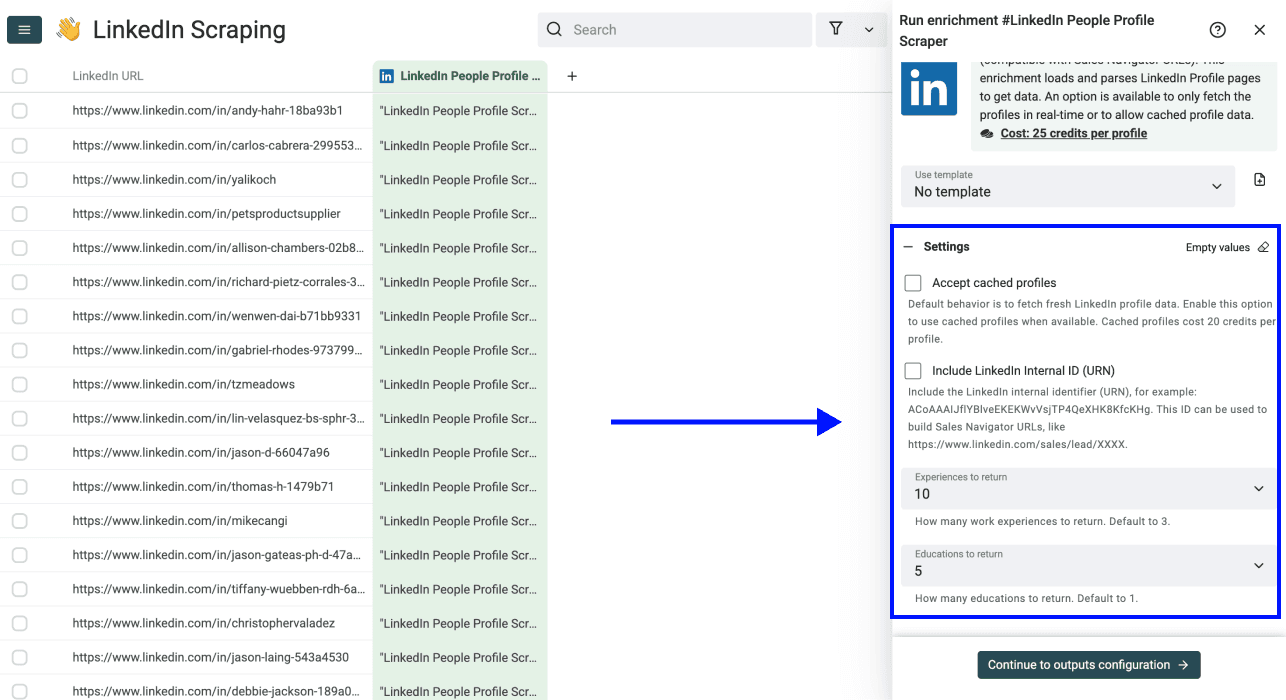
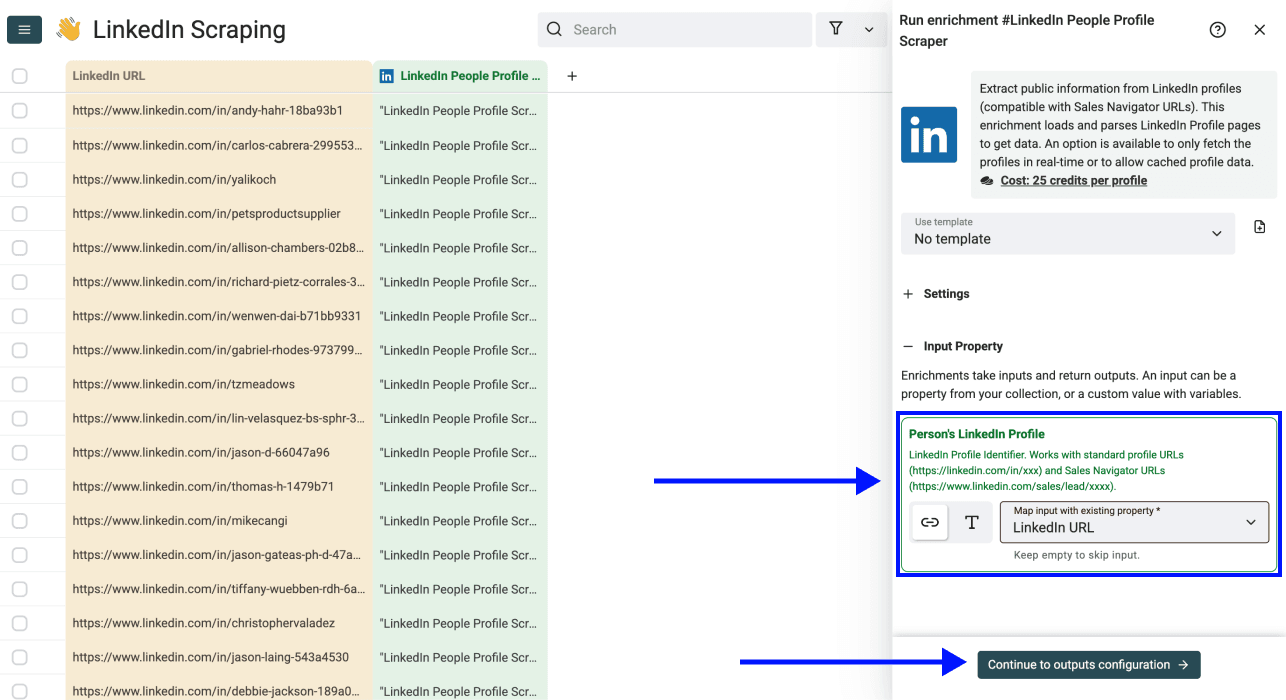
Step 4: Configure Your Inputs
Once you’ve configured your settings, scroll down and map the column with your LinkedIn profile URLs as Input Property
Click Continue to Outputs Configuration when ready
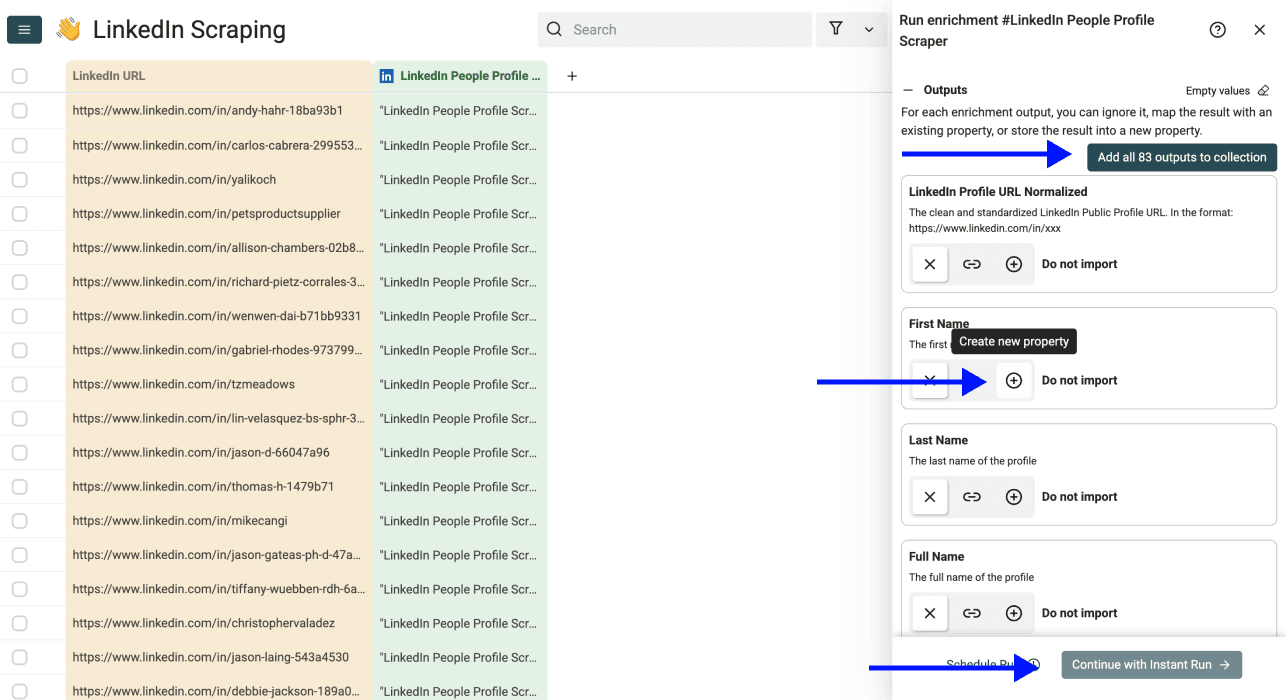
Step 5: Select Outputs
Configure where the extracted data will be stored. For name extraction, map Full Name, First Name, and Last Name to existing columns or create new ones. Keep the input URL column so you can compare each result with its source profile.
Click the ⊕ icons to add outputs to your collection. Alternatively, you can also use the shortcut to add all columns with one click.
Then click Continue with Instant Run to continue.
Step 6: Run the Enrichment
Now you can choose your run settings:
- Run on first 10 items: Test before committing
- Run on first 100 items: Validate larger samples
- Run on all view items: Process your entire list
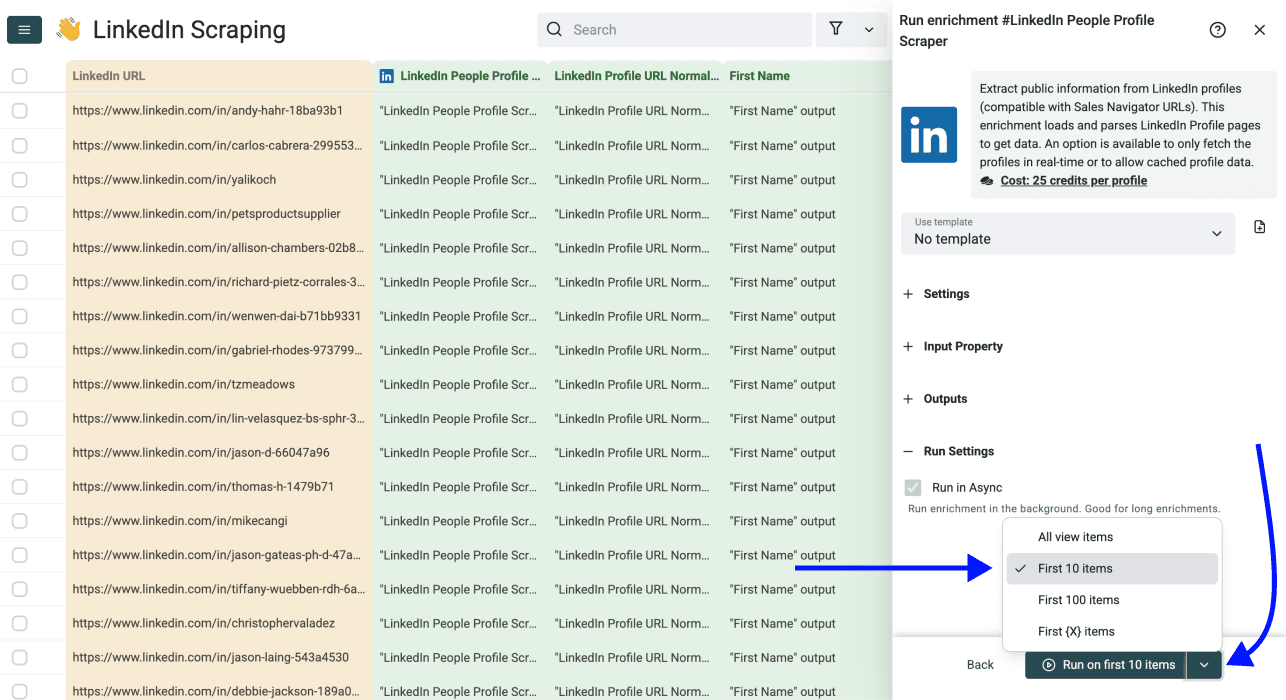
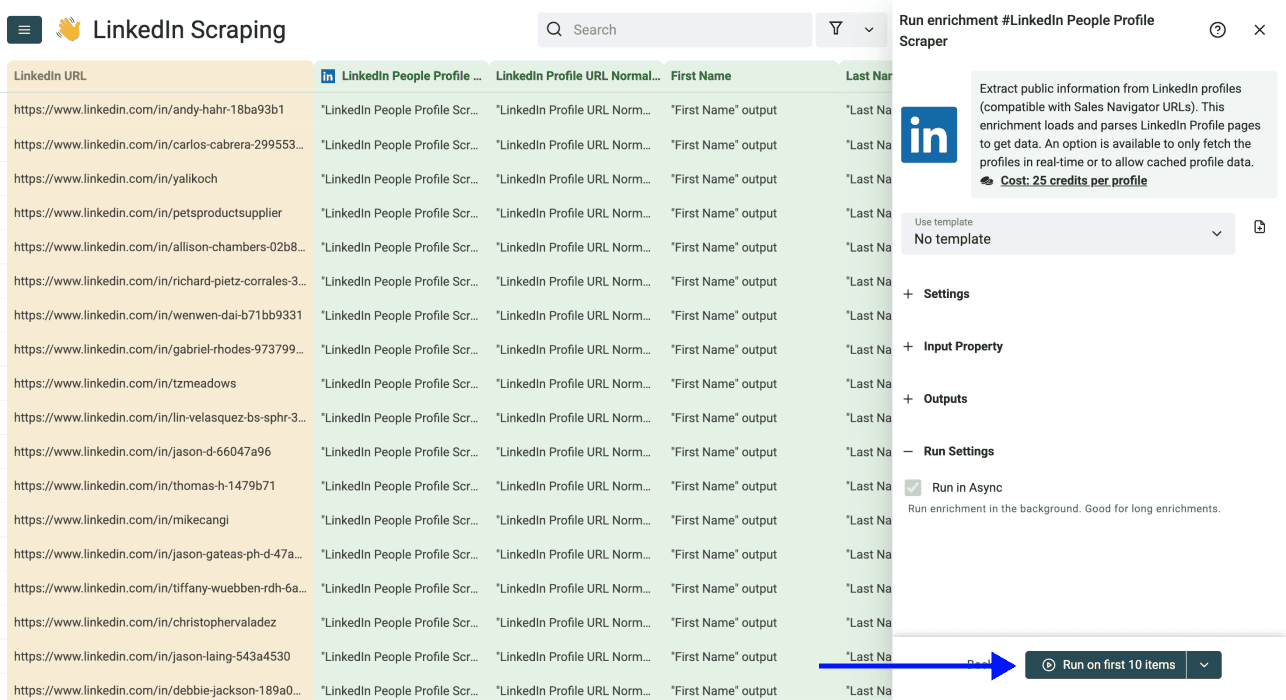
Click Run on first 10 items and watch your data populate automatically.
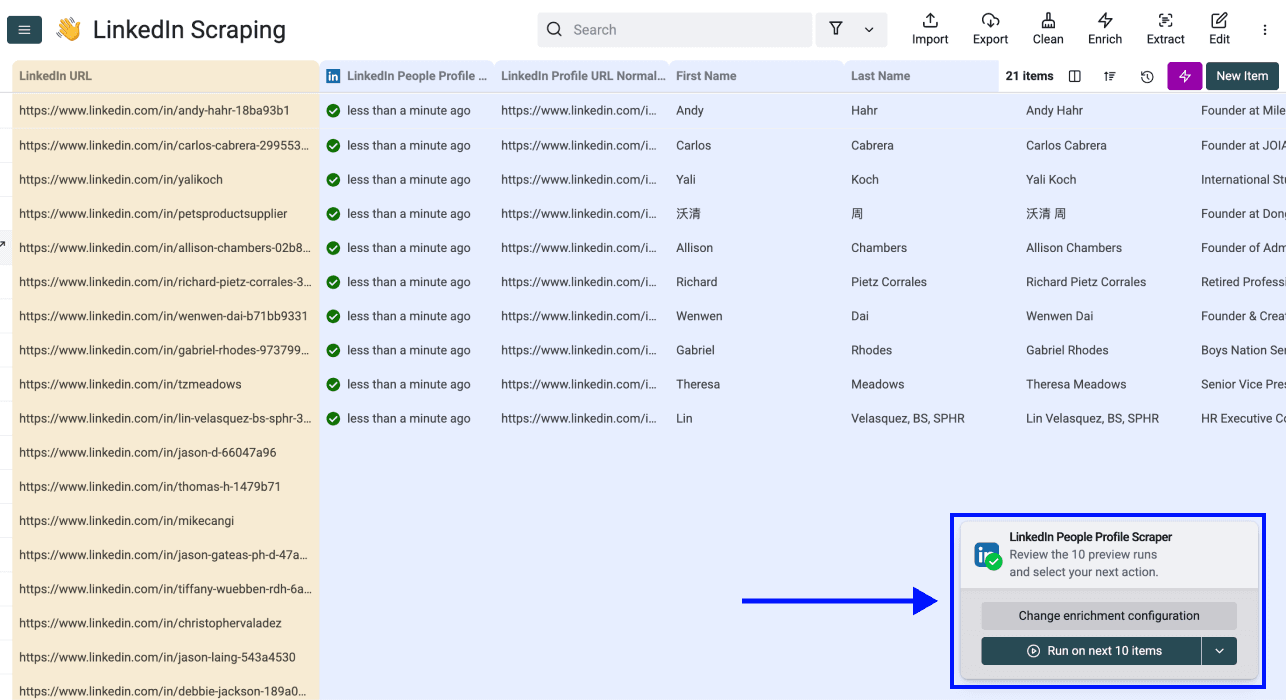
Check the first results before continuing. An unavailable profile or incomplete provider result may leave name fields empty; do not infer a name from the URL slug.
Cost Breakdown
Datablist uses a credit system for enrichments. Here's what LinkedIn profile scraping costs:
- Fresh profile data: 25 credits per profile
- Cached profile data: 20 credits per profile (when available)
Credit allowances depend on the plan: the Starter plan includes 5,000 monthly credits and Growth includes 20,000. The following USD top-up examples come from the current package catalog; check the in-app price before purchase.
| Top-Up | Credits | Profiles (Fresh @ 25) | Cost/Profile |
|---|---|---|---|
| $20 | 20,000 | 800 profiles | $0.025 |
| $55 | 60,000 | 2,400 profiles | $0.023 |
| $165 | 200,000 | 8,000 profiles | $0.021 |
| $700 | 1,000,000 | 40,000 profiles | $0.018 |
📘 Subscription Required
Check your active plan and balance in Datablist before a bulk run. At 25 credits per fresh result, 100 successful profiles use 2,500 credits; cached results can cost less when available.
Review the Extracted Profile Data
After a test run, compare several full names, profile URLs, and current roles with the source profiles. Check rows with empty names separately. A /in/ slug is an identifier, not a reliable first-and-last-name source. Datablist does not need your LinkedIn login for this enrichment.
But Datablist isn't just a scraper. It's an entire lead generation and data enrichment ecosystem. Once you've scraped your LinkedIn profiles, you can continue building your lead list with these tools:
- Waterfall Email Finder: Find email addresses from LinkedIn profiles
- Phone Number Finder: Add direct phone numbers to your leads
- Job Board Scraper: Scrape job postings from 19 job boards at once
- LinkedIn Sales Navigator Scraper: Scrape Sales Navigator searches with ease
- AI Research Agent: Run ChatGPT search on a spreadsheet to get relevant answers for each line
Use the reviewed names and profile details as a starting point for your next workflow.
Frequently Asked Questions (FAQ)
Can I Extract a Full Name From a LinkedIn Profile URL?
Yes, by using the URL as the input to the LinkedIn Profile Scraper and mapping its Full Name, First Name, and Last Name outputs. Do not split the /in/ URL slug to guess a name. The slug may be custom or outdated, and some profiles may not return a name. Match each returned name to its profile URL before using it.
How Much Does It Cost to Scrape LinkedIn Profiles?
Fresh profile data costs 25 credits per profile. Cached profiles cost 20 credits. Here are sample calculations:
- 100 fresh profiles: 2,500 credits
- 1,000 fresh profiles: 25,000 credits
- 10,000 fresh profiles: 250,000 credits
These are credit estimates for successful fresh results. Your balance and any cached results affect the amount of top-up credits needed.
Does Datablist’s LinkedIn Profile Scraper Connect to My LinkedIn Account?
No LinkedIn login is required for this enrichment. That avoids sharing your credentials with Datablist for this workflow; it does not guarantee how LinkedIn applies its rules to any account.
Does Datablist's LinkedIn Profile Scraper Include Emails?
The profile scraper does not return an email address as part of the profile data described here. For recruiting, the candidate personal-email guide explains the separate lookup and its public-profile URL requirements. You can run the Waterfall Email Finder separately if you need email enrichment.
Are There Any Rate Limits on Datablist’s LinkedIn Profile Scraper?
Processing capacity and provider availability can vary. Test a small batch, check the run status and credit balance, then increase the number of profiles if the results meet your needs.
What Data Do I Get Back From Datablist’s LinkedIn Profile Scraper?
You get comprehensive profile data, including: name, headline, summary, location, current job details, work history (up to 10 positions), education (up to 5 records), languages, and connection count. See the full table above for details.
How Long Does It Take to Scrape 1,000 LinkedIn Profiles?
There is no dependable fixed duration for 1,000 profiles. Run a small sample first and use its observed completion time to plan the larger batch; provider response times and unavailable profiles can affect the result.
Does Datablist’s LinkedIn Profile Scraper Work With Sales Navigator URLs?
Yes. Datablist’s LinkedIn Profile Scraper accepts both standard LinkedIn profile URLs (linkedin.com/in/xxx) and Sales Navigator URLs (linkedin.com/sales/lead/xxx). When you input a Sales Navigator URL, it also returns the normalized public profile URL.
What's the Best Way to Scrape Details From a List of LinkedIn Profiles?
Upload a column of profile URLs, select the LinkedIn Profile Scraper, map the name and other needed outputs, and run a small sample. Review empty or mismatched results before processing the full list.
Does Candidate Profile Extraction Require My LinkedIn Login?
The LinkedIn Profile Scraper does not require your LinkedIn credentials, so you do not automate your own logged-in session to run this enrichment. Review platform rules and your data-use obligations; no tool can promise that an account will never be restricted.