Visit a company website and extract their phone number with the source location.

Your goal is to visit the website I am going to give you and find the phone number of the company

## Information I want you to extract:
- Phone Number
- Source (Only one word e.g. Web, Contact, About)

## Instructions
- In the case you don't find the phone number, keep the field empty.
- Important: Do not extract anything else but the requested information.
- Look for the phone number in common sections like "Contact Us", "About Us", "Footer", or "Get in Touch" pages.
- The phone number format should include country code and area code e.g., +x xxx xxx xxxx
- For the Source field, indicate where you found the information using as little words as possible (e.g., Contact page, About page, Homepage).

## Fast Exit Rule (Critical)
- If you cannot quickly get a phone number, STOP immediately.
- Return empty values for all outputs.
- Do NOT perform deep searches, long browsing, or complex reasoning.
- We prefer empty data over spending credits

## Mistakes to avoid:
- Don't return fax numbers, toll-free support lines, or sales hotlines unless they are the main company phone number.
- Make sure to format the phone number correctly with country and area codes.
- Don't return phone numbers from third-party sites or directories unless verified on the company website.

## Input
Website to visit: /domain

このプロンプトをCSVファイルで使う方法は?

Datablistでは、CSVファイル全体に対して各行に直接プロンプトを実行できます。

朗報です。必要なプロンプトは、すでにDatablistの「Templates」セクションに用意されています。ゼロから作成する必要はありません。タスクに合うテンプレートを選ぶだけで、CSVの各行にすぐ実行できます。数クリックでデータ変換がさらに簡単になります。

DatablistにCSVファイルをインポートします。次に、ヘッダーから「Enrich」を選択します。

テンプレート:Business Number Extractor を選択します
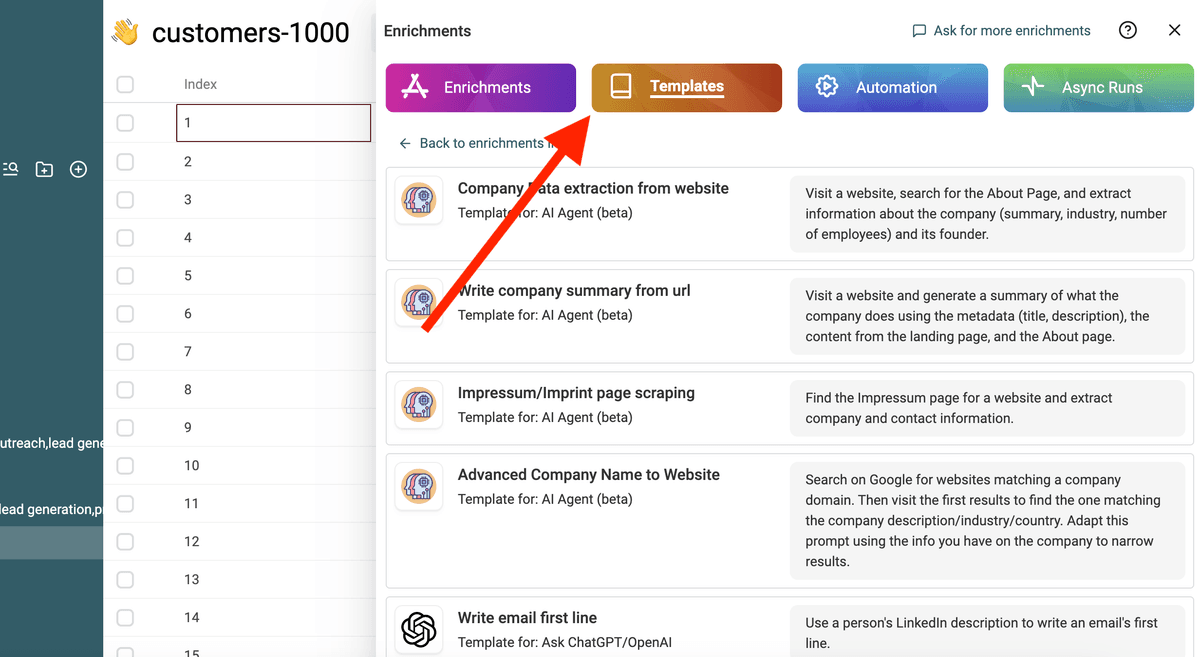
テンプレートを選択
テンプレートを選択

「/」または「'{{'」を使って、プロンプトの変数をコレクションのプロパティに置き換えます。
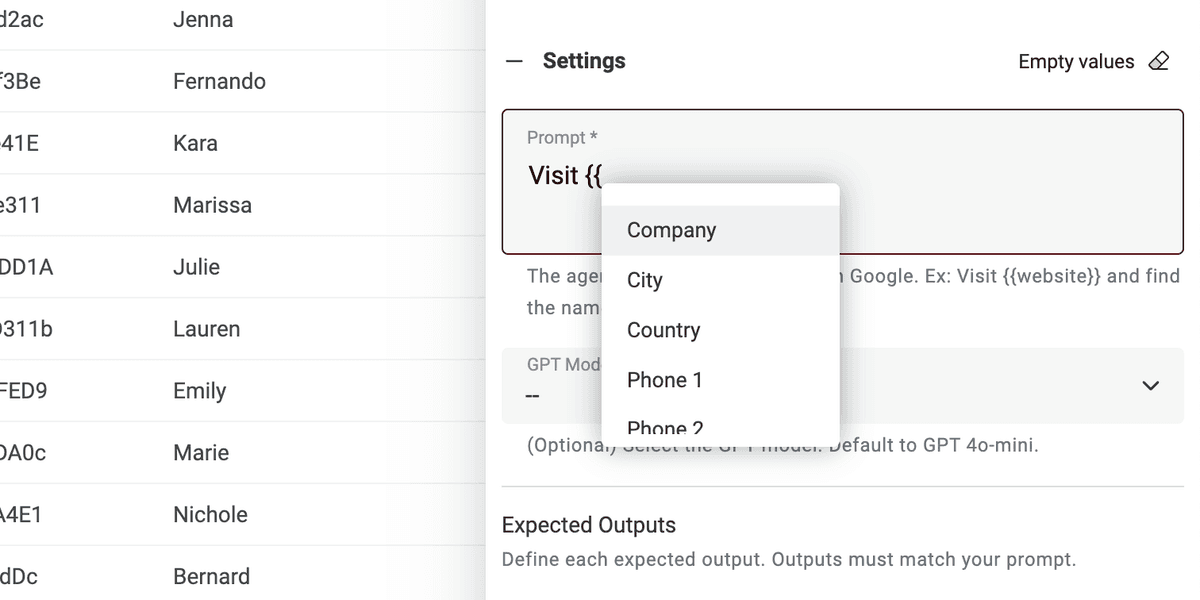
コレクションのプロパティで変数を定義
コレクションのプロパティで変数を定義

すべての変数が揃っていない場合は、プロンプトを編集してください。

これで完了です! CSVファイルの各行でプロンプトを実行し、結果を新しい列で取得できます。 🚀

AIエージェント プロンプトに関する注意

このプロンプトはDatablistのAI Agentエンリッチメント向けです。AIエージェントは、人工知能(AI)を用いて業務を代行するスマートなツールです。Webサイトの閲覧、Googleでの情報検索、各種オンラインサービスとの連携が可能です。 そのため、リアルタイムデータや最新の回答にアクセスできます。

一方、ChatGPT APIは入力テキストを解析し、既存の知識に基づいて応答するのみです。自らインターネットにアクセスしたり新しい情報を収集することはできません。

AIエージェントはリアルタイムデータを取り込むことで、より動的な体験を提供します。一方、ChatGPT APIは既存知識に基づいて応答します。

https://chatgpt.com/で直接操作している場合、エージェントと対話しています。プロンプトに追加情報を提供するためにオンラインにアクセスすることがあります(頻繁ではありません)。一方、ChatGPTと連携する他ツールはAPIを使用します。したがって、このプロンプトはChatGPT APIを呼び出す他のツールでは使用できない点にご留意ください。

DatablistのAI Agentは、CSVの各行でエージェントを実行します。