
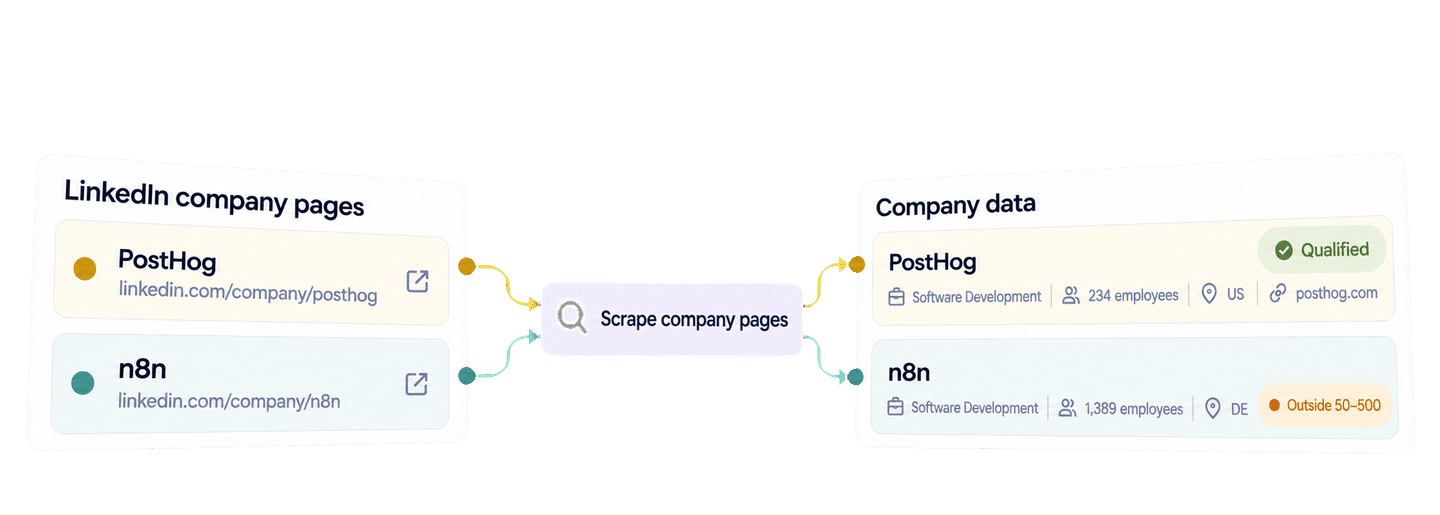
LinkedIn企業ページのURL一覧をRequestsライブラリでDatablist APIに送信すれば、PythonでLinkedInの企業データを取得できます。APIは、公開されている企業ページから取得可能な業界、従業員数、本社所在地、Webサイト、企業概要などを、構造化された企業レコードとして返します。
このガイドでは、読みやすい1つのPython関数を使い、n8n、PostHog、Back Market、Datablistのレコードを取得します。さらに、その結果を再利用し、米国またはドイツに本社を置く従業員数50〜500人のソフトウェア企業を抽出します。該当したレコードには、詳しい営業リサーチに使えるWebサイトと企業概要も保持されます。
🔑 お急ぎの方向けの要約
Datablistを使うと、確認済みのLinkedIn企業ページURLを、営業リサーチのワークフローで活用できる構造化された企業レコードに変換できます。以下のPythonサンプルはすべての結果ページを取得した後、APIを再度呼び出すことなく、ローカルでアカウントを絞り込みます。
- 入力: LinkedIn企業ページのURL。
- 出力: 取得可能な企業情報とローカルでの判定結果。元のURLと完全な企業データもまとめて保持されます。
💡 ノーコードで進めたい場合
コードを書かずに既知のLinkedIn企業ページURLから企業情報を抽出するには、DatablistのLinkedIn Company Page Scraperをご利用ください。
PythonとDatablist APIキーを設定する
このPythonサンプルでは、requestsパッケージを使用します。DatablistのREST APIはGrowthプランで利用でき、企業ページを1件検索するたびにenrichmentクレジットを消費します。
Datablist APIのアカウントページでPersonal API Keyを作成してください。
scrape_linkedin_companies.pyというファイルを作成し、仮想環境を用意してRequestsをインストールします。
python -m venv .venv
source .venv/bin/activate
python -m pip install requests
export DATABLIST_API_KEY="your-api-key"スクリプトはDATABLIST_API_KEYからキーを読み取り、X-API-Keyヘッダーで送信します。
1つのPython関数でLinkedIn企業ページを取得する
以下の入力リストには、業界、企業規模、本社所在国が異なる企業を含めています。それぞれのaccount_idがAPIのinputIdになります。結果はレスポンス内の並び順では紐付けないため、この固定IDによって各結果と正しい入力URLを対応させます。
次のスクリプト全体をscrape_linkedin_companies.pyに貼り付けてください。
import json
import os
import time
import uuid
import requests
accounts = [
{
"account_id": "account-n8n",
"linkedin_company_url": "https://www.linkedin.com/company/n8n/",
},
{
"account_id": "account-posthog",
"linkedin_company_url": "https://www.linkedin.com/company/posthog/",
},
{
"account_id": "account-back-market",
"linkedin_company_url": "https://www.linkedin.com/company/back-market/",
},
{
"account_id": "account-datablist",
"linkedin_company_url": "https://www.linkedin.com/company/datablist/",
},
]
def scrape_companies(accounts, api_key):
"""Submit one task, wait for it to finish, and return every result."""
tasks_url = "https://api.datablist.com/v1/enrichments/tasks"
headers = {"X-API-Key": api_key}
inputs = [
{
"inputId": account["account_id"],
"data": {"companyLinkedInUrl": account["linkedin_company_url"]},
}
for account in accounts
]
unique_id = str(uuid.uuid4())
print(f"Request ID: {unique_id}")
payload = {
"enrichmentId": "linkedin-company-enrichment",
"uniqueId": unique_id,
"settings": {},
"inputs": inputs,
}
response = requests.post(tasks_url, headers=headers, json=payload)
response.raise_for_status()
task = response.json()
task_id = task["@id"]
task_url = f"{tasks_url}/{task_id}"
print(f"Task ID: {task_id}")
while task["status"] not in ("completed", "failed", "stopped"):
time.sleep(3)
response = requests.get(task_url, headers=headers)
response.raise_for_status()
task = response.json()
if task["status"] != "completed":
raise RuntimeError(
f"Task {task_id} {task['status']}: {task.get('error')}"
)
results = []
results_url = f"{task_url}/results"
params = {"limit": 100}
while True:
response = requests.get(results_url, headers=headers, params=params)
response.raise_for_status()
page = response.json()
results.extend(page["results"])
next_cursor = page["nextCursor"]
if next_cursor is None:
break
params["cursor"] = next_cursor
return results
api_key = os.environ.get("DATABLIST_API_KEY")
if not api_key:
raise RuntimeError("Set DATABLIST_API_KEY before running this script.")
company_results = scrape_companies(accounts, api_key)
print(json.dumps(company_results, indent=2, ensure_ascii=False))次のコマンドで実行します。
python scrape_linkedin_companies.py主に変更するのはaccounts内のレコードです。各account_idは変更せず一意に保ち、linkedin_company_urlを確認済みのLinkedIn企業ページに置き換えてください。この関数はレコードをAPIのinputs形式に変換し、企業URLをcompanyLinkedInUrlとして送信します。このenrichmentには公開設定がないため、settingsは空のままです。
POSTによってバックグラウンドのenrichmentタスクが作成されます。APIは202 AcceptedとタスクIDを返し、RequestsクライアントはステータスURLをポーリングして完了を待ちます。この同期型のPythonコードは小規模なスクリプトに適していますが、Datablist側ではタスクが非同期で実行されます。
最初のGETはタスク自体の状態を確認します。タスクの終了ステータスはcompleted、failed、stoppedのいずれかです。スクリプトはcompletedの場合のみ処理を続け、それ以外の場合はタスクIDとAPIのタスクエラーを含む例外を発生させます。失敗または停止したタスクにも確認すべき結果やクレジット利用履歴が残っている場合があるため、調査時に備えてこのIDを保管してください。
タスクが完了すると、最後のループが上限100件で結果ページを取得します。nextCursorがnullになるまで次のページを取得します。各結果には指定したinputIdが保持されるため、レスポンスの順序が入力順と異なっていても、後続の判定ループで正しく紐付けられます。
企業データの結果と取得方法を理解する
LinkedIn URLから企業を直接特定します。Datablistはその企業URLを正規化し、候補となる複数の企業を検索してスコアリングするのではなく、公開企業ページから取得可能なデータを収集します。企業を特定できるURLでは公開ページを起点とし、すでに見つかった有用な値を維持しながら、未取得の項目を管理されたフォールバックソースで補完できる場合があります。
結果を確認する際には、この違いが重要です。任意項目の有無は、公開されている情報に左右されます。本社住所がnullであったり、specialtyが含まれていなかったりしても、企業情報の取得全体が失敗したわけではありません。
4つのURLに対して返された完全な結果ページは次のとおりです。
{
  "taskId": "69516a973dc34481920f41ade748e917",
  "results": [
    {
      "inputId": "account-n8n",
      "status": "success",
      "outputs": {
        "companyName": "n8n",
        "companyHQPostalCode": "10115",
        "companyDescription": "n8n is a workflow automation platform that uniquely combines AI capabilities with business process automation. The platform enables connection to any app or API while maintaining the flexibility of code with the speed of no-code.\n\nReleased under a fair-code license, n8n can be self-hosted and is supported by a vibrant community of developers and builders. Users can start simple and layer complexity as needed - utilizing the visual builder for quick wins, and adding custom Javascript or Python code where more control is required, enabling the connection of anything to everything.\n\nn8n is privately held, with funding from Sequoia, Felicis Ventures, Firstminute Capital, Harpoon Ventures, and others. Individual investors include Eventbrite's Kevin Hartz and Supercell's IIkka Paananen. n8n was founded in 2019 and is headquartered in Berlin.",
        "companyTagline": "Flexible AI workflow automation for technical teams.",
        "companyIndustry": "Software Development",
        "companySpecialities": "AI, SOAR, Workflow Automation, and AI agents",
        "companyWebsite": "https://n8n.io",
        "companyHQCity": "Berlin",
        "linkedInCompanyId": "28491094",
        "companyType": "Privately Held",
        "companyHQCountry": "DE",
        "companySize": 1389,
        "companyLogoUrl": "https://media.licdn.com/dms/image/v2/D4D0BAQEgEphZqatXwA/company-logo_200_200/B4DaFY.Sa2JcAE-/0/1792494086070/n8n_logo?e=2147483647&v=beta&t=NTL4C6f5QAd_o9nXd15PO8pOMSSEoms_tJdDHEo6eLk",
        "companyHQAddress": "Novalisstraße 10",
        "companyFoundedYear": 2019,
        "companyFollowerCount": 442229
      },
      "creditsUsed": "25",
      "error": null
    },
    {
      "inputId": "account-posthog",
      "status": "success",
      "outputs": {
        "companyName": "PostHog",
        "companyHQPostalCode": null,
        "companyDescription": "At PostHog, we're working to increase the number of successful products in the world.\n\nUntil now, tools for building products have been fragmented. Product analytics, heatmaps, session recording, web analytics, feature flags, and A/B testing are all helpful, but no one wants to buy, send data to, and integrate multiple products.\n\nPostHog offers these tools (and more) in an integrated, open source platform which can be hosted in either the US or EU. Both versions are SOC2 certified, GDPR-ready, and HIPAA compliant. \n\nWe started PostHog during Y Combinator's W20 cohort and had the most successful B2B software launch on Hacker News since 2012 - with a product that was just 4 weeks old.\n\nWith over 100,000 users, we're default alive, growing 97% through word of mouth, and we are in the top 0.01% most popular repos on GitHub.",
        "companyTagline": "Your product's context layer. Get started with npx @posthog/wizard",
        "companyIndustry": "Software Development",
        "companySpecialities": "analytics, open source, product analytics, product, data, engineering, self-driving product, session replay, context warehouse, AI, product context, and error tracking",
        "companyWebsite": "https://posthog.com/",
        "companyHQCity": "San Francisco",
        "linkedInCompanyId": "37415928",
        "companyType": "Privately Held",
        "companyHQCountry": "US",
        "companySize": 234,
        "companyLogoUrl": "https://media.licdn.com/dms/image/v2/D560BAQGQUyE_CXUxIw/company-logo_200_200/B56aCMWEgaJAAE-/0/1789060991251/posthog_logo?e=2147483647&v=beta&t=WfTGRSqp5UfYL33sBXx3tZ1zmFUECfUPf7JtEGPAvbA",
        "companyHQAddress": null,
        "companyFoundedYear": 2020,
        "companyFollowerCount": 59696
      },
      "creditsUsed": "25",
      "error": null
    },
    {
      "inputId": "account-back-market",
      "status": "success",
      "outputs": {
        "companyName": "Back Market",
        "companyHQPostalCode": null,
        "companyDescription": "The world is waking up to what fast tech costs. Back Market is where the revolution shops. \nWe make refurbished tech the smart, confident choice by building trust in quality, repair and circularity. New is not always better. Smarter is.\n\nAs a certified B Corp, our mission is to create a world that does more with what we already have by prolonging the lifespan of electronic devices through circularity and repair. We have grown by double digits year over year and now serve 18 million customers across 17 markets, avoiding more than 2 million tons of CO2 emissions*\n*Back Market calculation based on ADEME 2022 methodology.\n\nFounded in Paris in 2014 by Thibaud Hug de Larauze, Quentin Le Brouster and Vianney Vaute, Back Market is a leading global marketplace where people can buy professionally refurbished technology or trade in their devices.\n\nAre you ready to join us?",
        "companyTagline": "Where the world shops refurbished tech.",
        "companyIndustry": "Internet Marketplace Platforms",
        "companySpecialities": "refurbished tech, marketplace, sustainability, circularity, Right to Repair, sustainable solutions, refurbished marketplace, circular economy, and sustainable alternatives",
        "companyWebsite": "http://www.backmarket.com",
        "companyHQCity": "Paris",
        "linkedInCompanyId": "4793443",
        "companyType": "Privately Held",
        "companyHQCountry": "FR",
        "companySize": 1054,
        "companyLogoUrl": "https://media.licdn.com/dms/image/v2/D4E0BAQHRv6UClt5D2g/company-logo_200_200/B4EZnoUG3tKgAI-/0/1760539209613/back_market_logo?e=2147483647&v=beta&t=Pywpeu1Qs3h0Cl8kgvYurmBfXbImm5QIIc-aQog1MqM",
        "companyHQAddress": null,
        "companyFoundedYear": 2014,
        "companyFollowerCount": 101878
      },
      "creditsUsed": "25",
      "error": null
    },
    {
      "inputId": "account-datablist",
      "status": "success",
      "outputs": {
        "companyName": "Datablist",
        "companyHQPostalCode": null,
        "companyDescription": "When people hear \"data,\" they think of something complicated. We will change this.\n\nDatablist is an AI-powered spreadsheet that helps you: get, manipulate, or clean data and create workflows that run automatically while you focus on what matters most.\n\nIf you want to separate Datablist.com into its main parts, you can say we have:\n\n- Deduplicating, grouping, and labeling data\n- Cleaning and editing data\n- Managing data and automated workflows\n- 50+ B2B data sources and scrapers\n- 3 AI agents:\n    - Editing assistant\n    - AI Research agent\n    - Deduplication assistant\n\nThe top 3 reasons why companies choose Datablist.com are:\n\n1. Simplicity: you don't need to have technical knowledge or experience with formulas to get everything out of it.\n2. Flexibility that allows you to do (almost) everything with your data and AI while keeping everything under your control.\n3. Scalability that no other solution can match. Up to 2 million rows—forget Excel.\n\nGo on try it for free!\n\nhttps://www.Datablist.com",
        "companyTagline": "Let your tasks become workflows: automated workflows.",
        "companyIndustry": "Information Technology & Services",
        "companyWebsite": "https://www.datablist.com",
        "companyHQCity": "Paris",
        "linkedInCompanyId": "69842428",
        "companyType": "Privately Held",
        "companyHQCountry": "FR",
        "companySize": 3,
        "companyLogoUrl": "https://media.licdn.com/dms/image/v2/C4E0BAQFNFlMb8KEPRQ/company-logo_200_200/company-logo_200_200/0/1630622803412?e=2147483647&v=beta&t=UVkk7BOerChiWgS9Y06zOpT08SlK4kpAWGDYiVvUEVU",
        "companyFollowerCount": 134,
        "companyFoundedYear": 2020,
        "companyHQAddress": null
      },
      "creditsUsed": "25",
      "error": null
    }
  ],
  "nextCursor": null
}4件すべてが成功し、それぞれ25クレジットを使用しました。PostHogからはSoftware Development、従業員234人、米国本社、Webサイト、企業概要が返されています。n8nも対象国にあるソフトウェア企業ですが、返された従業員数は1,389人です。Back MarketからはInternet Marketplace Platforms、従業員1,054人、フランス本社という結果が返されました。DatablistはInformation Technology & Services、従業員3人、フランス本社です。
アカウントリサーチが1つの項目だけで完結することは少ないため、完全なオブジェクトが役立ちます。業界、従業員数、国で対象を絞り込みながら、次の調査に使う正確なWebサイトと企業概要を保持できます。
このレスポンスのcompanySizeは、LinkedInの企業規模レンジではなく、取得された従業員数です。companyHQCountryは本社所在地であり、その企業が事業を展開するすべての国を示すものではありません。企業規模や国のフィルターを理想顧客プロファイルに合わせる際は、こうした違いに注意してください。
判定にすべての任意項目が揃っている必要はありません。業界、従業員数、本社所在国を取得できていれば、住所やspecialtyがなくても空欄のままで問題ありません。APIがWebサイトをドメインだけに変換すると決めつけず、companyWebsiteは返された形式のまま保持してください。企業概要は、営業担当者が製品を理解し、アプローチ前にアカウントごとのリサーチを行ううえで役立ちます。レコードを確認または保存するときは、結果単位のstatus、creditsUsed、errorも企業情報と一緒に保持してください。
営業リサーチ向けにアカウントを絞り込む
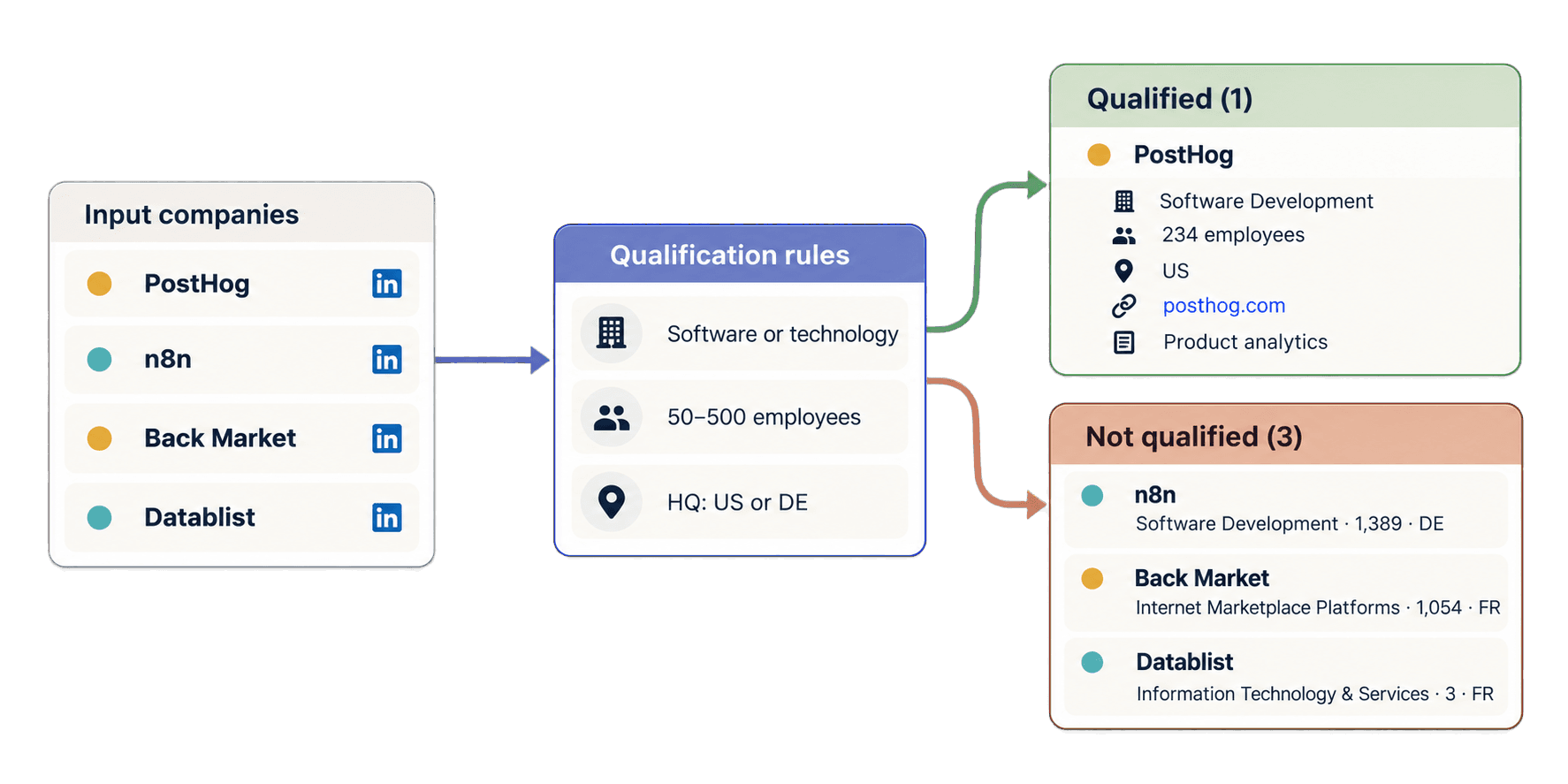
ターゲットを、従業員数50〜500人で米国またはドイツに本社を置くソフトウェア・テクノロジー企業とします。完全なスクリプトの下に、次のループを追加してください。company_resultsを再利用するため、新しいタスクは送信されません。
accounts_by_id = {account["account_id"]: account for account in accounts}
qualified_accounts = []
other_accounts = []
for result in company_results:
account = accounts_by_id.get(result["inputId"])
qualification = "needs_review"
if result["status"] == "success":
outputs = result["outputs"]
industry = outputs.get("companyIndustry")
company_size = outputs.get("companySize")
country = outputs.get("companyHQCountry")
if industry and isinstance(company_size, (int, float)) and country:
industry_matches = any(
keyword in industry.lower()
for keyword in ("software", "technology")
)
size_matches = 50 <= company_size <= 500
country_matches = country in {"US", "DE"}
if industry_matches and size_matches and country_matches:
qualification = "qualified"
else:
qualification = "not_qualified"
source_url = None
if account is not None:
source_url = account["linkedin_company_url"]
reviewed_account = dict(result)
reviewed_account["sourceLinkedInUrl"] = source_url
reviewed_account["qualification"] = qualification
if qualification == "qualified":
qualified_accounts.append(reviewed_account)
else:
other_accounts.append(reviewed_account)
print(json.dumps(qualified_accounts, indent=2, ensure_ascii=False))APIから異なる順序で行が返されても、PostHogはaccount-posthogに正しく紐付きます。Software Development、従業員234人、USという値が3つの条件をすべて満たすため、対象と判定されます。このループでは、完全なoutputs、返されたhttps://posthog.com/のWebサイト、企業概要、creditsUsed、errorを含む元の結果をコピーします。追加されるのは、入力元URLとローカルの判定ラベルだけです。
n8nはaccount-n8nに紐付きますが、従業員数1,389人で上限を超えるため対象外です。Back Marketは指定した業界、企業規模、国の条件を満たさず、Datablistは企業規模が下限未満で、対象国にも該当しません。今後、取得に失敗した行や情報が不完全な行があっても、無言で破棄されるのではなくneeds_reviewが付与されます。
管理されている同期型Requestsサンプルをダウンロードできます。アプリケーションでノンブロッキングコードが必要な場合は、リポジトリの非同期HTTPX版も利用できます。
LinkedIn企業データ取得のクレジットを見積もる
通常の企業名入りLinkedInページでは25クレジットを使用します。数値の企業IDを含むURLでは、最終フォールバックが必要な場合に75クレジットを使用することがありますが、すべての数値URLが75クレジットになるわけではありません。取得失敗や該当なしの場合にもクレジットを消費する可能性があるため、タスクの合計値と各結果のcreditsUsedを実際の利用記録として確認してください。
このガイドの企業名入りURL 4件では、合計100クレジットを使用しました。通常レートでは、企業ページ1,000件に25,000クレジットが必要です。数値IDのURLが多い入力では、75クレジットになるケースを考慮して余裕を持たせてください。
REST APIの利用にはGrowthプランが必要です。月額プランには20,000クレジットが含まれ、追加クレジットは別途購入します。現在の米ドル建て基本追加パックは20,000クレジットで20ドルのため、1クレジットは0.001ドルです。このレートでは、25,000クレジットは25ドル相当です。最新のプランとクレジット一覧はDatablistの料金ページでご確認ください。
入力・タスク・結果でよくある問題を解決する
DATABLIST_API_KEYが設定されていない: リクエストを送信する前にスクリプトが停止します。環境変数をexportしてから、ファイルを再度実行してください。- APIがキーを拒否する: Personal API Keyを確認し、サンプルと同じ
X-API-Keyヘッダーに設定してください。 - 入力URLが無効: 個人プロフィール、無関係なサイト、空の値、不正な形式のURLを、対応する公開LinkedIn企業ページ、学校ページ、Showcase Page、数値ID URL、またはSales Navigatorの企業URLに置き換えてください。
- クレジットが不足している: 残高を確認し、プラン付属のクレジットを利用するか、追加クレジットを購入してから新しいタスクを作成してください。
- タスクが
failedまたはstopped: 新しい有料タスクを送信するか判断する前に、エラー、既存の結果、クレジット使用量を確認してください。 - 結果が少ない、
no_result、またはerror: 確認できるように、入力元URL、ステータス、クレジット、エラーを保持してください。データを取得できなかった理由を推測せず、入力が公開企業ページであることを確認してから再送信してください。
作成時のレスポンスを失った場合は、POSTの前にスクリプトが表示したリクエストIDを使用してください。まずタスク一覧を取得し、uniqueIdが一致するものを探します。
curl "https://api.datablist.com/v1/enrichments/tasks?limit=100" \
-H "X-API-Key: $DATABLIST_API_KEY"一致したタスクの@idがタスクIDです。別のタスクを自動的に作成するのではなく、このIDを使って/v1/enrichments/tasks/{taskId}の確認を続けるか、/v1/enrichments/tasks/{taskId}/resultsから結果を取得してください。1回のリクエストには最大10,000件、合計10 MiBまでの入力を含められます。保存期間など、ライフサイクルの詳細はタスクのドキュメントをご覧ください。
次のステップ
これで、LinkedIn企業ページのURL一覧を構造化された企業レコードに変換する、再利用可能なPython Requests関数が完成しました。営業リサーチ用にAPIの完全な出力を保持したまま、ローカルで対象企業を絞り込むループも利用できます。
4つのサンプルを確認済みの小規模なアカウントリストに置き換え、固定IDを維持しながら、理想顧客プロファイルに合わせて業界、従業員数、国の条件を調整してください。企業ではなく人物を起点にする場合は、LinkedInプロフィールスクレイピングAPIガイドをご覧ください。企業名しかない場合は、まずPythonで企業Webサイトを検索する方法から始めてください。