
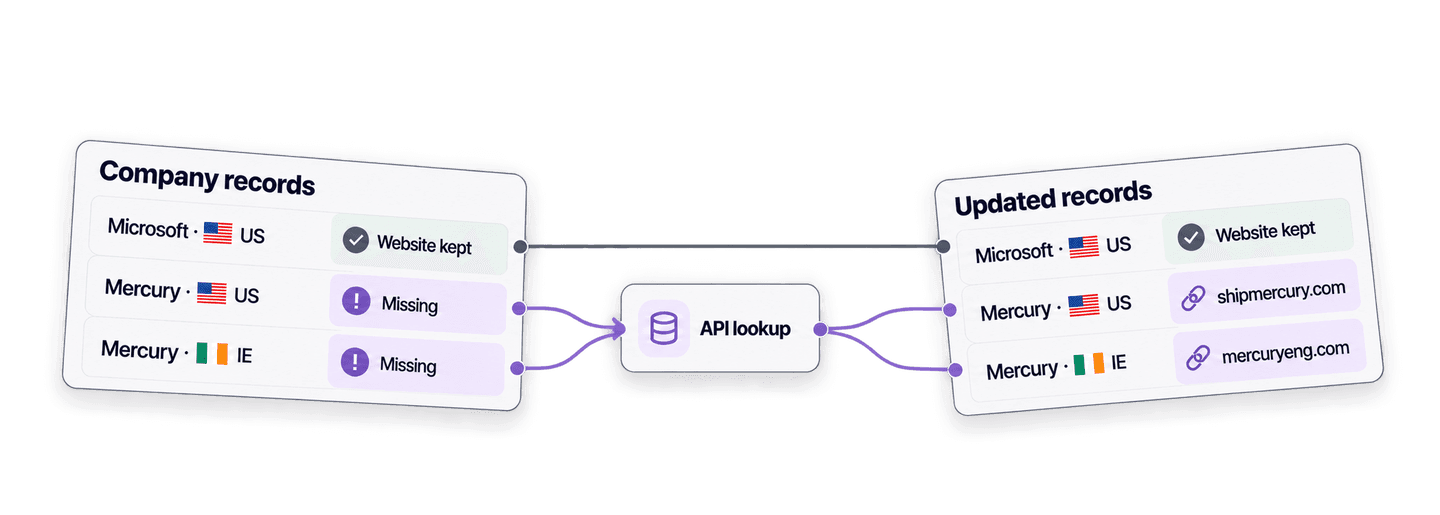
To find a company website from a company name in Python, send the name and any available country context to Datablist's Company Name to Domain API. The API processes the lookup in the background, then returns the domain and full website URL.
I will first show you a simple Python API request. Then I will reuse the same function to fill only the missing websites in a list of company records while preserving the URLs already present.
If you prefer a spreadsheet-like interface, follow the bulk company name to website guide.
💡 Summary For Those In a Rush
Build one Python function that finds websites from company names, then use it to complete records with blank websites without replacing known URLs.
- Input: company names with optional country context.
- Output: domain, full website URL, confidence, result status, and credits used.
Set up Python and your Datablist API key
For this example, I use the Requests package to make synchronous HTTP calls. Install it in a virtual environment:
python3 -m venv .venv
source .venv/bin/activate
python -m pip install requestsYou also need a Datablist Growth plan because REST API access is a Growth feature. Create a Personal API Key from your Datablist API account page, then put it in an environment variable:
export DATABLIST_API_KEY="auth0|exampleuser:exampleaccount:EXAMPLE_TOKEN_NOT_VALID:1"Replace the sample value above with the key generated on your account page. Company website lookups consume credits. I explain the 1-credit and 2.5-credit paths before scaling the script, and current plan values are on the Datablist pricing page.
Run one company website lookup in Python
Create a file named find_company_websites.py. The script submits the names,
waits for the task, and fetches the results in one function. Each input uses
your stable record ID as inputId, so you can match every result to the right
record even if the response order changes.
import json
import os
import time
import uuid
import requests
API_BASE_URL = "https://api.datablist.com/v1"
def find_domains(companies, api_key):
headers = {
"Accept": "application/json",
"Content-Type": "application/json",
"X-API-Key": api_key,
}
inputs = [
{
"inputId": company["id"],
"data": {
"companyName": company["company_name"],
"targetCountry": company.get("country", ""),
},
}
for company in companies
]
unique_id = f"python-domain-lookup-{uuid.uuid4().hex}"
payload = {
"enrichmentId": "company-name-to-domain",
"uniqueId": unique_id,
"settings": {
"workflow": "dataset_google",
"countryOverwrite": True,
"acceptNonRoot": True,
},
"inputs": inputs,
}
print(f"Task uniqueId: {unique_id}")
response = requests.post(
f"{API_BASE_URL}/enrichments/tasks",
headers=headers,
json=payload,
)
response.raise_for_status()
task_id = response.json()["@id"]
while True:
response = requests.get(
f"{API_BASE_URL}/enrichments/tasks/{task_id}",
headers=headers,
)
response.raise_for_status()
task = response.json()
if task["status"] in {"completed", "failed", "stopped"}:
break
time.sleep(3)
if task["status"] != "completed":
raise RuntimeError(
f"Task {task_id} ended with status {task['status']}: {task.get('error')}"
)
results = []
cursor = None
while True:
params = {"limit": 100}
if cursor is not None:
params["cursor"] = cursor
response = requests.get(
f"{API_BASE_URL}/enrichments/tasks/{task_id}/results",
headers=headers,
params=params,
)
response.raise_for_status()
page = response.json()
results.extend(page["results"])
cursor = page.get("nextCursor")
if cursor is None:
break
return results
api_key = os.environ["DATABLIST_API_KEY"]
companies = [
{
"id": "direct-microsoft-us",
"company_name": "Microsoft",
"country": "US",
}
]
lookup_results = find_domains(companies, api_key)
for result in lookup_results:
print(json.dumps(result, indent=2))Run it from the terminal where you exported the key:
python find_company_websites.pyHere is the Microsoft result:
{
  "inputId": "direct-microsoft-us",
  "status": "success",
  "outputs": {
    "companyUrl": "https://microsoft.com",
    "companyDomain": "microsoft.com",
    "domainConfidence": "High"
  },
  "creditsUsed": "1",
  "error": null
}
Use inputId to match this result to the original record. status is
success, no_result, error, or skipped. A successful result can include
companyDomain, the full companyUrl, and domainConfidence. creditsUsed
shows the charge for this input, while error explains an item-level failure.
The function makes three types of API calls in order.
First, it submits the lookup. The payload contains the settings and company
records. The POST returns 202 Accepted, and @id is the task ID needed by the
next calls:
response = requests.post(
f"{API_BASE_URL}/enrichments/tasks",
headers=headers,
json=payload,
)
response.raise_for_status()
task_id = response.json()["@id"]If DATABLIST_API_KEY is not set, Python raises KeyError at the environment
lookup before making an HTTP request. Export the variable, then run the script
again. If the variable contains an invalid key, the POST reaches the API and
returns HTTP 401. Copy a current Personal API Key from your account page and
replace the invalid value.
Second, it polls the task. The POST starts background work, so the script
reads the task every three seconds until it reaches completed, failed, or
stopped:
while True:
response = requests.get(
f"{API_BASE_URL}/enrichments/tasks/{task_id}",
headers=headers,
)
response.raise_for_status()
task = response.json()
if task["status"] in {"completed", "failed", "stopped"}:
break
time.sleep(3)If the task fails because credits are unavailable, its error has the reason
credits_error. Add credits or wait for your monthly credits to renew, inspect
any results already returned, then submit only the unfinished inputs in a new
task.
Third, it retrieves every result page. Each response adds results to the list and supplies the cursor for the next request:
results.extend(page["results"])
cursor = page.get("nextCursor")
if cursor is None:
breakIt fetches the next page until nextCursor is null.
The script prints the generated uniqueId before the POST. If the connection
drops before you receive the creation response, list your tasks first to check
their status before creating another task:
curl --get "https://api.datablist.com/v1/enrichments/tasks" \
--header "X-API-Key: $DATABLIST_API_KEY" \
--data-urlencode "enrichmentId=company-name-to-domain"Find the task whose uniqueId matches the value generated by the script, then
copy its @id. The list endpoint can filter by enrichmentId, but not by
uniqueId. Use the @id with the same status and results URLs used by the
script. If the task is still active, keep polling it. If it has stopped or
failed, check for partial results before submitting the inputs again.
Understand dataset matching and the country-aware fallback
The script uses dataset_google, the recommended default. Datablist checks its
company datasets first. If the match is missing or conflicting, it can use
Google as a fallback. It checks possible matches before returning a confidence
level.
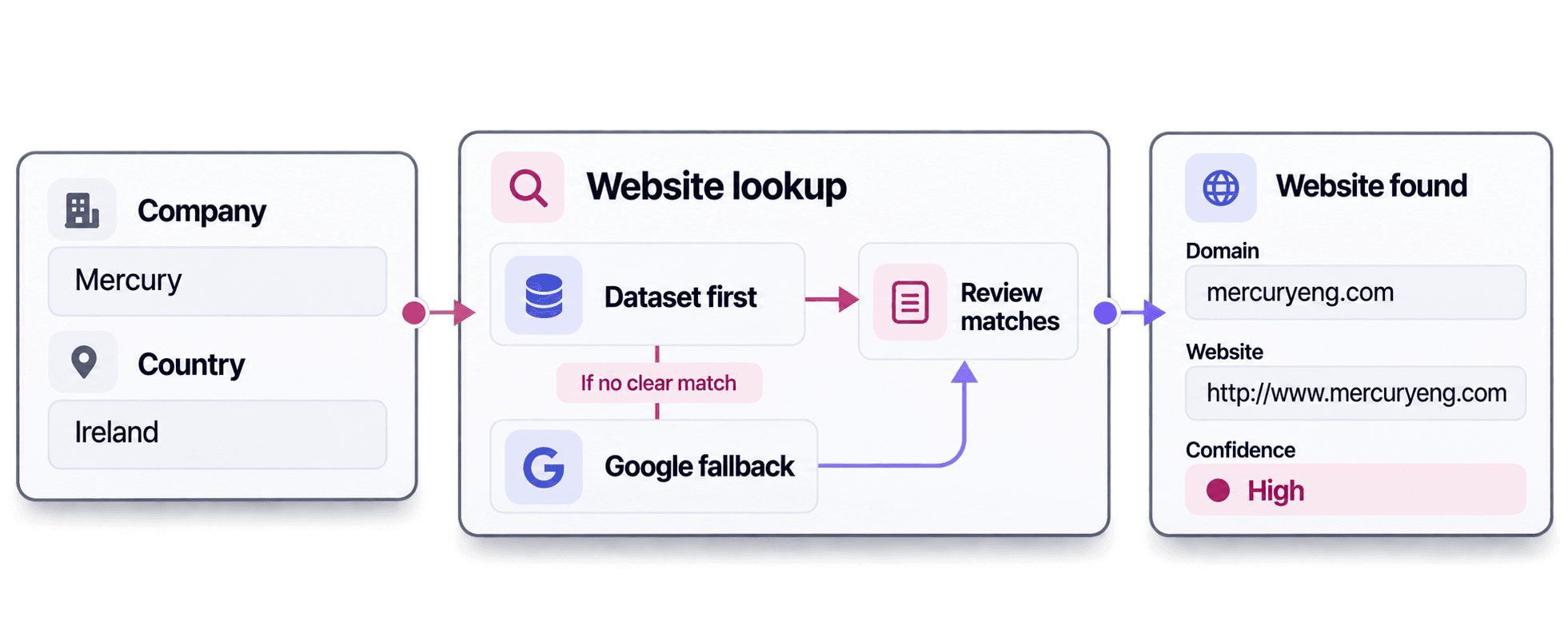
Country context helps with ambiguous names. In this example, the same company name produced different results:
MercurywithUSreturnedshipmercury.comandhttps://www.shipmercury.com/.MercurywithIEreturnedmercuryeng.comandhttp://www.mercuryeng.com.
Both had High confidence. Country context helps the lookup choose between companies with the same name, while confidence helps you decide which results need review.
When the match also depends on industry, company size, or other business context, use the AI Agent research workflow. Add those details to the AI Agent prompt so it can research the intended company with richer business context.
Fill only the missing websites in your application records
Now that find_domains() can find a website from a company name, reuse it to
fill only missing websites in your company records. Records that already have a
website bypass the API, so their values stay unchanged and consume no lookup
credits.
In find_company_websites.py, replace everything from companies = [ through
the final print loop with the block below. Keep the api_key assignment above
it. The blank check handles None, an empty string, and whitespace. It makes no
API call when every website is filled.
records = [
{
"id": "crm-001",
"company_name": "Microsoft",
"country": "US",
"website": "https://www.microsoft.com",
},
{
"id": "crm-002",
"company_name": "boulangerie du palais lyon",
"country": "FR",
"website": "",
},
{
"id": "crm-003",
"company_name": "Mercury Engineering",
"country": "IE",
"website": None,
},
{
"id": "crm-004",
"company_name": "Mercury",
"country": "US",
"website": " ",
},
{
"id": "crm-005",
"company_name": "Datablist",
"country": "FR",
"website": "https://www.datablist.com",
},
{
"id": "crm-006",
"company_name": "Mercury",
"country": "IE",
"website": None,
},
]
def website_is_missing(value):
return not isinstance(value, str) or not value.strip()
records_to_lookup = [
record for record in records if website_is_missing(record.get("website"))
]
lookup_results = (
find_domains(records_to_lookup, api_key) if records_to_lookup else []
)
results_by_id = {result["inputId"]: result for result in lookup_results}
for record in records:
if not website_is_missing(record.get("website")):
record["website_lookup"] = {"status": "not_requested"}
continue
result = results_by_id.get(record["id"])
if result is None:
record["website_lookup"] = {
"status": "missing_result",
"domain": None,
"confidence": None,
"credits": None,
"error": {
"code": "missing_result",
"message": "No result was returned for this inputId.",
},
}
continue
outputs = result.get("outputs") or {}
if result["status"] == "success" and outputs.get("companyUrl"):
record["website"] = outputs["companyUrl"]
record["website_lookup"] = {
"status": result["status"],
"domain": outputs.get("companyDomain"),
"confidence": outputs.get("domainConfidence"),
"credits": result.get("creditsUsed"),
"error": result.get("error"),
}
print(json.dumps(records, indent=2))The code indexes results by inputId, then walks through the original records
in order. The website_lookup object keeps the outcome and review details next
to each attempted record, including unsuccessful or missing results.
For crm-001, website_is_missing() returns False because the Microsoft URL
is already present. The record is not added to records_to_lookup, so the API
never receives it. The merge keeps its website and records the status as
not_requested.
For crm-002, the website is blank, so the request sends the bakery with
inputId: crm-002. The API returns the same inputId. results_by_id uses it
to find the right result, and the merge writes
https://boulangerie-du-palais-lyon.eatbu.com to that record without relying on
the result order.
| ID | Company | Website after merge | Status | Domain | Confidence | Credits |
|---|---|---|---|---|---|---|
crm-001 | Microsoft · US | https://www.microsoft.com | not_requested | |||
crm-002 | boulangerie du palais lyon · FR | https://boulangerie-du-palais-lyon.eatbu.com | success | boulangerie-du-palais-lyon.eatbu.com | High | 1 |
crm-003 | Mercury Engineering · IE | https://mercuryeng.com | success | mercuryeng.com | High | 1 |
crm-004 | Mercury · US | https://www.shipmercury.com/ | success | shipmercury.com | High | 1 |
crm-005 | Datablist · FR | https://www.datablist.com | not_requested | |||
crm-006 | Mercury · IE | http://www.mercuryeng.com | success | mercuryeng.com | High | 1 |
The bakery uses a business-specific subdomain,
boulangerie-du-palais-lyon.eatbu.com. Keep that value instead of reducing it
to eatbu.com, and save the exact address from companyUrl. The
acceptNonRoot: true setting also allows a hosted business page whose address
includes a path after the hostname, so the full URL matters in both cases.
A completed task can still contain no_result, error, or skipped items.
The example changes website only when the status is success and
companyUrl is present. For no_result, the website stays blank and the status
remains visible in website_lookup. Check the company name and country first.
If either input is wrong, correct it and submit that record in a new task.
Otherwise, keep the blank website visible for manual review.
Estimate lookup credits before scaling the script
The five example lookups all returned success with High confidence and used
5 credits total.
A lookup resolved from the dataset costs 1 credit. A lookup processed with Google costs 2.5 credits. You pay for the path used, not both. For 1,000 inputs, that means 1,000 credits if all resolve through the dataset or 2,500 credits if all use Google. These are planning scenarios, not a promise that every lookup will succeed.
At $20 for 20,000 credits, those scenarios cost $1 and $2.50. The Growth subscription is separate and currently includes 20,000 monthly credits, which are used before top-ups. Check current pricing because plan and package values can change.
One task accepts up to 10,000 inputs, with a 16 KiB limit per input and 10 MiB per request. This example uses blocking Requests calls to submit, poll, and fetch results from one small asynchronous Datablist task. The maintained repository also includes CSV batching and non-blocking client examples.
Next steps
Replace the sample records with a small slice of your own data, then run the script and inspect the merged records. Keep stable IDs and country context, and scale up only after the script preserves known websites and fills the expected blanks. You can start from the maintained Company Name to Domain API examples on GitHub if you want the downloadable script, CSV batching, or an asynchronous version.