
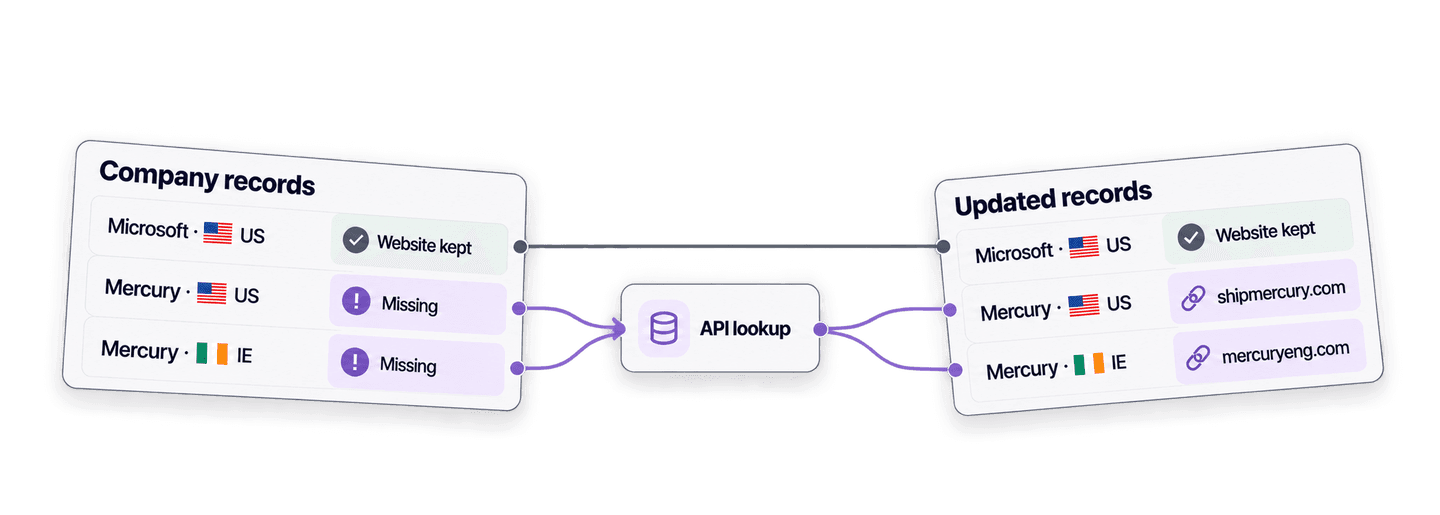
要在 Python 中根据公司名称查找公司网站,只需将公司名称及可用的国家/地区信息发送到 Datablist 的 Company Name to Domain API。API 会在后台处理查询,然后返回域名和完整的网站 URL。
本文先演示一个简单的 Python API 请求,再复用同一个函数,仅补全公司记录中缺失的网站,同时保留已有 URL。
如果你更喜欢类似电子表格的操作界面,请参阅批量根据公司名称查找网站指南。
💡 赶时间?先看摘要
编写一个根据公司名称查找网站的 Python 函数,再用它补全网站字段为空的记录,同时避免覆盖已知 URL。
- **输入:**公司名称,以及可选的国家/地区信息。
- **输出:**域名、完整网站 URL、置信度、结果状态和已用 credits。
配置 Python 和 Datablist API Key
本例使用 Requests 包发起同步 HTTP 请求。请在虚拟环境中安装:
python3 -m venv .venv
source .venv/bin/activate
python -m pip install requests你还需要订阅 Datablist Growth 套餐,因为 REST API 访问权限属于 Growth 功能。请前往 Datablist API 账户页面创建 Personal API Key,然后将其写入环境变量:
export DATABLIST_API_KEY="exampleuser-exampleaccount-EXAMPLE_TOKEN_NOT_VALID-2"🔑 **已经有 API Key?**旧版 Key 采用
auth0|<userId>:<accountId>:<secret>:1格式,目前仍受支持。继续使用系统最初生成的 Key 即可,无需替换或重新设置格式。
请将上面的示例值替换为账户页面生成的 Key。查询公司网站会消耗 credits。下文会在扩展脚本规模前说明消耗 1 credit 和 2.5 credits 的两种路径;当前套餐额度请查看 Datablist 价格页面。
用 Python 查询一个公司网站
创建名为 find_company_websites.py 的文件。该脚本通过一个函数提交公司名称、等待任务完成并获取结果。每条输入都使用你的稳定记录 ID 作为 inputId,因此即使响应顺序发生变化,也能将每个结果匹配到正确的记录。
import json
import os
import time
import uuid
import requests
API_BASE_URL = "https://api.datablist.com/v1"
def find_domains(companies, api_key):
headers = {
"Accept": "application/json",
"Content-Type": "application/json",
"X-API-Key": api_key,
}
inputs = [
{
"inputId": company["id"],
"data": {
"companyName": company["company_name"],
"targetCountry": company.get("country", ""),
},
}
for company in companies
]
unique_id = f"python-domain-lookup-{uuid.uuid4().hex}"
payload = {
"enrichmentId": "company-name-to-domain",
"uniqueId": unique_id,
"settings": {
"workflow": "dataset_google",
"countryOverwrite": True,
"acceptNonRoot": True,
},
"inputs": inputs,
}
print(f"Task uniqueId: {unique_id}")
response = requests.post(
f"{API_BASE_URL}/enrichments/tasks",
headers=headers,
json=payload,
)
response.raise_for_status()
task_id = response.json()["@id"]
while True:
response = requests.get(
f"{API_BASE_URL}/enrichments/tasks/{task_id}",
headers=headers,
)
response.raise_for_status()
task = response.json()
if task["status"] in {"completed", "failed", "stopped"}:
break
time.sleep(3)
if task["status"] != "completed":
raise RuntimeError(
f"Task {task_id} ended with status {task['status']}: {task.get('error')}"
)
results = []
cursor = None
while True:
params = {"limit": 100}
if cursor is not None:
params["cursor"] = cursor
response = requests.get(
f"{API_BASE_URL}/enrichments/tasks/{task_id}/results",
headers=headers,
params=params,
)
response.raise_for_status()
page = response.json()
results.extend(page["results"])
cursor = page.get("nextCursor")
if cursor is None:
break
return results
api_key = os.environ["DATABLIST_API_KEY"]
companies = [
{
"id": "direct-microsoft-us",
"company_name": "Microsoft",
"country": "US",
}
]
lookup_results = find_domains(companies, api_key)
for result in lookup_results:
print(json.dumps(result, indent=2))在已导出 Key 的终端中运行:
python find_company_websites.py下面是 Microsoft 的查询结果:
{
  "inputId": "direct-microsoft-us",
  "status": "success",
  "outputs": {
    "companyUrl": "https://microsoft.com",
    "companyDomain": "microsoft.com",
    "domainConfidence": "High"
  },
  "creditsUsed": "1",
  "error": null
}
使用 inputId 将结果匹配到原始记录。status 的值可能是 success、no_result、error 或 skipped。成功的结果可能包含 companyDomain、完整的 companyUrl 和 domainConfidence。creditsUsed 表示这条输入产生的费用,error 则用于说明单条记录的失败原因。
该函数会依次发起三类 API 调用。
**第一步,提交查询任务。**Payload 包含设置和公司记录。POST 请求返回 202 Accepted,其中的 @id 是后续调用所需的任务 ID:
response = requests.post(
f"{API_BASE_URL}/enrichments/tasks",
headers=headers,
json=payload,
)
response.raise_for_status()
task_id = response.json()["@id"]如果尚未设置 DATABLIST_API_KEY,Python 会在读取环境变量时抛出 KeyError,此时还没有发出 HTTP 请求。请导出该变量,然后重新运行脚本。如果变量中是无效 Key,POST 请求会到达 API 并返回 HTTP 401。请从账户页面复制当前的 Personal API Key,并替换无效值。
**第二步,轮询任务状态。**POST 请求会启动后台任务,因此脚本每三秒读取一次任务状态,直到状态变为 completed、failed 或 stopped:
while True:
response = requests.get(
f"{API_BASE_URL}/enrichments/tasks/{task_id}",
headers=headers,
)
response.raise_for_status()
task = response.json()
if task["status"] in {"completed", "failed", "stopped"}:
break
time.sleep(3)如果任务因 credits 不足而失败,错误原因会显示为 credits_error。你可以补充 credits,或等待每月 credits 刷新;检查已经返回的结果后,再通过新任务仅提交尚未完成的输入。
**第三步,获取每一页结果。**每次响应都会把结果追加到列表中,并提供下一次请求所需的 cursor:
results.extend(page["results"])
cursor = page.get("nextCursor")
if cursor is None:
break脚本会持续获取下一页,直到 nextCursor 为 null。
POST 之前,脚本会输出生成的 uniqueId。如果在收到创建任务的响应前连接中断,请先列出任务并检查状态,不要立即重复创建任务:
curl --get "https://api.datablist.com/v1/enrichments/tasks" \
--header "X-API-Key: $DATABLIST_API_KEY" \
--data-urlencode "enrichmentId=company-name-to-domain"找到 uniqueId 与脚本生成值一致的任务,然后复制其 @id。列表 endpoint 可以按 enrichmentId 筛选,但不能按 uniqueId 筛选。使用该 @id 调用脚本所用的相同状态和结果 URL。如果任务仍在运行,请继续轮询;如果任务已停止或失败,请先检查是否存在部分结果,再重新提交输入。
理解数据集匹配与国家信息回退机制
脚本使用推荐的默认 workflow:dataset_google。Datablist 会先检查其公司数据集;如果找不到匹配项或结果存在冲突,则可以回退到 Google 搜索。返回置信度之前,系统会核验可能的匹配结果。
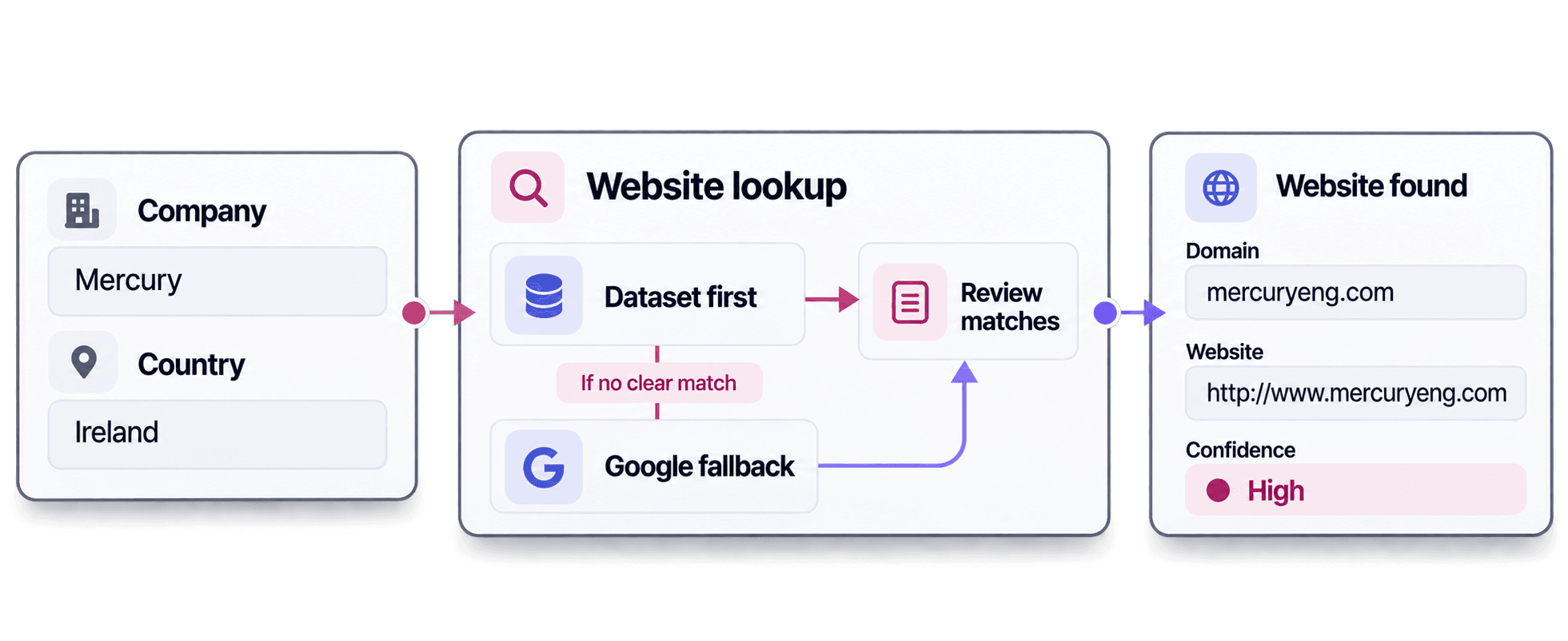
国家/地区信息有助于区分名称有歧义的公司。在本例中,同一个公司名称得到了不同结果:
Mercury搭配US时,返回shipmercury.com和https://www.shipmercury.com/。Mercury搭配IE时,返回mercuryeng.com和http://www.mercuryeng.com。
两个结果的置信度均为 High。国家/地区信息能帮助查询服务在同名公司之间做出选择,而置信度则有助于判断哪些结果需要人工审核。
如果匹配还取决于行业、公司规模或其他商业背景,请使用 AI Agent 调研 workflow。将这些信息加入 AI Agent prompt,它就能结合更丰富的商业背景调研目标公司。
仅补全业务记录中缺失的网站
现在,find_domains() 已经能根据公司名称查找网站。接下来可以复用它,仅补全公司记录中缺失的网站。已有网站的记录会跳过 API,因此原值保持不变,也不会消耗查询 credits。
在 find_company_websites.py 中,将 companies = [ 开始到最后一个 print 循环的全部内容替换为下面的代码块,并保留上方的 api_key 赋值。空值检查可处理 None、空字符串和仅含空格的字符串。如果所有记录都已有网站,脚本不会调用 API。
records = [
{
"id": "crm-001",
"company_name": "Microsoft",
"country": "US",
"website": "https://www.microsoft.com",
},
{
"id": "crm-002",
"company_name": "boulangerie du palais lyon",
"country": "FR",
"website": "",
},
{
"id": "crm-003",
"company_name": "Mercury Engineering",
"country": "IE",
"website": None,
},
{
"id": "crm-004",
"company_name": "Mercury",
"country": "US",
"website": " ",
},
{
"id": "crm-005",
"company_name": "Datablist",
"country": "FR",
"website": "https://www.datablist.com",
},
{
"id": "crm-006",
"company_name": "Mercury",
"country": "IE",
"website": None,
},
]
def website_is_missing(value):
return not isinstance(value, str) or not value.strip()
records_to_lookup = [
record for record in records if website_is_missing(record.get("website"))
]
lookup_results = (
find_domains(records_to_lookup, api_key) if records_to_lookup else []
)
results_by_id = {result["inputId"]: result for result in lookup_results}
for record in records:
if not website_is_missing(record.get("website")):
record["website_lookup"] = {"status": "not_requested"}
continue
result = results_by_id.get(record["id"])
if result is None:
record["website_lookup"] = {
"status": "missing_result",
"domain": None,
"confidence": None,
"credits": None,
"error": {
"code": "missing_result",
"message": "No result was returned for this inputId.",
},
}
continue
outputs = result.get("outputs") or {}
if result["status"] == "success" and outputs.get("companyUrl"):
record["website"] = outputs["companyUrl"]
record["website_lookup"] = {
"status": result["status"],
"domain": outputs.get("companyDomain"),
"confidence": outputs.get("domainConfidence"),
"credits": result.get("creditsUsed"),
"error": result.get("error"),
}
print(json.dumps(records, indent=2))代码先按 inputId 为结果建立索引,再按原有顺序遍历记录。website_lookup 对象会把查询结果和审核信息保存在对应记录旁,包括失败或缺少结果的情况。
对于 crm-001,由于 Microsoft URL 已存在,website_is_missing() 返回 False。该记录不会加入 records_to_lookup,API 也不会收到它。合并操作会保留原网站,并将状态记录为 not_requested。
对于 crm-002,网站字段为空,因此请求会发送这家面包店的信息,并使用 inputId: crm-002。API 返回相同的 inputId,results_by_id 据此找到正确结果。合并时,无需依赖结果顺序,就能把 https://boulangerie-du-palais-lyon.eatbu.com 写入对应记录。
| ID | 公司 | 合并后的网站 | 状态 | 域名 | 置信度 | Credits |
|---|---|---|---|---|---|---|
crm-001 | Microsoft · US | https://www.microsoft.com | not_requested | |||
crm-002 | boulangerie du palais lyon · FR | https://boulangerie-du-palais-lyon.eatbu.com | success | boulangerie-du-palais-lyon.eatbu.com | High | 1 |
crm-003 | Mercury Engineering · IE | https://mercuryeng.com | success | mercuryeng.com | High | 1 |
crm-004 | Mercury · US | https://www.shipmercury.com/ | success | shipmercury.com | High | 1 |
crm-005 | Datablist · FR | https://www.datablist.com | not_requested | |||
crm-006 | Mercury · IE | http://www.mercuryeng.com | success | mercuryeng.com | High | 1 |
这家面包店使用业务专属子域名 boulangerie-du-palais-lyon.eatbu.com。请保留该值,不要将其缩减为 eatbu.com;同时,应保存 companyUrl 返回的完整地址。acceptNonRoot: true 设置还允许返回 hostname 后带路径的托管商家页面,因此在这两种情况下,完整 URL 都很重要。
即使任务状态为 completed,其中仍可能包含 no_result、error 或 skipped 条目。示例仅在状态为 success 且存在 companyUrl 时修改 website。如果状态是 no_result,网站字段会保持为空,并在 website_lookup 中保留该状态。请先检查公司名称和国家/地区是否正确。如果任一输入有误,请修正后通过新任务重新提交该记录;否则,保留空白网站,以便人工审核。
扩展脚本前估算查询 Credits
示例中的五次查询全部返回 success,置信度均为 High,总共使用了 5 credits。
通过数据集完成的查询消耗 1 credit;通过 Google 处理的查询消耗 2.5 credits。你只需为实际采用的路径付费,不会同时支付两种费用。对于 1,000 条输入,如果全部通过数据集匹配,需要 1,000 credits;如果全部使用 Google,则需要 2,500 credits。这些数字仅用于规划,并不代表每次查询都一定成功。
拖动滑块,比较你的名单在不同情况下的 credits 用量。
按 20 美元购买 20,000 credits 计算,这两种情况的成本分别为 1 美元和 2.50 美元。Growth 订阅费用另计,目前每月包含 20,000 credits,并会优先于额外购买的 credits 使用。套餐和 credits 包的数值可能发生变化,请查看当前价格。
单个任务最多可接收 10,000 条输入,每条输入上限为 16 KiB,每个请求上限为 10 MiB。本例使用阻塞式 Requests 调用,提交一个小型异步 Datablist 任务、轮询状态并获取结果。官方维护的代码仓库还提供 CSV 分批处理和非阻塞 client 示例。
后续步骤
确认返回的网站属于目标企业后,你可以使用 Python 抓取网站的 Impressum,把企业法定信息和法律声明页面的来源 URL 添加到同一条供应商记录中。网站匹配审核与后续信息提取应分别进行。
将示例记录替换为你自己的少量数据,然后运行脚本并检查合并后的记录。请保留稳定 ID 和国家/地区信息;确认脚本能保留已知网站并按预期补全空白字段后,再逐步扩大处理规模。如果需要可下载脚本、CSV 分批处理或异步版本,可以从 GitHub 上持续维护的 Company Name to Domain API 示例开始。