
Job boards show who is hiring, what skills are in demand, and which companies are growing. Scraping one job board is often not enough. Job openings are scattered across dozens of platforms, and manual collection takes time.
The Job Postings Scraper aggregates job listings from multiple sources into one place. It gives you a broad view of the job market, helping you find leads, research competitors, or analyze market trends.
What is a Job Postings Scraper?
A Job Postings Scraper is a tool that automatically collects job posting data from various online job boards. It goes beyond a simple scraper for one site. Our scraper is a single solution that pulls data from multiple sources at once.
Instead of writing code for each job board, you use one interface to get the data you need. You can then use the job data in your sales, recruiting, or market research workflows.
Why not just use a single job board?
In the past, one or two platforms dominated the job market. Today, job postings are fragmented across many sites, including:
- General job boards like Indeed and Glassdoor
- Niche boards for specific industries
- Company career pages
- Social media platforms like LinkedIn
Only scraping one source gives you an incomplete picture. You might miss opportunities or misread market trends. The Job Boards Scraper solves this by consolidating data from over 19 major job boards into one collection.
How the Job Boards Scraper Works
Our Job Boards Scraper is built for simplicity and power. It offers multiple ways to find the data you want.
1. Job Offer Search
This method is the most common. It lets you search for job listings using keywords and filters. You can use it to build a targeted lead list or analyze market trends.
If you sell HR software, search for "HR Manager" jobs in "New York" to find companies hiring for that role. That hiring signal can indicate a need for tools that help manage a growing team.
You can filter your search by:
- Job title keywords: Search for specific roles like "software engineer" or "marketing manager."
- Location: Target specific cities, states, or countries.
- Workplace type: Choose on-site, hybrid, remote, or any combination.
- Employment type: Select full-time, part-time, contract, internship, freelance, and other arrangements.
- Job status: Return open jobs by default, only closed jobs, or both.
- Job seniority: Find roles for interns, seniors, or executives.
- Description matching: Match complete words by default, with optional exclusions. Enable regular expressions for advanced patterns.
- Industry: Narrow your search to a specific sector.
- Company HQ location: Filter jobs by the hiring company's city.
- Company size and HQ country: Focus on employers that match your ideal customer profile.
- Job posting date: Use a maximum age or an exact publication-date range.
2. Search from a list of companies
This is a more advanced use case. Instead of a broad search, you provide a list of companies you want to find jobs for. This is useful for account-based marketing (ABM) or sales.
Let's say you have a list of target accounts from a previous campaign. You can feed this list into the scraper to find all current job openings within those companies. This data can help you:
- Identify decision-makers for your sales outreach.
- Personalize your messages by referencing a specific job opening.
- Spot new opportunities with existing or past clients.
This method works with company names, domains, or LinkedIn URLs. You just need to have a collection with your company data.
Getting Started: A Step-by-Step Guide
Here is how to use the Job Boards Scraper in Datablist.
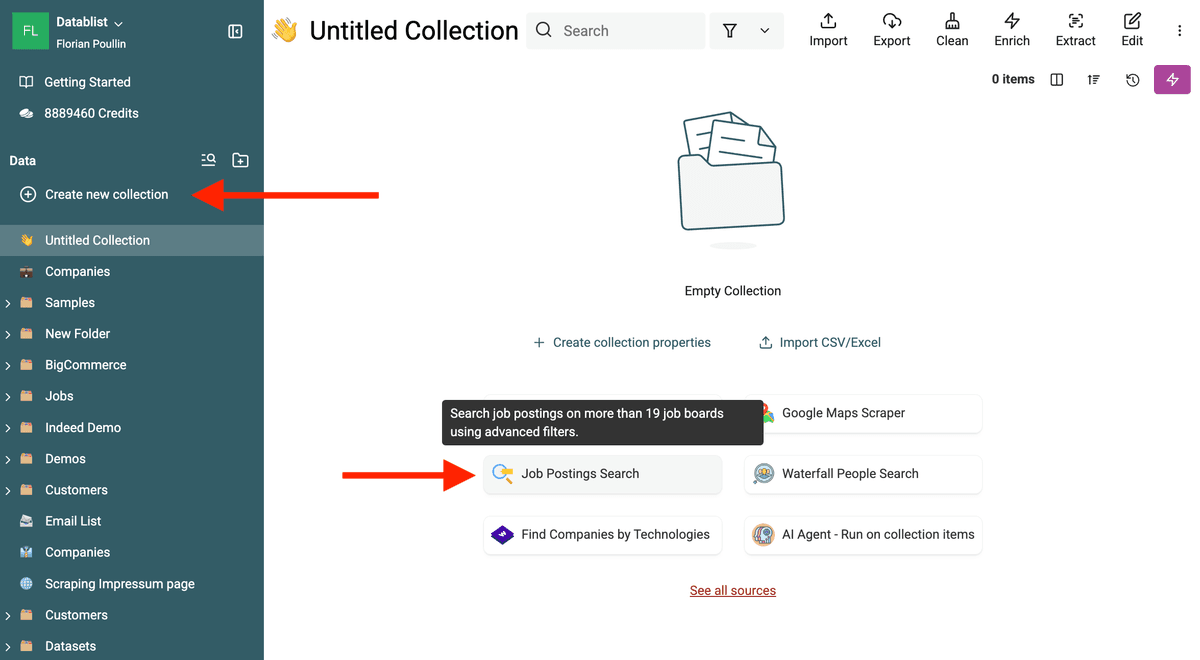
Step 1: Create a new collection & select "Job Postings Search"
First, you need a place to store your data. Create a new collection in your Datablist account by clicking the "+" button in the left sidebar.
In the data sources select "Job Postings Scraper." This will open the scraper configuration.
Step 3: Configure your search
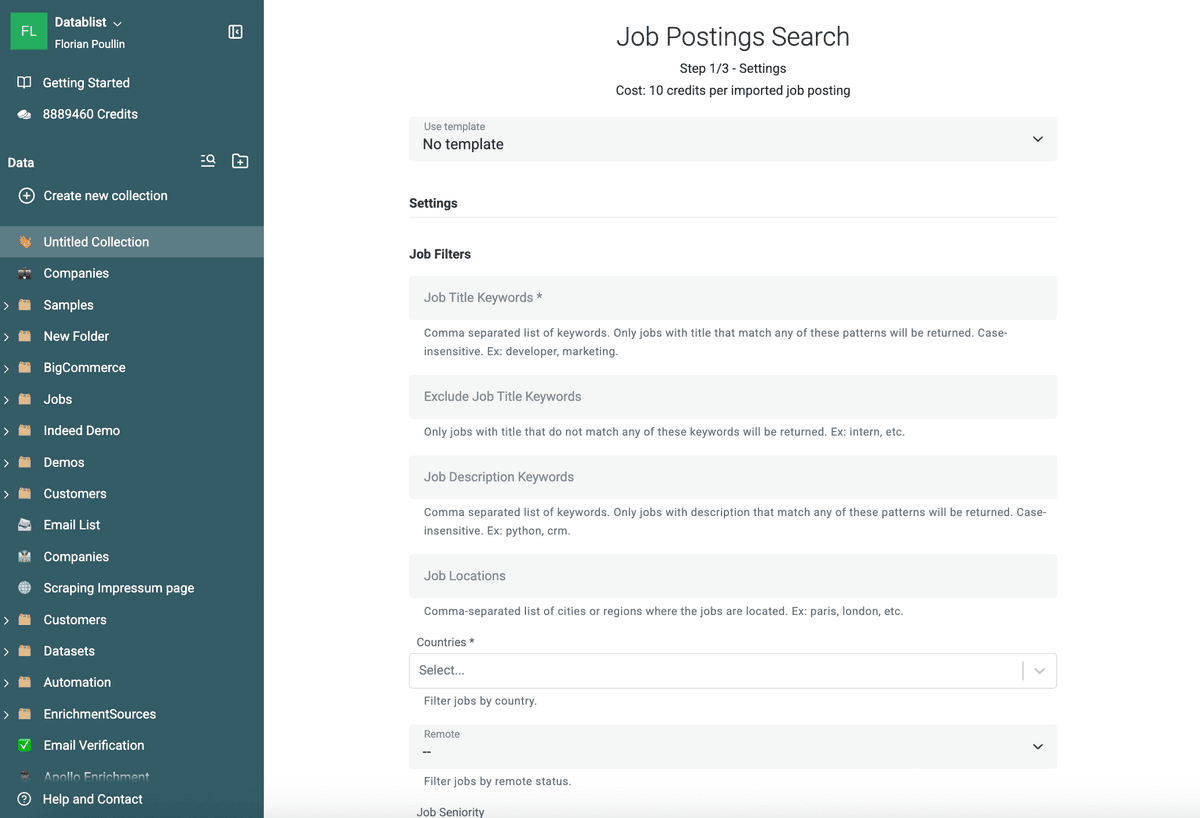
This is where you tell the scraper what to look for. You have two main options, as described above:
- General Search: Use the search filters to define your criteria. You can search for keywords in job titles or descriptions, select a country, and set seniority levels. You can also exclude keywords like "intern" to refine your results.
- Company-based Search: Select an existing collection that contains your list of companies. The scraper will then find job postings for only those companies.
For example, if you want to find marketing roles in San Francisco, you would enter "marketing" as the keyword and "San Francisco" as the location. You can also add "manager" to the list of keywords to narrow the search.
Step 4: Configure output properties
Define the columns where the scraped data will be saved. The scraper automatically extracts data points like:
- Job Title
- Company Name
- Location
- Workplace Type
- Job Description
- Application URL
- Posting Date
- Closed At
- Company Type
- Company HQ Country Code
- Company Funding Stage
Make sure the output columns have the correct data type (text, URL, etc.) so your data is clean and ready to use.
Step 5: Run the scraper
Once everything is configured, click "Run." The scraper will go to work, collecting job postings that match your criteria and populating your collection.
You can then clean and normalize the scraped data. Use a Data Extractor to pull specific information like email addresses or phone numbers from the job descriptions.
Use Cases for Your Job Postings Data
Scraped job data is valuable for many business functions.
- Sales & Lead Generation: Identify companies that are growing and may need new tools. A company hiring for a "Head of Marketing" can be a good lead for marketing automation software.
- Recruiting: A recruiter can use this data to find new job opportunities for their candidates. They can also see what skills are in demand in their industry.
- Market Research: Analyze job trends to understand which industries are booming or what skills are most sought after in a given city.
- Competitor Intelligence: See which roles your competitors are hiring for. This can give you insights into their strategy and future plans.
Filters That Make Job Scraping Useful
Good job scraping is about filtering. Broad searches create noisy spreadsheets. Focused searches produce buying signals you can act on.
Start with job title keywords and job description keywords, then add country, location, seniority, employment type, workplace type, application method, and posting date. Workplace and employment types can be combined. Description values match complete words by default. Enable regular expressions for advanced searches or when every pattern must match. Use exclusion filters for terms such as intern, junior, staffing, recruitment agency, or customer names you already manage.
For sales and account-based marketing, run the company-based workflow on a target account list. This lets you monitor only the companies you care about and detect new openings that match your offer. You can also filter by company HQ location, HQ country, and employee-count range. Optional toggles can retain companies whose HQ country or employee count is unknown.
For market research, keep the job board source, company name, location, title, posting date, and description. These columns make it easier to compare hiring demand across cities, industries, and competitors.
FAQ
Is it legal to scrape job boards?
Yes, it is generally legal to scrape publicly available data from job boards. However, you should always check the terms of service of the specific sites you are scraping.
Can I scrape specific company career pages?
The Job Boards Scraper focuses on aggregating data from multiple job boards. If you need to scrape a specific career page, you can use the AI Website Scraper.
How is this different from other job scrapers?
Most other scrapers are built for a single job board. The Job Boards Scraper aggregates several sources, so you do not need to combine data from different scrapers.
The Job Boards Scraper turns job postings into clean data for sales, marketing, recruiting, and market research.
Can I use job postings as buying intent data?
Yes. Job postings show which companies are hiring, what roles they need, and which tools or skills they mention. Use those signals to find accounts with active needs before running people search or email finding.
What filters should I start with?
Start with job title keywords, country, location, seniority, employment type, workplace type, and posting date. Add company filters such as HQ location, HQ country, and employee count when you want to monitor a specific market segment.
Can I exclude recruiting agencies or existing customers?
Yes. Use exclusion terms to remove recruiting agencies, staffing firms, junior roles, or companies that should not appear in your prospecting list. This keeps the imported jobs closer to your ideal customer profile.