Finds the founder, CEO, or owner of a company by visiting their website and extracting leadership information

I want to find the founder, CEO, or owner of a company based on their website URL.

## Steps
- Visit the given company website URL and find the founder, CEO, or owner's information.

## Information I want you to extract:
- First Name
- Last Name
- Title

## Instructions
- In the case you don't find information, keep the field empty.
- Important: Do not extract anything else but the requested information.
- Visit the company website and navigate all relevant pages (home, team, about us, about the owner, etc.).
- Look for the founder, CEO, or owner in common sections like "About Us", "Team", "Leadership", "Our Team", or "About the Owner" pages.
- Extract the first name, last name, and title once you find the right person.

## Mistakes to avoid:
- Make sure you find the right person, extract only the relevant information, and avoid false positives.
- Do not extract the names of employees if you don't find the owner.
- Don't confuse other roles or staff members with the founder, CEO, or owner.
- Make sure to return only the current owner/founder/CEO, not former ones.

## Fast Exit Rule (Critical)
- If you cannot quickly get the business owner, STOP immediately.
- Return empty values for all outputs.
- Do NOT perform deep searches, long browsing, or complex reasoning.
- We prefer empty data over spending credits

## Input
URL to visit: /CompanyWebsiteURL

이 prompt를 CSV 파일에서 어떻게 사용하나요?

Datablist는 전체 CSV 파일을 가져와 각 행에 바로 prompts를 실행할 수 있습니다.

좋은 소식입니다! 필요한 prompt는 이미 Datablist의 "Templates" 섹션에 있습니다. 처음부터 시작할 필요가 없습니다. 작업에 맞는 템플릿을 선택하기만 하면 CSV의 모든 행에서 바로 실행할 수 있습니다. 몇 번의 클릭만으로 데이터를 손쉽게 변환하세요.

CSV 파일을 Datablist로 Import합니다. 그런 다음 헤더에서 "Enrich"를 선택하세요.

템플릿 선택: Business Owner Finder
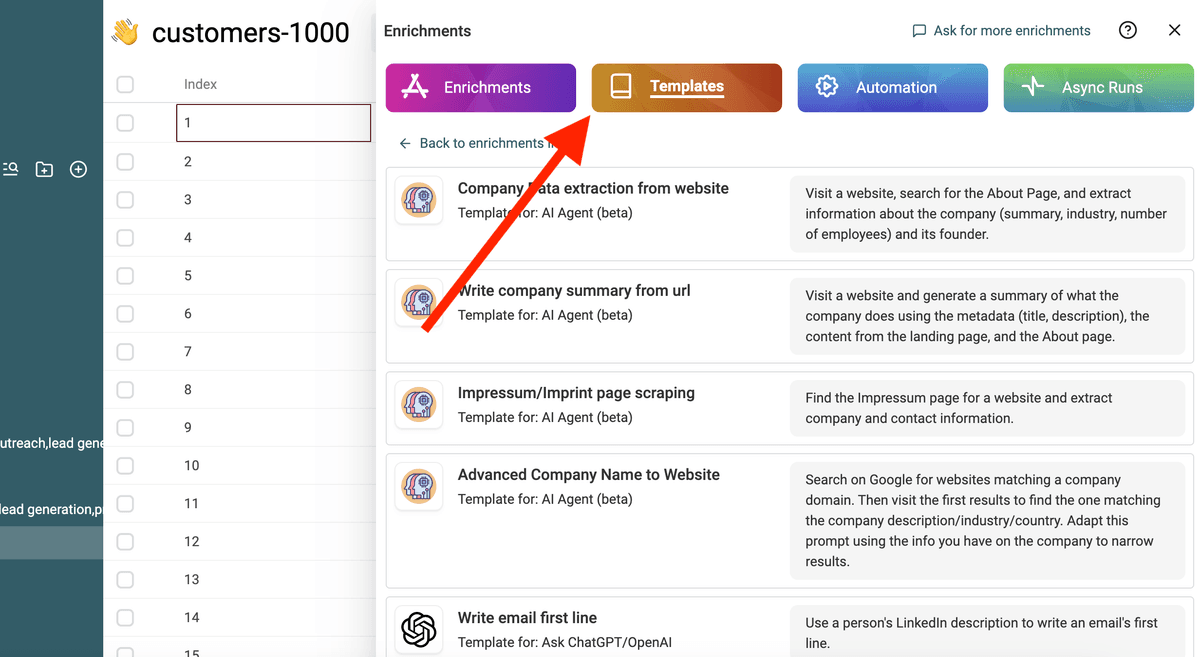
템플릿 선택
템플릿 선택

"/" 또는 "{{"를 사용해 prompt의 변수를 컬렉션 속성으로 대체하세요.
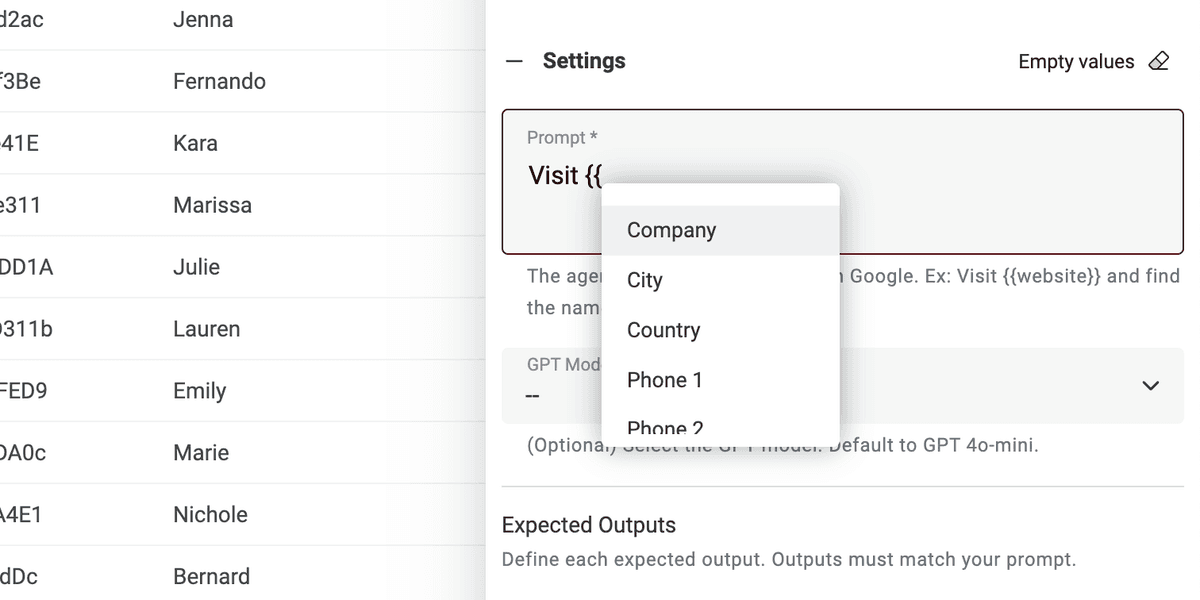
컬렉션 속성으로 변수 정의
컬렉션 속성으로 변수 정의

모든 변수가 없더라도, prompt를 직접 수정하시면 됩니다.

완료입니다! 이제 CSV 파일의 모든 행에 prompt를 실행하고 결과를 새 컬럼에서 확인하세요. 🚀

AI Agent prompts에 대한 안내

이 prompt는 Datablist AI Agent enrichment용입니다. AI Agent는 인공지능(AI)을 사용해 사용자를 대신해 작업을 수행하는 스마트 도구입니다. 웹사이트를 탐색하고, 정보를 찾기 위해 Google을 활용하며, 다양한 온라인 서비스와 상호작용할 수 있습니다. 즉, 실시간 데이터와 최신 답변을 제공해 드립니다.

반면 ChatGPT API는 입력 텍스트를 분석하고 기존 지식에 기반해 응답만 할 수 있습니다. 인터넷에 접속하거나 새로운 정보를 직접 수집하는 기능은 없습니다.

AI Agent는 실시간 데이터를 가져와 보다 역동적인 경험을 제공하는 반면, ChatGPT API는 사전에 학습된 지식에 의존해 질의에 응답합니다.

https://chatgpt.com/에서 직접 상호작용할 때는 Agent와 상호작용하는 것입니다. 때때로 prompt에 추가 정보를 제공하기 위해 온라인에 접속하기도 합니다(빈번하진 않음). 그러나 ChatGPT에 연결된 다른 도구들은 API를 사용합니다. 따라서 이 prompt는 ChatGPT API를 호출하는 다른 도구에서는 사용할 수 없다는 점을 기억하세요.

Datablist AI Agent는 CSV의 각 행마다 에이전트를 실행합니다.