Bulk Google Search API
Run many Google searches at once and get every result, from your AI assistant, no-code workflow or own code.
- 每10 results $0.0017 起
- Any Country and Language
- 1,000 Results per Query
| Google searches |
|---|
| coffee roaster hamburg |
| coffee roaster berlin |
| coffee roaster munich |
Trusted by 38,000+ users at startups and Fortune 500 teams


Works with any tool that can send HTTP requests
 Claude
 Cursor
 Codex
 Make
 n8n
 Zapier
- Your own code
Pick Your Way In
Let an AI assistant or your automation tool do the setup, or call the REST API from your own code.
Paste the setup prompt
Copy the prompt for Claude Code, Codex or Cursor, or for Make, n8n or Zapier, and paste it in. The AI creates a Datablist folder on your computer and sets everything up.
Paste your API key
When the AI asks, copy your API key from the Datablist app and paste it into the .env file it opened. Never paste it into the chat.
Get your results
Send your list of searches and get one row back per Google result: title, link, snippet, position and the search that found it.
See a sample resultUsing Make, n8n or Zapier? Here is every field for the HTTP request
Use the HTTP request module or node your tool offers. You need three steps: start the task, wait, then read the results.
1. Start the task (HTTP request)
- Method
POST- URL
https://api.datablist.com/v1/sources/tasks- Headers
X-API-Key= your API keyContent-Type=application/json- Body (JSON)
- json{"sourceId": "bulk-google-source","uniqueId": "bulk-google-source-run-1","settings": {"searchQuery": ["coffee roaster hamburg","coffee roaster berlin","coffee roaster munich"],"searchCountry": "de","searchLanguage": "de","searchLimit": 100}}
- Keep
- The
@idfrom the response. That is your task ID.
2. Wait until it is done
Add a short wait or delay, then a GET request to https://api.datablist.com/v1/sources/tasks/TASK_ID with the same X-API-Key header. Repeat until status is completed, failed or stopped.
3. Read the results
GET https://api.datablist.com/v1/sources/tasks/TASK_ID/results?limit=50. Map the fields of each result to your columns. If nextCursor is not empty, call again with &cursor= plus that value.
At a Glance
Search wide instead of deep: run up to 100 Google queries in one task, in the country and language you need, and keep the query behind every result. No Datablist workspace, collection or import needed.
What you give it
- Google searches: Up to 100 per task, with operators like site: or quotes
- Country and language (optional): For example Germany and German. Defaults to US and English
- A time period and limit (optional): Last day to last year, and up to 1,000 results per query
What you get back
- Every result: Title, link and snippet, as Google shows them
- The position: Where the result ranks for its query
- The query: Which of your searches found it, so you can sort and dedupe
What it costs
- 2.5 credits per 10 results: Counted per query, rounded up to the next 10
- 1,000 credits = $1: Shared with the Datablist app
What Teams Build With It
Put Bulk Google Search wherever your data already flows.
Build local lead lists
- Trade plus city, 100 times
- Websites to enrich
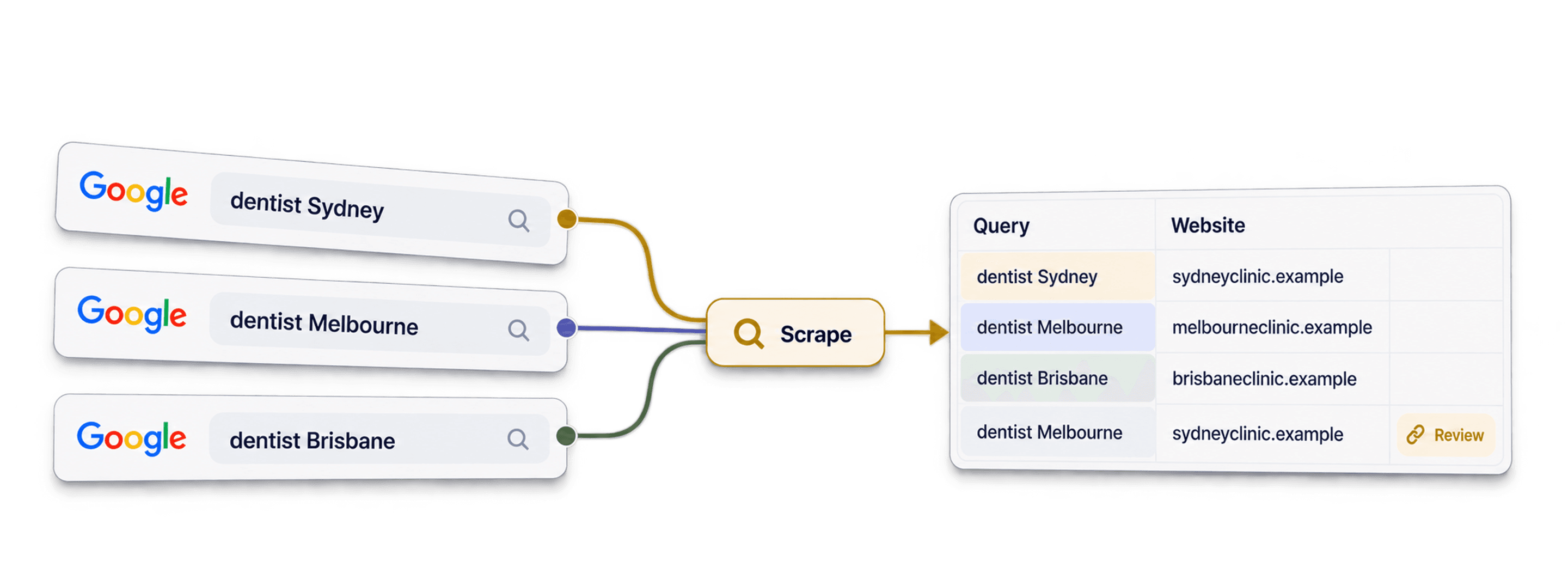
Pair a trade with every city you serve, run all the searches in one task, and send the result links to a domain or email finder.
Track rankings and mentions
- Your keywords
- Positions over time
Run the same keywords on a schedule, filter on the last week and follow where you and your competitors rank.
Find profiles with operators
- site:instagram.com plus niche
- Profile URLs
Use site: and quoted phrases to find Instagram, LinkedIn or directory pages for a niche and a location.
What Will It Cost You?
Pay per lookup with credits. API access starts on the Growth plan.
How much will it cost you?
Tell us how many Google results you need and we'll show you the cheapest way to get them.
= at least 250 credits; each query rounds up separately to groups of 10 results
How credits work
1,000 credits = $1, so each credit costs a tenth of a cent. Each query costs 2.5 credits per group of up to 10 results, rounded up on its own, so 11 results for one query cost 5 credits. 1,000 results cost about 250 credits. The task shows credits.used with the real amount. Plan credits renew monthly and reset if unused. Top-up credits never expire.
Build It Into Your Code
Everything you need to call the REST API directly: code, responses, endpoints, fields, authentication and limits.
Copy, Paste, Run
A complete script that creates a task, waits for it and prints every result. Replace YOUR_PERSONAL_API_KEY with your key.
# 1. Create the task (returns 202 Accepted and the task "@id")
curl --request POST 'https://api.datablist.com/v1/sources/tasks' \
  --header 'X-API-Key: YOUR_PERSONAL_API_KEY' \
  --header 'Content-Type: application/json' \
  --data '{
    "sourceId": "bulk-google-source",
    "uniqueId": "bulk-google-source-run-1",
    "settings": {
      "searchQuery": [
        "coffee roaster hamburg",
        "coffee roaster berlin",
        "coffee roaster munich"
      ],
      "searchCountry": "de",
      "searchLanguage": "de",
      "searchLimit": 100
    }
  }'
# 2. Poll every few seconds until status is completed, failed or stopped
curl 'https://api.datablist.com/v1/sources/tasks/TASK_ID' \
--header 'X-API-Key: YOUR_PERSONAL_API_KEY'
# 3. Read the results, then follow nextCursor until it is null
curl 'https://api.datablist.com/v1/sources/tasks/TASK_ID/results?limit=50' \
--header 'X-API-Key: YOUR_PERSONAL_API_KEY'What the API Returns
One flat JSON object per generated record, plus a nextCursor for the next page. Sample data.
{
  "taskId": "00000000000040008000000000000001",
  "results": [
    {
      "resultTitle": "Northpeak Coffee Roasters | Specialty coffee from Hamburg",
      "resultSnippet": "Small batch roastery in Hamburg. Order beans online or visit our cafe.",
      "resultLink": "https://northpeak-coffee.de",
      "resultPosition": 1,
      "resultQuery": "coffee roaster hamburg"
    }
  ],
  "nextCursor": null
}
Endpoints and Fields
All paths are relative to https://api.datablist.com. Field definitions come from GET /v1/sources/bulk-google-source (docs updated Oct 19, 2026). Schema version: 2026-09-12.
View API schema (JSON) (opens in a new tab)
- /v1/sources/bulk-google-source
- Read the schema, no key needed
- POST
- /v1/sources/tasks
- Create a task
- /v1/sources/tasks/{taskId}
- Poll status and progress
- /v1/sources/tasks/{taskId}/results
- Read results, 1 to 100 per page
- POST
- /v1/sources/tasks/{taskId}/stop
- Cancel a running task
- /v1/sources/tasks
- Task history, newest first
Schema Reference
Send settings once per task. Sources need no input rows. Results can include extra fields as the source evolves, so keep unknown keys when you parse them.
Show all settings and outputs
Settings
searchQueryGoogle Search Queries | Text list or Text | Google search queries, with one complete query per array element. |
|---|---|---|
searchCountrySearch Country | Text | Google country setting. Default to US.Allowed values: |
searchLanguageSearch Language | Text | Google language setting. Default to English.Allowed values: |
searchPeriodTime Period (Optional) | Text | The time period for the results.Allowed values: |
searchLimitLimit Per Query | Number | Maximum number of results. Default to 300 (⚠️ Max 200 results on the free plan). Google typically stops after 200/300 results. |
Outputs
resultTitleResult Title | Text | |
|---|---|---|
resultSnippetResult Snippet | Text | |
resultLinkResult Link | Text | Format: |
resultPositionPosition | Number | The result position in Google. |
resultQuerySearch Query | Text | Search query used to get this result. |
One Header, Clear Limits
Create a Personal API Key in your Datablist account and send it on every authenticated request.
Authentication
Send your key in the X-API-Key header. Datablist exchanges and renews access tokens for you.
- Header:
X-API-Key: YOUR_PERSONAL_API_KEY - Optional: manage tokens yourself with
Authorization: BearerfromPOST /v1/account/token - One or the other: sending both headers returns
400 AmbiguousCredentials - Server side only: keep keys out of URLs, browser code and logs
Limits
- Inputs: none, a source runs from its settings
- Size: 10 MiB per request, 16 KiB per generated object
- Run time: up to 24 hours per task
- Requests: 120 per 60 seconds for each source operation
- Active tasks: about 20 at once per account, shared with enrichments
- Retention: tasks and results are kept for 90 days
Related Tutorials
Learn the newest workflows with detailed step-by-step guides.
Frequently Asked Questions
Everything you or your AI coding agent need to integrate the Bulk Google Search API: auth, request, polling, results, limits and retries.
Related APIs, Enrichments and Free Tools
Chain Bulk Google Search with other APIs, in your code, in the Datablist app or for free.
Related APIs
- Company Name to Domain APIFind the website and domain behind every company name.
- Sitemap Scraper APIGet every page URL and its last update from a website sitemap.
- Waterfall Email Finder APIFind a verified work email from a name and the company domain.


No-code enrichments
- AI AgentBrowse websites and run Google searches for every row with one prompt.
- Website FinderFind websites from company names in just a few clicks.
- LinkedIn Profile Finder from NameFind a prospect's LinkedIn profile URL from their name.


Free tools
- Free Domain FinderPaste company names and find their websites. Free, no credit card required.
- Free Company Name CleanerNormalize company names: legal suffixes stripped, casing fixed, duplicates flagged.
- Free Email FinderFind a work email from a name and a company. Free to try.