
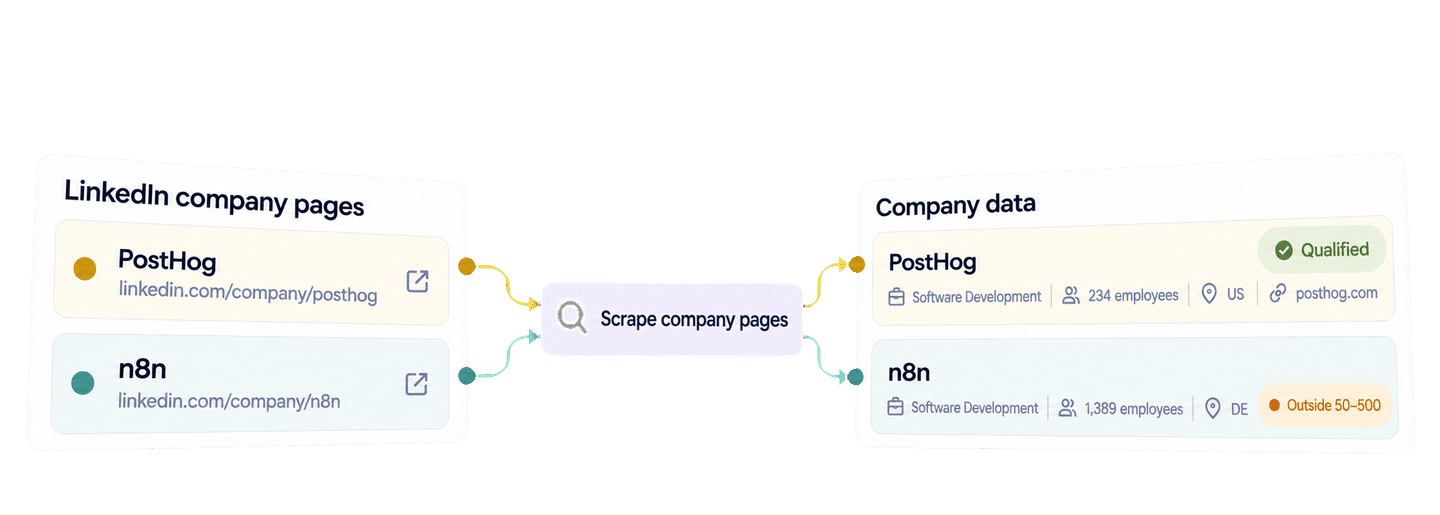
Python에서 Requests 라이브러리를 사용해 기업 페이지 URL 목록을 Datablist API로 보내면 LinkedIn 기업 데이터를 스크래핑할 수 있습니다. API는 공개 기업 페이지에서 확인할 수 있는 경우 업종, 직원 수, 본사 위치, 웹사이트, 기업 설명 등의 필드를 구조화된 기업 레코드로 반환합니다.
이 가이드에서는 읽기 쉬운 Python 함수 하나로 n8n, PostHog, Back Market, Datablist의 레코드를 가져옵니다. 그런 다음 이 결과를 재사용해 미국 또는 독일에 본사를 둔 직원 수 50~500명의 소프트웨어 기업을 선별합니다. 선별된 레코드에는 더 심층적인 Sales Research를 위해 웹사이트와 기업 설명도 그대로 유지됩니다.
🔑 바쁜 분을 위한 요약
Datablist는 검토를 마친 LinkedIn 기업 페이지 URL을 Sales Research 워크플로에서 활용할 수 있는 구조화된 기업 레코드로 변환합니다. 아래 Python 예제는 모든 결과 페이지를 가져온 다음, 추가 API 호출 없이 로컬에서 Account 필터를 적용합니다.
- 입력: LinkedIn 기업 페이지 URL
- 출력: 확인 가능한 기업 정보와 로컬 선별 결과. 원본 URL과 전체 기업 데이터도 함께 유지됩니다.
💡 No-code 방식을 선호하시나요? 코드를 작성하지 않고 기존 LinkedIn 기업 페이지 URL에서 기업 필드를 추출하려면 Datablist의 LinkedIn Company Page Scraper를 사용하세요.
Python과 Datablist API 키 설정하기
이 Python 예제에서는 requests 패키지를 사용합니다. Datablist REST API는 Growth 플랜에서 이용할 수 있으며, 기업 페이지를 조회할 때마다 Enrichment 크레딧이 차감됩니다.
Datablist API 계정 페이지에서 Personal API Key를 생성하세요.
scrape_linkedin_companies.py라는 파일을 만든 다음, 가상 환경을 준비하고 Requests를 설치합니다.
python -m venv .venv
source .venv/bin/activate
python -m pip install requests
export DATABLIST_API_KEY="your-api-key"스크립트는 DATABLIST_API_KEY에서 키를 읽어 X-API-Key 헤더에 담아 전송합니다.
Python 함수 하나로 LinkedIn 기업 페이지 스크래핑하기
아래 소스 목록에는 업종, 규모, 본사 소재국이 서로 다른 기업이 포함되어 있습니다. 각 account_id는 API의 inputId가 됩니다. 결과는 응답 내 위치를 기준으로 연결되지 않으므로, 이 고유 ID를 이용해야 각 결과를 올바른 원본 URL과 매칭할 수 있습니다.
아래 전체 스크립트를 scrape_linkedin_companies.py에 붙여 넣으세요.
import json
import os
import time
import uuid
import requests
accounts = [
{
"account_id": "account-n8n",
"linkedin_company_url": "https://www.linkedin.com/company/n8n/",
},
{
"account_id": "account-posthog",
"linkedin_company_url": "https://www.linkedin.com/company/posthog/",
},
{
"account_id": "account-back-market",
"linkedin_company_url": "https://www.linkedin.com/company/back-market/",
},
{
"account_id": "account-datablist",
"linkedin_company_url": "https://www.linkedin.com/company/datablist/",
},
]
def scrape_companies(accounts, api_key):
"""Submit one task, wait for it to finish, and return every result."""
tasks_url = "https://api.datablist.com/v1/enrichments/tasks"
headers = {"X-API-Key": api_key}
inputs = [
{
"inputId": account["account_id"],
"data": {"companyLinkedInUrl": account["linkedin_company_url"]},
}
for account in accounts
]
unique_id = str(uuid.uuid4())
print(f"Request ID: {unique_id}")
payload = {
"enrichmentId": "linkedin-company-enrichment",
"uniqueId": unique_id,
"settings": {},
"inputs": inputs,
}
response = requests.post(tasks_url, headers=headers, json=payload)
response.raise_for_status()
task = response.json()
task_id = task["@id"]
task_url = f"{tasks_url}/{task_id}"
print(f"Task ID: {task_id}")
while task["status"] not in ("completed", "failed", "stopped"):
time.sleep(3)
response = requests.get(task_url, headers=headers)
response.raise_for_status()
task = response.json()
if task["status"] != "completed":
raise RuntimeError(
f"Task {task_id} {task['status']}: {task.get('error')}"
)
results = []
results_url = f"{task_url}/results"
params = {"limit": 100}
while True:
response = requests.get(results_url, headers=headers, params=params)
response.raise_for_status()
page = response.json()
results.extend(page["results"])
next_cursor = page["nextCursor"]
if next_cursor is None:
break
params["cursor"] = next_cursor
return results
api_key = os.environ.get("DATABLIST_API_KEY")
if not api_key:
raise RuntimeError("Set DATABLIST_API_KEY before running this script.")
company_results = scrape_companies(accounts, api_key)
print(json.dumps(company_results, indent=2, ensure_ascii=False))다음 명령으로 실행합니다.
python scrape_linkedin_companies.py주로 변경해야 할 부분은 accounts의 레코드입니다. 각 account_id는 변경하지 않고 고유하게 유지한 뒤, linkedin_company_url을 검토한 LinkedIn 기업 페이지 URL로 바꾸세요. 함수는 이 레코드를 API의 inputs 형식으로 변환하고 기업 URL을 companyLinkedInUrl로 전송합니다. 이 Enrichment에는 공개 설정이 없으므로 settings는 빈 상태로 둡니다.
POST 요청은 백그라운드 Enrichment Task를 생성합니다. API는 202 Accepted와 Task ID를 반환하며, Requests 클라이언트는 상태 URL을 폴링하며 기다립니다. 이 Blocking 방식의 Python 코드는 소규모 스크립트에 편리하지만, Datablist 측에서는 Task가 여전히 비동기로 실행됩니다.
첫 번째 GET 요청은 Task 자체의 상태를 확인합니다. Task는 completed, failed, stopped 중 하나로 종료될 수 있습니다. 스크립트는 completed일 때만 계속 진행하며, 그 외에는 Task ID와 API의 Task 오류를 포함한 예외를 발생시킵니다. 실패하거나 중단된 Task에도 검토할 결과와 크레딧 사용 내역이 남아 있을 수 있으므로 문제를 조사할 때는 이 ID를 보관하세요.
Task가 완료되면 마지막 반복문이 한 페이지당 최대 100개의 결과를 가져옵니다. nextCursor가 null이 될 때까지 다음 페이지를 계속 요청합니다. 각 결과에는 전송한 inputId가 유지되므로, 응답 순서가 입력 순서와 달라도 이후 선별 반복문에서 결과를 정확히 연결할 수 있습니다.
기업 결과와 데이터 조회 방식 이해하기
LinkedIn URL은 기업을 직접 식별합니다. Datablist는 여러 후보 기업을 검색하고 점수를 매기는 대신, 해당 기업 URL을 정규화한 후 공개 기업 페이지에서 확인 가능한 데이터를 가져옵니다. 특정 기업 URL이 주어지면 공개 페이지를 기준으로 조회를 시작하며, 이미 찾은 유용한 값은 유지하면서 확인되지 않은 필드를 관리형 fallback 소스로 보완할 수 있습니다.
결과를 해석할 때 이 차이가 중요합니다. 선택 필드의 제공 여부는 공개된 정보에 따라 달라집니다. 본사 주소가 null이거나 전문 분야가 누락되었다고 해서 전체 기업 조회가 실패한 것은 아닙니다.
다음은 네 개 URL에 대해 반환된 전체 결과 페이지입니다.
{
  "taskId": "69516a973dc34481920f41ade748e917",
  "results": [
    {
      "inputId": "account-n8n",
      "status": "success",
      "outputs": {
        "companyName": "n8n",
        "companyHQPostalCode": "10115",
        "companyDescription": "n8n is a workflow automation platform that uniquely combines AI capabilities with business process automation. The platform enables connection to any app or API while maintaining the flexibility of code with the speed of no-code.\n\nReleased under a fair-code license, n8n can be self-hosted and is supported by a vibrant community of developers and builders. Users can start simple and layer complexity as needed - utilizing the visual builder for quick wins, and adding custom Javascript or Python code where more control is required, enabling the connection of anything to everything.\n\nn8n is privately held, with funding from Sequoia, Felicis Ventures, Firstminute Capital, Harpoon Ventures, and others. Individual investors include Eventbrite's Kevin Hartz and Supercell's IIkka Paananen. n8n was founded in 2019 and is headquartered in Berlin.",
        "companyTagline": "Flexible AI workflow automation for technical teams.",
        "companyIndustry": "Software Development",
        "companySpecialities": "AI, SOAR, Workflow Automation, and AI agents",
        "companyWebsite": "https://n8n.io",
        "companyHQCity": "Berlin",
        "linkedInCompanyId": "28491094",
        "companyType": "Privately Held",
        "companyHQCountry": "DE",
        "companySize": 1389,
        "companyLogoUrl": "https://media.licdn.com/dms/image/v2/D4D0BAQEgEphZqatXwA/company-logo_200_200/B4DaFY.Sa2JcAE-/0/1792494086070/n8n_logo?e=2147483647&v=beta&t=NTL4C6f5QAd_o9nXd15PO8pOMSSEoms_tJdDHEo6eLk",
        "companyHQAddress": "Novalisstraße 10",
        "companyFoundedYear": 2019,
        "companyFollowerCount": 442229
      },
      "creditsUsed": "25",
      "error": null
    },
    {
      "inputId": "account-posthog",
      "status": "success",
      "outputs": {
        "companyName": "PostHog",
        "companyHQPostalCode": null,
        "companyDescription": "At PostHog, we're working to increase the number of successful products in the world.\n\nUntil now, tools for building products have been fragmented. Product analytics, heatmaps, session recording, web analytics, feature flags, and A/B testing are all helpful, but no one wants to buy, send data to, and integrate multiple products.\n\nPostHog offers these tools (and more) in an integrated, open source platform which can be hosted in either the US or EU. Both versions are SOC2 certified, GDPR-ready, and HIPAA compliant. \n\nWe started PostHog during Y Combinator's W20 cohort and had the most successful B2B software launch on Hacker News since 2012 - with a product that was just 4 weeks old.\n\nWith over 100,000 users, we're default alive, growing 97% through word of mouth, and we are in the top 0.01% most popular repos on GitHub.",
        "companyTagline": "Your product's context layer. Get started with npx @posthog/wizard",
        "companyIndustry": "Software Development",
        "companySpecialities": "analytics, open source, product analytics, product, data, engineering, self-driving product, session replay, context warehouse, AI, product context, and error tracking",
        "companyWebsite": "https://posthog.com/",
        "companyHQCity": "San Francisco",
        "linkedInCompanyId": "37415928",
        "companyType": "Privately Held",
        "companyHQCountry": "US",
        "companySize": 234,
        "companyLogoUrl": "https://media.licdn.com/dms/image/v2/D560BAQGQUyE_CXUxIw/company-logo_200_200/B56aCMWEgaJAAE-/0/1789060991251/posthog_logo?e=2147483647&v=beta&t=WfTGRSqp5UfYL33sBXx3tZ1zmFUECfUPf7JtEGPAvbA",
        "companyHQAddress": null,
        "companyFoundedYear": 2020,
        "companyFollowerCount": 59696
      },
      "creditsUsed": "25",
      "error": null
    },
    {
      "inputId": "account-back-market",
      "status": "success",
      "outputs": {
        "companyName": "Back Market",
        "companyHQPostalCode": null,
        "companyDescription": "The world is waking up to what fast tech costs. Back Market is where the revolution shops. \nWe make refurbished tech the smart, confident choice by building trust in quality, repair and circularity. New is not always better. Smarter is.\n\nAs a certified B Corp, our mission is to create a world that does more with what we already have by prolonging the lifespan of electronic devices through circularity and repair. We have grown by double digits year over year and now serve 18 million customers across 17 markets, avoiding more than 2 million tons of CO2 emissions*\n*Back Market calculation based on ADEME 2022 methodology.\n\nFounded in Paris in 2014 by Thibaud Hug de Larauze, Quentin Le Brouster and Vianney Vaute, Back Market is a leading global marketplace where people can buy professionally refurbished technology or trade in their devices.\n\nAre you ready to join us?",
        "companyTagline": "Where the world shops refurbished tech.",
        "companyIndustry": "Internet Marketplace Platforms",
        "companySpecialities": "refurbished tech, marketplace, sustainability, circularity, Right to Repair, sustainable solutions, refurbished marketplace, circular economy, and sustainable alternatives",
        "companyWebsite": "http://www.backmarket.com",
        "companyHQCity": "Paris",
        "linkedInCompanyId": "4793443",
        "companyType": "Privately Held",
        "companyHQCountry": "FR",
        "companySize": 1054,
        "companyLogoUrl": "https://media.licdn.com/dms/image/v2/D4E0BAQHRv6UClt5D2g/company-logo_200_200/B4EZnoUG3tKgAI-/0/1760539209613/back_market_logo?e=2147483647&v=beta&t=Pywpeu1Qs3h0Cl8kgvYurmBfXbImm5QIIc-aQog1MqM",
        "companyHQAddress": null,
        "companyFoundedYear": 2014,
        "companyFollowerCount": 101878
      },
      "creditsUsed": "25",
      "error": null
    },
    {
      "inputId": "account-datablist",
      "status": "success",
      "outputs": {
        "companyName": "Datablist",
        "companyHQPostalCode": null,
        "companyDescription": "When people hear \"data,\" they think of something complicated. We will change this.\n\nDatablist is an AI-powered spreadsheet that helps you: get, manipulate, or clean data and create workflows that run automatically while you focus on what matters most.\n\nIf you want to separate Datablist.com into its main parts, you can say we have:\n\n- Deduplicating, grouping, and labeling data\n- Cleaning and editing data\n- Managing data and automated workflows\n- 50+ B2B data sources and scrapers\n- 3 AI agents:\n    - Editing assistant\n    - AI Research agent\n    - Deduplication assistant\n\nThe top 3 reasons why companies choose Datablist.com are:\n\n1. Simplicity: you don't need to have technical knowledge or experience with formulas to get everything out of it.\n2. Flexibility that allows you to do (almost) everything with your data and AI while keeping everything under your control.\n3. Scalability that no other solution can match. Up to 2 million rows—forget Excel.\n\nGo on try it for free!\n\nhttps://www.Datablist.com",
        "companyTagline": "Let your tasks become workflows: automated workflows.",
        "companyIndustry": "Information Technology & Services",
        "companyWebsite": "https://www.datablist.com",
        "companyHQCity": "Paris",
        "linkedInCompanyId": "69842428",
        "companyType": "Privately Held",
        "companyHQCountry": "FR",
        "companySize": 3,
        "companyLogoUrl": "https://media.licdn.com/dms/image/v2/C4E0BAQFNFlMb8KEPRQ/company-logo_200_200/company-logo_200_200/0/1630622803412?e=2147483647&v=beta&t=UVkk7BOerChiWgS9Y06zOpT08SlK4kpAWGDYiVvUEVU",
        "companyFollowerCount": 134,
        "companyFoundedYear": 2020,
        "companyHQAddress": null
      },
      "creditsUsed": "25",
      "error": null
    }
  ],
  "nextCursor": null
}
네 개 레코드 모두 성공했으며 각각 25크레딧을 사용했습니다. PostHog는 Software Development, 직원 234명, 미국 본사, 웹사이트, 기업 설명을 반환했습니다. n8n 역시 선택한 국가에 있는 소프트웨어 기업이지만, 반환된 직원 수는 1,389명입니다. Back Market은 Internet Marketplace Platforms, 직원 1,054명, 프랑스 본사로 반환되었습니다. Datablist는 Information Technology & Services, 직원 3명, 프랑스 본사로 반환되었습니다.
Account Research는 필드 하나만 확인하고 끝나는 경우가 드물기 때문에 전체 객체가 유용합니다. 업종, 직원 수, 국가를 기준으로 선별하면서 다음 조사 단계에 필요한 정확한 웹사이트와 기업 설명도 유지할 수 있습니다.
이 응답에서 companySize는 LinkedIn의 기업 규모 구간 라벨이 아니라 반환된 직원 수입니다. companyHQCountry는 기업이 사업을 운영하는 모든 국가가 아니라 본사 소재국을 뜻합니다. 이상적인 고객 프로필에 맞춰 규모 및 국가 필터를 조정할 때 이 차이를 고려해야 합니다.
선별에 모든 선택 필드가 필요한 것은 아닙니다. 업종, 직원 수, 본사 소재국을 확인할 수 있다면 주소나 전문 분야가 없어도 빈 값으로 둘 수 있습니다. API가 웹사이트를 루트 도메인으로 변환한다고 가정하지 말고, companyWebsite는 반환된 그대로 유지하세요. 기업 설명은 Sales Research 담당자가 해당 기업의 제품을 이해하고 Outreach 전에 Account별 조사를 준비하는 데 도움이 됩니다. 레코드를 검토하거나 저장할 때는 결과 단위의 status, creditsUsed, error도 기업 필드와 함께 보관해야 합니다.
Sales Research용 Account 선별하기
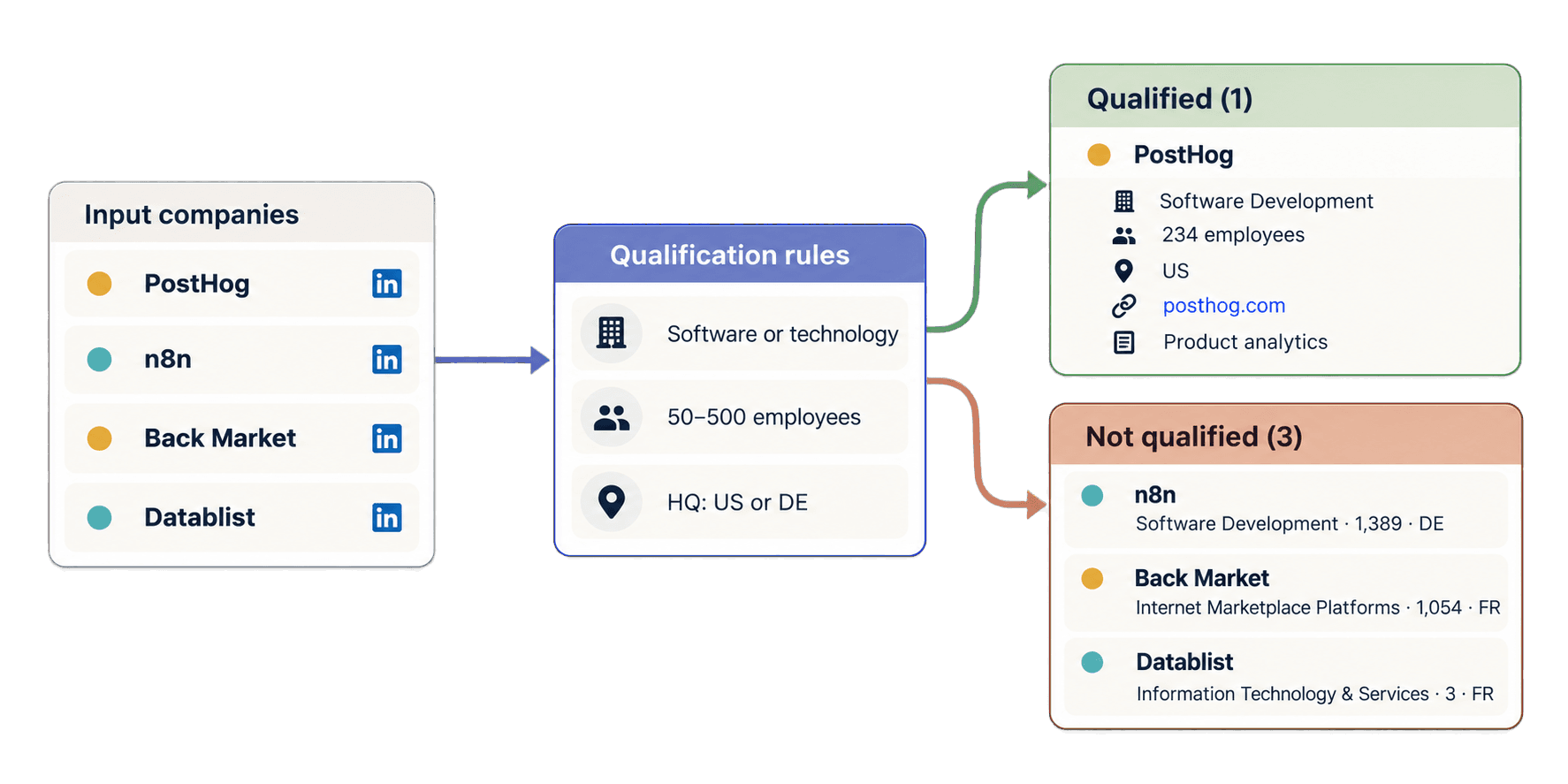
타깃이 직원 수 50~500명이고 미국 또는 독일에 본사를 둔 소프트웨어·기술 기업이라고 가정해 보겠습니다. 전체 스크립트 아래에 다음 반복문을 추가하세요. 기존 company_results를 재사용하므로 새 Task를 제출하지 않습니다.
accounts_by_id = {account["account_id"]: account for account in accounts}
qualified_accounts = []
other_accounts = []
for result in company_results:
account = accounts_by_id.get(result["inputId"])
qualification = "needs_review"
if result["status"] == "success":
outputs = result["outputs"]
industry = outputs.get("companyIndustry")
company_size = outputs.get("companySize")
country = outputs.get("companyHQCountry")
if industry and isinstance(company_size, (int, float)) and country:
industry_matches = any(
keyword in industry.lower()
for keyword in ("software", "technology")
)
size_matches = 50 <= company_size <= 500
country_matches = country in {"US", "DE"}
if industry_matches and size_matches and country_matches:
qualification = "qualified"
else:
qualification = "not_qualified"
source_url = None
if account is not None:
source_url = account["linkedin_company_url"]
reviewed_account = dict(result)
reviewed_account["sourceLinkedInUrl"] = source_url
reviewed_account["qualification"] = qualification
if qualification == "qualified":
qualified_accounts.append(reviewed_account)
else:
other_accounts.append(reviewed_account)
print(json.dumps(qualified_accounts, indent=2, ensure_ascii=False))API가 레코드를 다른 순서로 반환하더라도 PostHog는 account-posthog에 다시 연결됩니다. Software Development, 직원 234명, US가 세 가지 조건을 모두 충족하므로 선별 대상이 됩니다. 반복문은 전체 outputs, 반환된 https://posthog.com/ 웹사이트, 기업 설명, creditsUsed, error를 포함한 원본 결과를 복사합니다. 여기에 원본 URL과 로컬 선별 라벨만 추가합니다.
n8n은 account-n8n에 연결되지만 직원 수 1,389명이 상한을 초과하므로 선별되지 않습니다. Back Market은 선택한 업종, 규모, 국가 조건에 맞지 않으며, Datablist는 규모 하한보다 작고 선택한 국가에도 속하지 않습니다. 향후 실패하거나 데이터가 불완전한 레코드는 조용히 삭제하는 대신 needs_review로 표시됩니다.
관리되는 동기식 Requests 예제를 다운로드하거나, Non-blocking 애플리케이션 코드가 필요하다면 저장소의 비동기 HTTPX 대안을 사용할 수 있습니다.
LinkedIn 기업 스크래핑 크레딧 계산하기
일반적인 기업명 기반 LinkedIn 기업 페이지는 25크레딧을 사용합니다. 숫자형 기업 ID URL은 최종 fallback이 필요한 경우 75크레딧을 사용할 수 있지만, 모든 숫자형 URL의 비용이 75크레딧인 것은 아닙니다. 실패하거나 일치하는 결과가 없는 조회에도 크레딧이 사용될 수 있으므로, 실제 사용량은 Task의 총사용량과 각 결과의 creditsUsed 값을 기준으로 확인하세요.
이 가이드의 기업명 기반 URL 네 개에는 총 100크레딧이 사용되었습니다. 표준 요율이라면 기업 페이지 1,000개에 25,000크레딧이 필요합니다. 숫자형 ID가 많은 입력에는 75크레딧 경로가 적용될 가능성을 고려해 여유 크레딧을 확보해야 합니다.
REST API를 사용하려면 Growth 플랜이 필요합니다. 월간 플랜에는 20,000크레딧이 포함되며, 추가 크레딧은 별도로 구매합니다. 현재 USD 기준으로 20달러에 20,000크레딧을 추가 구매할 수 있으므로 크레딧당 비용은 0.001달러입니다. 이 요율에서 25,000크레딧은 25달러입니다. 최신 플랜과 크레딧 상품은 Datablist 요금제에서 확인하세요.
입력·Task·결과의 일반적인 오류 해결하기
DATABLIST_API_KEY가 없음: 스크립트가 요청을 보내기 전에 중단됩니다. 환경 변수를 설정한 뒤 파일을 다시 실행하세요.- API가 키를 거부함: Personal API Key가 올바른지 확인하고 예제와 같이
X-API-Key헤더에 넣으세요. - 원본 URL이 유효하지 않음: 개인 프로필, 관련 없는 사이트, 빈 값 또는 잘못된 URL을 지원되는 공개 LinkedIn 기업, 학교, Showcase, 숫자형 ID 또는 Sales Navigator 기업 URL로 교체하세요.
- 크레딧 부족: 잔액을 확인한 뒤 포함된 크레딧을 사용하거나 추가 크레딧을 구매하고 새 Task를 생성하세요.
- Task가
failed또는stopped상태임: 유료 Task를 다시 제출할지 결정하기 전에 오류, 기존 결과, 크레딧 사용량을 확인하세요. - 결과가 부족하거나
no_result또는error상태임: 검토할 수 있도록 원본 URL, 상태, 크레딧, 오류를 보관하세요. 데이터가 제공되지 않은 이유를 추측해 곧바로 재제출하지 말고, 입력이 공개 기업 페이지인지 먼저 확인하세요.
생성 응답을 받지 못했다면 스크립트가 POST 요청 전에 출력한 Request ID를 사용하세요. 먼저 Task 목록을 조회한 뒤 uniqueId에서 해당 값을 찾습니다.
curl "https://api.datablist.com/v1/enrichments/tasks?limit=100" \
-H "X-API-Key: $DATABLIST_API_KEY"일치하는 Task의 @id가 Task ID입니다. 자동으로 새 Task를 생성하는 대신 이 ID로 /v1/enrichments/tasks/{taskId}의 상태 확인을 계속하거나 /v1/enrichments/tasks/{taskId}/results에서 결과를 가져오세요. 요청 하나에는 최대 10,000개의 입력과 10MiB의 데이터를 담을 수 있습니다. 보관 기간과 기타 수명 주기 정보는 Task 문서를 참고하세요.
다음 단계
이제 LinkedIn 기업 페이지 URL 목록을 구조화된 기업 레코드로 변환하는 재사용 가능한 Python Requests 함수와, Sales Research를 위해 전체 API 출력을 보존하는 로컬 선별 반복문을 갖추었습니다.
네 개의 예시를 검토한 소규모 Account 목록으로 바꾸고, 안정적인 ID를 유지하면서 이상적인 고객 프로필에 맞게 업종, 직원 수, 국가 조건을 조정하세요. 출발점이 기업이 아니라 사람이라면 LinkedIn 프로필 스크래퍼 API 가이드를 참고하세요. 기업명만 있다면 먼저 Python으로 기업 웹사이트 찾기부터 시작할 수 있습니다.