![Google Scraper: Scrape results from several queries at once [NoCode]](https://storage.googleapis.com/public_datablist/app_assets/enrichments_icons/google.svg)
Google search can reveal prospects in almost any niche. The problem is scale: broad Google searches stop returning useful pages after a limited number of results.
You run a broad search like "marketing agencies in USA" and Google shows millions of estimated results. But after around 250 results, the pages stop.
This 250-result limit makes broad Google scraping weak for building a B2B lead list.
So, how do you get the thousands of leads you know are in there?
The secret is to stop trying to scrape deep and start scraping wide. Instead of one big query, you use hundreds of small, specific ones. Datablist's Start with a Google Query source is the tool that makes this strategy simple and scalable.
Here is how it works.
Scraping Wide, Not Deep
If Google won't let you go deep on one query, the answer is to go wide with many queries.
Instead of one search for "Lawyers in France" (250 results), you run 100 different searches:
- "lawyer paris" (gets 250 results)
- "lawyer nantes" (gets 250 results)
- "lawyer lyon" (gets 250 results)
- "lawyer marseille" (gets 250 results)
- ...and so on for 100 cities.
Your potential pool of 250 results becomes 25,000 results (100 cities x 250 results).
This multi-query strategy is the same principle used for scraping Google Maps effectively, where you search by ZIP code instead of a whole city. By breaking one broad search into hundreds of small searches, you get more coverage.
The hard part is running hundreds of searches.
How to Generate Thousands of Google Queries (Fast)
You do not have to type 500 search queries by hand. Use an LLM like ChatGPT, Claude, or Gemini to generate them.
Here is a prompt template:
"I need to create a list of Google search queries. Please give me a list of the 100 largest cities in Germany.
Now, create a new list by adding the keyword 'Software Agency' in front of each city name. The final list should only contain the queries, one per line. For example: Software Agency Berlin Software Agency Hamburg"
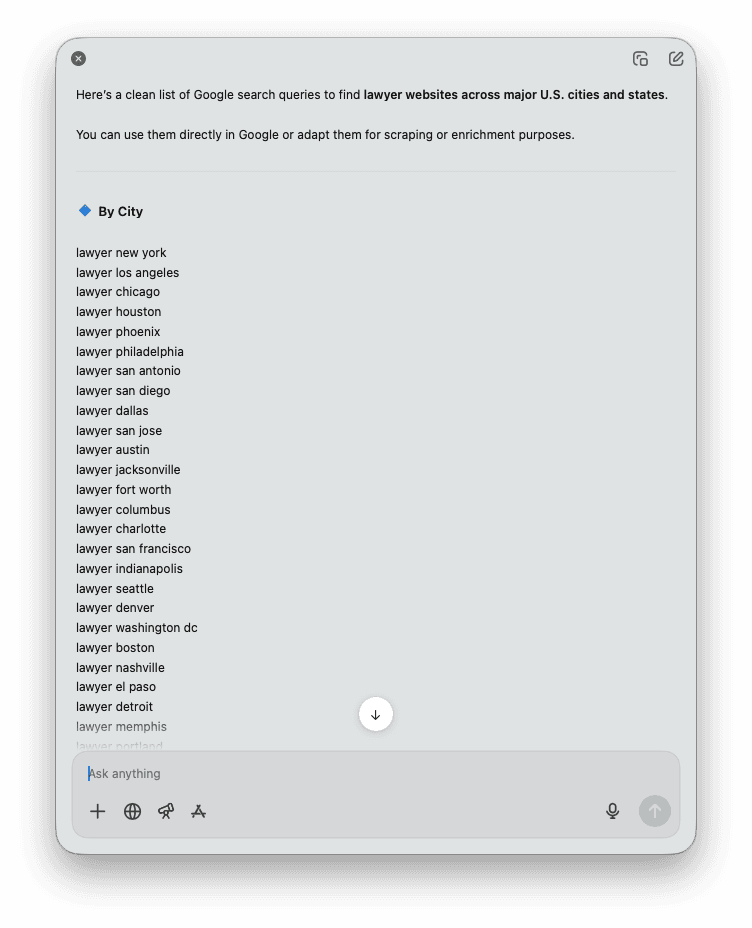
This gives you a list of specific queries ready to paste into Datablist.
You can get creative with your query generation. Combine industries, job titles, technologies, and locations to create thousands of permutations.
How to Scrape Google Results with Datablist (Step-by-Step)
This is where it all comes together. Datablist's "Start with a Google Query" source was built specifically for this multi-query strategy.
Step 1: Create a New Collection
First, create a new collection in Datablist. This is where your scraped results will be stored.
Step 2: Select the "Start with a Google Query" Source
From your new collection, click "Import" and select "Start with a Google Query" from the list of data sources.
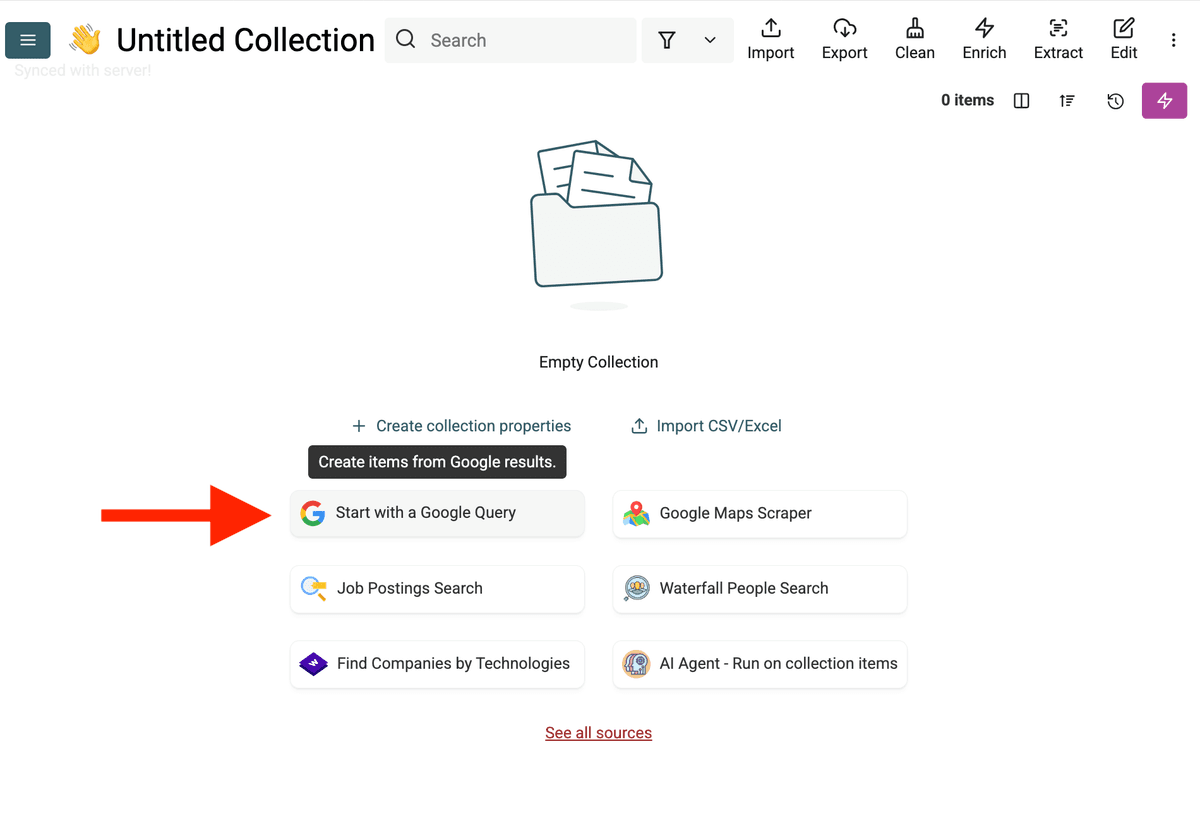
Step 3: Paste Your Query List
Paste the list of 100 or 1,000 queries into the "Search Queries" box, with one query per line.
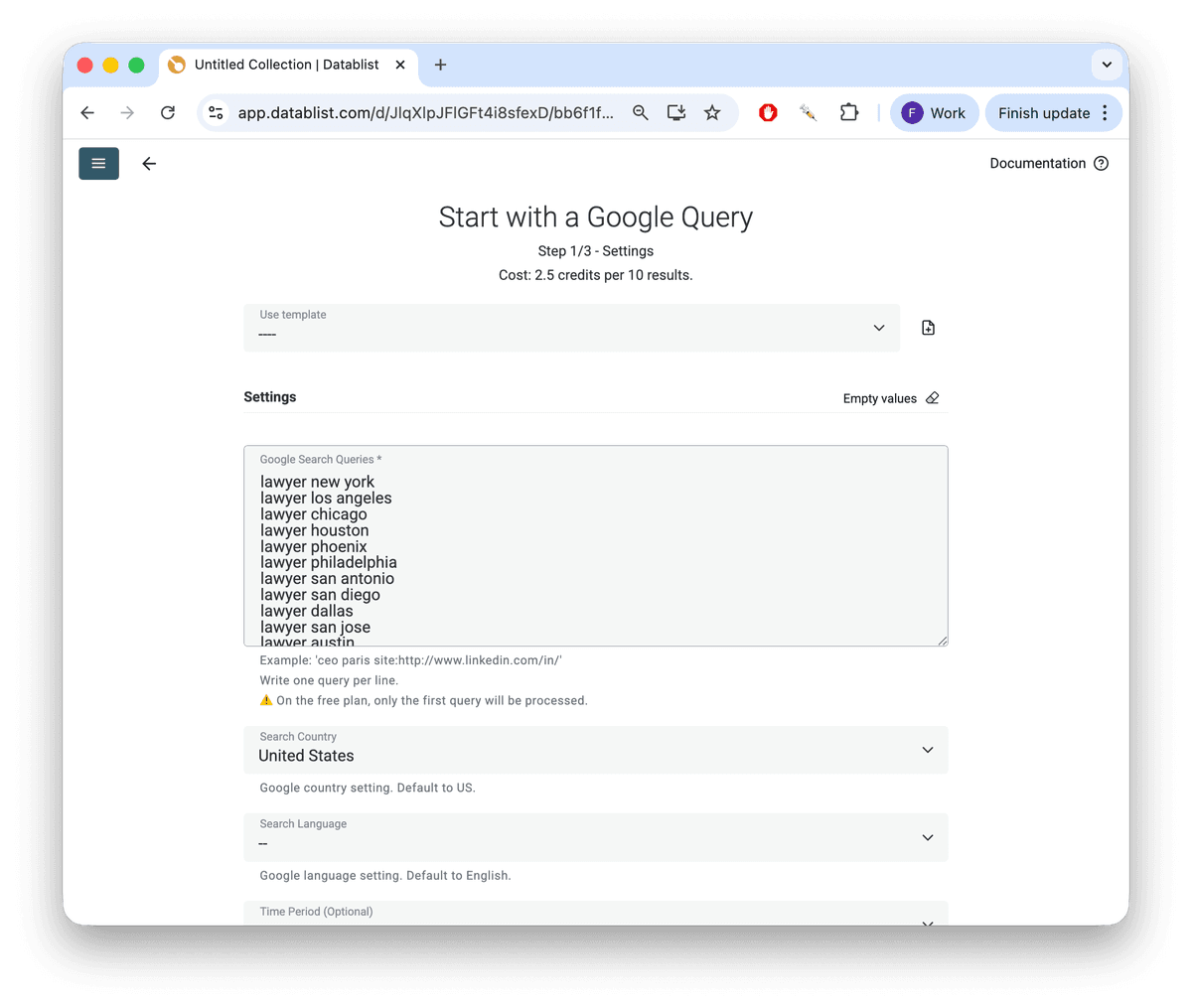
Step 4: Configure Your Search Settings
Now, you can fine-tune your scrape:
- Search Country Choose the Google domain to search from (e.g., google.de for Germany, google.fr for France). This is crucial for getting local results.
- Search Language Set the language for the search interface to ensure you get results in the correct language.
- Time Period You can filter results from the "Past 24 hours," "Past Week," "Past Month," or "Past Year." This is useful for fresh leads or recent news.
- Limit Per Query Set a maximum number of results to pull for each query. You can set this to 50, 100, or the full 250.
Step 5: Run the Import
Click "Run Import." Datablist works through your list of queries, one by one, and scrapes the results for each.
Step 6: Review Your Results
Once finished, your collection will be filled with clean, structured data. For every result, you get:
- Result Title: The page title.
- Result Snippet: The short description from Google.
- Result URL: The direct link to the page.
- Result Position: The ranking (1, 2, 3, etc.) on the Google results page.
- Search Query: The exact query that found this result, so you always know which search was successful.
The "Hidden" Feature: Automatic Deduplication
Google search results are messy. A URL that appears as result #5 for "lawyer paris" might also show up as result #12 for "corporate lawyer paris."
If you scrape both queries, you will have duplicates in your list.
Datablist automatically handles this. As it scrapes, it identifies results that have already been added (even from different queries) and automatically deduplicates them. This ensures the final list you get is clean and unique, saving you a data cleaning headache later.
Let's Talk Cost: 4,000 Results for $1
This strategy is also cheap.
- Scraping 10 Google results costs 2.5 credits.
- A $20 top-up in Datablist gives you 20,000 credits.
Let's do the math:
- $1 (which is 1,000 credits) gets you 4,000 Google search results.
- Your $20 credit pack gets you 80,000 results.
You can generate a targeted lead list that would take days to build manually.
What to Do With Your Scraped Data
Scraping the results is just the first step. Now you have a list of high-intent URLs. The real value comes from what you do next.
- Enrich Your List: You have the
Result URL. Use this as the input for other Datablist enrichments. You can find their LinkedIn Company Page URL, and then find verified email addresses. - Qualify Leads: Use the
Result SnippetandTitleto quickly qualify leads. You can even feed this text into an AI model (like ChatGPT or Claude) to automatically categorize them. - Find Technology Users: Create queries like
"powered by Shopify"or"running on WooCommerce"to build highly targeted lists of e-commerce stores. (Check our guides for finding Shopify stores or WooCommerce stores). - Competitor & Market Research: Track mentions of your competitors or industry keywords over time. Set the "Time Period" to "Past 24 hours" and run it daily to get a live feed of news and mentions.
Conclusion
Stop fighting Google's 250-result limit. You can't win by scraping one query deeply. The key is to scrape wide by using hundreds of specific, targeted queries.
Datablist's "Start with a Google Query" source fits this strategy. It automates the searches, handles deduplication, and returns a structured list of Google results.
Query Patterns from the How-To Guides
The best results come from query lists that describe one precise target at a time.
For Instagram profile discovery, use Google operators to find profiles by niche and location:
site:instagram.com "fitness coach" "Paris"site:instagram.com "real estate agent" "Miami"site:instagram.com "founder" "SaaS"
For technology or ecommerce lead lists, combine platform footprints with a country, city, niche, or product category:
"powered by Shopify" "France""built with WooCommerce" "dentist""myshopify.com" "skincare"
For local service lists, generate keyword and location combinations with AI, then paste one query per line. Keep the title, snippet, result URL, position, and search query so you can qualify and deduplicate results after import.
FAQ
What is the Google 250 result limit? Google limits the number of search results it displays to any user (or scraper) to around 250, regardless of how many millions of results it claims to have found.
Is it legal to scrape Google? Scraping publicly available information from Google is generally legal for purposes like market research and lead generation. However, you must always respect Google's terms of service and use the data ethically. Datablist handles scraping responsibly.
How many queries can I run at once? You can paste thousands of queries into the Datablist source. The tool will work through them sequentially, building your list as it goes.
How is this different from a normal Google search? A normal search is manual and stops at 250 results. The Datablist Google Query source automates hundreds of searches at once, bypasses the 250-result limit by using multiple queries, deduplicates the findings, and delivers the data in a clean, structured spreadsheet.
What data does the Google Query scraper return? It returns the Result Title, Result Snippet (description), Result URL (the direct link), Result Position (ranking), and the original Search Query that found the result.
Use Cases
- Sales Teams: Build targeted lead lists by scraping for industries and locations (e.g., "plumbers in new york," "dentists in chicago").
- Marketing Agencies: Find potential clients by searching for "marketing agency needed" or by finding companies using specific technologies (e.g., "powered by HubSpot").
- Recruiters: Scrape for "we are hiring [Job Title]" combined with specific city names to find companies that are actively growing.
- E-commerce Agencies: Create lists of stores using specific platforms by searching for "powered by Shopify" or "powered by WooCommerce".
- Market Researchers: Track brand mentions, competitor news, or industry trends by running queries with the "Time Period" filter set to the last day or week.
Can I use Google search operators in each query?
Yes. Add operators such as site:, quoted phrases, exclusions, and location terms in each query. This works well for finding LinkedIn profiles, directories, review pages, public datasets, or niche company lists.
What should I do with duplicate Google results?
Keep the result URL and query columns. Datablist can deduplicate URLs after import so the same result found by several queries does not pollute your list.
Can I use this source to find Instagram profiles from Google?
Yes. Use site:instagram.com queries with niche, profession, city, and bio keywords. After import, remove irrelevant URLs, deduplicate profiles, then enrich the Instagram profile URLs.