LinkedIn Profile Scraper API
Rufen Sie Berufs-, Unternehmens- und Ausbildungsdaten aus LinkedIn-Profil-URLs ab – mit Ihrem AI-Assistenten, einem No-Code-Workflow oder Ihrem eigenen Code.
- Ab 0,014 $ pro Profil
- Kein LinkedIn-Login erforderlich
- 10.000 Profile pro Task
| LinkedIn-Profil-URL |
|---|
| linkedin.com/in/maya-lindqvist |
| linkedin.com/in/tom-okafor |
| linkedin.com/in/lea-moreau |
Mehr als 38.000 Nutzer vertrauen uns – von Start-ups bis zu Fortune-500-Teams





Funktioniert mit jedem Tool, das HTTP-Anfragen senden kann
 Claude
 Cursor
 Codex
Codex Make
Make n8n
n8n Zapier
- Ihr eigener Code
Wählen Sie Ihren Einstieg
Lassen Sie die Einrichtung von einem AI-Assistenten oder Ihrem Automatisierungstool übernehmen oder rufen Sie die REST API aus Ihrem eigenen Code auf.
Einrichtungs-Prompt einfügen
Kopieren Sie den Prompt für Claude Code, Codex oder Cursor beziehungsweise für Make, n8n oder Zapier und fügen Sie ihn dort ein. Die AI erstellt einen Datablist-Ordner auf Ihrem Computer und richtet alles ein.
API-Key einfügen
Wenn die AI Sie dazu auffordert, kopieren Sie Ihren API-Key aus der Datablist-App und fügen Sie ihn in die geöffnete .env-Datei ein. Fügen Sie ihn niemals in den Chat ein.
Ergebnisse abrufen
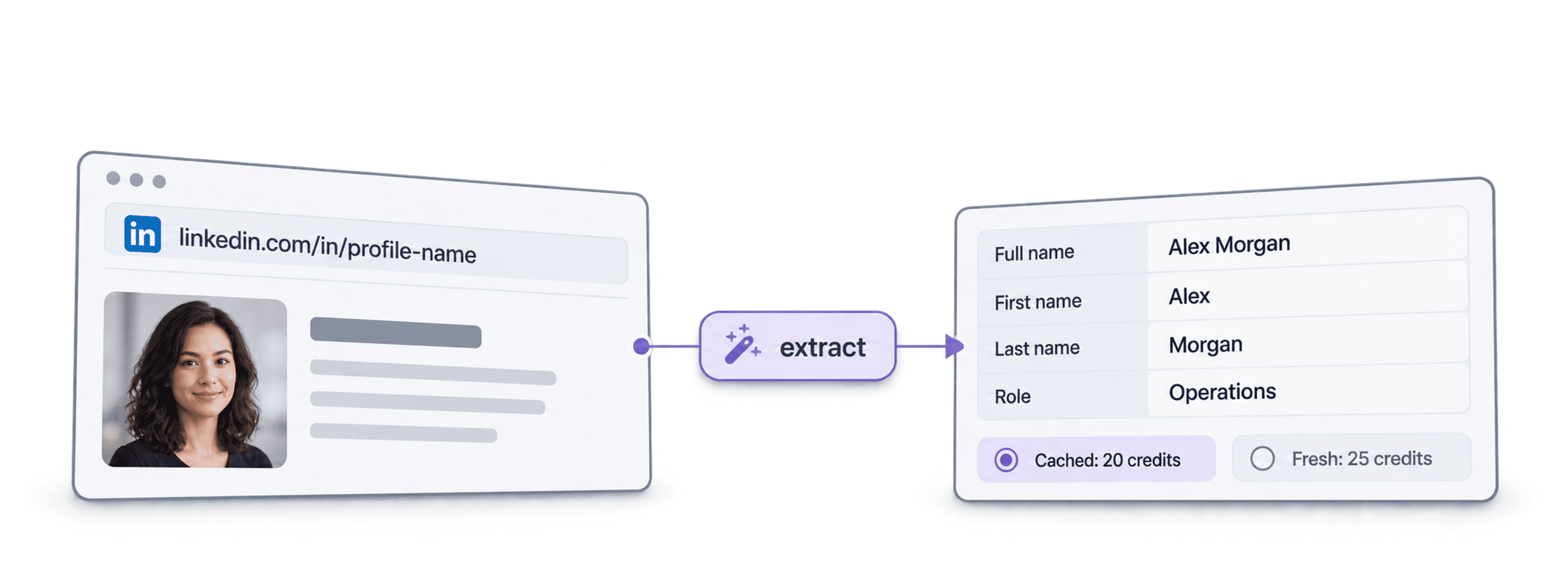
Senden Sie Ihre Liste mit LinkedIn-Profil-URLs und erhalten Sie pro Profil eine Zeile mit Name, Profilüberschrift, Standort, aktueller Position und Unternehmen – bereit für Ihre Tabelle oder Ihr CRM.
Beispielergebnis ansehenSie verwenden Make, n8n oder Zapier? Hier finden Sie alle Felder für die HTTP-Anfrage
Verwenden Sie das HTTP-Anfragemodul oder den entsprechenden Node Ihres Tools. Sie benötigen drei Schritte: Liste senden, warten und anschließend die Ergebnisse abrufen.
1. Liste senden (HTTP-Anfrage)
- Methode
POST- URL
https://api.datablist.com/v1/enrichments/tasks- Header
X-API-Key= Ihr API-KeyContent-Type=application/json- Body (JSON)
- json{"enrichmentId": "linkedin-profile-scraper","uniqueId": "linkedin-profile-scraper-import-1","settings": {"experiencesNb": "3","educationsNb": "1"},"inputs": [{"inputId": "row-1", "data": {"profileUrl": "https://www.linkedin.com/in/maya-lindqvist/"}},{"inputId": "row-2", "data": {"profileUrl": "https://www.linkedin.com/in/tom-okafor/"}},{"inputId": "row-3", "data": {"profileUrl": "https://www.linkedin.com/in/lea-moreau/"}}]}
- Speichern
- Die
@idaus der Antwort. Das ist Ihre Task-ID.
2. Bis zum Abschluss warten
Fügen Sie eine kurze Wartezeit oder Verzögerung und anschließend eine GET-Anfrage an https://api.datablist.com/v1/enrichments/tasks/TASK_ID mit demselben X-API-Key-Header hinzu. Wiederholen Sie dies, bis status den Wert completed hat.
3. Ergebnisse abrufen
GET https://api.datablist.com/v1/enrichments/tasks/TASK_ID/results?limit=50. Ordnen Sie outputs Ihren Spalten zu. Wenn nextCursor nicht leer ist, führen Sie den Aufruf erneut mit &cursor= und diesem Wert aus.
Auf einen Blick
Aktuelle öffentliche Profildaten aus einer LinkedIn-URL: wer die Person ist, wo sie arbeitet und was sie studiert hat. Kein Datablist-Workspace, keine Collection und kein Import erforderlich.
Ihre Eingaben
- LinkedIn-Profil-URLs: Standardmäßige Profillinks oder Sales-Navigator-Lead-Links
- Umfang des Verlaufs (optional): 3, 5 oder 10 frühere Positionen und 1, 3 oder 5 Bildungseinrichtungen
- Profile aus dem Cache (optional): Akzeptieren Sie eine kürzlich gespeicherte Kopie und zahlen Sie weniger
Ihre Ergebnisse
- Die Person: Name, Profilüberschrift, Zusammenfassung, Standort, Sprachen und Kontakte
- Die aktuelle Position: Titel, Startdatum, Unternehmen, Unternehmenswebsite, Branche und Größe
- Frühere Positionen und Ausbildung: So viele Einträge, wie Sie angefordert haben
Die Kosten
- Aktuelles Profil: 25 Credits pro Profil
- Profil aus dem Cache: 20 Credits, wenn Sie eine gespeicherte Kopie akzeptieren
- 1.000 Credits = 1 $: Gemeinsam mit der Datablist-App nutzbar
Was Teams damit entwickeln
Integrieren Sie den LinkedIn Profile Scraper überall dort, wo Ihre Daten bereits verarbeitet werden.
Leads vor dem Outreach recherchieren
- LinkedIn-URL aus einer Lead-Liste
- Position, Unternehmen, Standort
Rufen Sie für jeden Lead die aktuelle Position und das Unternehmen ab, damit Ihre Sequenz die richtige Person mit einer relevanten ersten Zeile anspricht.
Kandidatenprofile erstellen
- LinkedIn-URL des Kandidaten
- Positionen und Ausbildung in Ihrem ATS
Rufen Sie frühere Positionen und Ausbildungsdaten für jeden Kandidaten ab und halten Sie Ihr ATS oder Ihre Tabelle ohne Copy-and-paste aktuell.
Jobwechsel erkennen
- Kontakte im CRM
- Neues Unternehmen markiert
Verarbeiten Sie Ihre Kontakte erneut und vergleichen Sie das aktuelle Unternehmen mit dem CRM, um Champions zu erkennen, die zu einem neuen Account gewechselt sind.
Welche Kosten entstehen?
Zahlen Sie pro Abfrage mit Credits. Der API-Zugriff ist ab dem Growth-Tarif verfügbar.
Wie hoch sind Ihre Kosten?
Geben Sie an, wie viele LinkedIn-Profile Sie benötigen, und wir zeigen Ihnen die günstigste Option.
= 25.000 Credits bei 25 Credits pro aktuellem Profil
So funktionieren Credits
1.000 Credits = 1 $, ein Credit kostet also ein Zehntel Cent. Ein aktuelles Profil kostet 25 Credits, ein Profil aus dem Cache 20 Credits. Für ein nicht gefundenes Profil können dennoch Credits berechnet werden, da die Suche durchgeführt wurde. Jedes Ergebnis gibt creditsUsed zurück, sodass Sie die tatsächlichen Kosten pro Zeile verfolgen können. Tarif-Credits werden monatlich erneuert und verfallen, wenn sie nicht genutzt werden. Zusätzlich erworbene Credits verfallen nie.
Integrieren Sie die API in Ihren Code
Alles, was Sie zum direkten Aufruf der REST API benötigen: Code, Antworten, Endpoints, Felder, Authentifizierung und Limits.
datablist/linkedin-profile-scraper-api
Offizielle Beispiele: cURL, Python mit Requests oder asynchronem HTTPX sowie TypeScript. Speichern Sie Ihren Key in DATABLIST_API_KEY und führen Sie den Code aus.
Kopieren, einfügen, ausführen
Ein vollständiges Skript, das einen Task erstellt, auf dessen Abschluss wartet und jedes Ergebnis ausgibt. Ersetzen Sie YOUR_PERSONAL_API_KEY durch Ihren Key.
# 1. Create the task (returns 202 Accepted and the task "@id")
curl --request POST 'https://api.datablist.com/v1/enrichments/tasks' \
  --header 'X-API-Key: YOUR_PERSONAL_API_KEY' \
  --header 'Content-Type: application/json' \
  --data '{
    "enrichmentId": "linkedin-profile-scraper",
    "uniqueId": "linkedin-profile-scraper-import-1",
    "settings": {
      "experiencesNb": "3",
      "educationsNb": "1"
    },
    "inputs": [
      {"inputId": "row-1", "data": {"profileUrl": "https://www.linkedin.com/in/maya-lindqvist/"}},
      {"inputId": "row-2", "data": {"profileUrl": "https://www.linkedin.com/in/tom-okafor/"}},
      {"inputId": "row-3", "data": {"profileUrl": "https://www.linkedin.com/in/lea-moreau/"}}
    ]
  }'
# 2. Poll every few seconds until status is completed, failed or stopped
curl 'https://api.datablist.com/v1/enrichments/tasks/TASK_ID' \
--header 'X-API-Key: YOUR_PERSONAL_API_KEY'
# 3. Read the results, then follow nextCursor until it is null
curl 'https://api.datablist.com/v1/enrichments/tasks/TASK_ID/results?limit=50' \
--header 'X-API-Key: YOUR_PERSONAL_API_KEY'Was die API zurückgibt
Ein Ergebnis pro Eingabe mit Ihrer inputId, einem Status, den Outputs und den verbrauchten Credits. Beispieldaten.
{
  "taskId": "00000000000040008000000000000001",
  "results": [
    {
      "inputId": "row-1",
      "status": "success",
      "outputs": {
        "profileUrl": "https://www.linkedin.com/in/maya-lindqvist/",
        "firstName": "Maya",
        "lastName": "Lindqvist",
        "fullName": "Maya Lindqvist",
        "linkedInHeadline": "Head of Sales at Brightwave Analytics",
        "linkedInCity": "Stockholm",
        "linkedInCountryCode": "SE",
        "linkedInLocation": "Stockholm, Sweden",
        "linkedInlastExpTitle": "Head of Sales",
        "linkedInlastExpStartsAt": "2023-02-01",
        "linkedInlastExpCompany": "Brightwave Analytics",
        "linkedInlastExpCompanyWebsite": "https://www.brightwaveanalytics.com",
        "linkedInlastExpCompanyIndustry": "Software Development",
        "linkedInlastExpCompanyRange": "51-200",
        "linkedInlastEduSchool": "Example University",
        "linkedInLanguages": "English, Swedish",
        "linkedInConnections": "500"
      },
      "creditsUsed": "25",
      "error": null
    }
  ],
  "nextCursor": null
}
Endpoints und Felder
Alle Pfade beziehen sich auf https://api.datablist.com. Die Felddefinitionen stammen aus GET /v1/enrichments/linkedin-profile-scraper (Dokumentation aktualisiert am 21. Okt. 2026). Schemaversion: 2026-09-12.
API-Schema anzeigen (JSON) (wird in einem neuen Tab geöffnet)
- /v1/enrichments/linkedin-profile-scraper
- Schema abrufen, kein Key erforderlich
- POST
- /v1/enrichments/tasks
- Task erstellen
- /v1/enrichments/tasks/{taskId}
- Status und Fortschritt abfragen
- /v1/enrichments/tasks/{taskId}/results
- Ergebnisse abrufen, 1 bis 100 pro Seite
- POST
- /v1/enrichments/tasks/{taskId}/stop
- Laufenden Task abbrechen
- /v1/enrichments/tasks
- Task-Verlauf, neueste zuerst
Schemareferenz
Senden Sie settings einmal pro Task und ein data-Objekt pro Eingabe. Die Ergebnisse können zusätzliche Felder enthalten, wenn das Enrichment erweitert wird. Behalten Sie daher beim Parsen von outputs unbekannte Keys bei.
Alle Einstellungen, Eingaben und Ausgaben anzeigen
Einstellungen
includeUrnInclude LinkedIn Internal ID (URN) | Boolean | Include the LinkedIn internal identifier (URN), for example: ACoAAAIJflYBlveEKEKWvVsjTP4QeXHK8KfcKHg. This ID can be used to build Sales Navigator URLs, like https://www.linkedin.com/sales/lead/XXXX. Aktiviert, wenn: |
|---|---|---|
includePicturesInclude Pictures | Boolean | Include the LinkedIn profile picture and the company logo URL. ⚠️ These URLs expire fast. Download the images to avoid broken links. Aktiviert, wenn: |
acceptCachedProfilesAccept cached profiles | Boolean | Default behavior is to fetch fresh LinkedIn profile data. Enable this option to use cached profiles when available. Cached profiles cost 20 credits per profile. Aktiviert, wenn: |
experiencesNbExperiences to return | Text | How many work experiences to return. Default to 3.Zulässige Werte: |
educationsNbEducations to return | Text | How many educations to return. Default to 1.Zulässige Werte: |
Eingaben (data)
profileUrlerforderlichPerson's LinkedIn Profile | Text | LinkedIn Profile Identifier. Works with standard profile URLs (https://linkedin.com/in/xxx) and Sales Navigator URLs (https://www.linkedin.com/sales/lead/xxxx). |
|---|
Ausgaben
linkedInInternalIdentifierLinkedIn Internal ID (URN) | Text | The unique internal LinkedIn identifier (URN). Example: ACoAAAIJflYBlveEKEKWvVsjTP4QeXHK8KfcKHg. Use it to build Sales Navigator URLs like https://www.linkedin.com/sales/lead/XXXX. Aktiviert, wenn: |
|---|---|---|
profileUrlLinkedIn Profile URL Normalized | Text | The clean and standardized LinkedIn Public Profile URL. In the format: https://www.linkedin.com/in/xxxFormat: |
firstNameFirst Name | Text | The first name of the profile |
lastNameLast Name | Text | The last name of the profile |
fullNameFull Name | Text | The full name of the profile |
linkedInHeadlineHeadline | Text | The tagline on the user profile. |
linkedInSummarySummary | Text | A blurb (longer than the tagline) written by the user for his profile. |
linkedInCityCity | Text | The city of the profile |
linkedInStateState | Text | The state of the profile |
linkedInCountryCodeCountry | Text | The country code of the profile. 2-letter country code (ISO 3166-1 alpha-2). |
linkedInCountryNameCountry Name | Text | The profile's country of residence, in English words. |
linkedInLocationLocation | Text | Full Location text |
linkedInProfilePictureLinkedIn Profile Picture | Text | These URLs expire fast. Download the images to avoid broken links. Aktiviert, wenn: |
linkedInlastExpTitleTitle (Current or last experience) | Text | The title of the current (or last) experience |
linkedInlastExpEmploymentTypeEmployment Type (Current or last experience) | Text | The employment type of the current (or last) experience. |
linkedInlastExpDescriptionDescription (Current or last experience) | Text | The description of the current (or last) experience |
linkedInlastExpStartsAtStart Date (Current or last experience) | Text | The start date of the current (or last) experience.Format: |
linkedInlastExpEndsAtEnd date (Current or last experience) | Text | The end date of the last experience. None if still active.Format: |
linkedInlastExpLocationLocation (Current or last experience) | Text | The location of the current (or last) experience |
linkedInlastExpCompanyCompany Name (Current or last experience) | Text | The company name of the current (or last) experience. |
linkedInlastExpCompanyPageCompany page URL (Current or last experience) | Text | LinkedIn company's profile URL of the current (or last) experience. |
linkedInlastExpCompanyWebsiteCompany website (Current or last experience) | Text | Company Website of the current (or last) experience. |
linkedInlastExpCompanyDescriptionCompany description (Current or last experience) | Text | The company description from the LinkedIn company page of the current or last experience. |
linkedInlastExpCompanyIndustryCompany Industry (Current or last experience) | Text | Company Industry of the current (or last) experience. |
linkedInlastExpCompanyRangeCompany employee range (Current or last experience) | Text | Size of the company. In the form: 1, 2-10, 11-50, etc. |
linkedInlastExpCompanyLogoCompany Logo (Current or last experience) | Text | These URLs expire fast. Download the images to avoid broken links. Aktiviert, wenn: |
linkedIn2ExpTitleTitle (Experience #2) | Text | The title from the second most recent work experience. If available. |
linkedIn2ExpEmploymentTypeEmployment Type (Experience #2) | Text | The employment type from the second most recent work experience. If available. |
linkedIn2ExpDescriptionDescription (Experience #2) | Text | The description from the second most recent work experience. If available. |
linkedIn2ExpStartsAtStart Date (Experience #2) | Text | The start date from the second most recent work experience. If available.Format: |
linkedIn2ExpEndsAtEnd date (Experience #2) | Text | The end date from the second most recent work experience. If available.Format: |
linkedIn2ExpCompanyNameCompany Name (Experience #2) | Text | The company name from the second most recent work experience. If available. |
linkedIn2ExpLogoCompany Logo (Experience #2) | Text | These URLs expire fast. Download the images to avoid broken links. Aktiviert, wenn: |
linkedIn3ExpTitleTitle (Experience #3) | Text | The title from the third most recent work experience. If available. |
linkedIn3ExpEmploymentTypeEmployment Type (Experience #3) | Text | The employment type from the third most recent work experience. If available. |
linkedIn3ExpDescriptionDescription (Experience #3) | Text | The description from the third most recent work experience. If available. |
linkedIn3ExpStartsAtStart Date (Experience #3) | Text | The start date from the third most recent work experience. If available.Format: |
linkedIn3ExpEndsAtEnd date (Experience #3) | Text | The end date from the third most recent work experience. If available.Format: |
linkedIn3ExpCompanyNameCompany Name (Experience #3) | Text | The company name from the third most recent work experience. If available. |
linkedIn3ExpLogoCompany Logo (Experience #3) | Text | These URLs expire fast. Download the images to avoid broken links. Aktiviert, wenn: |
linkedInlastEduSchoolSchool (Current or last education) | Text | The school name of the current (or last) education |
linkedInlastEduDegreeDegree (Current or last education) | Text | The degree of the current (or last) education |
linkedInlastEduFieldField of Study (Current or last education) | Text | The field of study of the current (or last) education |
linkedInlastEduStartsAtStart Date (Current or last education) | Text | The start date of the current (or last) educationFormat: |
linkedInlastEduEndsAtEnd date (Current or last education) | Text | The end date of the current (or last) educationFormat: |
linkedInlastEduLogoLogo URL (Current or last education) | Text | These URLs expire fast. Download the images to avoid broken links. Aktiviert, wenn: |
linkedInSkillsSkills | Text | Comma-separated list of skills listed on the LinkedIn profile. |
linkedInLanguagesLanguages | Text | Comma-separated list of spoken languages of the LinkedIn profile. |
linkedInConnectionsConnections | Text | The number of connections of the profile |
Ein Header, klare Limits
Erstellen Sie einen persönlichen API-Key in Ihrem Datablist-Konto und senden Sie ihn bei jeder authentifizierten Anfrage mit.
Authentifizierung
Senden Sie Ihren Key im X-API-Key-Header. Datablist tauscht und erneuert die Access Tokens für Sie.
- Header:
X-API-Key: YOUR_PERSONAL_API_KEY - Optional: Verwalten Sie Tokens selbst mit
Authorization: BearerausPOST /v1/account/token - Entweder oder: Wenn Sie beide Header senden, wird
400 AmbiguousCredentialszurückgegeben - Nur serverseitig: Halten Sie Keys aus URLs, Browsercode und Logs heraus
Limits
- Eingaben pro Task: 1 bis 10.000
- Größe: 16 KiB pro Eingabe, 10 MiB pro Anfrage
- Laufzeit: bis zu 24 Stunden pro Task
- Task-Erstellung: 10 Anfragen pro 60 Sekunden und Konto
- Polling und Ergebnisse: 120 Anfragen pro 60 Sekunden und Vorgang
- Aktive Tasks: etwa 20 gleichzeitig pro Konto
- Aufbewahrung: Tasks und Ergebnisse werden 90 Tage lang gespeichert
Passende Tutorials
Lernen Sie die neuesten Workflows mit detaillierten Schritt-für-Schritt-Anleitungen kennen.
Häufig gestellte Fragen
Alles, was Sie oder Ihr AI-Coding-Agent zur Integration der LinkedIn Profile Scraper API benötigen: Authentifizierung, Anfrage, Polling, Ergebnisse, Limits und Wiederholungsversuche.
Passende APIs, Enrichments und kostenlose Tools
Verknüpfen Sie den LinkedIn Profile Scraper mit weiteren Enrichments – in Ihrem Code, in der Datablist-App oder kostenlos.
Enrichment APIs
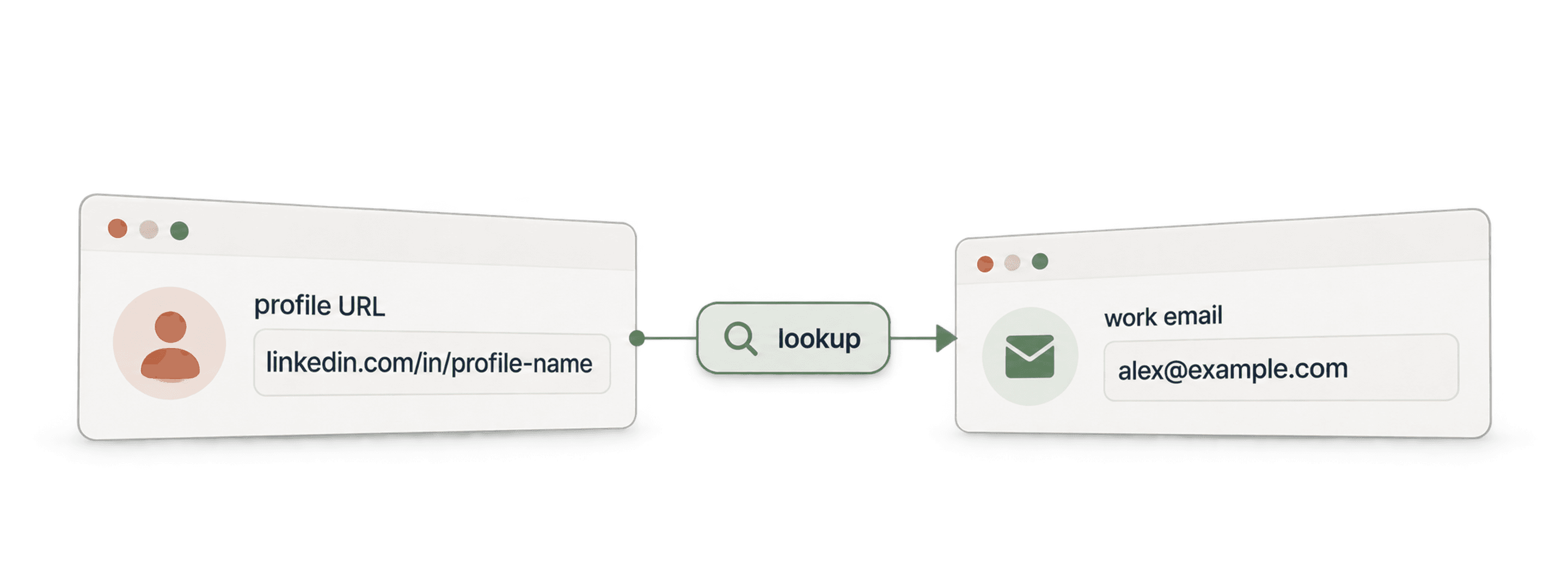
- Waterfall Email Finder APIFinden Sie anhand eines Namens und der Unternehmensdomain eine verifizierte geschäftliche Email-Adresse.
- Waterfall Phone Finder APIFinden Sie anhand einer LinkedIn-Profil-URL eine Telefonnummer. Sie zahlen nur bei einem Treffer.
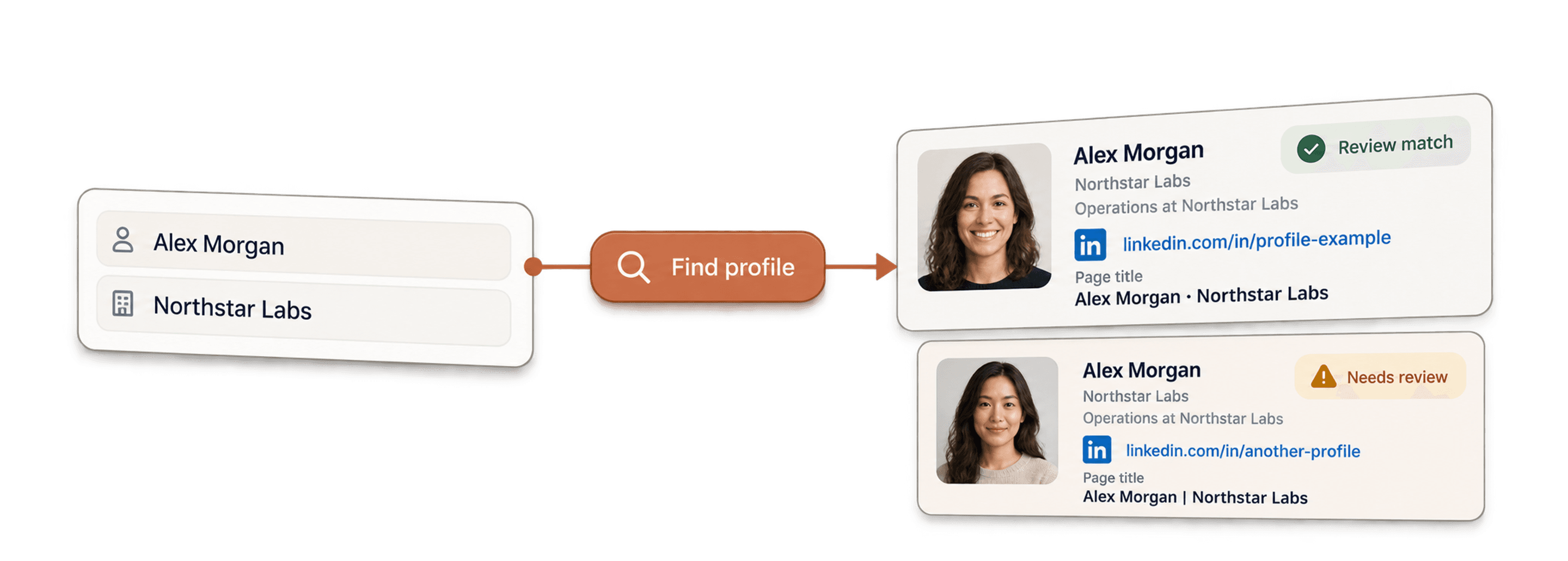
- LinkedIn Profile Finder APIFinden Sie anhand des Namens einer Person deren LinkedIn-Profil-URL.



No-Code-Enrichments
- Waterfall Email FinderFinden Sie mit mehr als 20 Anbietern gleichzeitig verifizierte Emails anhand einer LinkedIn-URL.
- Waterfall Phone FinderErmitteln Sie direkte Mobilnummern aus denselben LinkedIn-Profil-URLs.
- LinkedIn Company Page ScraperExtrahieren Sie öffentliche Unternehmensdaten aus LinkedIn-Unternehmensseiten-URLs.
Kostenlose Tools
- Kostenloser LinkedIn Profile ScraperExtrahieren Sie öffentliche Datenpunkte aus einer Profil-URL. Kein Login, keine Cookies und keine Session-ID erforderlich.
- Kostenloser Email FinderFinden Sie anhand eines Namens und eines Unternehmens eine geschäftliche Email-Adresse. Kostenlos testen.
- Unternehmens-Domain-FinderWebsite-Domains anhand einer Liste von Unternehmensnamen finden.
