

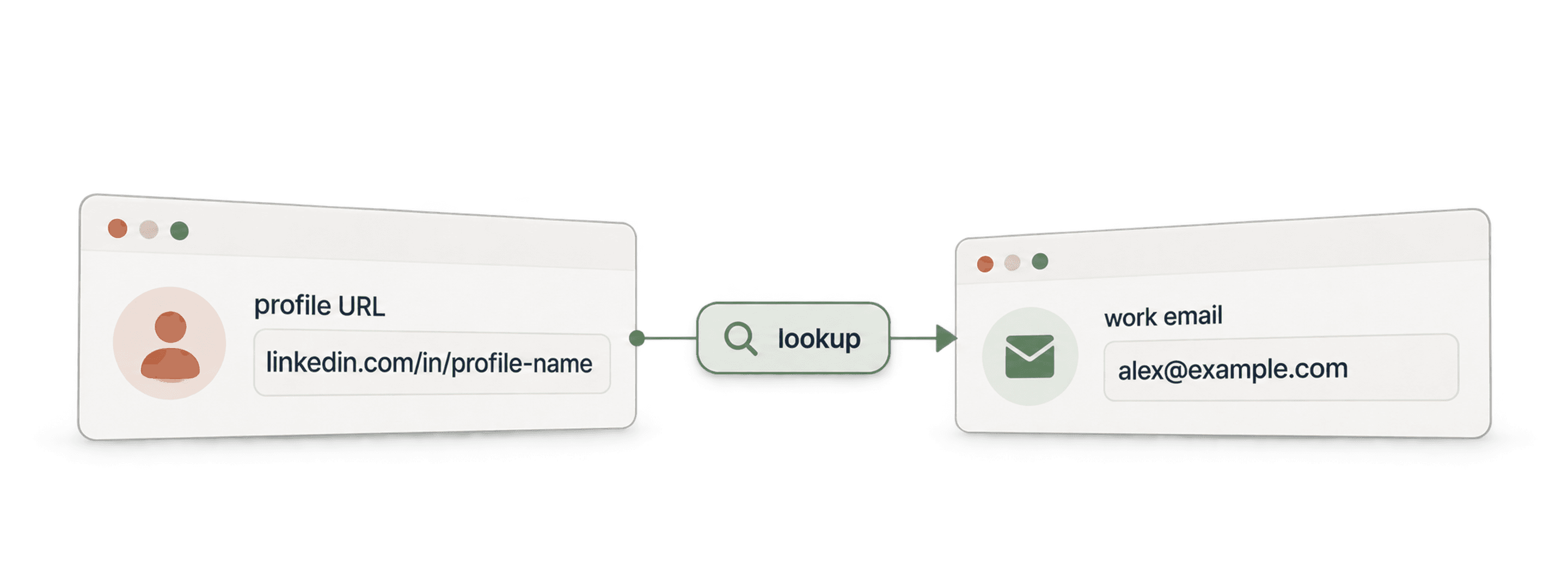
A LinkedIn email extractor turns LinkedIn profiles or a Sales Navigator search into a list of work emails. LinkedIn does not show those emails on the profile, so every tool on this list does the same two things: it pulls the leads, then matches each one to an email from outside data.
Where they differ is cost, how many emails they actually return, and what they need from you. Most run as a Chrome extension inside your logged-in LinkedIn account, and most need a Sales Navigator seat for bulk exports. We compared 6 tools on public monthly pricing (checked November 2026) and priced one real job on each: 1,000 Sales Navigator leads with work emails in one month.
📌 Summary
The pick: Datablist. It is the only tool here that runs without your LinkedIn account, cookies or a browser extension, and it does the job for $89 a month with no Sales Navigator seat needed to run the export.
The catch everyone has: no extractor finds an email for every lead. Datablist returns the work email when it already has it, then you run its Waterfall Email Finder on the rest: 20+ email providers in sequence, 25 credits per email found and nothing for a miss.
The numbers: 1,000 Sales Navigator leads with emails cost $89 on Datablist. The extension tools cost $39 to $174 on their own, or $158.99 to $293.99 once you add the Sales Navigator Core seat they need for bulk exports.
Also compared: Evaboot, Skrapp, Kaspr, Surfe and Wiza.
The 6 Best LinkedIn Email Extractors at a Glance
| Tool | How it reaches LinkedIn | Emails | Entry price (monthly) | Cost of the job (1,000 leads with emails) |
|---|---|---|---|---|
| Datablist | Cloud, on Datablist's own accounts: no login, cookies or extension | Known work email, then a 20+ provider waterfall on the rest | $49 (Starter) | $89 |
| Evaboot | Your own Sales Navigator account | Verified email included in each lead credit | $9 (100 leads) | $49 + Sales Navigator |
| Skrapp | Chrome extension on your account | 1 credit per email found (valid or catch-all) | $39 (2,000 emails) | $39 + Sales Navigator |
| Kaspr | Chrome extension on your account | Unlimited B2B emails, capped exports | $65 (1,000 exports) | $65 + Sales Navigator |
| Surfe | Chrome extension on your account | 1 credit per email | $49 (150 emails) | $89 + Sales Navigator |
| Wiza | Chrome extension on your account | 1 credit per valid email | $49 (100 emails) | $174 + Sales Navigator |
Sales Navigator Core costs $119.99 a month on monthly billing in the US 7. Skrapp, Kaspr, Surfe and Wiza also work on regular LinkedIn profiles, but their bulk Sales Navigator exports run on your own Sales Navigator account.
How We Compared the Tools
We picked tools that sell themselves as LinkedIn email extractors or that bundle an email in every LinkedIn export, and compared them on three things a buyer actually pays for:
- Access: does the tool run inside your LinkedIn account (extension, cookies, your Sales Navigator), or outside it?
- Email billing: do you pay per lead exported, per email found, or per valid email?
- Cost of one real job: 1,000 leads from a Sales Navigator search, each with a work email, in one month. For every tool we took the cheapest monthly plan that covers the job.
All prices are each vendor's own monthly prices, read on its pricing page on 27 November 2026 1-6. Annual discounts are left out so every tool is compared on the same billing period. We did not test match rates in this version, so no tool is credited with a find rate it did not publish.
The Real Cost of 1,000 LinkedIn Leads With Emails
| Tool | Cheapest plan that covers the job | Tool cost | Needs your Sales Navigator seat for the export? | Total with Sales Navigator Core |
|---|---|---|---|---|
| Datablist | Growth (100,000 credits) | $89 | No | $89 |
| Evaboot | Scale 1,000 credits | $49 | Yes | $168.99 |
| Skrapp | Professional (2,000 email credits) | $39 | Yes | $158.99 |
| Kaspr | Starter (1,000 exports a month, unlimited B2B emails) | $65 | Yes | $184.99 |
| Surfe | Pro (1,000 email credits) | $89 | Yes | $208.99 |
| Wiza | Email (500 valid emails) + 500 extra at $0.15 | $174 | Yes | $293.99 |
How the Datablist number works: the Sales Navigator Scraper costs 20 credits per lead, so 1,000 leads are 20,000 credits. The Waterfall Email Finder costs 25 credits per email found, so the emails cost at most 25,000 credits. That is 45,000 credits at most, which fits in Growth's 100,000. Starter's 25,000 credits cover the job as long as no more than 200 leads need the waterfall. On Growth, 1,000 leads cost $17.80 and each email found about $0.022.
What the totals leave out: the extension tools also use your LinkedIn account for every export. That is a cost too, just not one on the invoice: LinkedIn's User Agreement does not allow browser plugins or add-ons that scrape the site 8, and an account restriction stops your outreach until it is lifted. See how to appeal a LinkedIn restriction for what that looks like.
The 6 Best LinkedIn Email Extractors in 2026
1. Datablist: Best LinkedIn Email Extractor Without a LinkedIn Account
Datablist is a lead data platform: you scrape a LinkedIn or Sales Navigator search, find the emails, clean and export the list in the same spreadsheet. Its Sales Navigator Scraper runs in Datablist's cloud on its own accounts, so you never share your login or cookies and nothing runs in your browser 9.
Key Features
- No LinkedIn account, cookies or extension. Paste a regular LinkedIn search URL or a Sales Navigator search URL; Datablist scrapes the results in the background, up to 2,500 profiles per search.
- 57 columns per lead, including names, job title and history, company domain, the LinkedIn and Sales Navigator URLs, and the Known Work Email.
- Known Work Email at no extra cost. When Datablist already has a lead's work email, it comes back with the scrape.
- Waterfall Email Finder for the rest. It queries 20+ email providers in sequence until one finds the address, straight from the LinkedIn profile URL, and returns the email, its status and the email provider 10.
- Pay only for emails found. 25 credits per email found, 0 credits when nothing comes back.
- The rest of the workflow in one place: phone finder, company enrichment, deduplication, and CSV, Excel, CRM or API export.
Why Datablist Does Not Return an Email for Every Lead
The Sales Navigator Scraper only returns an email it already has; it does not run a live email search during the scrape. So after a scrape, some rows have a Known Work Email and some are empty. That is by design: you only pay the waterfall for the leads that need it.
The full flow takes two steps:
- Scrape the search. Open the Sales Navigator Scraper, paste your search URL, set the limit and run it. 20 credits per lead.
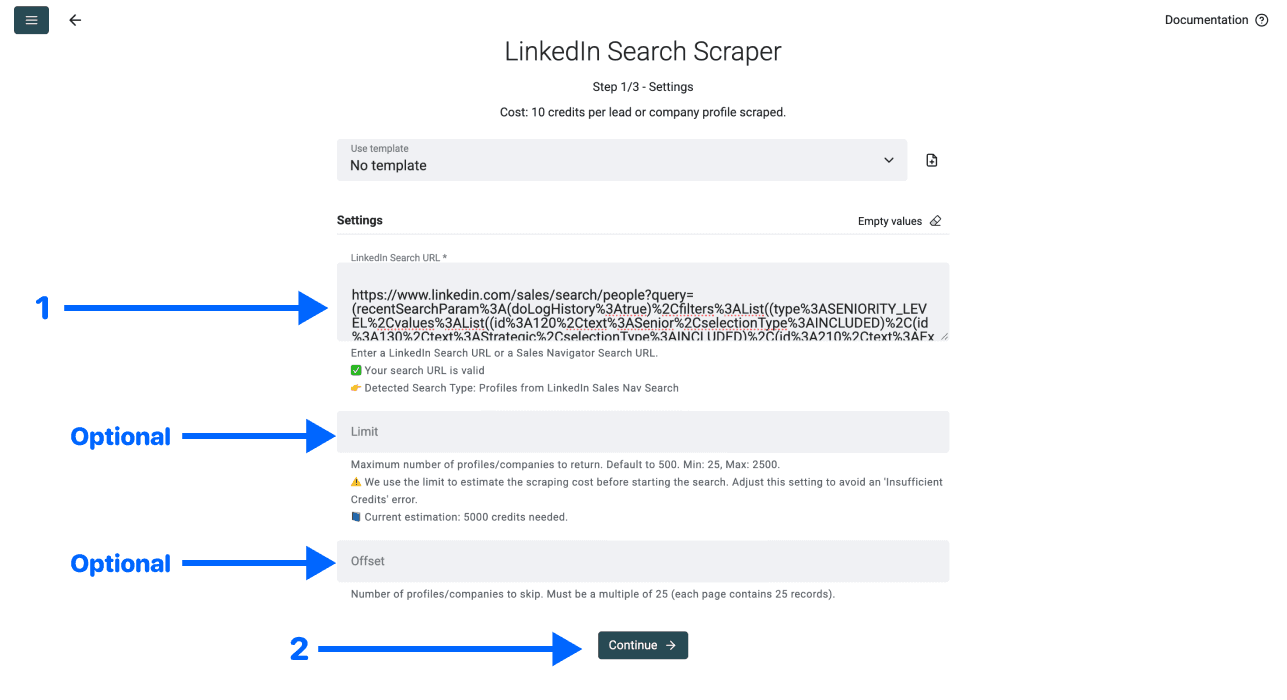
- Find the missing emails. Filter the rows where Known Work Email is empty, open Enrich, People, Waterfall Email Finder, set the search method to By LinkedIn URL, map the LinkedIn URL column and run it on the filtered rows. 25 credits per email found.
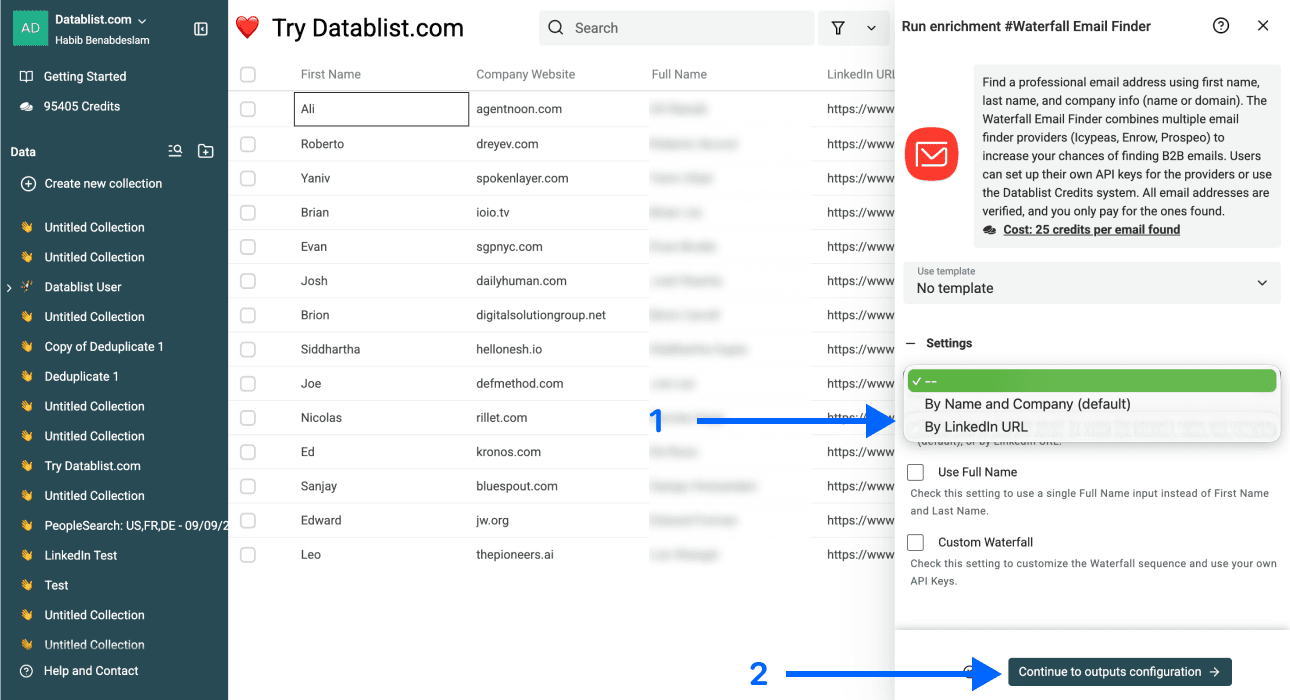
Each row comes back with the email, a verified or unverified status, and the email provider (Google, Microsoft and others), so you can send to verified emails first. The step-by-step guide with every screen is in How To Find Email Addresses From a LinkedIn Profile URL.
Pricing
- Free: 500 credits a year.
- Starter: $49/mo for 25,000 credits a month (1,250 leads at 20 credits each).
- Growth: $89/mo for 100,000 credits a month, with credit rollover, automations, API and integrations. Bigger Growth credit sizes go up to 1,000,000 credits for $809/mo.
Limitation
Emails are a second step, not part of the scrape. If you want one click that returns a lead and its email together, Evaboot does that, but it bills the lead credit even when no email is found.
2. Evaboot: Best for One-Click Sales Navigator Exports With Emails
Evaboot exports the results of your own Sales Navigator searches and adds a verified email to each lead when it finds one 1.
Key Features
- Exports Sales Navigator lead and account searches, up to 2,500 leads per search.
- A verified email is included in the 1 credit per lead.
- Export to CSV, CRM, webhooks or API.
Pricing
- Starter $9/mo for 100 credits, Grow $29/mo for 400 credits.
- Scale from $49/mo for 1,000 credits up to $299/mo for 15,000 credits.
- No free plan.
Limitation
Evaboot needs a Sales Navigator subscription, and a lead with no email found still costs 1 credit, so you pay for the misses.
3. Skrapp: Cheapest Per Email if You Already Pay for Sales Navigator
Skrapp is an email finder with a Chrome extension that works on LinkedIn, Sales Navigator and LinkedIn Recruiter, including a List Saver for Sales Navigator 2.
Key Features
- Finds professional emails from LinkedIn profiles and searches.
- Each email is marked Valid or Catch-all.
- One credit finds one email or verifies one email.
Pricing
- Free: 50 email credits a month.
- Professional: $39/mo for 2,000 email credits.
- Enterprise: $349/mo for 50,000 email credits.
Limitation
A catch-all email counts as a find, and catch-all addresses carry a bounce risk. The extension runs on your LinkedIn account, export limits are not stated, and there are no phone numbers.
4. Kaspr: Best for Emails and Phones From LinkedIn Profiles
Kaspr is a Chrome extension that shows emails and phone numbers on LinkedIn profiles and, from the Starter plan, enriches Sales Navigator searches in bulk 3.
Key Features
- Unlimited B2B email credits on paid plans.
- 100 to 200 phone credits a month.
- Bulk enrichment from Sales Navigator searches, up to 500 leads per search on Starter.
Pricing
- Free: 15 email credits a month.
- Starter: $65/mo, up to 12,000 exports a year (1,000 a month), 3 bulk launches a month.
- Business: $99/mo, up to 30,000 exports a year, 10 bulk launches a month.
Limitation
"Unlimited emails" is capped by exports: 1,000 a month on Starter. Bulk runs need Sales Navigator and go through the extension on your account.
5. Surfe: Best for Pushing LinkedIn Contacts Into a CRM
Surfe is a Chrome extension built to move LinkedIn and Sales Navigator contacts into a CRM, with email and phone credits 4.
Key Features
- Bulk export from LinkedIn and Sales Navigator searches.
- Syncs contacts to the CRM, or exports a CSV.
- Email and phone credits on every plan.
Pricing
- Free: 20 emails and 5 phones a month, limited bulk export.
- Essential: $49/mo for 150 emails and 50 phones.
- Pro: $89/mo for 1,000 emails and 100 phones.
Limitation
The email allowance is small for list building: 150 emails on Essential. It is priced per user and runs on your LinkedIn account.
6. Wiza: Best if You Only Want to Pay for Valid Emails
Wiza is a Chrome extension for LinkedIn and Sales Navigator that charges per valid email 5.
Key Features
- Credits are valid emails, so you do not pay for misses.
- Phone numbers on some plans.
- One-click export from Sales Navigator lists and searches.
Pricing
- Free: 20 valid emails and 5 phones.
- Starter: $49/mo for 100 valid emails; Email: $99/mo for 500; Email + Phone: $199/mo for 500 emails and 500 phones.
- Extra emails cost $0.15 each. Unlimited emails are only on annual plans.
Limitation
On monthly billing, Wiza is the most expensive per email here: $198 per 1,000 emails on the Email plan. It also needs your Sales Navigator account for list exports.
How to Choose a LinkedIn Email Extractor
Start from what you can risk and what you already pay for:
- You do not want to put your LinkedIn account at risk, or you do not pay for Sales Navigator: use Datablist. Scrape the search, then run the Waterfall Email Finder on the leads without an email.
- You already pay for Sales Navigator and want one click per export: Evaboot, accepting that misses still cost a credit.
- You look up profiles one at a time while browsing LinkedIn: an extension such as Kaspr or Skrapp fits that habit.
- Your goal is the CRM, not a list: Surfe.
Whatever you pick, check the email status before you send. A catch-all or unverified address is where bounces come from; send to verified emails first and hold the rest.
Conclusion: Datablist Is the Best LinkedIn Email Extractor
Every extractor on this list has to match LinkedIn leads to emails from outside data, and none finds every email. The difference is what you give up to get them. The extension tools need your LinkedIn account in the loop and, for bulk exports, a Sales Navigator seat on top of their own price.
Datablist does the same job outside your account: scrape the search for 20 credits per lead, keep the work emails it already has, and run the Waterfall Email Finder on the rest for 25 credits per email found. For 1,000 leads with emails, that is $89 a month, all in.