
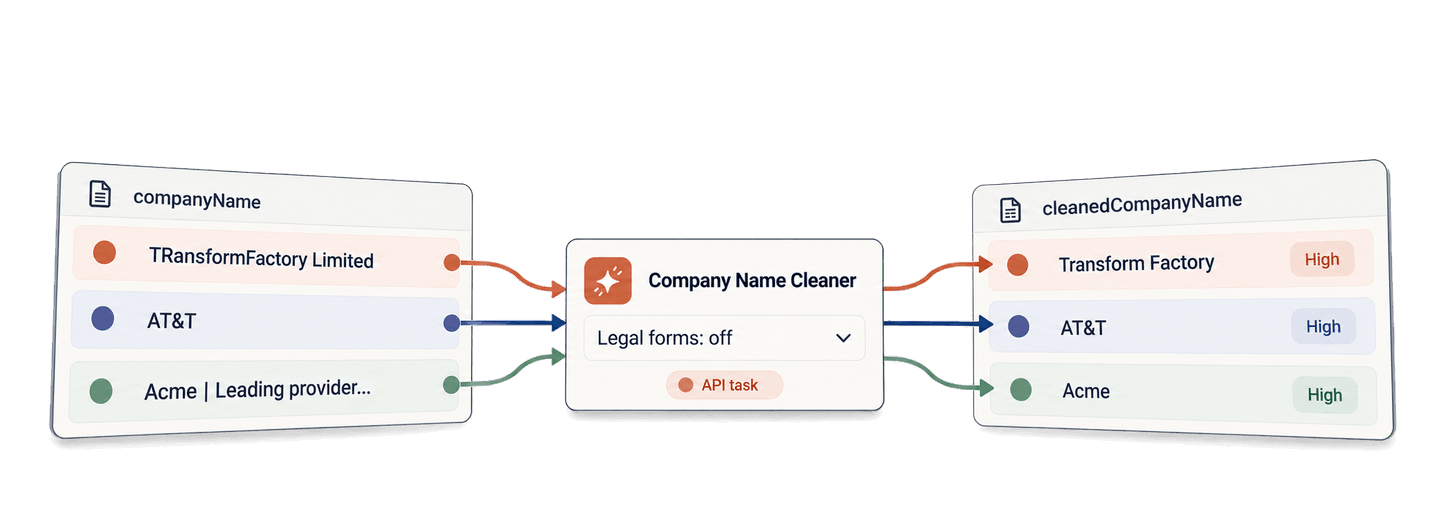
You can clean company names in Python before they turn into awkward email copy. In this guide, you will send eight names to Datablist's Company Name Cleaner API, wait for the background task, and read every result page. Then you will reuse the same function to turn raw company names from a lead provider into natural email introductions.
This approach handles more than a fixed list of suffixes. It can fix casing and spacing, remove a separate legal form or an obvious tagline, and preserve accents, numbers, acronyms, and brand punctuation. Keep the raw name on each lead, then use the cleaned value where people will read it.
📌 Summary For Those In a Rush
Use the Company Name Cleaner API to turn raw lead-provider company names into readable email introductions while preserving the source data. The Python example first cleans eight names, then reuses the same function to prepare personalization copy.
- Input: Source names such as
TRansformFactory Limited,AT&T, and a directory name containing a tagline.- Output: A cleaned name and confidence value, followed by an introduction such as
your team at NGF Immobilien.
Set up your API key and Python environment
Create a Datablist Personal API Key. The key follows this shape:
auth0|exampleuser:exampleaccount:EXAMPLE_TOKEN_NOT_VALID:1That value is an example, not a working key. Export your own key as
DATABLIST_API_KEY:
export DATABLIST_API_KEY="your-personal-api-key"REST API access is available on the Growth plan. Cleaner calls also use enrichment credits, which I explain in the cost section.
For this example, I use the requests package. Create a file named
clean_company_names.py, install the package, and run the file with:
python -m pip install requests
python clean_company_names.pyBuild the clean_company_names() function
Paste this complete script into clean_company_names.py:
import json
import os
import time
import uuid
import requests
def clean_company_names(company_records, api_key):
"""Submit one company-name task, wait, and return every result."""
tasks_url = "https://api.datablist.com/v1/enrichments/tasks"
headers = {"X-API-Key": api_key}
inputs = [
{
"inputId": record["id"],
"data": {"companyName": record["company_name"]},
}
for record in company_records
]
request_id = str(uuid.uuid4())
print(f"Request ID: {request_id}", flush=True)
payload = {
"enrichmentId": "company-name-cleaner",
"uniqueId": request_id,
"settings": {"keepLegalSuffix": False},
"inputs": inputs,
}
response = requests.post(tasks_url, headers=headers, json=payload)
response.raise_for_status()
task = response.json()
task_id = task["@id"]
task_url = f"{tasks_url}/{task_id}"
while task["status"] not in ("completed", "failed", "stopped"):
time.sleep(3)
response = requests.get(task_url, headers=headers)
response.raise_for_status()
task = response.json()
if task["status"] != "completed":
raise RuntimeError(
f"Task {task_id} {task['status']}: {task.get('error')}"
)
results = []
results_url = f"{task_url}/results"
params = {"limit": 100}
while True:
response = requests.get(results_url, headers=headers, params=params)
response.raise_for_status()
page = response.json()
results.extend(page["results"])
next_cursor = page["nextCursor"]
if next_cursor is None:
break
params["cursor"] = next_cursor
return results
if __name__ == "__main__":
api_key = os.environ.get("DATABLIST_API_KEY")
if not api_key:
raise RuntimeError("Set DATABLIST_API_KEY before running this script.")
companies = [
{"id": "transform-factory", "company_name": "TRansformFactory Limited"},
{"id": "ngf-immobilien", "company_name": "NGF Immobilien GmbH & Co. KG"},
{"id": "lensen-partner", "company_name": "Lenßen + Partner Immobilien"},
{"id": "studio-54", "company_name": "Studio 54"},
{"id": "att", "company_name": "AT&T"},
{"id": "ebay", "company_name": "ebay"},
{
"id": "acme-tagline",
"company_name": "Acme | Leading provider of solar installations",
},
{
"id": "boston-consulting-group",
"company_name": "Boston Consulting Group",
},
]
cleaning_results = clean_company_names(companies, api_key)
for result in cleaning_results:
print(json.dumps(result, ensure_ascii=False))The function keeps the three API steps in execution order.
First, it turns each company into an API input. The inputId is your stable
record ID, while data.companyName is the value to clean. A stable ID matters
because you should map a result back to its record by ID, not by its position in
the response.
For one company, the important part of the submitted JSON looks like this:
{
  "enrichmentId": "company-name-cleaner",
  "uniqueId": "your-generated-request-id",
  "settings": {
    "keepLegalSuffix": false
  },
  "inputs": [
    {
      "inputId": "transform-factory",
      "data": {
        "companyName": "TRansformFactory Limited"
      }
    }
  ]
}
You can submit several inputs in the same task. Each one remains independent,
so a problem with one name does not change the inputId or source data for the
others. The script builds this array from companies, which means you can swap
in IDs and names from your own application without changing the API sequence.
Next, the POST request creates a task with the company-name-cleaner
enrichment. The script prints its generated uniqueId before making that
request. Keep that value: it helps you find the task if your connection drops
before you receive the creation response.
The API accepts the request with HTTP 202 and returns a task. The response
includes an @id, its current status, and URLs for the task and its results. A
shortened response looks like this:
{
  "@id": "task-id",
  "enrichmentId": "company-name-cleaner",
  "uniqueId": "your-generated-request-id",
  "status": "queued",
  "links": {
    "self": "https://api.datablist.com/v1/enrichments/tasks/task-id",
    "results": "https://api.datablist.com/v1/enrichments/tasks/task-id/results"
  }
}
The function reads @id and builds the same task URLs itself. You do not need
to copy an ID between requests when the script receives the creation response
normally.
The API processes the task in the background. This example uses blocking
Requests calls, so the script sleeps for three seconds between status checks and
does not continue until the task reaches completed, failed, or stopped.
Finally, the function requests 100 results at a time. When nextCursor contains
a value, it sends that value as cursor and fetches the next page. It stops only
when nextCursor is null. You can find the
synchronous Requests example
and an async HTTPX example
in the Company Name Cleaner API GitHub repository.
Read the results
Here is the result for TRansformFactory Limited:
{
  "inputId": "transform-factory",
  "status": "success",
  "outputs": {
    "cleanedCompanyName": "Transform Factory",
    "companyNameConfidence": "High"
  },
  "creditsUsed": "0.5",
  "error": null
}
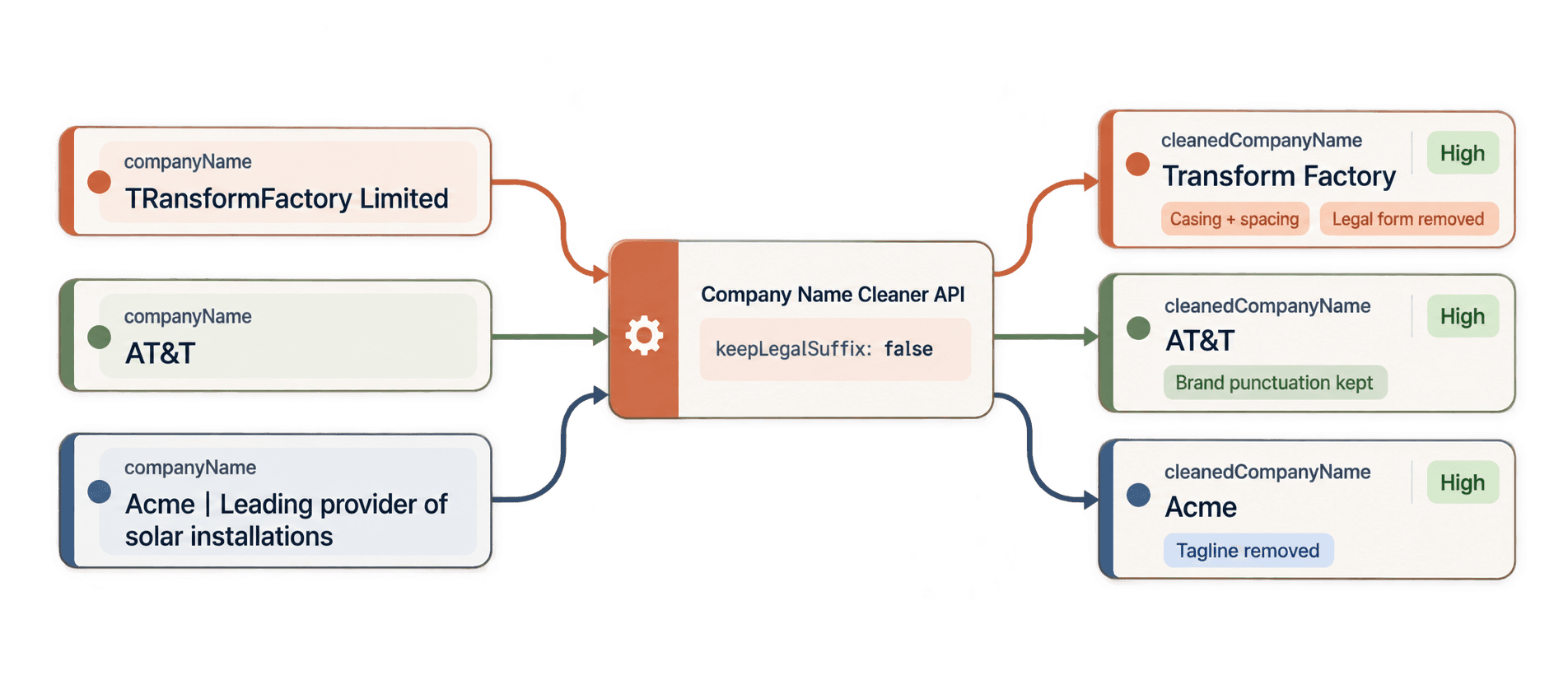
The eight examples show why cleaning a display name takes more than removing
Inc. or converting everything to title case.
| Source company name | Cleaned company name |
|---|---|
TRansformFactory Limited | Transform Factory |
NGF Immobilien GmbH & Co. KG | NGF Immobilien |
Lenßen + Partner Immobilien | Lenßen + Partner Immobilien |
Studio 54 | Studio 54 |
AT&T | AT&T |
ebay | eBay |
Acme | Leading provider of solar installations | Acme |
Boston Consulting Group | Boston Consulting Group |
Every result in this task returned success, High confidence, and 0.5
credits. The task used 4 credits in total. Confidence gives you a practical
review signal. You can use a High-confidence name directly in this small
example, while Low or Very Low results are worth comparing with the source name
before you put them into email copy.
A task can also contain no_result, error, or skipped items. Read each
item's status before using outputs, and read error when the status is not
success. The email example below creates an introduction only when the status
is success and cleanedCompanyName is not empty. An unsuccessful lead stays
visible without message copy while successful names continue.
The script sets keepLegalSuffix to false, which is the useful default for
conversational display names. It removed Limited and GmbH & Co. KG when they
were separate from the brand. If you set it to true, the cleaner keeps an
existing legal form in a shorter conventional form when appropriate. It does not
add a legal form that was missing.
See the Company Name Cleaner reference for current behavior and settings. If you prefer to clean names in the Datablist interface, the company-name cleaning methods guide covers the no-code options.
Use cleaned names in email introductions
The direct call gives you clean names. The practical next step is to put them between lead delivery and email preparation.
Imagine a lead provider sends a record for NGF Immobilien GmbH & Co. KG.
Starting an email with “your team at NGF Immobilien GmbH & Co. KG” sounds like
you pasted a database field. Cleaning it first gives you “your team at NGF
Immobilien” while the provider's raw value stays available on the record.
To run this follow-up on its own, keep the imports and
clean_company_names() function from the complete script. Replace its
if __name__ == "__main__": block with the code below:
if __name__ == "__main__":
api_key = os.environ.get("DATABLIST_API_KEY")
if not api_key:
raise RuntimeError("Set DATABLIST_API_KEY before running this script.")
leads = [
{
"lead_id": "lead-001",
"first_name": "Maya",
"company_name": "TRansformFactory Limited",
},
{
"lead_id": "lead-002",
"first_name": "Jonas",
"company_name": "NGF Immobilien GmbH & Co. KG",
},
{
"lead_id": "lead-003",
"first_name": "Alex",
"company_name": "AT&T",
},
{
"lead_id": "lead-004",
"first_name": "Priya",
"company_name": "Acme | Leading provider of solar installations",
},
]
company_records = [
{"id": lead["lead_id"], "company_name": lead["company_name"]}
for lead in leads
]
cleaning_results = clean_company_names(company_records, api_key)
results_by_id = {
result["inputId"]: result for result in cleaning_results
}
for lead in leads:
result = results_by_id.get(lead["lead_id"])
if not result or result["status"] != "success":
continue
cleaned_name = result.get("outputs", {}).get("cleanedCompanyName")
if cleaned_name:
lead["email_intro"] = (
f"Hi {lead['first_name']}, I wanted to reach out to "
f"your team at {cleaned_name}."
)
print(json.dumps(leads, indent=2, ensure_ascii=False))The list comprehension adapts each lead to the same id and company_name
shape used in the first example. This submits one task with the same
clean_company_names() function. The follow-up adds only the message-building
logic.
The result index is keyed by inputId, so the code does not depend on response
order. If lead-002 comes back after another record, its result still maps to
Jonas. The API changes NGF Immobilien GmbH & Co. KG to NGF Immobilien, and
the code produces:
Hi Jonas, I wanted to reach out to your team at NGF Immobilien.The raw company_name remains NGF Immobilien GmbH & Co. KG. If a result is
unsuccessful or has no cleaned name, the lead remains in the output without an
email_intro, ready for you to inspect.
Here is the resulting list:
[
  {
    "lead_id": "lead-001",
    "first_name": "Maya",
    "company_name": "TRansformFactory Limited",
    "email_intro": "Hi Maya, I wanted to reach out to your team at Transform Factory."
  },
  {
    "lead_id": "lead-002",
    "first_name": "Jonas",
    "company_name": "NGF Immobilien GmbH & Co. KG",
    "email_intro": "Hi Jonas, I wanted to reach out to your team at NGF Immobilien."
  },
  {
    "lead_id": "lead-003",
    "first_name": "Alex",
    "company_name": "AT&T",
    "email_intro": "Hi Alex, I wanted to reach out to your team at AT&T."
  },
  {
    "lead_id": "lead-004",
    "first_name": "Priya",
    "company_name": "Acme | Leading provider of solar installations",
    "email_intro": "Hi Priya, I wanted to reach out to your team at Acme."
  }
]
This example prepares the text but does not send an email. For the wider outreach workflow, see how to normalize company names for cold outreach.
Estimate the API cost
Each successfully cleaned, uncached name uses 0.5 credits. Cached results and
failed inputs use zero credits. This means 1,000 successful uncached names use
500 credits.
API access requires the Growth plan, which currently includes monthly credits. Datablist uses included credits before purchased top-ups. At the current USD base top-up price of $20 for 20,000 credits, 500 credits cost $0.50. Check the pricing page for the current subscription and credit-package prices, especially if your account uses EUR pricing.
Fix common errors and recover a task
The example stops instead of hiding an HTTP or task error. Use the point of failure to choose the next action:
- Missing environment variable: the script raises
RuntimeErrorbefore it sends a request. ExportDATABLIST_API_KEYand run it again. - Invalid API key:
raise_for_status()reports the failed API request. Create or copy the Personal API Key again and confirm that the script sends it inX-API-Key. - Insufficient credits: add credits or wait for your included credits to renew, then decide whether to create a new task.
- Unsuccessful item: inspect its
statusanderror. Leave that lead without anemail_introrather than building copy from an empty value. - Failed or stopped task: inspect the task and any available results and credit use before submitting the names again.
If the connection drops while you create a task, the script has already printed
its uniqueId. List your tasks first to check their status before creating
another task. Put the following snippet in a separate file after copying the
imports and api_key setup from the main script. It lists recent cleaner tasks,
matches the printed value locally, and shows the returned @id:
response = requests.get(
"https://api.datablist.com/v1/enrichments/tasks",
headers={"X-API-Key": api_key},
params={"enrichmentId": "company-name-cleaner", "limit": 100},
)
response.raise_for_status()
request_id = "paste-the-printed-request-id"
tasks = response.json()["tasks"]
matching_task = None
for task in tasks:
if task["uniqueId"] == request_id:
matching_task = task
break
if matching_task:
print("Task ID:", matching_task["@id"])Task history can be filtered by enrichmentId, but not by uniqueId. If your
task is not on the first page, follow the history response's nextCursor and
check the next page. Once you have the task ID, use the same status and results
URLs from the main function. The task documentation
explains task states, result access, and interruption behavior.
Conclusion: use cleaned names in your email copy
You now have one readable Python function that submits company names, waits for the Datablist task, retrieves all result pages, and returns a confidence value. The lead example reuses those results to create natural email introductions while leaving every raw company name intact.
Run the message-building example over a small sample from your latest lead provider delivery next. Compare Low or Very Low confidence names with their source values before you use the introductions in your outreach workflow.