Find a company's official domain using its name and an employee's full name to identify and verify the correct company.

Your goal is to identify the correct company and employee using:

- The company name
- The employee's first name
- The employee's last name

Then provide:

1. The company's official website URL
2. A short summary of what the company does
3. The employee's LinkedIn profile URL

To do so, search Google using queries such as:

- "[Company Name]" official website
- site:linkedin.com/in "[Employee First Name] [Employee Last Name]" "[Company Name]"
- site:linkedin.com/company "[Company Name]"

Visit relevant search results, the company website, and the employee's LinkedIn profile when publicly accessible.

Verify that the company website belongs to the requested company. Verify that the LinkedIn profile matches both the employee's full name and the specified company. Do not select a profile based on the name alone.

For the company website, discard company directories, legal listings, business reports, map listings, shops, social networks, and other results that are not official corporate websites.

The company website must be returned as a root domain without a path or tracking parameters. For example: https://example.com

If an output cannot be found, leave only that output empty. When evidence is incomplete, conflicting, or ambiguous, return a lower confidence value. Do not invent URLs or facts.

## Confidence

Return exactly one of these values:

- High: The company website and employee LinkedIn profile are both strongly verified using consistent evidence.
- Medium: The results are likely correct and supported by evidence, but one part cannot be fully verified.
- Low: The results are plausible, but the employee-company relationship or company identity is supported by limited or ambiguous evidence.
- Very Low: The evidence is weak or conflicting, or one or more requested results could not be found.

## Inputs

The company name to process is: /Name
Employee First Name: /FirstName
Employee Last Name: /LastName

How to use this prompt on a CSV file?

Datablist allows you to take an entire CSV file and run prompts directly on every line.

The great news is that the prompt you need is already available in Datablist under the "Templates" section. No need to start from scratch! Simply select the template that fits your task, and it's ready to run on every line of your CSV. This makes it even easier to transform your data with just a few clicks.

Import your CSV file in Datablist. Then select "Enrich" from the header.

Select the template: Find Company Domain from Company and Employee Names
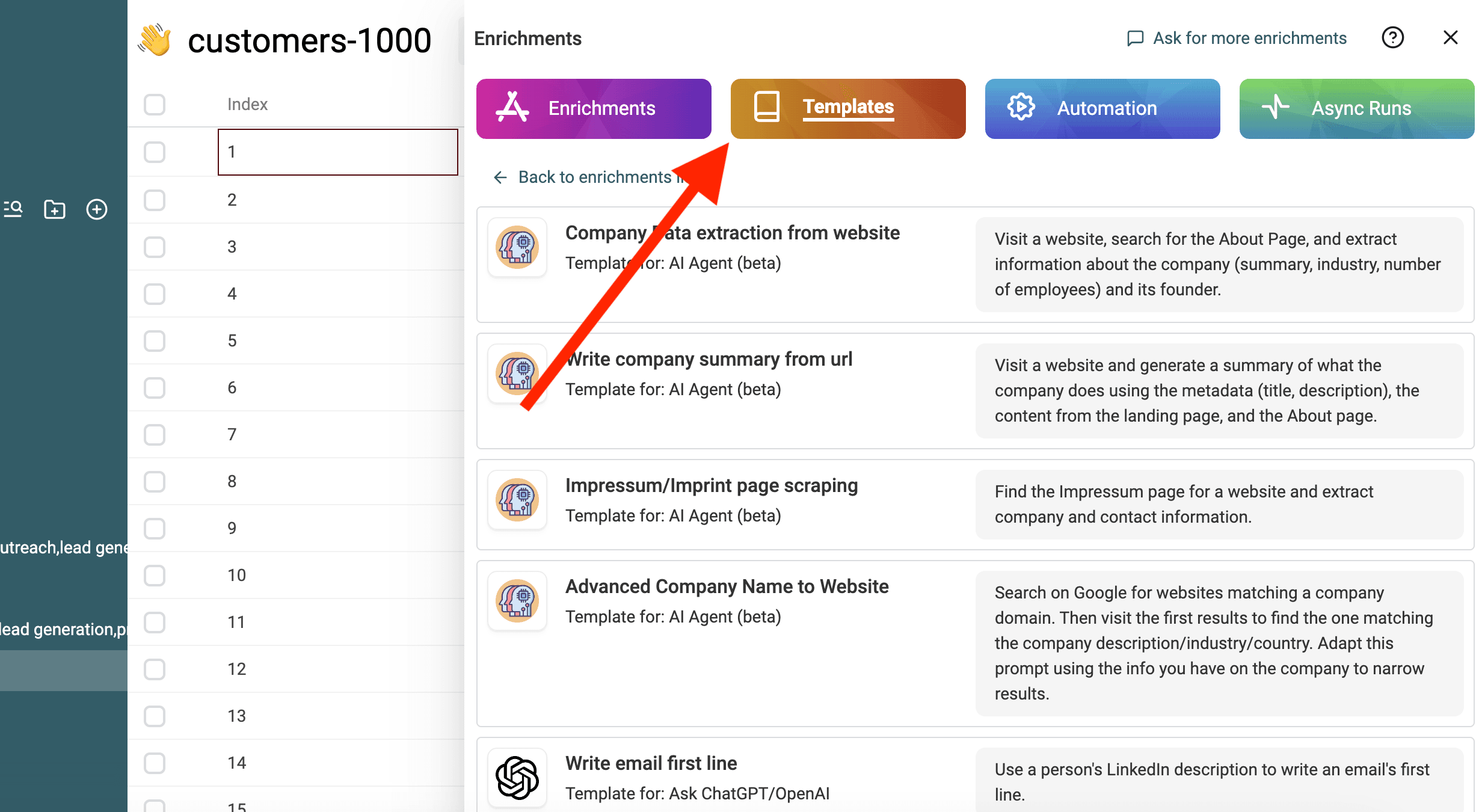
Select Template
Select Template

Replace the variables from the prompt with your collection's properties using / or '{{'.
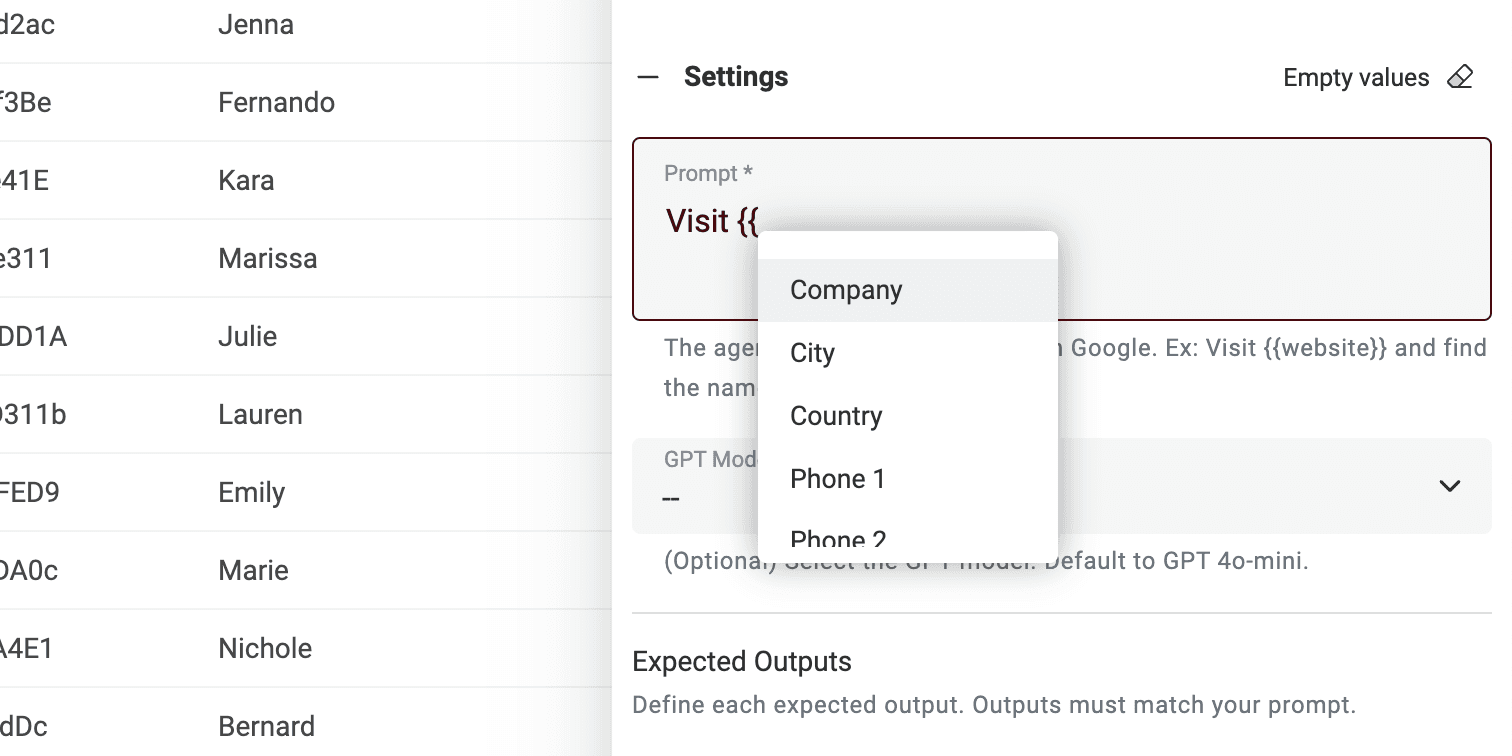
Define variables using your collection's properties

If you don't have all the variables, just edit the prompt.

That's it! You can now run the prompt on every line of your CSV file and get the results in a new column. 🚀

Note on AI Agent prompts

This prompt is made for Datablist AI Agent enrichment. An AI Agent is a smart tool that uses artificial intelligence (AI) to perform tasks for you. It can browse websites, use Google to find information and interact with different online services. This means it can help you with real-time data and up-to-date answers.

On the other hand, the ChatGPT API can only analyze the input text and respond based on its existing knowledge. It doesn't have the ability to access the internet or gather new information on its own.

An AI Agent provides a more dynamic experience by pulling in real-time data, while the ChatGPT API relies on pre-existing knowledge to respond to queries.

When you interact directly on https://chatgpt.com/, you are interacting with an Agent. Sometimes it goes online to provide extra information for your prompt (but not often). However other tools that are connected to ChatGPT use the API. So remember that this prompt cannot be used in another tool that calls the ChatGPT API.

Datablist AI Agent runs an agent on every line of your CSV.