
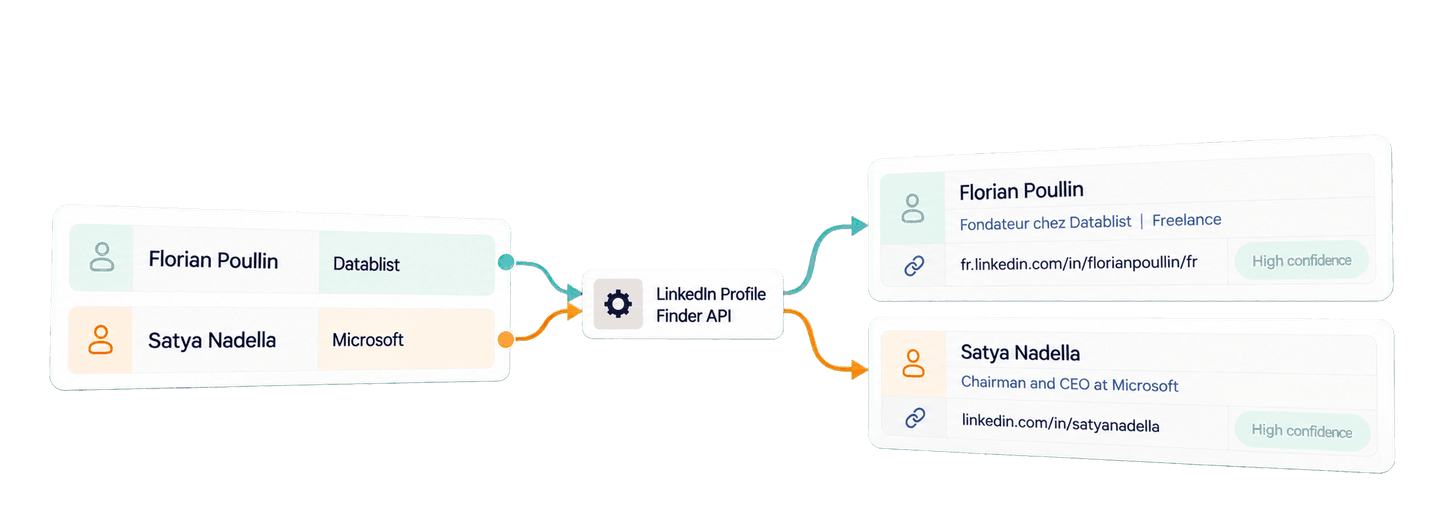
You can find LinkedIn profiles from names in Python with Datablist's LinkedIn Profile Finder API. Give the API a full name and, when you have it, a company or school keyword. It returns a public LinkedIn URL, search-result context, and a confidence signal that helps you decide whether the result belongs to the person you meant.
I will first show you a complete Python integration for four people using the Requests library. Then I will reuse the results to prepare a small research list for potential webinar or podcast guests. Stable IDs keep each returned profile attached to the right source record, even if the API returns results in a different order.
📌 Summary For Those In a Rush
Use Datablist's API to find LinkedIn profiles from names in Python, then turn useful matches into a guest-research list. The example submits one background task, waits for it, and retrieves every result page.
- Input: A person's full name and an optional company or school keyword.
- Output: A LinkedIn URL with a search title and confidence signal, plus a research list mapped back to the original people.
Set up Datablist API access
Create a Datablist account, then create a Personal API Key. Your key follows this shape:
auth0|exampleuser:exampleaccount:EXAMPLE_TOKEN_NOT_VALID:1Export your own key as DATABLIST_API_KEY; the script will send it in the
X-API-Key header.
REST API access requires the Growth plan. Profile lookups also use enrichment credits, which I calculate later in the article.
For this example, I use Python's requests package. Create a project folder,
activate a virtual environment, install Requests, and create the script file:
mkdir linkedin-profile-lookup
cd linkedin-profile-lookup
python -m venv .venv
source .venv/bin/activate
python -m pip install requests
touch find_linkedin_profiles.py
export DATABLIST_API_KEY="your-personal-api-key"Run a complete LinkedIn profile lookup in Python
The sample looks up Andrew Ng with DeepLearning.AI, Florian Poullin with
Datablist, Satya Nadella with Microsoft, and Dharmesh Shah with HubSpot. Each
API input has an inputId that will connect the result to the same person later.
Paste this complete script into find_linkedin_profiles.py:
import json
import os
import time
import uuid
import requests
def find_linkedin_profiles(inputs, api_key):
"""Submit one profile lookup task, wait, and return every result."""
tasks_url = "https://api.datablist.com/v1/enrichments/tasks"
headers = {"X-API-Key": api_key}
request_id = str(uuid.uuid4())
print(f"Request ID: {request_id}", flush=True)
payload = {
"enrichmentId": "linkedin-profile-lookup",
"uniqueId": request_id,
"settings": {"searchCountry": "US", "skipIfNotName": False},
"inputs": inputs,
}
response = requests.post(tasks_url, headers=headers, json=payload)
response.raise_for_status()
task = response.json()
task_id = task["@id"]
task_url = f"{tasks_url}/{task_id}"
while task["status"] not in ("completed", "failed", "stopped"):
time.sleep(3)
response = requests.get(task_url, headers=headers)
response.raise_for_status()
task = response.json()
if task["status"] != "completed":
raise RuntimeError(
f"Task {task_id} {task['status']}: {task.get('error')}"
)
results = []
results_url = f"{task_url}/results"
params = {"limit": 100}
while True:
response = requests.get(results_url, headers=headers, params=params)
response.raise_for_status()
page = response.json()
results.extend(page["results"])
next_cursor = page["nextCursor"]
if next_cursor is None:
break
params["cursor"] = next_cursor
return results
if __name__ == "__main__":
api_key = os.environ["DATABLIST_API_KEY"]
inputs = [
{
"inputId": "andrew-ng",
"data": {"fullName": "Andrew Ng", "keyword": "DeepLearning.AI"},
},
{
"inputId": "florian-poullin",
"data": {"fullName": "Florian Poullin", "keyword": "Datablist"},
},
{
"inputId": "satya-nadella",
"data": {"fullName": "Satya Nadella", "keyword": "Microsoft"},
},
{
"inputId": "dharmesh-shah",
"data": {"fullName": "Dharmesh Shah", "keyword": "HubSpot"},
},
]
lookup_results = find_linkedin_profiles(inputs, api_key)
print(json.dumps(lookup_results, indent=2, ensure_ascii=False))The task-level searchCountry sets the search engine's country to the United
States for every search in this task.
The skipIfNotName setting controls what happens to weak name matches. false
is the default and the value used here, so the API can return the URL, title,
and confidence even when name confidence is Very Low. With
skipIfNotName: true, the API discards only Very Low name matches. It can
still return Low, Medium, or High matches, and it does not change the
keyword or country inputs. The API evaluates the name and keyword signals first,
then applies this filter. If filtering removes every candidate, the lookup has
no profile result. The search was still attempted, so it still uses 2.5 credits.
Run the file with:
python find_linkedin_profiles.pyHow the lookup finds and selects a profile
The tool uses Google Search to find public LinkedIn profile candidates. For Florian Poullin, the search is shaped like this:
Florian Poullin Datablist site:linkedin.com/in/The name is required, while the company or school keyword gives Google and the
selection step more context. searchCountry sets Google's country context for
every input in the task.
The tool then checks the first few Google results. It compares the submitted
name with each result title and LinkedIn handle, looks for the keyword in the
URL, title, or summary, and considers the result's Google position. A scoring
algorithm combines those signals and selects the strongest remaining result. A
keyword match can strengthen a Low or Medium name match, but it cannot turn
a Very Low name match into a stronger one.
The resulting confidence is the signal used by the skipIfNotName setting
described with the script. After that filter, the strongest remaining profile is
returned with its URL, title, and confidence.
1. Submit the lookup task
The inputs list already uses the API contract. fullName is required in this
example, while keyword supplies company context that can help rank search
results. Use your own record ID as inputId; you will need it to join results
back to your source data.
You can omit keyword when you only have a name, or send firstName and
lastName together instead of fullName. When several people share a name, a
known company or school usually gives the search a more useful clue. Keep
searchCountry at the task level because it applies to every input in that
task. If different groups need different search-country settings, submit them
as separate tasks. The LinkedIn Profile Finder API
documentation
has the current input schema and supported country codes.
Here is the request body produced by the example. The script generates a new
uniqueId for each run:
{
  "enrichmentId": "linkedin-profile-lookup",
  "uniqueId": "526c13d1-4a02-4093-870b-ccde2da5be55",
  "settings": {
    "searchCountry": "US",
    "skipIfNotName": false
  },
  "inputs": [
    {
      "inputId": "andrew-ng",
      "data": {
        "fullName": "Andrew Ng",
        "keyword": "DeepLearning.AI"
      }
    },
    {
      "inputId": "florian-poullin",
      "data": {
        "fullName": "Florian Poullin",
        "keyword": "Datablist"
      }
    },
    {
      "inputId": "satya-nadella",
      "data": {
        "fullName": "Satya Nadella",
        "keyword": "Microsoft"
      }
    },
    {
      "inputId": "dharmesh-shah",
      "data": {
        "fullName": "Dharmesh Shah",
        "keyword": "HubSpot"
      }
    }
  ]
}
This call sends that JSON to the task endpoint:
response = requests.post(tasks_url, headers=headers, json=payload)
response.raise_for_status()
task = response.json()
task_id = task["@id"]Datablist responds with HTTP 202 Accepted. The selected fields below show the
task ID and queued status returned for this four-person sample:
{
  "@id": "d3f6e08e9b9445a29482cebd80091234",
  "enrichmentId": "linkedin-profile-lookup",
  "uniqueId": "526c13d1-4a02-4093-870b-ccde2da5be55",
  "status": "queued",
  "progress": {
    "finishedInputs": 0,
    "totalInputs": 4
  }
}
Processing continues in the background. The script prints its generated
uniqueId before the POST, so you can find the task if the creation response is
lost.
2. Poll until processing finishes
The function checks the task every three seconds. Although this Python client
blocks while it waits, the API task itself runs in the background. A completed
task is ready for normal result retrieval. If the status is failed or
stopped, the function raises an error so you can inspect the task before
deciding whether to submit paid work again.
3. Retrieve every result page
The last loop requests up to 100 results at a time. It fetches the next page
until nextCursor is null.
Every result carries the original inputId. This matters because results do
not need to arrive in the same order as your source list.
Read the results
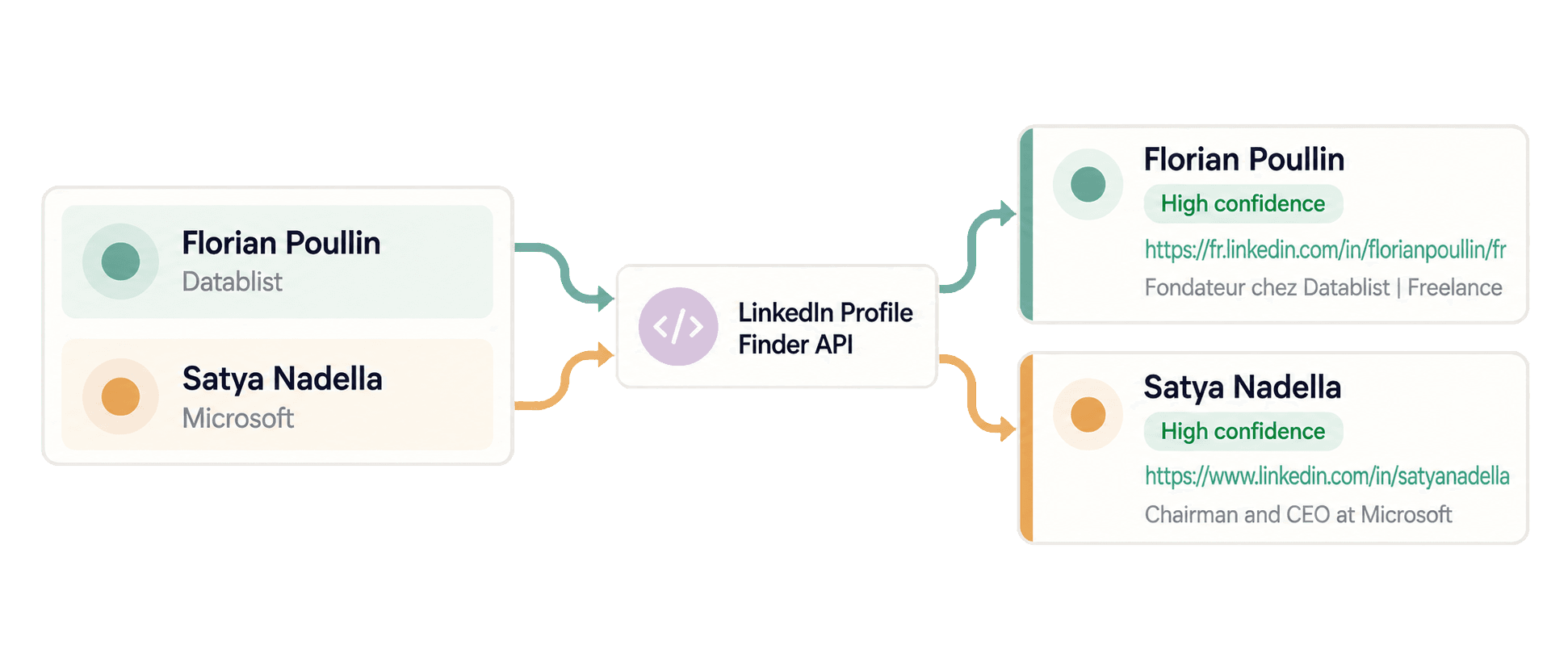
Here is the result for Florian Poullin:
{
  "inputId": "florian-poullin",
  "status": "success",
  "outputs": {
    "profileUrl": "https://fr.linkedin.com/in/florianpoullin/fr",
    "linkedInUrlTitle": "Florian Poullin - Fondateur chez Datablist | Freelance",
    "profileConfidence": "High"
  },
  "creditsUsed": "2.5",
  "error": null
}
The ID connects the result to the original input. The URL, title, and
High confidence support using this link in the small research list. Satya
Nadella's record follows the same shape:
{
  "inputId": "satya-nadella",
  "status": "success",
  "outputs": {
    "profileUrl": "https://www.linkedin.com/in/satyanadella",
    "linkedInUrlTitle": "Satya Nadella - Chairman and CEO at Microsoft",
    "profileConfidence": "High"
  },
  "creditsUsed": "2.5",
  "error": null
}
Andrew Ng also returned High confidence, the URL
https://www.linkedin.com/in/andrewyng, and the title Andrew Ng - DeepLearning.AI, AI Fund and AI Aspire. Dharmesh Shah returned
https://www.linkedin.com/in/dharmesh with the title Dharmesh Shah - Founder and CTO at HubSpot. Helping ... and High confidence.
Use a current company or school as the keyword when you know it. That context helps the search rank useful results, while the returned title, summary, and confidence help you decide whether to use the URL. Public-profile visibility and search engine indexing can still affect discovery. LinkedIn explains how public profile visibility and search indexing work and how those settings affect what search engines can see.
Reuse the results for a guest-research list
Suppose a content team has a webinar topic, four possible guests, and their known affiliations. The team wants likely profile links to open before deciding who fits the topic.
The complete script has already fetched lookup_results, so this follow-up does
not repeat the same API task. Add the code below after the existing
print(json.dumps(...)) line. When you replace the sample records with your own
shortlist, the same function will fetch those records once and the loop will
prepare the corresponding research list.
guests = [
{
"guest_id": "andrew-ng",
"full_name": "Andrew Ng",
"affiliation": "DeepLearning.AI",
},
{
"guest_id": "florian-poullin",
"full_name": "Florian Poullin",
"affiliation": "Datablist",
},
{
"guest_id": "satya-nadella",
"full_name": "Satya Nadella",
"affiliation": "Microsoft",
},
{
"guest_id": "dharmesh-shah",
"full_name": "Dharmesh Shah",
"affiliation": "HubSpot",
},
]
results_by_id = {
result["inputId"]: result for result in lookup_results
}
research_list = []
for guest in guests:
prepared_guest = guest.copy()
prepared_guest["profile_url"] = None
prepared_guest["search_title"] = None
prepared_guest["profile_confidence"] = None
result = results_by_id.get(guest["guest_id"], {})
outputs = result.get("outputs", {})
title = outputs.get("linkedInUrlTitle", "")
is_useful_match = (
result.get("status") == "success"
and outputs.get("profileConfidence") == "High"
and guest["full_name"].casefold() in title.casefold()
)
if is_useful_match:
prepared_guest["profile_url"] = outputs.get("profileUrl")
prepared_guest["search_title"] = title
prepared_guest["profile_confidence"] = outputs.get("profileConfidence")
research_list.append(prepared_guest)
print(json.dumps(research_list, indent=2, ensure_ascii=False))The dictionary maps every result by inputId, so an out-of-order response does
not attach one person's URL to another person. The local acceptance rule keeps a
link only when the result succeeded, confidence is High, and the returned
title contains the submitted full name.
For Florian, guest_id: florian-poullin matches the same inputId in the API
result. His original name and Datablist affiliation stay the same, while the URL,
title, and confidence are added. The complete output is:
[
  {
    "guest_id": "andrew-ng",
    "full_name": "Andrew Ng",
    "affiliation": "DeepLearning.AI",
    "profile_url": "https://www.linkedin.com/in/andrewyng",
    "search_title": "Andrew Ng - DeepLearning.AI, AI Fund and AI Aspire",
    "profile_confidence": "High"
  },
  {
    "guest_id": "florian-poullin",
    "full_name": "Florian Poullin",
    "affiliation": "Datablist",
    "profile_url": "https://fr.linkedin.com/in/florianpoullin/fr",
    "search_title": "Florian Poullin - Fondateur chez Datablist | Freelance",
    "profile_confidence": "High"
  },
  {
    "guest_id": "satya-nadella",
    "full_name": "Satya Nadella",
    "affiliation": "Microsoft",
    "profile_url": "https://www.linkedin.com/in/satyanadella",
    "search_title": "Satya Nadella - Chairman and CEO at Microsoft",
    "profile_confidence": "High"
  },
  {
    "guest_id": "dharmesh-shah",
    "full_name": "Dharmesh Shah",
    "affiliation": "HubSpot",
    "profile_url": "https://www.linkedin.com/in/dharmesh",
    "search_title": "Dharmesh Shah - Founder and CTO at HubSpot. Helping ...",
    "profile_confidence": "High"
  }
]
All four people receive the URL, title, and confidence from the result carrying their own ID. The merge does not depend on the order of the API response.
You can download the maintained synchronous Requests example. After you understand the blocking version, see the async HTTPX alternative for an asynchronous client.
How much the API lookup costs
Each attempted profile lookup uses 2.5 credits, whether it returns a profile or
no_result. An empty or invalid input that is not searched uses zero credits.
The four lookups in this example used 10 credits. At the same rate, 1,000
attempted lookups use 2,500 credits.
API access requires the Growth plan, which includes subscription credits. Optional top-ups are separate from the subscription. At the current USD base top-up price of $20 for 20,000 credits, one credit costs $0.001, so 2,500 credits cost $2.50. Check Datablist pricing for current plan and credit-package prices, especially if your account uses EUR pricing.
The LinkedIn Profile Finder reference lists the enrichment's current inputs, outputs, and credit use.
Fix common lookup problems
DATABLIST_API_KEYis missing: Python raises aKeyErrorbefore the script makes a request. Export the environment variable and run the file again.- The API rejects the key:
raise_for_status()surfaces the HTTP error. Copy your Personal API Key again and make sure you send only theX-API-Keycredential used in this example. - Credits are insufficient: check your balance, then use included credits or add a top-up before creating another task.
- The task is
failedorstopped: inspect its error, available results, and credit use before deciding whether another paid lookup is necessary.
If the connection drops while you submit the task, use the Request ID printed
before the POST. List recent profile-lookup tasks and compare that value with
each task's uniqueId before submitting anything again:
response = requests.get(
"https://api.datablist.com/v1/enrichments/tasks",
headers={"X-API-Key": api_key},
params={"enrichmentId": "linkedin-profile-lookup", "limit": 100},
)
response.raise_for_status()
request_id = "paste-the-printed-request-id"
tasks = response.json()["tasks"]
matching_task = None
for task in tasks:
if task["uniqueId"] == request_id:
matching_task = task
break
if matching_task:
print("Task ID:", matching_task["@id"])Task history can be filtered by enrichmentId, but not directly by
uniqueId. If the task is not on the first page, follow the task-list response's
nextCursor. Once you find its @id, continue with the status and results URLs
used by the main function. The task API
documentation explains
task states, result retrieval, and interruption behavior.
Next steps
You now have one Python function that submits name and company data, waits for the background task, and retrieves every page of LinkedIn profile results. The follow-up maps those results into a local guest-research list without relying on response order.
Replace the four examples with a small shortlist from your next webinar or podcast topic, then open the returned profiles and confirm the people and roles before using them in your research. If you prefer a spreadsheet-like workflow, use the no-code LinkedIn profile finder guide. Once you have reviewed a URL, the separate LinkedIn profile scraping guide shows how to retrieve additional public profile details.