
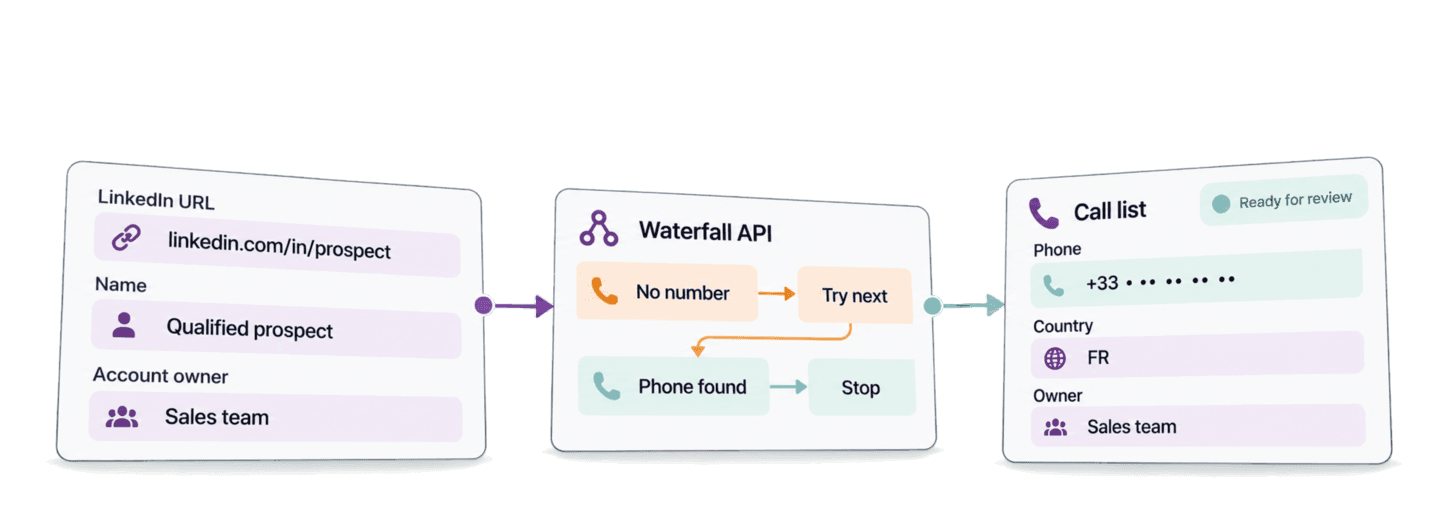
You can find phone numbers from LinkedIn in Python by sending public
linkedin.com/in/... profile URLs to Datablist's Waterfall Phone Finder API.
The API checks eligible phone-data providers in sequence and returns found
numbers in international format with their country codes.
This guide uses the Requests library to run one complete Python integration. Then it reuses the same results to prepare a local sales call list that keeps each prospect's name, LinkedIn URL, and account owner.
📌 Summary For Those In a Rush
Use one API to find phone numbers from a list of public LinkedIn profile URLs, then prepare a local sales call list with each prospect's name and account owner. The Waterfall Phone Finder tries eligible providers in sequence and keeps found numbers ready for your team to review.
- Input: Prospect records with a public LinkedIn profile URL.
- Output: A local call list with found international phone numbers, number-country codes, names, and account owners.
💡 Prefer a no-code solution? Use Datablist's Waterfall Phone Finder to find phone numbers from LinkedIn profile URLs without writing code.
If you start with names instead of profile URLs, follow the no-code name-to-phone workflow or find LinkedIn profiles from names in Python first.
Set up Python, Requests, and your Datablist API key
For this Python example, I use the requests package. Create a project folder,
activate a virtual environment, install Requests, and create the script file:
mkdir waterfall-phone-lookup
cd waterfall-phone-lookup
python -m venv .venv
source .venv/bin/activate
python -m pip install requests
touch find_phone_numbers.py
export DATABLIST_API_KEY="your-api-key"Create a Personal API Key in your
Datablist account and use it for DATABLIST_API_KEY. REST API access is a
Growth-plan feature. I cover the credits used by successful lookups later in
the guide.
Find phone numbers with one complete Python function
The example uses three editable prospect records. Each record has a stable
prospect_id, a name, a public LinkedIn URL, and the account owner responsible
for reviewing the result:
- Florian Poullin at
https://www.linkedin.com/in/florianpoullin/ - Satya Nadella at
https://www.linkedin.com/in/satyanadella/ - Reid Hoffman at
https://www.linkedin.com/in/reidhoffman/
Only the stable ID and LinkedIn URL need to go to the API. The name and account owner stay in your local source record. This separation keeps the lookup request small while preserving the business details your team needs after the result is returned.
Paste this complete script into find_phone_numbers.py:
import json
import os
import time
import uuid
import requests
def find_phone_numbers(prospects, api_key, settings):
"""Submit one phone lookup task, wait, and return every result."""
tasks_url = "https://api.datablist.com/v1/enrichments/tasks"
headers = {"X-API-Key": api_key}
inputs = [
{
"inputId": prospect["prospect_id"],
"data": {"profileUrl": prospect["linkedin_url"]},
}
for prospect in prospects
]
unique_id = str(uuid.uuid4())
print(f"Task uniqueId: {unique_id}", flush=True)
payload = {
"enrichmentId": "waterfall-phone-finder",
"uniqueId": unique_id,
"settings": settings,
"inputs": inputs,
}
response = requests.post(tasks_url, headers=headers, json=payload)
response.raise_for_status()
task = response.json()
task_id = task["@id"]
task_url = f"{tasks_url}/{task_id}"
while task["status"] not in ("completed", "failed", "stopped"):
time.sleep(3)
response = requests.get(task_url, headers=headers)
response.raise_for_status()
task = response.json()
if task["status"] != "completed":
raise RuntimeError(
f"Task {task_id} {task['status']}: {task.get('error')}"
)
results = []
results_url = f"{task_url}/results"
params = {"limit": 100}
while True:
response = requests.get(results_url, headers=headers, params=params)
response.raise_for_status()
page = response.json()
results.extend(page["results"])
next_cursor = page["nextCursor"]
if next_cursor is None:
break
params["cursor"] = next_cursor
return results
if __name__ == "__main__":
api_key = os.environ.get("DATABLIST_API_KEY")
if not api_key:
raise SystemExit("Set DATABLIST_API_KEY before running this script.")
prospects = [
{
"prospect_id": "prospect-florian-poullin",
"name": "Florian Poullin",
"linkedin_url": "https://www.linkedin.com/in/florianpoullin/",
"account_owner": "Habib",
},
{
"prospect_id": "prospect-satya-nadella",
"name": "Satya Nadella",
"linkedin_url": "https://www.linkedin.com/in/satyanadella/",
"account_owner": "Florian",
},
{
"prospect_id": "prospect-reid-hoffman",
"name": "Reid Hoffman",
"linkedin_url": "https://www.linkedin.com/in/reidhoffman/",
"account_owner": "Habib",
},
]
settings = {"cacheAge": "30"}
phone_results = find_phone_numbers(prospects, api_key, settings)
print(json.dumps(phone_results, indent=2, ensure_ascii=False))Run the file with:
python find_phone_numbers.pyYou can also download Datablist's maintained synchronous Requests example. The script above keeps the same simple order: submit one task, wait for it, and retrieve all result pages.
Submit the phone lookup
The list comprehension turns each source prospect into the API's input shape.
Your prospect_id becomes inputId, while linkedin_url becomes
data.profileUrl. Use a public person-profile URL with the
linkedin.com/in/... path. Sales Navigator URLs are not supported by this
enrichment.
The function generates uniqueId and prints it before the POST. The request
sends that value with the waterfall-phone-finder enrichment ID, the cache
setting, and the inputs. A successful submission returns HTTP 202 Accepted
and a task @id while processing continues in the background.
The Waterfall Phone Finder API reference lists the current settings, input fields, outputs, credits, and limits.
For one prospect, the request body follows this shape:
{
  "enrichmentId": "waterfall-phone-finder",
  "uniqueId": "generated-uuid",
  "settings": {
    "cacheAge": "30"
  },
  "inputs": [
    {
      "inputId": "prospect-florian-poullin",
      "data": {
        "profileUrl": "https://www.linkedin.com/in/florianpoullin/"
      }
    }
  ]
}
The public profile URL is the lookup input. inputId is the join key that
connects the result to the name and account owner in your source record. Choose
an ID that is stable in your own system and unique within the task.
Wait for the background task
The Requests client blocks locally while it checks the task every three
seconds. The Datablist task still runs in the background. When its status becomes
completed, the function moves to result retrieval. A failed or stopped
status raises an error with the task ID so you can inspect it.
Retrieve every result page
The results request asks for up to 100 rows at a time. It keeps fetching pages
until nextCursor is null. Every result includes its source inputId, so you
can map it back to the correct prospect without relying on response order.
How the managed waterfall finds a phone number
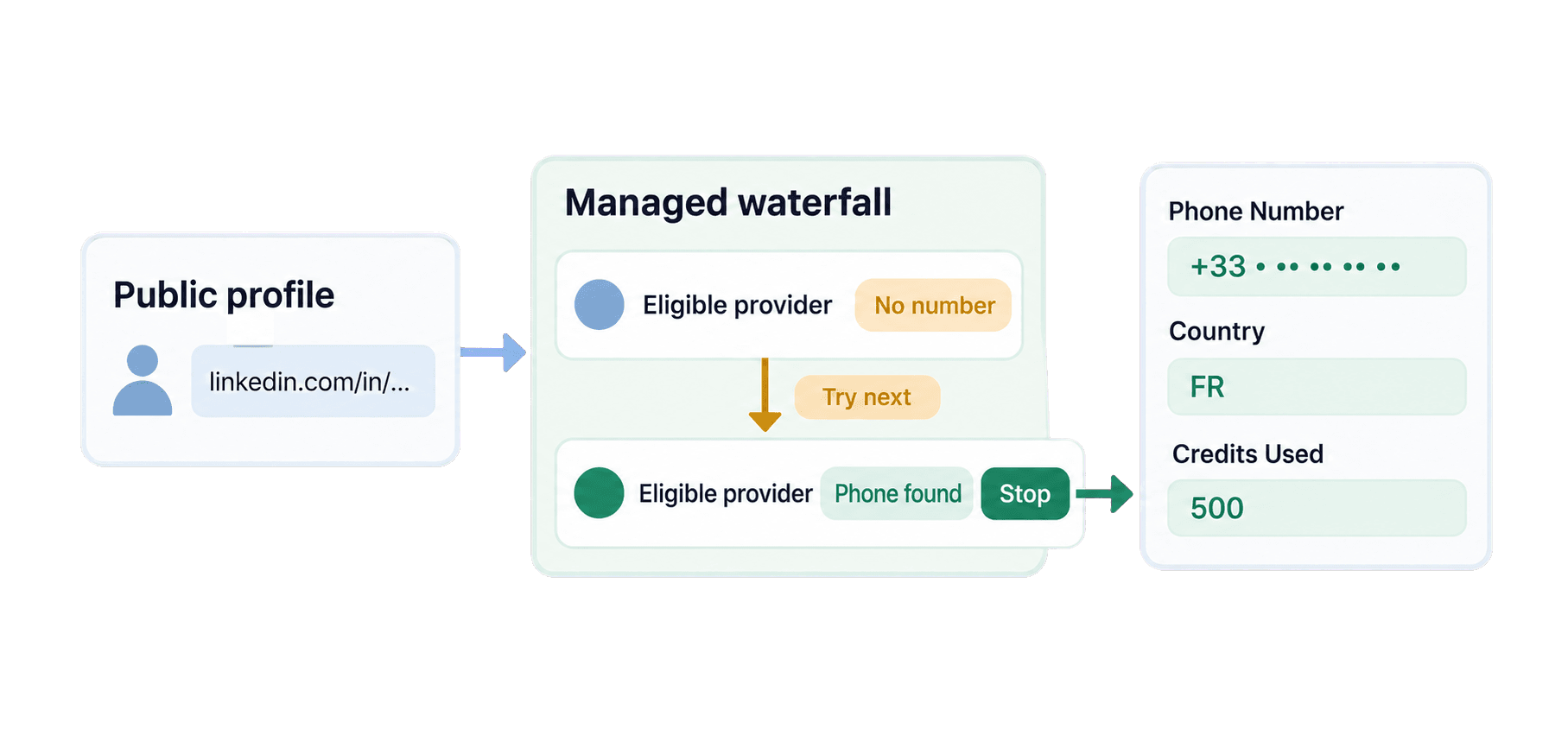
The example sets cacheAge to "30". Datablist first checks for an eligible
result no more than 30 days old. When one exists, the API can reuse it. The
setting accepts a cache hit but does not guarantee one.
If the profile remains unresolved, the managed waterfall tries eligible phone-data providers in sequence. A provider that returns no usable number lets the record continue. A usable number stops the sequence for that record.
Why a waterfall helps across countries and markets
Datablist does not rely on a single phone-data provider. Providers use different datasets, and their coverage varies across countries and markets. When one provider has no phone number, another can find it. Datablist manages these providers through the same API integration.
For a sales team building a call list across several markets, this means fewer prospects are left out after a single provider returns no result. Your Python code submits one task and reads one result format, so you do not need to build and maintain a separate integration for each provider.
Set cacheAge to "0" when your workflow specifically needs to request a fresh
lookup. Keep "30" for the example so an eligible cached result can be reused.
Read the complete result
Here is one result for Florian Poullin. Phone numbers are masked below.
{
  "inputId": "prospect-florian-poullin",
  "status": "success",
  "outputs": {
    "finderProvider": "wizleads",
    "phoneNumber": "+33 • •• •• •• ••",
    "phoneNumberCountry": "FR"
  },
  "creditsUsed": "500",
  "error": null
}
phoneNumber contains the international number when one is available. The
+33 prefix and phoneNumberCountry: "FR" identify a French number.
finderProvider is the finder reported for this result. The row used 500
credits, and error: null means the API returned no row-level error.
Prepare a reviewed sales call list
Once phone_results is available, you can prepare a local list for a sales team
to review. Append this block after the result printing in the same file. It
reuses the existing results and makes no second API call:
results_by_id = {
result["inputId"]: result
for result in phone_results
}
call_list = []
for prospect in prospects:
result = results_by_id.get(prospect["prospect_id"])
if not result or result["status"] != "success":
continue
phone_number = result.get("outputs", {}).get("phoneNumber")
if not phone_number:
continue
call_list_record = prospect.copy()
call_list_record["result"] = result
call_list.append(call_list_record)
print(json.dumps(call_list, indent=2, ensure_ascii=False))The result index uses inputId as the join key, so each result stays tied to its
source record without depending on list position. The API payload contains each
prospect's ID and profile URL, while the original prospects list keeps the name
and account owner needed for the call list.
For Florian's row, prospect-florian-poullin connects the returned result to
the original name, linkedin_url, and account_owner. The team reads the
phone and its FR country code from result.outputs. The complete API object,
including status, credits, and error, remains attached under result.
The call-list loop follows the order of prospects. It copies each included
prospect before attaching result, which leaves the original source list
available for corrections or a different follow-up channel.
A no-result, error, or empty-phone row stays in the unchanged prospects list
but does not enter call_list. The code prepares a local sales call list for
review.
Estimate Waterfall Phone Finder API costs
Each new uncached phone number found by the default managed waterfall uses 500
credits. An accepted cached result uses 0 credits, and a search without a result
also uses 0 credits. Read creditsUsed on each returned row for actual spend
instead of multiplying every submitted profile by 500.
For planning, use this formula:
new uncached phone numbers found × 500 credits
Forty new numbers use 20,000 credits. One hundred new numbers use 50,000 credits. At the current base USD top-up rate, $20 buys 20,000 credits, so 500 credits are worth $0.50. The Growth subscription that provides REST API access is separate. See Datablist pricing for current plans and credit packages.
For a planning example, suppose 100 profiles produce 20 new numbers, 5 accepted
cached numbers, and 75 misses. The billable quantity is the 20 new numbers, so
the lookup uses 10,000 credits. The call list can contain all 25 found numbers.
Enter 20 in the calculator, rather than all 100 inputs or all 25 found
numbers. This example illustrates the billing calculation, not an expected
success rate.
Fix common errors and recover an existing task
DATABLIST_API_KEYis missing: the script stops before making a request. Export the variable and run the file again.- The API rejects the key:
raise_for_status()reports the HTTP error. Copy the Personal API Key again and confirm that the request sends it in theX-API-Keyheader. - The profile URL is unsupported: replace a blank, malformed, company, or
Sales Navigator URL with a public person profile using the
linkedin.com/in/...path. - Credits are insufficient: check the account balance and available credits before submitting more work.
- The task is
failedorstopped: inspect its error, available results, and credit use before deciding what still needs to run. - A row has no result or an error: keep the source prospect for correction or another follow-up channel. The row alone does not explain which provider, geography, or visibility condition caused the outcome.
If the POST response is lost, use the uniqueId printed before submission.
List your tasks before submitting again. Replace your-api-key in this
request, then find the task whose uniqueId matches the printed value:
curl --get "https://api.datablist.com/v1/enrichments/tasks" \
--header "X-API-Key: your-api-key" \
--data-urlencode "enrichmentId=waterfall-phone-finder" \
--data-urlencode "limit=100"If the task is not on the first page, follow the task-list response's
nextCursor. Copy the matching task's @id, replace TASK_ID below, and check
its status or retrieve its existing results:
curl "https://api.datablist.com/v1/enrichments/tasks/TASK_ID" \
--header "X-API-Key: your-api-key"
curl --get "https://api.datablist.com/v1/enrichments/tasks/TASK_ID/results" \
--header "X-API-Key: your-api-key" \
--data-urlencode "limit=100"The task API documentation explains task states, result pagination, and interruption behavior.
Next steps
You now have one reusable Requests function for public LinkedIn profile URLs and one stable-ID merge that prepares found phone numbers for sales review.
Replace the editable examples with a small set of qualified prospects. Keep their stable IDs and account owners, then review each found number before passing the prepared list to your team's calling process. Start with a small batch so you can inspect the ID mapping and returned fields. If you need non-blocking concurrency, use the maintained async HTTPX example.