
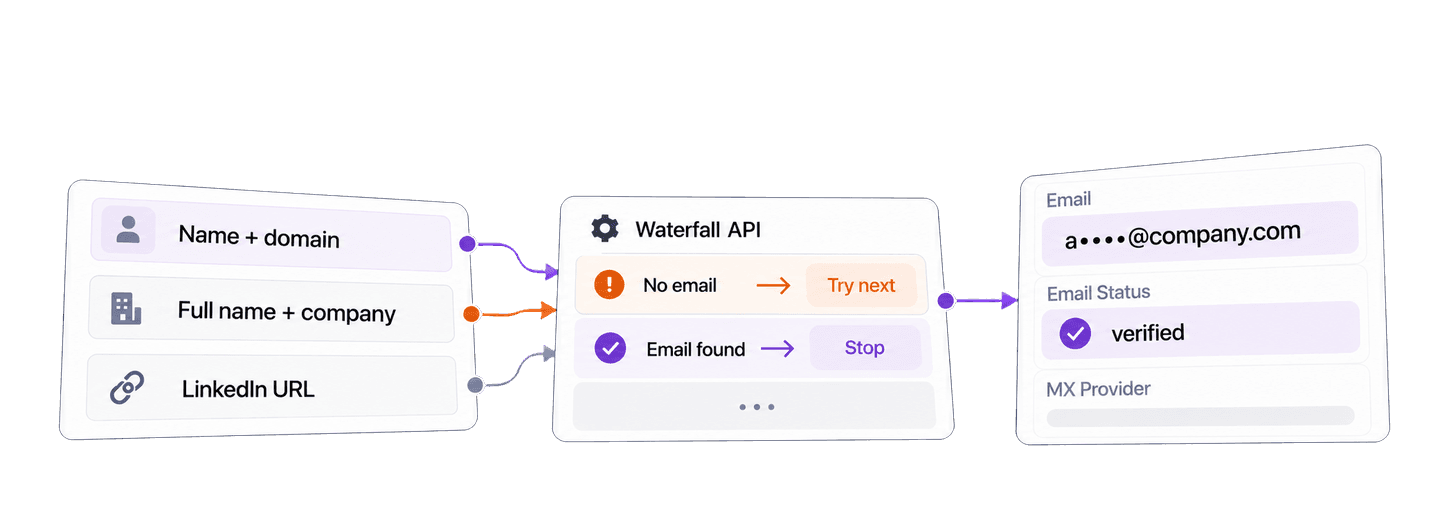
To find work emails in Python, send a person's name and company information, or a public LinkedIn profile URL, to Datablist's Waterfall Email Finder API with the Requests library. The API returns the work email it finds, the address's deliverability status, and its mail provider.
The complete example below looks up Satya Nadella at microsoft.com and Reid Hoffman at greylock.com. It waits for the background task and retrieves every page of results. I will then reuse those results to prepare a local list of verified contacts for campaign review.
📌 Summary For Those In a Rush
Use one Python function to submit known contacts to the Waterfall Email Finder API, wait for the task, and collect found work emails. Then prepare verified contacts for campaign review while keeping unresolved contacts in your source list.
- Input: First and last name with a company domain, a full name with a company name, or a public LinkedIn profile URL.
- Output: A work email with
emailStatusandmxProvider, followed by a local review list containing only contacts with an email.
💡 Prefer a no-code solution? Use Datablist's Waterfall Email Finder to find work emails from a collection without writing code.
Set up Python, Requests, and your API key
For this Python example, I use the requests package. Create a file named find_work_emails.py, then install Requests:
python -m pip install requestsCreate a Personal API Key from your Datablist API account page. REST API access requires the Growth plan. Export the key in the terminal where you will run the script:
export DATABLIST_API_KEY="your-api-key"Successful Waterfall Email Finder results also use credits. The cost section below separates those credits from the subscription that provides API access.
Find work emails with one Python function
Paste the following complete script into find_work_emails.py:
import json
import os
import time
import uuid
import requests
def find_emails(people, api_key, settings):
"""Submit one email-finder task, wait, and return every result."""
tasks_url = "https://api.datablist.com/v1/enrichments/tasks"
headers = {"X-API-Key": api_key}
unique_id = str(uuid.uuid4())
print(f"Task uniqueId: {unique_id}", flush=True)
payload = {
"enrichmentId": "waterfall-email-finder",
"uniqueId": unique_id,
"settings": settings,
"inputs": people,
}
response = requests.post(tasks_url, headers=headers, json=payload)
response.raise_for_status()
task = response.json()
task_id = task["@id"]
task_url = f"{tasks_url}/{task_id}"
while task["status"] not in ("completed", "failed", "stopped"):
time.sleep(3)
response = requests.get(task_url, headers=headers)
response.raise_for_status()
task = response.json()
if task["status"] != "completed":
raise RuntimeError(
f"Task {task_id} {task['status']}: {task.get('error')}"
)
results = []
results_url = f"{task_url}/results"
params = {"limit": 100}
while True:
response = requests.get(results_url, headers=headers, params=params)
response.raise_for_status()
page = response.json()
results.extend(page["results"])
next_cursor = page["nextCursor"]
if next_cursor is None:
break
params["cursor"] = next_cursor
return results
if __name__ == "__main__":
api_key = os.environ.get("DATABLIST_API_KEY")
if not api_key:
raise RuntimeError("Set DATABLIST_API_KEY before running this script.")
settings = {"sourceKind": "name_company"}
people = [
{
"inputId": "contact-satya-nadella",
"data": {
"firstName": "Satya",
"lastName": "Nadella",
"companyNameOrDomain": "microsoft.com",
},
},
{
"inputId": "contact-reid-hoffman",
"data": {
"firstName": "Reid",
"lastName": "Hoffman",
"companyNameOrDomain": "greylock.com",
},
},
]
lookup_results = find_emails(people, api_key, settings)
for result in lookup_results:
print(json.dumps(result, indent=2))Run it from the same terminal:
python find_work_emails.pyYou can also download the maintained Requests example. Once the blocking version is clear, the repository has an async HTTPX alternative.
The function makes three kinds of calls in order.
First, it submits the task. Each inputId is your stable contact ID. The nested data object contains the fields used for the lookup. The POST returns 202 Accepted with @id, the task ID used by later calls. The code prints uniqueId before submission so you still have a recovery value if the response is lost.
Second, it polls the task. Datablist processes the task in the background. This Requests client waits and checks the task every three seconds until it is completed, failed, or stopped. Requests blocks while it waits, but the API task itself remains asynchronous.
Third, it retrieves the results. A task may have several result pages. The loop keeps fetching pages until nextCursor is null. Use inputId, rather than response order, to match each result to its source contact.
Choose the input route for your contact data
One task uses one input mode. Keep the same find_emails() function and replace the settings and people values with the route that matches your source data.
Choose an inputId that is unique within the task and already belongs to the source contact when possible. A CRM record ID or another durable lead ID works well. Datablist returns that value with the result, so you can match records without comparing names or assuming the response follows the input order.
When you have separate names and a company domain, use sourceKind: "name_company". A known domain is the clearest company identifier:
settings = {"sourceKind": "name_company"}
people = [
{
"inputId": "contact-satya-nadella",
"data": {
"firstName": "Satya",
"lastName": "Nadella",
"companyNameOrDomain": "microsoft.com",
},
}
]
lookup_results = find_emails(people, api_key, settings)When your source has one name field and a company name, enable useFullName:
settings = {"sourceKind": "name_company", "useFullName": True}
people = [
{
"inputId": "contact-satya-nadella",
"data": {
"fullName": "Satya Nadella",
"companyNameOrDomain": "Microsoft",
},
}
]
lookup_results = find_emails(people, api_key, settings)When you have a public person profile URL, use the LinkedIn route:
settings = {"sourceKind": "linkedin"}
people = [
{
"inputId": "contact-satya-nadella",
"data": {
"linkedInProfile": "https://www.linkedin.com/in/satyanadella/"
},
}
]
lookup_results = find_emails(people, api_key, settings)This route accepts a public linkedin.com/in/... profile URL as person context for the email lookup. Sales Navigator profile URLs are not accepted.
If you need to choose provider keys and their order, read the custom waterfall guide. The managed waterfall used here does not require provider-specific setup.
How the managed waterfall finds an email
For a name-and-company request, the API uses a supplied domain directly. When you supply a company name, it first tries to resolve that name to a usable company domain. For a LinkedIn request, it cleans the public profile URL and turns the available person and company details into the context eligible email providers need.
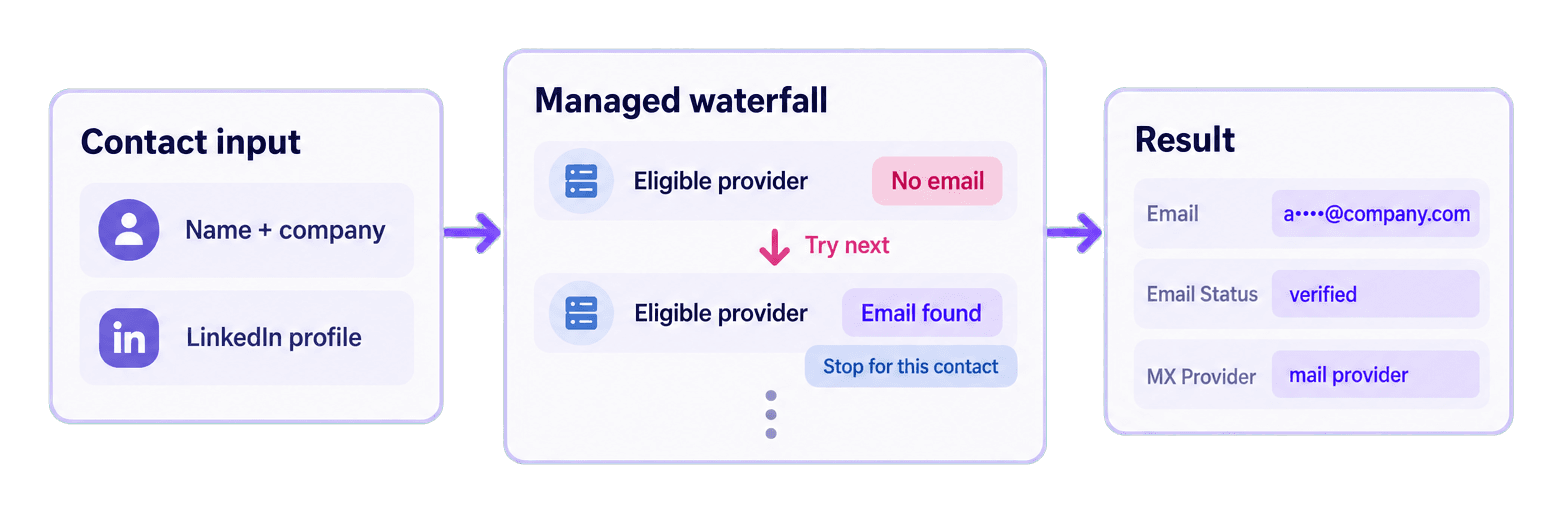
The managed waterfall sends an unresolved contact to an eligible provider. If no usable email comes back, another eligible provider can try the same contact. The sequence stops for that contact as soon as it accepts a work email. The default response does not name the finder.
Why a waterfall helps international outreach
Work email providers use different datasets, so their coverage varies across countries and markets. A provider may return no result for a contact in one region, while a different provider has the data needed to find that address.
For a sales or growth team, the waterfall gives each unresolved contact another opportunity to be found before it is left out of the outreach list. This can recover contacts that a single-provider workflow would miss, while keeping the technical process consistent for the team.
Datablist manages the eligible provider sequence behind one API integration. You submit the contact once and receive one result format, instead of building and maintaining a separate integration for each provider and merging those responses yourself.
Read the complete results
The example task returned two successful results. Email addresses are masked below.
{
  "taskId": "2286103ce43748828e27ce71b9cc526b",
  "results": [
    {
      "inputId": "contact-satya-nadella",
      "status": "success",
      "outputs": {
        "gender": null,
        "mxProvider": "microsoft",
        "emailFound": "s*******@microsoft.com",
        "emailStatus": "verified"
      },
      "creditsUsed": "25",
      "error": null
    },
    {
      "inputId": "contact-reid-hoffman",
      "status": "success",
      "outputs": {
        "gender": null,
        "mxProvider": "mimecast",
        "emailFound": "r*******@greylock.com",
        "emailStatus": "verified"
      },
      "creditsUsed": "25",
      "error": null
    }
  ],
  "nextCursor": null
}
emailFound is the returned work email. emailStatus describes its deliverability at lookup time, and mxProvider identifies the email hosting provider when available. Both records are verified, and each used 25 credits.
The campaign code below puts verified results in campaign_contacts and keeps other found addresses in needs_verification. The creditsUsed value is the authoritative charge for each result.
The default managed result does not contain finderProvider. That field is conditional output for a valid custom-key name-and-company workflow, so the script should not infer it from mxProvider.
Prepare found emails for campaign review
Once the direct lookup works, append this block at the end of the script, after lookup_results has been returned. It prepares local contacts for campaign review from the lookup you already ran.
results_by_id = {result["inputId"]: result for result in lookup_results}
campaign_contacts = []
needs_verification = []
for person in people:
result = results_by_id.get(person["inputId"])
if result is None:
continue
if result["status"] != "success":
continue
if not result["outputs"].get("emailFound"):
continue
contact = person.copy()
contact["result"] = result
if result["outputs"].get("emailStatus") == "verified":
campaign_contacts.append(contact)
else:
needs_verification.append(contact)
print(json.dumps({
"campaign_contacts": campaign_contacts,
"needs_verification": needs_verification,
}, indent=2))results_by_id makes response order irrelevant. For Satya, the loop reads contact-satya-nadella from the original people list, finds the result with the same inputId, copies the source record, and attaches the complete API object under result. Because the address is present and its status is verified, the contact goes into campaign_contacts. Reid follows the same path even if his API result arrives first.
The three conditions keep the decision readable. The first skips a contact when no matching result was returned. The second skips row-level errors and other non-success states. The third requires an actual emailFound value. Attaching the complete result object preserves the status, outputs, credit use, and error field for later review.
A found email with another deliverability state goes to needs_verification. An absent result, a row error, or a result without emailFound stays out of both prepared lists. The original people list remains available for correction or later research.
Estimate Waterfall Email Finder API costs
The default managed waterfall uses 25 credits for each found work email. An unsuccessful default lookup uses 0 credits. Read creditsUsed from each result instead of multiplying the total number of submitted contacts.
A found email with an unverified status still uses 25 credits, even though the local campaign code places it in needs_verification instead of campaign_contacts.
The two found emails in this example used 50 credits. For planning:
- 100 found work emails use 2,500 credits.
- 1,000 found work emails use 25,000 credits.
- A larger input list can use fewer credits than
contacts × 25because no-result lookups are not charged.
REST API access requires the Growth plan. At the current USD top-up rate, $20 buys 20,000 credits, which is $0.001 per credit. At that rate, 25,000 credits have a $25 credit value. The subscription is separate from that credit calculation. Check the Datablist pricing page for current plan and package details.
Fix common errors and recover a task
The API key is missing. The script raises Set DATABLIST_API_KEY before running this script. before making a request. Export the variable in the current terminal and run the file again.
The API returns an authentication error. raise_for_status() reports the HTTP failure. Copy a current Personal API Key, confirm the X-API-Key header uses it, and rerun only after fixing the credential.
The account has insufficient credits. Check the account balance. Add credits or wait for the plan's next credit allocation before submitting more work.
The input fields do not match the selected mode. Use separate name fields or fullName with name_company, or use linkedInProfile with linkedin. Correct the contact and submit it with one consistent mode.
The task is failed or stopped. The script raises a RuntimeError containing the task ID, terminal status, and available task error. Inspect that task and any available results before deciding which contacts still need a lookup.
The POST response was lost. Copy the uniqueId printed before submission. List your tasks with the same key:
curl "https://api.datablist.com/v1/enrichments/tasks" \
-H "X-API-Key: $DATABLIST_API_KEY"Find the task with the printed uniqueId, copy its @id, then continue with the task-status or results URL. This lets you recover the existing task instead of automatically submitting the contacts again. The task API documentation covers the lifecycle and result endpoints.
Next steps
You now have one blocking Python Requests function for the three supported input routes and a local filter that prepares found, verified emails for campaign review.
Replace the two example contacts with a small slice of your researched contacts. Choose the input route that matches your data, run the lookup, and review emailStatus before using an address. For a broader list workflow, read how to find emails at scale. The maintained GitHub repository provides the downloadable blocking and async Python examples.