
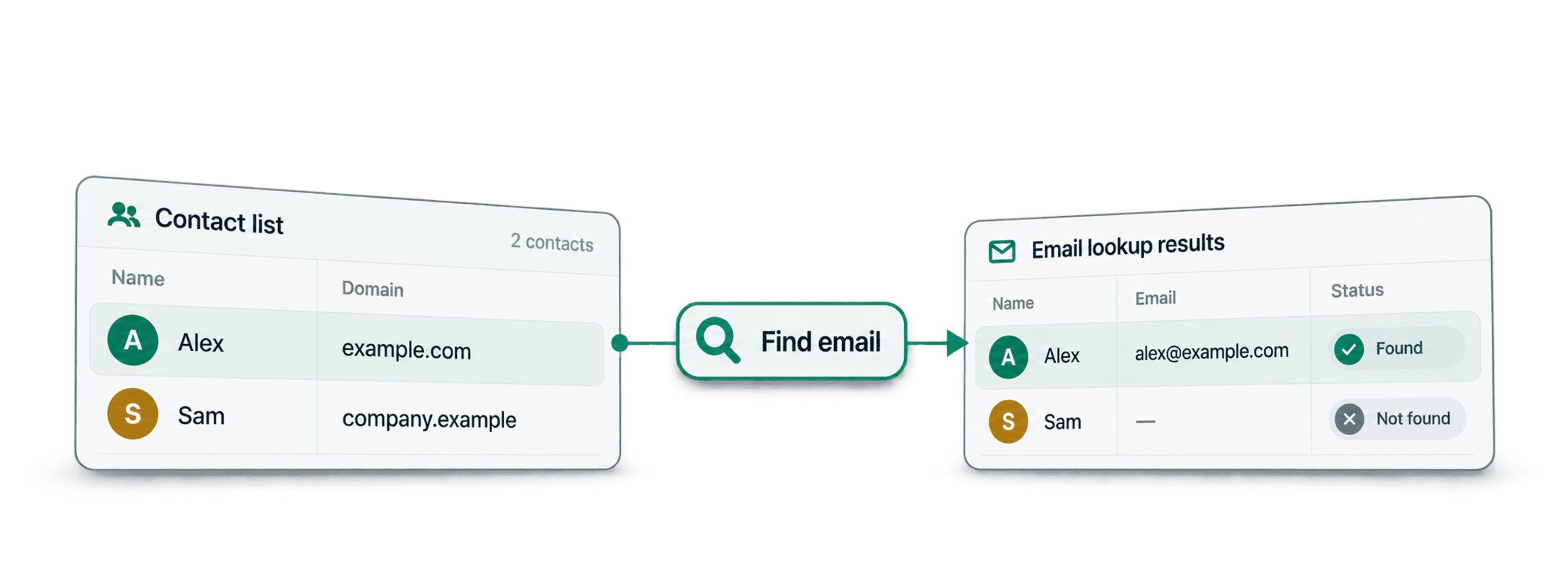
To find emails at scale, import a lead list, map person names and a company name or domain, then run Datablist's Waterfall Email Finder. You can also start from standard LinkedIn profile URLs. The result includes an email when found and a deliverability status to review before export.
I would start with a representative sample and a known company domain when available. A name at the wrong company can produce a result you should not use, even if the returned email is marked verified.
The managed waterfall checks eligible providers for each unresolved contact. You can also configure a custom sequence with supported provider API keys for the name-and-company method. This guide explains the inputs, setup, and checks needed to turn the output into a reviewed list.
📌 Choose the route for your file
- First Name and Last Name: map both, plus Company Name or Domain.
- Full Name: enable Use Full Name, then map the name and company columns.
- Standard LinkedIn profile URL: choose By LinkedIn URL under Email Search Method.
Keep original lead IDs and source columns. Review email statuses and unresolved rows before exporting the results to an outreach tool.
Table of Contents
- What Is Waterfall Email Finder and How Does It Work?
- A Step-By-Step Guide to Finding Emails At Scale
- Why Waterfall Email Finder Is Better Than Other Methods
- Alternatives to Waterfall Email Finder
- How Datablist's Approach Compares To Other Tools
What Is Waterfall Email Finder and How Does It Work?
A waterfall checks several eligible providers in sequence for contacts in an existing list. When one provider cannot return a usable email, the workflow can try another. This can extend coverage, but it does not guarantee an address for every person.
Think of it as having a team of researchers instead of just one. If the first researcher can't find the email, the task automatically goes to the second, then the third, and so on.
How Waterfall Email Finder Works
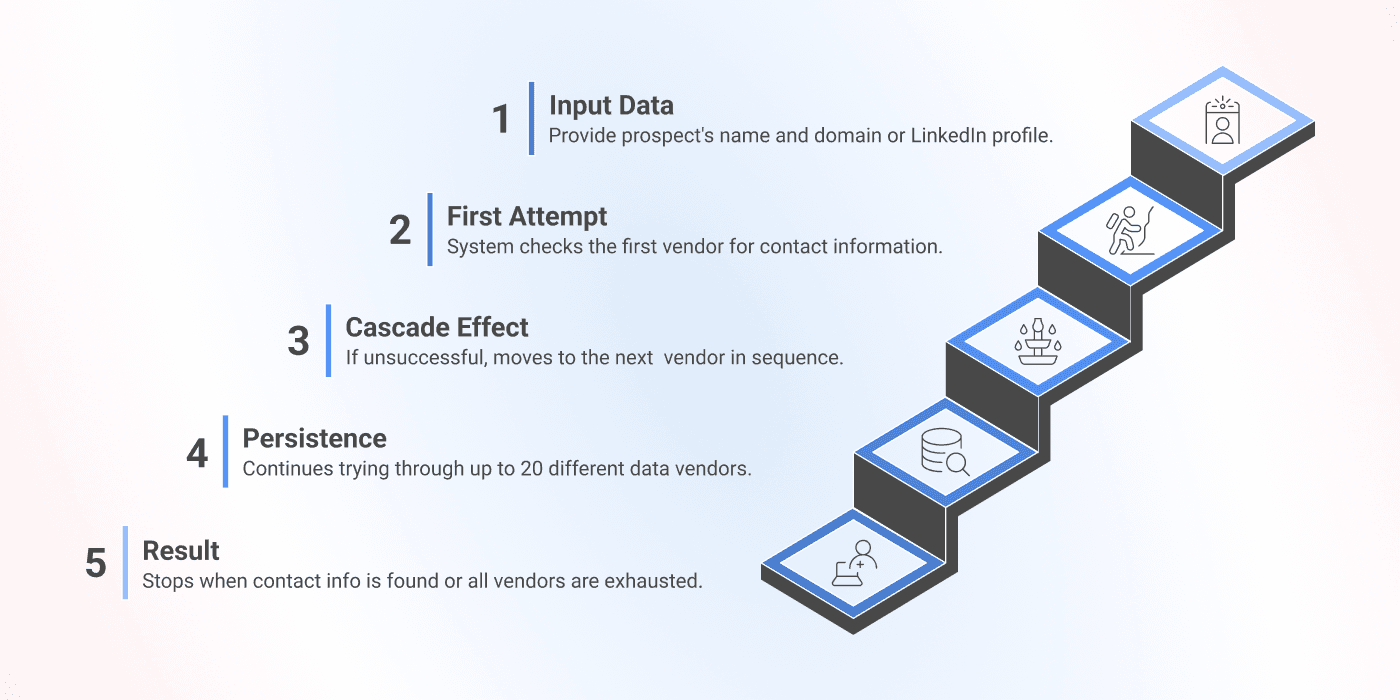
If you’re wondering how the Waterfall Email Finder method works, here’s a simple 5-step breakdown.
1️⃣ Input: Start with person names plus company names or domains. You can also use standard LinkedIn profile URLs.
2️⃣ First Attempt: The system checks the first data provider in the sequence for a matching email.
3️⃣ Cascade Effect: If no usable email is found, it moves to the next eligible provider in the chain.
4️⃣ Persistence: Unresolved rows continue through eligible providers until Datablist finds an email or reaches the end of the available attempts.
5️⃣ Result: The moment a usable email is found, the process stops and returns the email with its deliverability status. With the managed waterfall, you pay for found emails.
Review still matters: the provider sequence is automated. You still need to confirm person and company matches, inspect deliverability statuses, and decide which results belong in your outreach list.
How To Use The Waterfall Email Finder
I would prepare the input list before configuring the run. Keep one intended person per row, with the person's current company information and an ID that lets you join the results back to your source file.
📘 Some Context Beforehand
To start finding emails at scale with Datablist, you can choose between three options:
Option 1: Using first name, last name, and company domain or company name
Option 2: Using full name and company domain or company name to find the email address
Option 3: Finding email addresses from a LinkedIn profile URL
Additionally, you can build a custom waterfall with your own provider API keys.
For simplicity, I’ll just keep the default settings. Let’s get started!
Here’s an article showing how to find email addresses from LinkedIn profile URLs 👈🏽
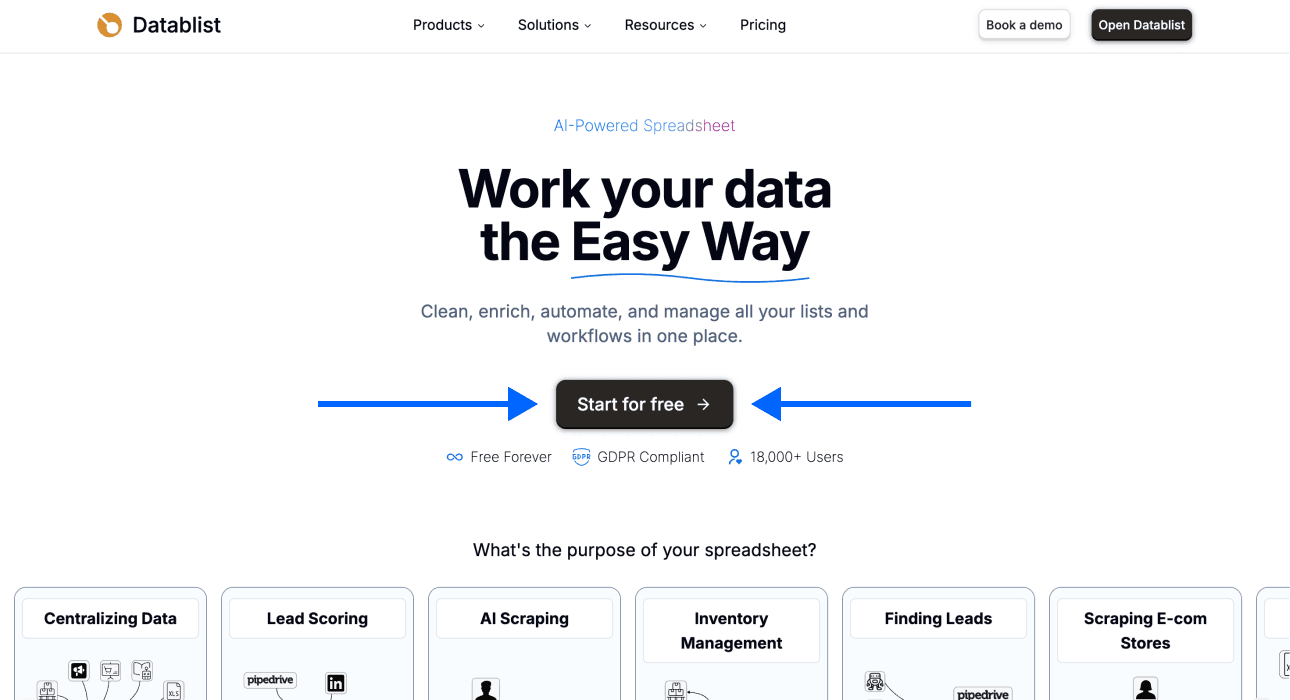
Step 1: Sign up for Datablist
Go to Datablist.com and create an account.
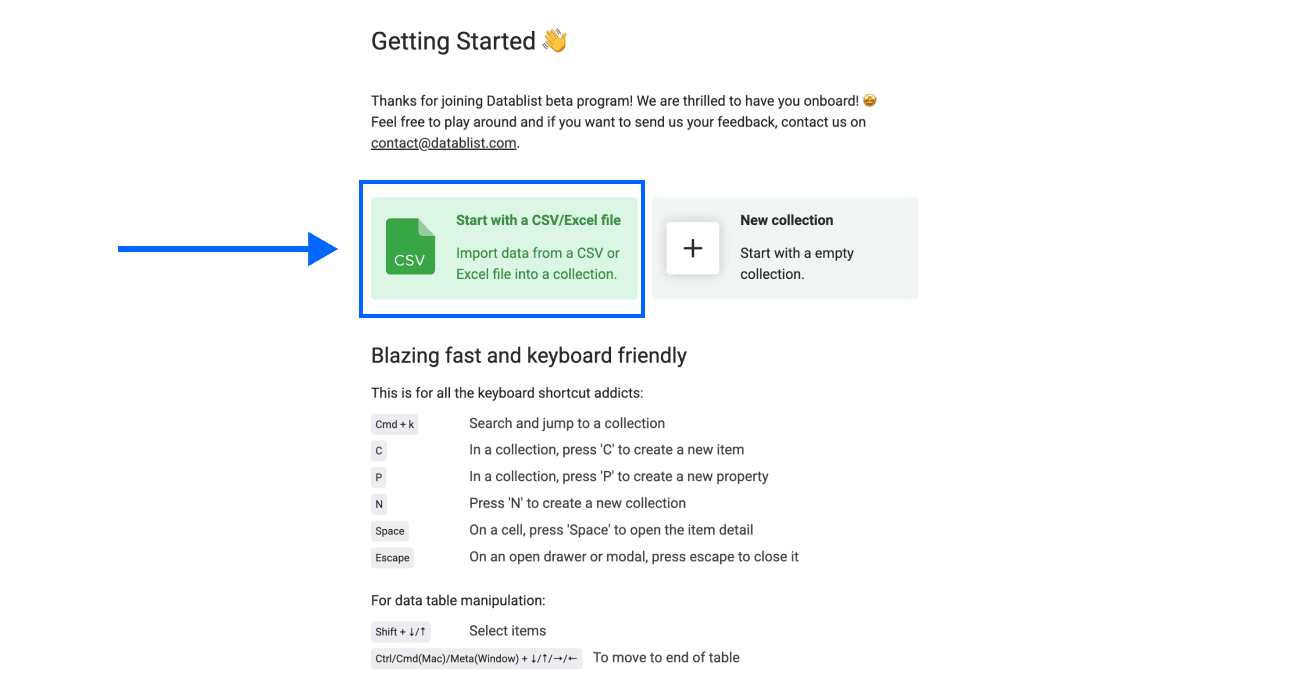
Step 2: Upload Your Data
On the Getting Started page, Upload your CSV or Excel file. For the name-and-company method, include first and last names, or one full-name column, plus a company name or domain. A company domain is not required.
Step 3: Select the Waterfall Email Finder
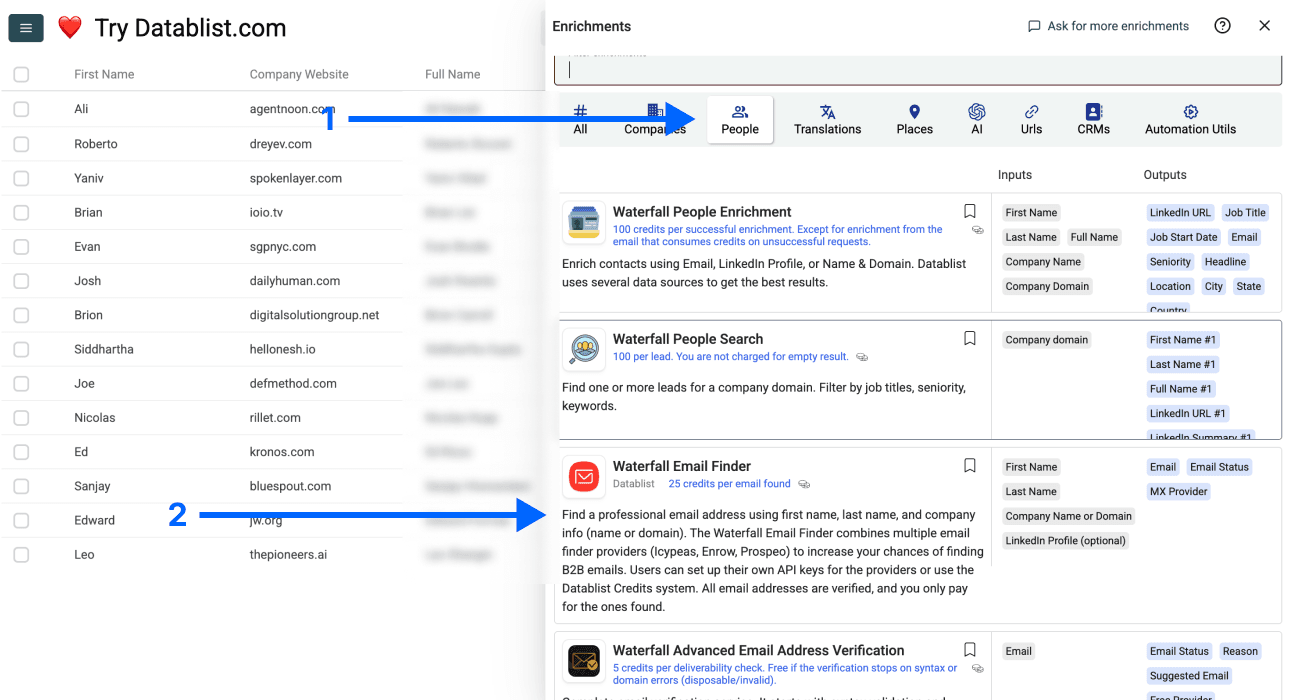
Click on Enrich in the top menu of the app
Go to the People panel
Choose the Waterfall Email Finder
Step 4: Configure Input Fields
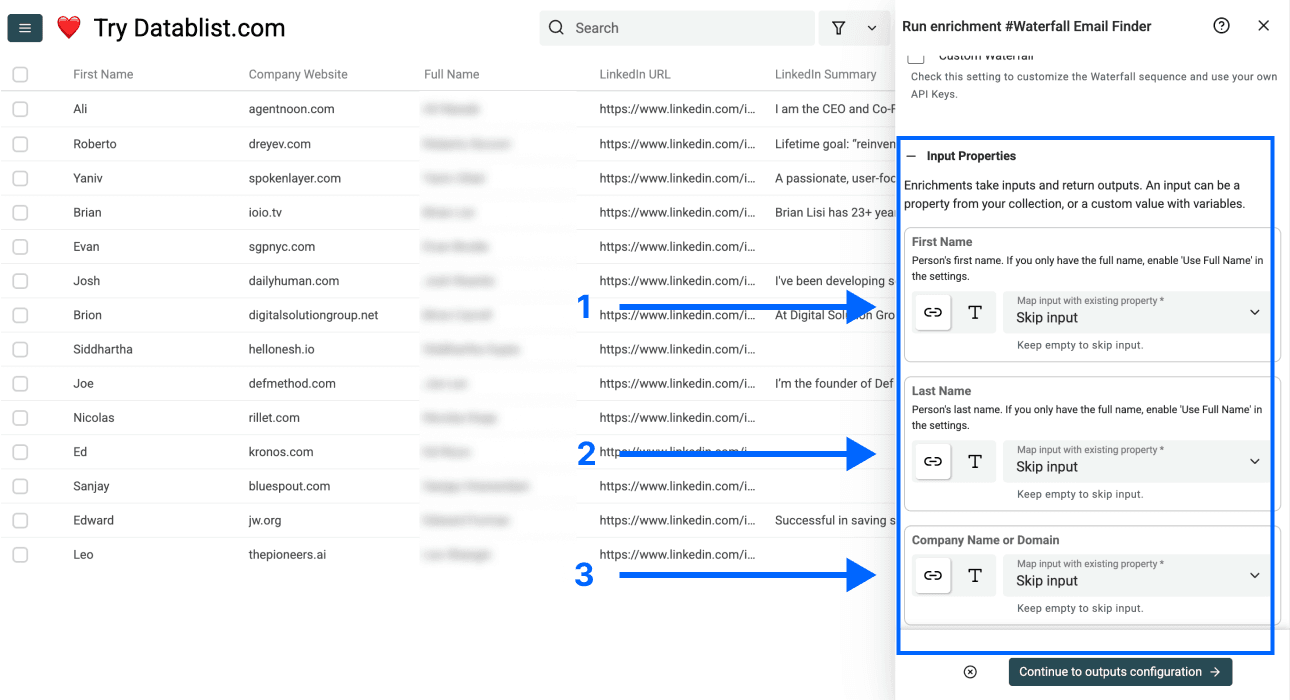
Map the first-name and last-name columns, or enable Use Full Name and map one full-name column. Then map one company-name or company-domain column to Company Name or Domain.
When you provide a company name, Datablist attempts to resolve a validated domain internally before calling email providers. You do not need to run a separate company-name-to-domain enrichment first. A known domain is still the cleaner input for ambiguous company names.
Check the Input Route Before Running
Under Email Search Method, choose By Name and Company (default) or By LinkedIn URL to match your file. The required columns change with that choice. Custom Waterfall is available for the name-and-company route; do not assume the same custom sequence configuration applies to a LinkedIn-only lookup.
For LinkedIn input, use a person's standard profile URL in the linkedin.com/in/... format. A Sales Navigator profile URL is not accepted by this input. See finding emails from LinkedIn profiles for that route.
Before the sample run, check:
- First and last names are mapped to the intended fields, or Full Name is mapped when that option is enabled.
- The company is the person's intended employer, not an unrelated similarly named business.
- The company domain is a company website, not a directory or social-media profile.
- Empty inputs and repeated people are kept out of the batch you intend to process.
Deduplicate according to person identity rather than company domain alone. Several employees at one company should remain separate contacts. Keep existing email columns and write the lookup result to a new output property so you can compare them.
Step 5: Select Outputs
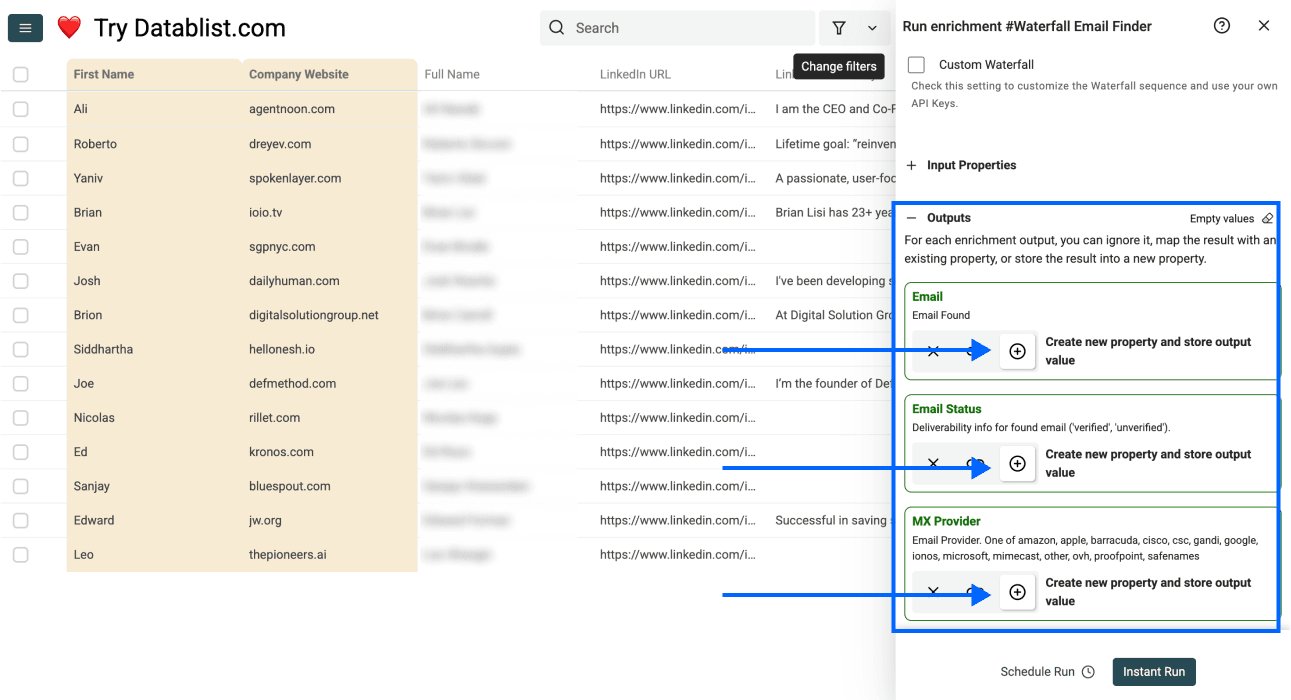
Now you can select the output fields and data you need. You can choose between:
- Email - The emails we found
- Email Status - Deliverability info for found email ('verified', 'unverified').
- MX Provider - Email Provider. One of amazon, apple, barracuda, cisco, csc, gandi, google, ionos, microsoft, mimecast, other, ovh, proofpoint, safenames
Step 6: Run the Enrichment
Configure a small sample in the run controls first. Once the sample passes your input and output checks, run the remaining intended rows in the collection or filtered view.
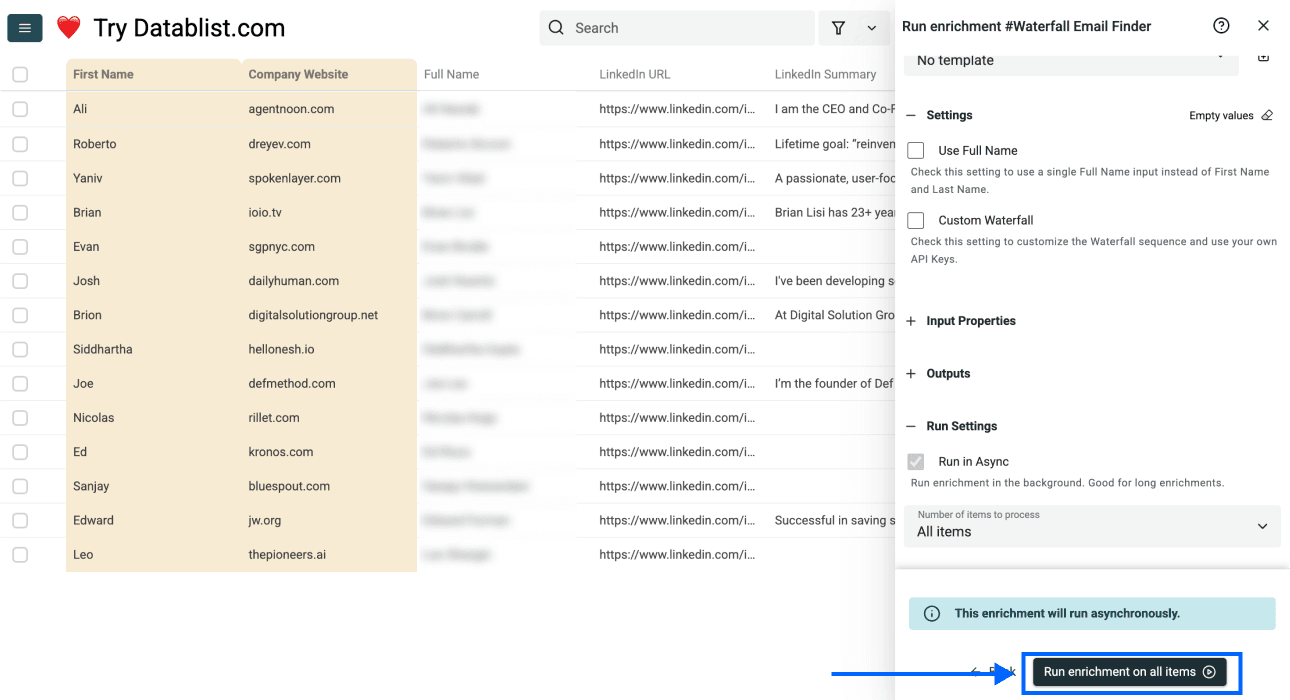
What you'll also see after running the enrichment: Credits spent and Run Status, both designed to give you maximum clarity on costs, data quality, and any potential errors.
Review Found Emails and Unresolved Rows Separately
A completed run is not the same as a send-ready list. Review Email Status alongside the original person, company, and returned email. A verified status concerns deliverability; it does not prove that the contact is the right decision maker or wants your offer.
| Result | What to review | Next step |
|---|---|---|
Email returned with verified status | Person and company identity, existing contacts, and suppression rules | Keep only records that pass your outreach checks |
Email returned with unverified status | The address is returned without a verified deliverability result | Keep it separate for further verification or manual review |
| No result | Whether the inputs are complete and refer to the intended person | Correct useful missing context before deciding whether to retry |
| Missing or invalid input | Name mapping, company field, and profile URL format | Fix the source row before rerunning it |
In the current run-status workflow, missing inputs, invalid inputs, and no-result outcomes are tracked as run errors; they are not deliverability labels on a found email. Review the run's error details as well as the email columns. An empty Email Status cell alone does not explain why a row failed.
For example, an illustrative sample could contain a found unverified email and a row with no company input. Keep both out of the reviewed export, but for different reasons: the first needs address verification, while the second needs its company input corrected. Repeating the same incomplete lookup does not fix either problem.
I would record the sample's input size, emails found, verified emails, unresolved rows, and credits used. These are different counts. Use them to estimate the next batch on your own audience rather than expecting a fixed find rate.
After reviewing the full run, export the lead ID, original person and company fields, the chosen email, and its status. Keep unresolved rows in a separate review set so you can improve their inputs without rerunning contacts that already passed the checks.
Why Waterfall Email Finder Is Better Than Other Methods
I would choose a waterfall when a single source leaves useful contacts unresolved and I want to test additional coverage in one row-based workflow. Compare it with your existing lookup on the same target market, using usable results and total cost rather than a promised percentage improvement.
Broader Provider Coverage
Providers have different databases and regional coverage. A waterfall can find emails a single provider misses because unresolved rows move to another eligible source. Your actual find rate depends on input quality, target market, and whether the contact has a discoverable work email.
Superior Cost-Effectiveness
- With Datablist's managed waterfall, you pay for found work emails. Review the returned
verifiedorunverifiedstatus before using the result. - If you already have provider subscriptions, you can build a custom waterfall email finder with your own API keys. The custom run uses your external provider accounts instead of the managed Datablist-credit sequence.
Time & Resource Efficiency
The entire process is automated, which means you can stop wasting hours manually searching for contact details or juggling multiple tools.

Alternatives To Waterfall Email Finder
You can use a single-provider email finder, an existing contact database, or a custom provider sequence. The right choice depends on the input data you already have and the coverage you need.
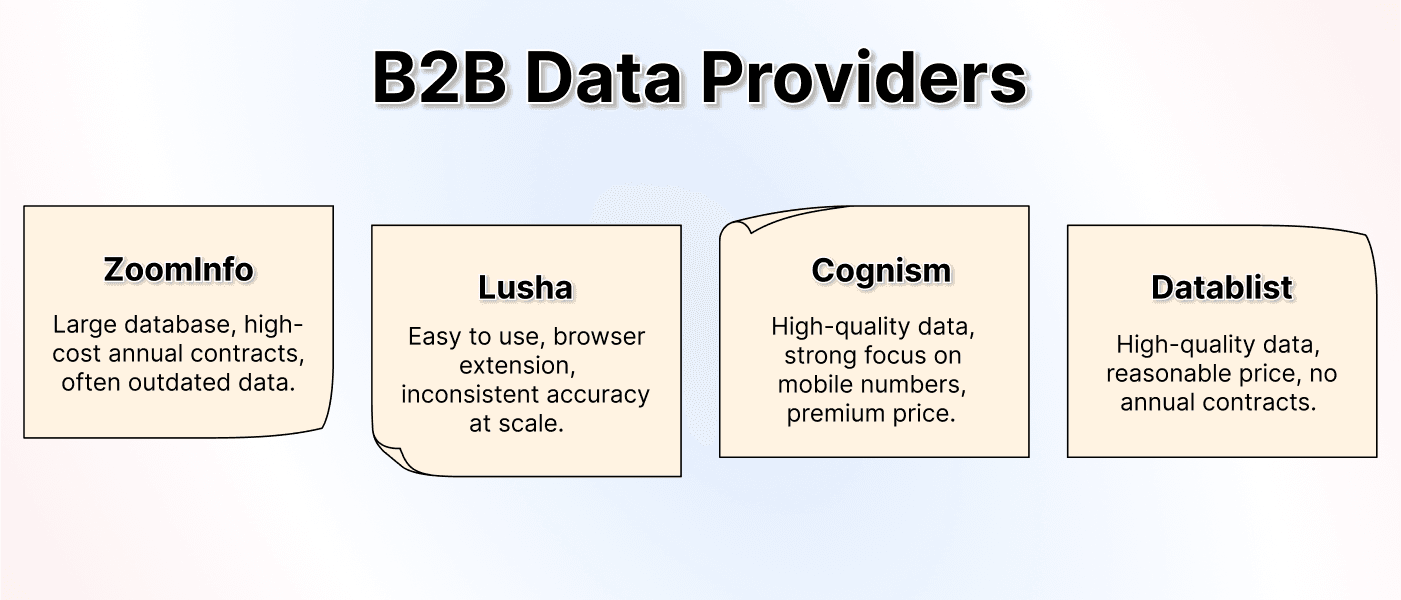
I would compare alternatives on a sample from your own list:
- Do they accept names, company domains, or the profile URLs you have?
- Can you inspect deliverability status separately from a found address?
- Are charges based on attempts, returned results, or a subscription allowance?
- Can you keep unresolved rows and export results with your source IDs?
A database can help when you need to discover contacts as well as retrieve their details. A waterfall is useful when you already know which people you want to look up. Check the current provider's workflow and plan rather than assuming all databases have the same coverage or pricing.
Datablist Compared To Other Data Enrichment Tools
Datablist runs the lookup on your existing CSV or Excel rows and writes the returned fields back into the collection. You can inspect the source data, outputs, and run errors together before exporting the reviewed records.
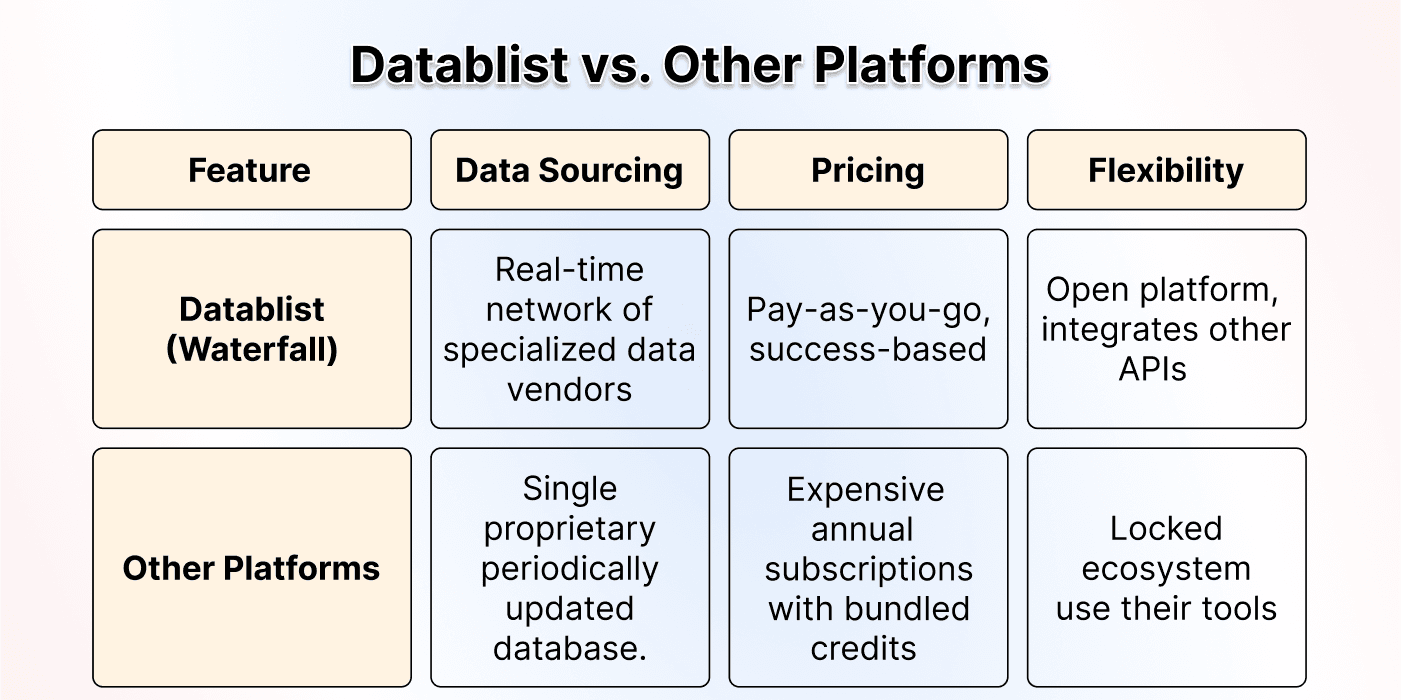
The managed waterfall uses Datablist credits for found work emails. A valid custom waterfall uses your supported external provider accounts, whose own charges still apply. Choose the route that fits the subscriptions and inputs you have; a custom sequence does not automatically combine external accounts with the managed sequence.
Keep lookup results separate from your final outreach decision. Neither a provider match nor a winner label in an illustration guarantees that a record is appropriate to contact.
The Bottom Line: Stop Overpaying For Bad Data
Start with accurate names and company context, run a sample, then review returned emails and unresolved rows separately. I would scale only after the sample shows usable matches and a cost you understand.
Keep the source IDs during export so your cleaned results can be joined back to the original lead list. For a comparison of lookup options, read best email finder tools.
Frequently Asked Questions (FAQ) About Finding Emails At Scale
How Much Does It Cost To Find Emails With Waterfall Email Finder?
The managed Waterfall Email Finder costs 25 credits per found work email. A USD 20 top-up provides 20,000 credits, enough for up to 800 found work emails. This equals $0.025 per found email. Rows with no result are not charged.
Can I Use My Own Subscriptions With Datablist's Waterfall Email Finder?
Yes. Enable Custom Waterfall and add supported provider API keys in the order you want. A valid custom run uses the external providers instead of the managed Datablist-credit sequence. Datablist does not charge enrichment credits for the custom run, but each provider can charge your external account.
What Kind of Accuracy Can I Expect From Waterfall Email Finder?
There is no fixed find rate for every list. Results depend on name quality, company ambiguity, geography, provider coverage, and whether the person has a discoverable work email. Run a representative sample first and review the returned deliverability statuses before processing the full list.
What’s The Limit of Emails I Can Process With Datablist’s Waterfall Email Finder?
You can run Email Finder on selected rows or across a collection. Datablist processes enrichment work in batches and keeps a run status for each row. For a large list, preview a sample first so you can validate the input mapping, expected coverage, and credit use.
How Can I Find Thousands of Emails At Scale?
Import a CSV or Excel file into Datablist and run Waterfall Email Finder. Map person names plus a company name or domain, or use standard LinkedIn profile URLs. The system checks eligible sources sequentially and writes the result back to the same collection.
What’s The Best Tool To Find Thousands of Emails?
For an existing lead list, use a tool that supports bulk input, several lookup sources, deliverability statuses, and reviewable row-level results. Datablist combines those steps in one spreadsheet-style workflow. For a full comparison, see the best email finder tools.
Can I find an email address just from a LinkedIn profile URL?
Yes! The Waterfall Email Finder can work from either a person’s name and company info or directly from their LinkedIn profile URL. When you use a LinkedIn URL, Datablist resolves the contact and company information needed by the provider workflow internally. This preparation does not add a separate enrichment-credit charge. With the managed waterfall, you pay when Datablist finds a work email. Read our article on how to get email addresses from LinkedIn profiles to learn more.
Is Waterfall Email Finder Really so Effective as They All Say?
A waterfall gives an unresolved row more than one provider opportunity. This often improves coverage compared with stopping after one provider, but no fixed percentage applies to every market or input file. Test a representative sample and measure the result on your own list.
What’s The Best Method to Find Emails At Scale?
For a CSV or Excel lead list, a waterfall is useful when you want to check several providers without calling each API or moving failed rows between tools manually. Datablist also keeps the source data, outputs, and run statuses in one collection.
I Have Thousands of Names and Company Names. How Can I Find Their Email Addresses?
Upload your list to Datablist, select Waterfall Email Finder, and map the person-name and company-name columns. Datablist attempts to resolve company domains internally before running the provider sequence. The enrichment appends the email, deliverability status, and MX provider while the run-status column tracks failures and progress.