
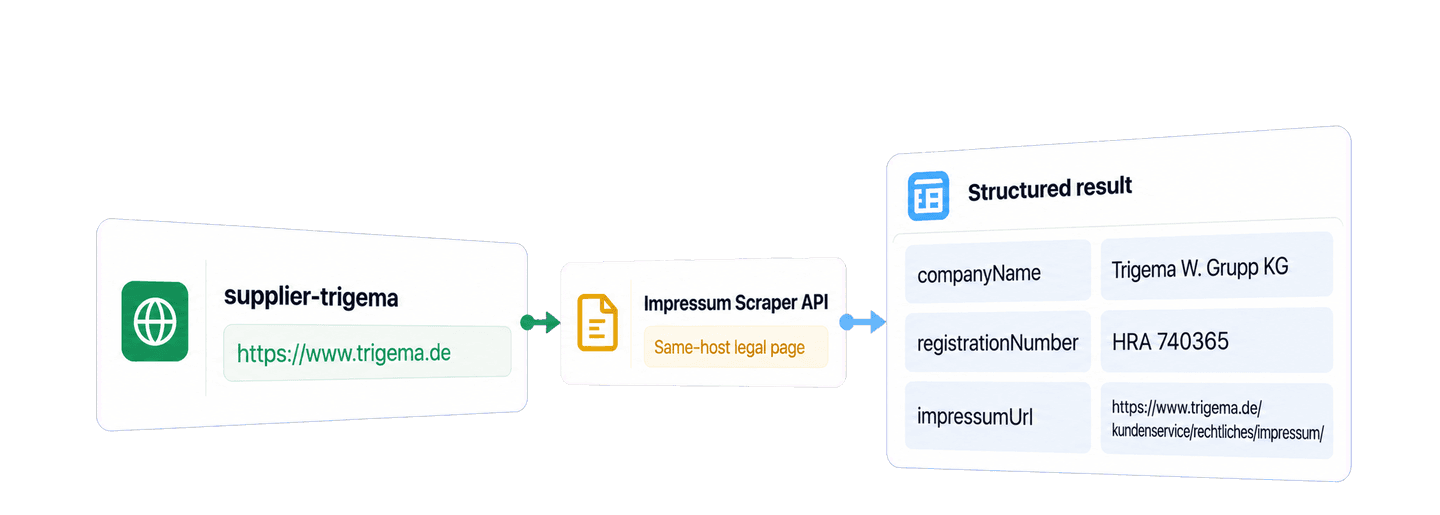
To scrape Impressum data in Python without building a custom crawler, use Datablist's Impressum Scraper API with the Requests library. You supply company website URLs, the API finds each website's Impressum page, and it extracts structured company and contact details from that page.
For this example, I use two established German brands: clothing manufacturer Trigema and outdoor brand VAUDE. A small runnable Python example performs the lookup, then keeps the extracted details and source Impressum URL with each supplier record.
📌 Summary For Those In a Rush
Use Datablist's Impressum Scraper API to turn German business websites into structured company and contact data. The Python example submits two websites, waits for the background task, retrieves every result page, and keeps the discovered legal-page URL with each record.
- Input: German business website URLs.
- Output: Company and contact details plus the source Impressum link.
💡 Prefer a no-code solution? Use Datablist's Impressum Scraper to extract these company details without writing code.
Set up your API key and Python environment
Create a Datablist account and then create a Personal API Key. REST API access is available on the Growth plan. Here is a sample key format:
auth0|exampleuser:exampleaccount:EXAMPLE_TOKEN_NOT_VALID:1Export your own key as DATABLIST_API_KEY:
export DATABLIST_API_KEY="your-personal-api-key"For this Python example, I use the requests package. Create a file named
scrape_impressum.py and install the package:
python -m pip install requestsEach submitted website uses 10 credits. The two-website example below uses 20 credits when both inputs are processed.
Build the scrape_impressums() function
Paste this complete script into scrape_impressum.py:
import json
import os
import time
import uuid
import requests
def scrape_impressums(suppliers, api_key):
"""Submit one task, wait for it to finish, and return every result."""
tasks_url = "https://api.datablist.com/v1/enrichments/tasks"
headers = {"X-API-Key": api_key}
inputs = [
{
"inputId": supplier["id"],
"data": {"websiteUrl": supplier["website_url"]},
}
for supplier in suppliers
]
payload = {
"enrichmentId": "impressum-scraper",
"uniqueId": str(uuid.uuid4()),
"settings": {},
"inputs": inputs,
}
response = requests.post(tasks_url, headers=headers, json=payload)
response.raise_for_status()
task = response.json()
task_id = task["@id"]
task_url = f"{tasks_url}/{task_id}"
while task["status"] not in ("completed", "failed", "stopped"):
time.sleep(3)
response = requests.get(task_url, headers=headers)
response.raise_for_status()
task = response.json()
if task["status"] != "completed":
raise RuntimeError(
f"Task {task_id} {task['status']}: {task.get('error')}"
)
results = []
results_url = f"{task_url}/results"
params = {"limit": 100}
while True:
response = requests.get(results_url, headers=headers, params=params)
response.raise_for_status()
page = response.json()
results.extend(page["results"])
next_cursor = page["nextCursor"]
if next_cursor is None:
break
params["cursor"] = next_cursor
return results
if __name__ == "__main__":
api_key = os.environ.get("DATABLIST_API_KEY")
if not api_key:
raise RuntimeError("Set DATABLIST_API_KEY before running this script.")
suppliers = [
{
"id": "supplier-trigema",
"label": "Trigema",
"website_url": "https://www.trigema.de",
},
{
"id": "supplier-vaude",
"label": "VAUDE",
"website_url": "https://www.vaude.com",
},
]
impressum_results = scrape_impressums(suppliers, api_key)
for result in impressum_results:
print(json.dumps(result, ensure_ascii=False))Run the complete script with:
python scrape_impressum.pyThe function follows the API in three steps. It submits the website inputs, waits for the task to finish, and then retrieves every result page.
Submit the website inputs
The script turns each supplier into an API input like this:
inputs = [
{
"inputId": supplier["id"],
"data": {"websiteUrl": supplier["website_url"]},
}
for supplier in suppliers
]inputId is your own stable identifier. data.websiteUrl is the company
homepage that the scraper will inspect. Use the business's own website rather
than a directory or social profile. The payload selects the public
impressum-scraper enrichment and uses an empty settings object because this
API does not require public settings.
The POST request creates a background task. Datablist accepts the request and
returns a task object whose @id identifies that run. The function uses that ID
to build the status and result URLs.
A shortened creation response looks like this:
{
  "@id": "task-id",
  "enrichmentId": "impressum-scraper",
  "status": "queued",
  "links": {
    "self": "https://api.datablist.com/v1/enrichments/tasks/task-id",
    "results": "https://api.datablist.com/v1/enrichments/tasks/task-id/results"
  }
}
queued means the request was accepted, not that the result is ready. The
script carries the returned @id into the next two steps, so you do not have to
copy task URLs by hand. It also calls raise_for_status() before reading each
response. An authentication or validation error therefore stops at the HTTP
request that failed instead of being mistaken for a completed lookup.
Wait for the background task
Datablist processes the task in the background. The example checks its status
every three seconds until it reaches completed, failed, or stopped.
Requests is a blocking Python library, so your local script waits during these
calls even though the API task itself runs in the background.
If the task finishes with failed or stopped, the function raises an error
that includes the task ID and terminal status. Keep that ID when investigating
the existing task rather than immediately submitting the same paid work again.
Retrieve every result page
Once the task is complete, the script requests up to 100 results at a time. The
pagination rule is simple: fetch the next page until nextCursor is null.
When the cursor contains a value, the script sends it with the next request.
Do not join the returned records to your application by list position. Results
can arrive in a different order from the submitted inputs. Use inputId as the
join key.
How the API finds an Impressum page
The homepage is the starting point, not the page the API expects to extract.
The Impressum Scraper uses AI to inspect internal links on the supplied host
and identify an Impressum or an equivalent legal or contact page. This matters
because the link may sit under labels such as Rechtliches, Kontakt, or
Legal instead of appearing at /impressum.
If AI does not find a suitable internal link, the scraper tries the common
/impressum and /imprint paths on the same host. After it reaches a source
page, AI extracts the legal-company, address, contact, registration, VAT, and
source fields into one result. It does not use a search engine or move to an
external directory.
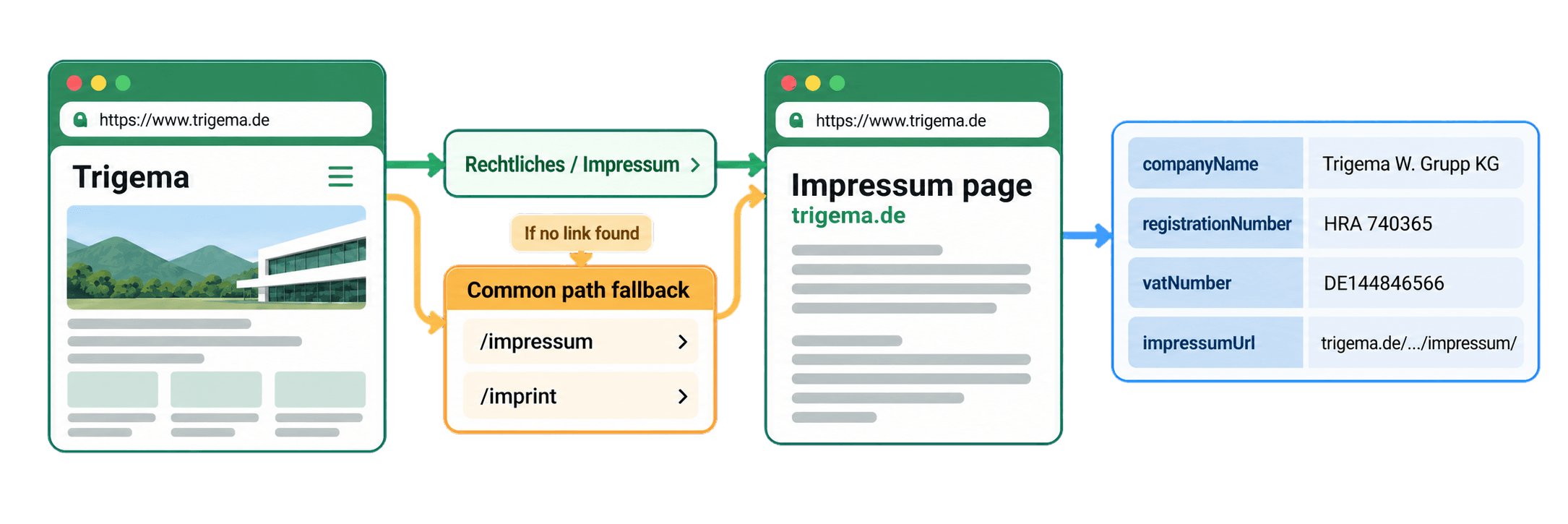
The two results show that path variation in practice. Trigema returned
/kundenservice/rechtliches/impressum/, while VAUDE returned
/de/de/impressum.html. Keep impressumUrl with each result because it records
the exact source page behind the extracted fields.
Read the Trigema and VAUDE results
Here is a compact excerpt from the two example results.
📘 Example email addresses: Emails are masked with
**below. The API returns the full addresses.
[
  {
    "inputId": "supplier-trigema",
    "status": "success",
    "outputs": {
      "firstName": "Wolfgang",
      "lastName": "Grupp",
      "companyName": "Trigema W. Grupp KG",
      "postalAddress": "Josef-Mayer-Str. 31-35, D-72393 Burladingen",
      "emailAddress": "b**@trigema.de",
      "registrationNumber": "HRA 740365",
      "vatNumber": "DE144846566",
      "impressumUrl": "https://www.trigema.de/kundenservice/rechtliches/impressum/",
      "agentConfidenceScore": 90
    },
    "creditsUsed": "10",
    "error": null
  },
  {
    "inputId": "supplier-vaude",
    "status": "success",
    "outputs": {
      "firstName": "Antje",
      "lastName": "von Dewitz",
      "companyName": "VAUDE Sport GmbH & Co. KG",
      "postalAddress": "Vaude Straße 2, 88069 Tettnang",
      "emailAddress": "s**@service.vaude.com",
      "registrationNumber": "HRA 631071",
      "vatNumber": "DE203894755",
      "impressumUrl": "https://www.vaude.com/de/de/impressum.html",
      "agentConfidenceScore": 95
    },
    "creditsUsed": "10",
    "error": null
  }
]
Start with the names. Trigema is the supplier label in the Python input, while
Trigema W. Grupp KG is the legal company name extracted from the Impressum.
The same distinction appears for VAUDE: the input label is VAUDE, and the
returned company is VAUDE Sport GmbH & Co. KG. Keeping both values lets you
retain the recognizable name used by your team while adding the legal entity
shown on the company's own website. This is especially useful when comparing a
supplier record with an invoice, contract, or another company dataset that may
use the longer legal name.
The returned fields answer different research questions:
firstNameandlastNamecontain the managing-director or founder name extracted from the page when found. Here they are Wolfgang Grupp and Antje von Dewitz.postalAddressgives the business address extracted from the legal page, while the email and phone fields provide the contact details published there.registrationNumberandvatNumberpreserve the identifiers printed on the page. For Trigema, those values areHRA 740365andDE144846566; for VAUDE, they areHRA 631071andDE203894755. They give you concrete values to compare with the identifiers already stored in your supplier data.impressumUrlidentifies the page used for extraction. It is separate from the submitted homepage because one records the business you started with and the other records the source of the legal-company details.
Both records have status: success and used 10 credits. The
agentConfidenceScore is a 0 to 100 signal that helps you prioritize review. It
is not an accuracy percentage. Output fields can still be empty when a value is
absent from the page or cannot be extracted, so keep the item status and open
the returned Impressum URL when a detail matters to your next step.
The documented output can also include gender, phone number, and other contact details. See the Impressum Scraper API documentation for the current schema.
Turn the output into supplier research records
The direct API call already works. Now put it in the context of a supplier research task. Supplier discovery or onboarding may give you a stable ID, the short name your team uses, and a homepage. The Impressum result adds the legal company behind that website, its published identifiers and contact details, and the page where those values appeared.
The following snippet indexes the results by inputId and builds local
company-research records. Add it after the scrape_impressums() call in the
complete script:
results_by_id = {
result["inputId"]: result for result in impressum_results
}
company_research = []
for supplier in suppliers:
result = results_by_id[supplier["id"]]
company_research.append(
{
"supplier_id": supplier["id"],
"supplier_label": supplier["label"],
"website_url": supplier["website_url"],
"status": result["status"],
"outputs": result.get("outputs", {}),
"credits_used": result["creditsUsed"],
"error": result.get("error"),
}
)
print(json.dumps(company_research, indent=2, ensure_ascii=False))For Trigema, the record preserves supplier-trigema, the Trigema display
label, and https://www.trigema.de. The nested outputs object adds
Trigema W. Grupp KG, its address and identifiers, Wolfgang Grupp's returned
name, and the source Impressum URL. The VAUDE record follows the same chain from
the VAUDE label and homepage to VAUDE Sport GmbH & Co. KG and its own source
page. You can now compare or group records by legal company without losing the
original supplier identity that triggered the research.
The record keeps the returned details, successful API status, 10-credit usage, and public error value together with the supplier ID, label, and website.
The important merge rule is the dictionary lookup by supplier ID. It still
connects the right result when the API returns VAUDE before Trigema. The snippet
also keeps unsuccessful item results in company_research because it does not
filter by status. A no_result or error item remains available with its ID
and error instead of disappearing from your review queue.
This code prepares local research records. You can serialize the list or pass it to your own downstream code without adding another API call.
Estimate the API cost
The Impressum Scraper uses a fixed 10 credits per submitted website. The two example websites used 20 credits in total. At the same rate, 1,000 websites use 10,000 credits.
The Growth plan provides REST API access and includes subscription credits. Optional top-ups add more credits when you need them. Plan access, included credits, and top-up purchases are separate parts of the cost, so check the current Datablist pricing before planning a larger run.
Handle common problems without repeating paid work
The script stops before making a request
If DATABLIST_API_KEY is missing, the script raises Set DATABLIST_API_KEY before running this script. Export the variable in the same terminal and run
the file again:
export DATABLIST_API_KEY="your-personal-api-key"
python scrape_impressum.pyThe API rejects the request
response.raise_for_status() stops on an HTTP error. Check that you supplied a
valid Personal API Key and that your account has REST API access. This differs
from the missing-variable case: an invalid value reaches the API and receives
an HTTP response.
The task fails or stops
The raised error contains the task ID and status. Inspect that existing task, its results, and its credit fields before creating another task. A failed or stopped task can retain results and credit usage, so repeating it immediately can duplicate paid work.
One result is incomplete
A completed task can contain item-level no_result, error, or incomplete
outputs. Keep the record's inputId, status, impressumUrl when available,
and public error. Check that the input is the company's own homepage or root
domain, then inspect the site before deciding whether another lookup is useful.
The task documentation explains statuses, result pagination, task history, limits, and retention in more detail.
Next steps
You now have a runnable Python Requests integration that submits German company websites, waits for the Impressum Scraper task, retrieves every result page, and keeps structured company details with their source URLs in local supplier research records.
Replace the two sample suppliers with your own stable IDs and website URLs.
Then review each returned impressumUrl before using the extracted fields in
your downstream process. You can download the maintained
synchronous Requests example
or switch to the repository's
async HTTPX example
when you need non-blocking concurrency.