
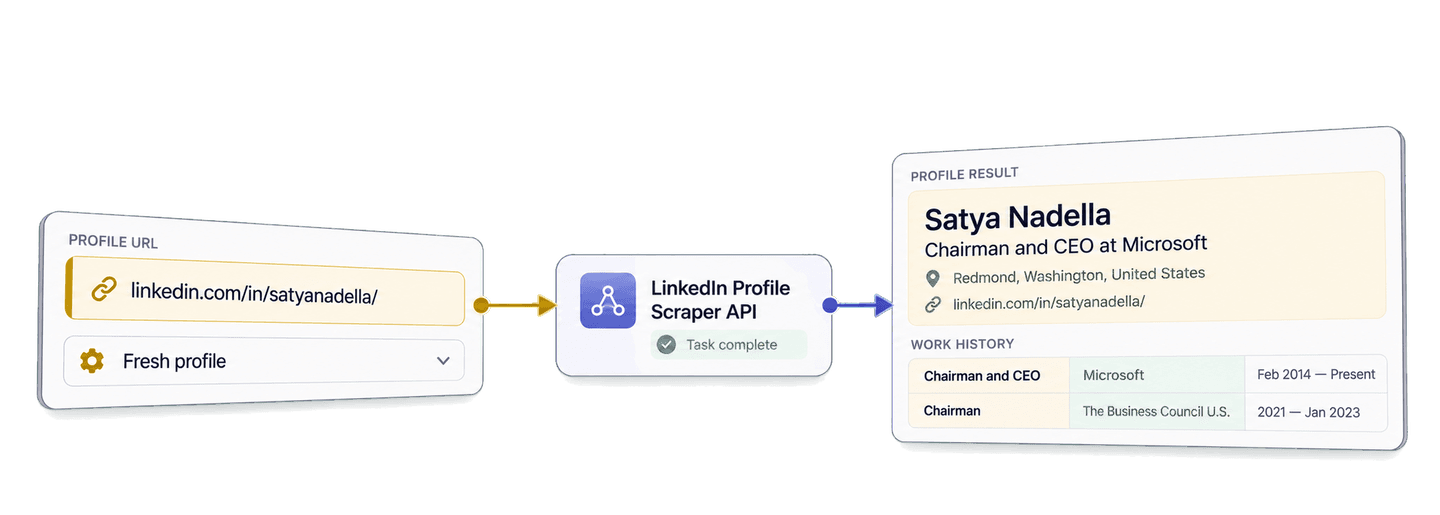
You can scrape LinkedIn profiles in Python by sending known public profile URLs to Datablist's LinkedIn Profile Scraper API with the Requests library. The API returns structured identity, location, work history, education, and company fields for building lead lists and personalizing outreach with relevant role and company context.
This guide uses Satya Nadella's public profile URL as a compact example. You will run a complete profile-scraping task, interpret the returned Microsoft role and dated work entries, then keep the result with your source lead before preparing outreach.
🔑 Summary For Those In a Rush: Send known LinkedIn person-profile URLs to Datablist and retrieve available profile, location, work-history, education, and company data as structured JSON. The Python example below keeps those details with each source lead so you can qualify the list and prepare more relevant outreach.
- Input: Known LinkedIn person-profile URLs.
- Output: Structured profile details stored with each source contact.
💡 Prefer a no-code solution? Use Datablist's LinkedIn Profile Scraper to extract details from known profile URLs without writing code.
Set up the Datablist API and Python environment
Datablist REST API access is included with the Growth plan. Profile retrieval also consumes enrichment credits, which I break down in the cost section.
Create a Personal API Key from your Datablist API account page. This example shows the Personal API Key format:
auth0|exampleuser:exampleaccount:EXAMPLE_TOKEN_NOT_VALID:1The script reads your key from the DATABLIST_API_KEY environment variable and
sends it in the X-API-Key header.
For this Python example, I use the requests package. These setup commands use
a macOS or Linux shell. Create a project folder, open it in your terminal, and
run:
python -m venv .venv
source .venv/bin/activate
python -m pip install requestsNext, create a file named scrape_linkedin_profiles.py and export your key:
export DATABLIST_API_KEY="your-personal-api-key"Run a complete LinkedIn profile scrape in Python
The source record in this walkthrough contains a stable contact ID and one known profile URL:
{
  "contact_id": "contact-satya-nadella",
  "profile_url": "https://www.linkedin.com/in/satyanadella/"
}
The script sends contact_id as the API's inputId. Results do not need to
arrive in the same order as the inputs, so this ID gives you a reliable way to
match every result to its source contact.
Paste the following complete script into scrape_linkedin_profiles.py:
import json
import os
import time
import uuid
import requests
def scrape_profiles(source_contacts, api_key):
"""Submit one task, wait for completion, and return every result page."""
tasks_url = "https://api.datablist.com/v1/enrichments/tasks"
headers = {"X-API-Key": api_key}
inputs = [
{
"inputId": contact["contact_id"],
"data": {"profileUrl": contact["profile_url"]},
}
for contact in source_contacts
]
unique_id = str(uuid.uuid4())
print(f"Task uniqueId: {unique_id}", flush=True)
payload = {
"enrichmentId": "linkedin-profile-scraper",
"uniqueId": unique_id,
"settings": {
"experiencesNb": "5",
"educationsNb": "3",
"acceptCachedProfiles": False,
"includeUrn": False,
"includePictures": False,
},
"inputs": inputs,
}
response = requests.post(tasks_url, headers=headers, json=payload)
response.raise_for_status()
task = response.json()
task_id = task["@id"]
task_url = f"{tasks_url}/{task_id}"
print(f"Task ID: {task_id}")
while task["status"] not in ("completed", "failed", "stopped"):
time.sleep(3)
response = requests.get(task_url, headers=headers)
response.raise_for_status()
task = response.json()
if task["status"] != "completed":
raise RuntimeError(
f"Task {task_id} {task['status']}: {task.get('error')}"
)
results = []
results_url = f"{task_url}/results"
params = {"limit": 100}
while True:
response = requests.get(results_url, headers=headers, params=params)
response.raise_for_status()
page = response.json()
results.extend(page["results"])
next_cursor = page["nextCursor"]
if next_cursor is None:
break
params["cursor"] = next_cursor
return results
if __name__ == "__main__":
api_key = os.environ.get("DATABLIST_API_KEY")
if not api_key:
raise RuntimeError("Set DATABLIST_API_KEY before running this script.")
source_contacts = [
{
"contact_id": "contact-satya-nadella",
"profile_url": "https://www.linkedin.com/in/satyanadella/",
}
]
profile_results = scrape_profiles(source_contacts, api_key)
print(json.dumps(profile_results, indent=2))Run it with:
python scrape_linkedin_profiles.pyThe settings request five work experiences and three education entries. The API
expects those counts as strings. acceptCachedProfiles: false asks for a fresh
retrieval, while the picture and internal-ID options stay off because this
workflow uses durable text and URL fields.
Use a standard public /in/ profile URL or a Sales Navigator lead URL for each
input. A person's name, a LinkedIn search page, and a company page identify
different tasks and are not valid profile inputs for this scraper. If your
source contains Sales Navigator links, the returned profileUrl can be the
normalized public profile URL. For a larger list, keep every inputId unique
and stable instead of deriving it from the row position.
The history counts control how many flat, numbered work and education fields the API can return. They do not change the per-profile credit rate. Request enough history for your research decision, but avoid selecting ten work entries when the latest few roles are all you plan to inspect.
What the three API calls do
The POST request sends the selected settings and profile inputs. Datablist
accepts the work as a background task and returns its @id. The script prints
both the generated uniqueId and the returned task ID, so you have the values
needed to inspect the task later.
The first GET call checks the task status every three seconds. The Python
client blocks while it waits, but the API task continues in the background. The
loop stops at completed, failed, or stopped.
The second GET call retrieves results in pages of up to 100 records. When
nextCursor contains a value, the script fetches the next page. It stops when
nextCursor is null.
Read the profile result and choose the right retrieval settings
The submitted URL determines which profile the scraper retrieves. Datablist accepts public person-profile URLs and Sales Navigator lead URLs, normalizes the profile URL when needed, and maps the available public data into flat profile, work, education, and company fields.
The fresh lookup used in this guide completed successfully and used 25 credits. Here is the complete result:
{
  "inputId": "contact-satya-nadella",
  "status": "success",
  "outputs": {
    "profileUrl": "https://www.linkedin.com/in/satyanadella/",
    "fullName": "Satya Nadella",
    "firstName": "Satya",
    "lastName": "Nadella",
    "linkedInHeadline": "Chairman and CEO at Microsoft",
    "linkedInSummary": "As chairman and CEO of Microsoft, I define my mission and that of my company as empowering every person and every organization on the planet to achieve more.",
    "linkedInProfilePicture": "https://media.licdn.com/dms/image/v2/C5603AQHHUuOSlRVA1w/profile-displayphoto-shrink_800_800/profile-displayphoto-shrink_800_800/0/1579726625483?e=1794441600&v=beta&t=I1sL---bTuvjxqb1vdbNsNy-fAsLCpBj3-WtJjOGbOc",
    "linkedInInternalIdentifier": "ACoAAAEkwwAB9KEc2TrQgOLEQ-vzRyZeCDyc6DQ",
    "linkedInLocation": "Redmond, Washington, United States",
    "linkedInCity": "Redmond",
    "linkedInState": "Washington",
    "linkedInCountryName": "United States",
    "linkedInCountryCode": "US",
    "linkedInLanguages": "",
    "linkedInConnections": 832,
    "linkedInlastExpTitle": "Chairman and CEO",
    "linkedInlastExpCompany": "Microsoft",
    "linkedInlastExpEmploymentType": null,
    "linkedInlastExpLocation": "Greater Seattle Area",
    "linkedInlastExpStartsAt": "2014-02-01",
    "linkedInlastExpEndsAt": null,
    "linkedInlastExpDescription": null,
    "linkedInlastExpCompanyWebsite": "https://news.microsoft.com/",
    "linkedInlastExpCompanyPage": "https://www.linkedin.com/company/microsoft/",
    "linkedInlastExpCompanyIndustry": "Software Development",
    "linkedInlastExpCompanyRange": "10001+",
    "linkedInlastExpCompanyDescription": "Every company has a mission. What's ours? To empower every person and every organization to achieve more. We believe technology can and should be a force for good and that meaningful innovation contributes to a brighter world in the future and today. Our culture doesn’t just encourage curiosity; it embraces it. Each day we make progress together by showing up as our authentic selves. We show up with a learn-it-all mentality. We show up cheering on others, knowing their success doesn't diminish our own. We show up every day open to learning our own biases, changing our behavior, and inviting in differences. Because impact matters. \n\nMicrosoft operates in 190 countries and is made up of approximately 228,000 passionate employees worldwide.",
    "linkedInlastExpCompanyLogo": "https://media.licdn.com/dms/image/v2/D560BAQH32RJQCl3dDQ/company-logo_200_200/B56ZYQ0mrGGoAM-/0/1744038948046/microsoft_logo?e=1793836800&v=beta&t=4wXD40LQU4IfLY4DiEvT2bwvjUoPQPGgi5_T-vPsbQ8",
    "linkedIn2ExpTitle": "Chairman",
    "linkedIn2ExpCompanyName": "The Business Council U.S.",
    "linkedIn2ExpEmploymentType": null,
    "linkedIn2ExpStartsAt": "2021-01-01",
    "linkedIn2ExpEndsAt": "2023-01-01",
    "linkedIn2ExpDescription": null,
    "linkedIn2ExpLogo": "https://media.licdn.com/dms/image/v2/C4D0BAQGcnaZNpjMvrw/company-logo_200_200/company-logo_200_200/0/1630557702704/the_business_council_us_logo?e=1793836800&v=beta&t=Ejb0D8lV5sMTFwcz_-FKdfQvIvq-mKx_Nl8vRMib53k",
    "linkedIn3ExpTitle": "Member Board Of Trustees",
    "linkedIn3ExpCompanyName": "University of Chicago",
    "linkedIn3ExpEmploymentType": null,
    "linkedIn3ExpStartsAt": "2018-01-01",
    "linkedIn3ExpEndsAt": null,
    "linkedIn3ExpDescription": null,
    "linkedIn3ExpLogo": "https://media.licdn.com/dms/image/v2/D4E0BAQGDP-PXY3u8dw/company-logo_200_200/B4EaENqZTQGoAM-/0/1791230580227/uchicago_logo?e=1793836800&v=beta&t=NJGoETr0tY868Z2pvlyXeh939iXwW0WbSFwRctabEVU",
    "linkedIn4ExpTitle": "Board Member",
    "linkedIn4ExpCompanyName": "Starbucks",
    "linkedIn4ExpEmploymentType": null,
    "linkedIn4ExpStartsAt": "2017-01-01",
    "linkedIn4ExpEndsAt": "2024-01-01",
    "linkedIn4ExpDescription": null,
    "linkedIn4ExpLogo": "https://media.licdn.com/dms/image/v2/C4D0BAQEQxk9y2rk7Hw/company-logo_200_200/company-logo_200_200/0/1631316692275?e=1793836800&v=beta&t=NVjljhe0oI5KzvJHodAJjss5EdvxaOIzQQ2rAGyh_AQ",
    "linkedIn5ExpTitle": "Board Member",
    "linkedIn5ExpCompanyName": "Fred Hutch",
    "linkedIn5ExpEmploymentType": null,
    "linkedIn5ExpStartsAt": "2016-01-01",
    "linkedIn5ExpEndsAt": "2022-01-01",
    "linkedIn5ExpDescription": null,
    "linkedIn5ExpLogo": "https://media.licdn.com/dms/image/v2/D4D0BAQGF4eOou62nvQ/company-logo_200_200/company-logo_200_200/0/1664795263764/fredhutch_logo?e=1793836800&v=beta&t=dJWSO-KkuBPd6I6aRYBoIcQVzcSEmGLwqYy-VMFXJQc",
    "linkedInlastEduSchool": "The University of Chicago Booth School of Business",
    "linkedInlastEduDegree": null,
    "linkedInlastEduField": null,
    "linkedInlastEduStartsAt": "1994-01-01",
    "linkedInlastEduEndsAt": "1996-01-01",
    "linkedInlastEduPage": "https://www.linkedin.com/school/universityofchicagoboothschoolofbusiness/",
    "linkedInlastEduLogo": "https://media.licdn.com/dms/image/v2/D560BAQFZO05jhYKSkw/company-logo_200_200/company-logo_200_200/0/1692627816910/universityofchicagoboothschoolofbusiness_logo?e=2147483647&v=beta&t=BTjFA4UVU5iKIIyicg8d44rhoiuMbetNDB97BmqpwhQ",
    "linkedIn2EduSchool": "Manipal Institute of Technology",
    "linkedIn2EduDegree": "Bachelor’s Degree",
    "linkedIn2EduField": "Electrical Engineering",
    "linkedIn2EduStartsAt": null,
    "linkedIn2EduEndsAt": null,
    "linkedIn2EduPage": "https://www.linkedin.com/school/manipal-institute-of-technology/",
    "linkedIn2EduLogo": "https://media.licdn.com/dms/image/v2/D4D0BAQHodG_7cUqs6w/company-logo_200_200/B4DZ8hC8AUJQAE-/0/1782965846314/manipal_institute_of_technology_logo?e=2147483647&v=beta&t=jqJK15_r7lxUNgWdbbzdMq47aLa_PqnkDYxg4Jun4Zo",
    "linkedIn3EduSchool": "University of Wisconsin-Milwaukee",
    "linkedIn3EduDegree": "Master’s Degree",
    "linkedIn3EduField": "Computer Science",
    "linkedIn3EduStartsAt": null,
    "linkedIn3EduEndsAt": null,
    "linkedIn3EduPage": "https://www.linkedin.com/school/uwmilwaukee/",
    "linkedIn3EduLogo": "https://media.licdn.com/dms/image/v2/D4D0BAQE47QlO_LG8SQ/company-logo_200_200/company-logo_200_200/0/1729615751602/uwmilwaukee_logo?e=2147483647&v=beta&t=l-w3ttd1mZRc-_j5aCPXEzNiYJzl1iJjMGw7q8B3eRI"
  },
  "creditsUsed": "25",
  "error": null
}
Read the title, employer, start date, and end date together. The Microsoft entry starts in February 2014 and has no end date. The Business Council U.S. entry runs from 2021 to January 2023. Those dates distinguish an open entry from an ended one and also show how roles can overlap.
linkedInlastExpTitle and linkedInlastExpCompany contain the current or last
mapped experience. That first mapped entry can include richer company details,
such as the company page, website, industry, description, and employee range.
Numbered entries add earlier titles, employers, and dates. In this response, the
returned Microsoft website is https://news.microsoft.com/. That URL gives the
lead record a useful company source alongside the person's role history.
The linkedInlastEduSchool, linkedIn2EduSchool, and linkedIn3EduSchool
fields name The University of Chicago Booth School of Business, Manipal
Institute of Technology, and the University of Wisconsin-Milwaukee. The Manipal
entry includes a Bachelor's Degree in Electrical Engineering, and the
Wisconsin-Milwaukee entry includes a Master's Degree in Computer Science. The
Chicago degree and field values are empty.
Use experiencesNb values of "3", "5", or "10" and educationsNb
values of "1", "3", or "5" to choose how much history you need. Read
those fields directly from outputs when they support your research. An empty
optional value does not make the whole result a failure.
Fresh mode fits lead-list preparation when you want a new retrieval of the available public profile data. Cached mode can return an available stored profile for fewer credits and fall back to a fresh retrieval when no cached profile is available. Choose based on your desired recency and credit budget.
Prepare lead records for outreach
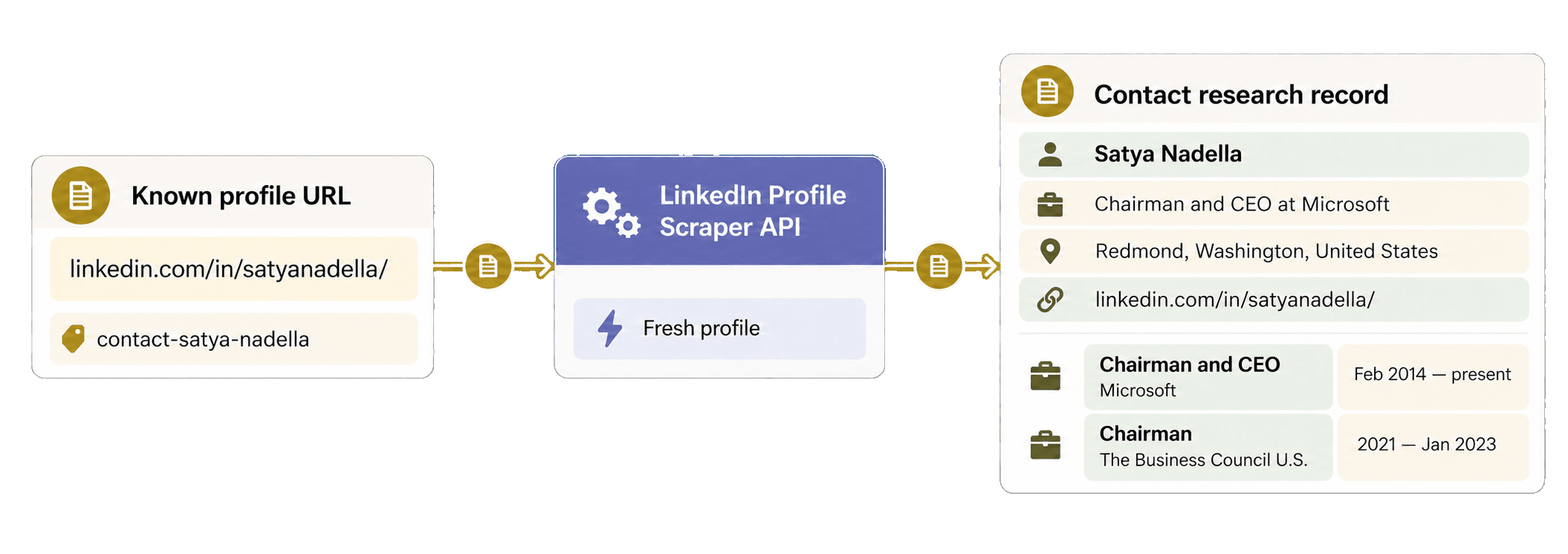
Once profile_results is available, you can attach each response to its source
contact without submitting another task. The following block reuses the
variables created by the complete script:
results_by_input_id = {
result["inputId"]: result
for result in profile_results
}
contact_research = []
for contact in source_contacts:
result = results_by_input_id[contact["contact_id"]]
contact_research.append(
{
"contact_id": contact["contact_id"],
"source_profile_url": contact["profile_url"],
"result_status": result["status"],
"profile": result.get("outputs", {}),
"credits_used": result["creditsUsed"],
"error": result.get("error"),
}
)
research_record = contact_research[0]
profile = research_record["profile"]
print("Contact:", profile.get("fullName"))
print("Headline:", profile.get("linkedInHeadline"))
print("Location:", profile.get("linkedInLocation"))
print(
"First work entry:",
profile.get("linkedInlastExpTitle"),
"at",
profile.get("linkedInlastExpCompany"),
)The dictionary keyed by inputId handles out-of-order responses.
contact-satya-nadella remains both the source ID and the API ID, the known
LinkedIn URL remains source_profile_url, and profile keeps the original
outputs object unchanged.
This wrapper keeps the complete returned profile together with the source URL, API status, and credit usage. You can use the printed headline, location, and first work entry to qualify the lead and add relevant role or company context to outreach. Unsuccessful API rows keep their returned status and error, so they remain visible in the lead list.
You can download the maintained blocking Requests example or use the async HTTPX alternative after the blocking flow is clear.
Estimate the LinkedIn profile scraping cost
A fresh retrieval uses 25 credits per profile. When cached profiles are enabled, an available cached result uses 20 credits, while a cache miss can still fall back to a 25-credit fresh retrieval. The fresh Satya Nadella sample used 25 credits.
For 1,000 profiles, the retrieval therefore uses 20,000 credits if every requested cached profile is available, or up to 25,000 credits for fresh retrieval. Datablist REST API access requires the Growth plan. The subscription, its included credits, and optional credit top-ups are separate parts of the cost. Check the pricing page for the live catalog.
Using the current USD base top-up of $20 for 20,000 credits as a planning example, the consumed credits are worth an estimated $20 for an all-cached 1,000-profile run or $25 for a fresh run. These estimates are separate from the Growth subscription cost.
Fix common errors and recover a task
DATABLIST_API_KEYis missing: the script stops before making a request. Export the variable, then rerun the file.- The API rejects the key: check the Personal API Key and send only the
X-API-Keycredential used in this example. - The profile URL is missing or malformed: use a public LinkedIn person URL or a supported Sales Navigator lead URL. A person's name, search page, or company page is not a profile input.
- Credits are insufficient: check your balance, then use included credits or add a top-up before creating another task.
- The task is
failedorstopped: inspect its error, available results, and credit usage before deciding whether another paid submission is needed. - A result is sparse,
no_result, orerror: inspect its status and public error, then confirm the URL and settings. Available fields can vary with the profile, its visibility, and retrieval.
If the connection drops during the POST, use the uniqueId printed before
submission. List recent scraper tasks and compare their values before creating
another task:
response = requests.get(
"https://api.datablist.com/v1/enrichments/tasks",
headers={"X-API-Key": api_key},
params={"enrichmentId": "linkedin-profile-scraper", "limit": 100},
)
response.raise_for_status()
printed_unique_id = "paste-the-printed-unique-id"
tasks = response.json()["tasks"]
matching_task = None
for task in tasks:
if task["uniqueId"] == printed_unique_id:
matching_task = task
break
if matching_task:
print("Task ID:", matching_task["@id"])The task list can be filtered by enrichmentId, but not by uniqueId. Follow
its nextCursor if the task is not on the first page. Once you have the task
ID, continue with the same status and results URLs used by the main function.
The task API documentation
explains the lifecycle, pagination, and interruption behavior in more detail.
Next steps
You now have one reusable Python Requests function that turns known LinkedIn profile URLs into structured results, plus lead records matched by stable ID. Replace the example with a small reviewed set of URLs, choose fresh or cached retrieval based on the recency and credit cost you need, and use the returned role and company context to qualify leads or personalize outreach.
If you still need to discover profile URLs from names and a company or school keyword, follow the separate guide to find LinkedIn profiles in Python with an API before running this scraper.