
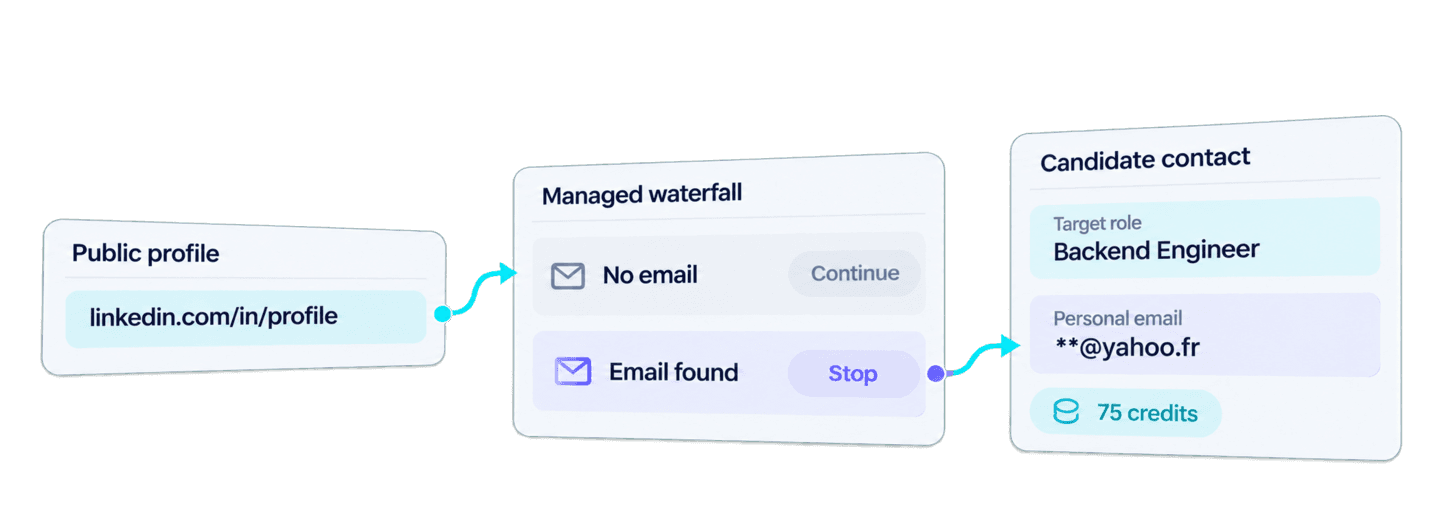
You can find personal emails from LinkedIn in Python by sending public linkedin.com/in/... profile URLs to Datablist's Waterfall Personal Email Finder API. The API runs a managed sequence of eligible email providers and returns a personal address when one of them finds a result.
The complete Requests example below submits one background task, waits for it to finish, and retrieves every result page. After the lookup works, you will reuse the returned objects to prepare recruiting contact records that keep each candidate's name, LinkedIn URL, and target role beside the found email.
This workflow looks for a personal email address that is independent of the candidate's current employer. If you need an address tied to the person's company instead, follow the separate guide to find a work email from a LinkedIn profile.
🔑 Summary For Those In a Rush
Supply candidate names, public LinkedIn profile URLs, and target roles. The Python workflow finds available personal emails and keeps each address with the recruiting details you started with.
- Input: Candidate names, public
linkedin.com/in/...profile URLs, and target roles.- Output: Found personal emails kept with the matching candidate details.
💡 Prefer a no-code solution? Use Datablist's Waterfall Personal Email Finder to find personal emails without writing code.
If your source contains names but no profile URLs, first find public LinkedIn profiles in Python, then pass those URLs to this API.
Set up Python, Requests, and your Datablist API key
For this example, I use Python with the requests package. Create a file named find_personal_emails.py, then install Requests:
python -m pip install requestsCreate a Personal API Key in your Datablist account and export it as an environment variable:
export DATABLIST_API_KEY='your-api-key'REST API access is available on the Growth plan. A successful personal-email result also consumes credits, which I calculate in the cost section below.
Find a personal email with one Python function
The editable candidates list in this script contains one recruiting record. target_role is an example source value that stays local to the recruiting workflow. Only candidate_id and linkedin_url enter the API payload.
import json
import os
import time
import uuid
import requests
def find_personal_emails(candidates, api_key):
"""Submit one task, wait for it to finish, and return every result."""
tasks_url = "https://api.datablist.com/v1/enrichments/tasks"
headers = {"X-API-Key": api_key}
inputs = [
{
"inputId": candidate["candidate_id"],
"data": {"profileUrl": candidate["linkedin_url"]},
}
for candidate in candidates
]
unique_id = str(uuid.uuid4())
print(f"Recovery uniqueId: {unique_id}", flush=True)
payload = {
"enrichmentId": "waterfall-personal-email-finder",
"uniqueId": unique_id,
"settings": {},
"inputs": inputs,
}
response = requests.post(tasks_url, headers=headers, json=payload)
response.raise_for_status()
task = response.json()
task_id = task["@id"]
task_url = f"{tasks_url}/{task_id}"
while task["status"] not in ("completed", "failed", "stopped"):
time.sleep(3)
response = requests.get(task_url, headers=headers)
response.raise_for_status()
task = response.json()
if task["status"] != "completed":
raise RuntimeError(f"Task {task_id} {task['status']}: {task.get('error')}")
results = []
results_url = f"{task_url}/results"
params = {"limit": 100}
while True:
response = requests.get(results_url, headers=headers, params=params)
response.raise_for_status()
page = response.json()
results.extend(page["results"])
next_cursor = page["nextCursor"]
if next_cursor is None:
break
params["cursor"] = next_cursor
return results
if __name__ == "__main__":
candidates = [
{
"candidate_id": "candidate-florian-poullin",
"name": "Florian Poullin",
"linkedin_url": "https://www.linkedin.com/in/florianpoullin/",
"target_role": "Backend Engineer",
}
]
api_key = os.environ.get("DATABLIST_API_KEY")
if not api_key:
raise RuntimeError("Set DATABLIST_API_KEY before running this script.")
personal_email_results = find_personal_emails(candidates, api_key)
for result in personal_email_results:
print(json.dumps(result, indent=2))Run the file from the same terminal:
python find_personal_emails.pyYou can also download the maintained synchronous Requests example. The script above keeps the same submit, poll, and paginate sequence while using candidate IDs from the source records.
Submit the lookup
The function turns each candidate into an API input. inputId receives the stable candidate ID, while data.profileUrl receives the public LinkedIn person-profile URL. A standard linkedin.com/in/... URL is required. Sales Navigator URLs, company pages, blank values, and names without profile URLs are not valid inputs for this enrichment.
The request uses waterfall-personal-email-finder as the enrichmentId and an empty settings object, as shown in the Waterfall Personal Email Finder API documentation. The script prints its generated uniqueId before submission. Keep that value because it lets you identify an existing task if the connection drops after the API accepts the request.
Here is the complete request body for the one-profile example:
{
  "enrichmentId": "waterfall-personal-email-finder",
  "uniqueId": "55001d29-4fb9-4fe2-9497-80f4b346eed7",
  "settings": {},
  "inputs": [
    {
      "inputId": "candidate-florian-poullin",
      "data": {
        "profileUrl": "https://www.linkedin.com/in/florianpoullin/"
      }
    }
  ]
}
A successful submission returns HTTP 202 Accepted with the task ID in @id. Processing continues on Datablist's servers after that response.
Wait for the background task
The Requests script blocks locally while the server runs the background task. It checks the task every three seconds and continues while the status is queued or running. A completed task moves to result retrieval. A failed or stopped task raises an error with the task ID and available error message.
Retrieve every result page
The results endpoint returns each row's source ID, status, outputs, credits, and error. The first request asks for up to 100 results. It fetches the next page until nextCursor is null.
The task results preserve input order. The inputId still gives each result an explicit connection to its candidate record, including across multiple result pages.
When you adapt the example for more records, keep each candidate_id stable from the source system. That value makes the join predictable when the task has multiple result pages.
How the personal-email waterfall finds a result
Datablist cleans the submitted public LinkedIn profile URL and passes the unresolved profile through currently eligible personal-email providers in sequence. If one provider returns no usable address, the profile can continue to the next eligible provider. When a provider finds a usable email, the sequence stops for that profile and returns it as outputs.emailFound.
The eligible providers are managed by Datablist, so your integration does not need provider-specific requests or fallback code. The public result reports the email outcome rather than a fixed provider order or attempt history.
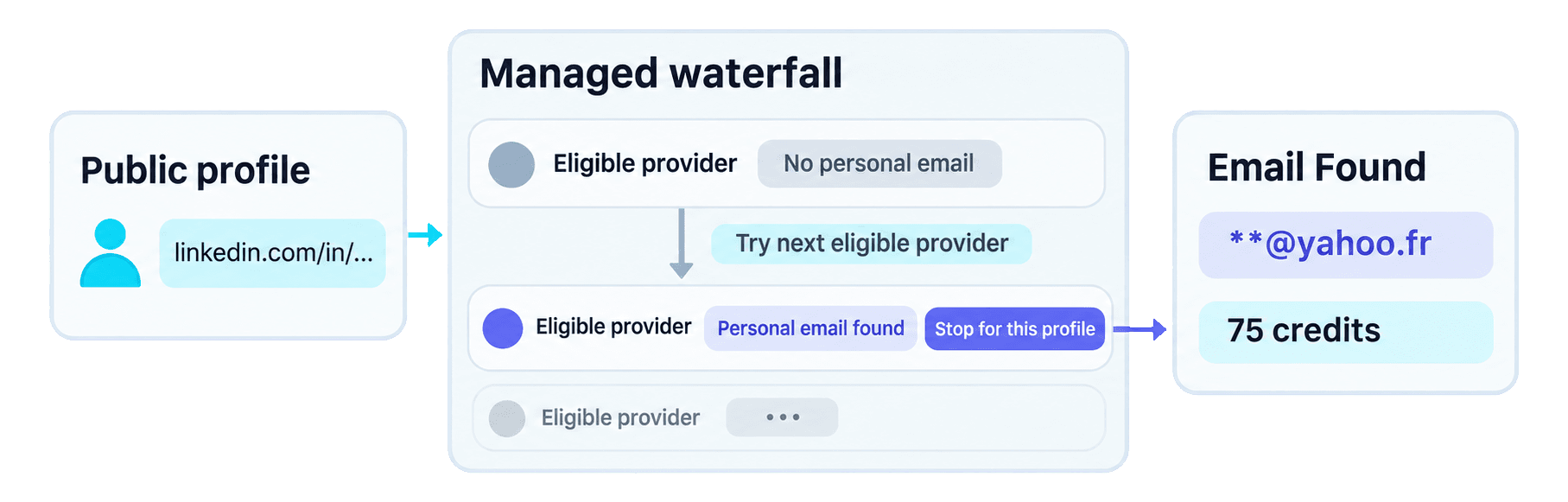
The waterfall is the lookup method. Polling has a different job: it lets the Python client wait for that background work to finish.
Why a waterfall helps international recruiting teams
Personal-email providers use different datasets, so their strengths vary across countries and markets. When the first provider has no email for a candidate, another provider in the waterfall may find one.
Recruiting teams working across several countries get broader provider coverage through one API integration. Datablist manages the sequence, so the team can recover contacts that a single-provider lookup might miss without connecting and maintaining several provider APIs.
Read the complete result
📘 Masked email: The local part of the address is replaced with
**below. Your API result contains the full value.
Here is the complete result page for the candidate input:
{
  "taskId": "b5de73ffaa3f4f349c125d7c85125bb4",
  "results": [
    {
      "inputId": "candidate-florian-poullin",
      "status": "success",
      "outputs": {
        "emailFound": "**@yahoo.fr"
      },
      "creditsUsed": "75",
      "error": null
    }
  ],
  "nextCursor": null
}
The inputId is the join key for the source candidate. outputs.emailFound contains the personal address. creditsUsed is the authoritative charge for this row, and error: null means the API returned no row-level error. The null cursor confirms that this response has no next result page.
Treat the address as a contact option associated with the submitted profile and review it before using it in recruiting.
Prepare candidate contact records for recruiter review
Once the lookup returns, you can prepare a local list for recruiter review without another API request. The following block reuses the existing candidates and personal_email_results variables:
results_by_id = {
result["inputId"]: result for result in personal_email_results
}
prepared_contacts = []
for candidate in candidates:
result = results_by_id.get(candidate["candidate_id"])
if not result or result.get("status") != "success":
continue
email_found = result.get("outputs", {}).get("emailFound")
if not email_found:
continue
prepared_contact = candidate.copy()
prepared_contact["result"] = result
prepared_contacts.append(prepared_contact)
print(json.dumps(prepared_contacts, indent=2))For candidate-florian-poullin, the dictionary lookup finds the result with the same inputId. The copied record keeps Florian Poullin's name, LinkedIn URL, and example Backend Engineer target role. It then attaches the complete API object under result, where the recruiter can read result.outputs.emailFound.
The loop starts from the source candidate list. A future no-result, row error, missing result, or empty emailFound leaves that source list unchanged and does not enter prepared_contacts.
For a broader review process and other contact channels, read the guide to finding a candidate's email address as a recruiter.
Estimate Waterfall Personal Email Finder API costs
Each found personal email uses 75 credits. A lookup with no result uses 0 credits. For actual spend, read creditsUsed on each result instead of multiplying the total number of submitted profiles.
The planning formula is:
personal emails found × 75 credits
For example, if you submit 100 profiles and 20 produce a personal email, the task uses 20 × 75 = 1,500 credits. This is planning arithmetic, not an expected result rate. For larger budgets, 100 found emails use 7,500 credits and 1,000 found emails use 75,000 credits.
At the current base USD top-up rate, $20 / 20,000 credits = $0.001 per credit. One found email therefore consumes $0.075 worth of credits, and 100 found emails consume $7.50 worth. This estimate values the credits used. The Growth subscription required for REST API access is separate. Check Datablist pricing for current plans and credit packages.
Fix common errors and recover an existing task
Most problems happen before submission, at the HTTP request, or in an individual result. Use the error location to choose the next action:
- Missing
DATABLIST_API_KEY: the script stops locally before making a request. Export the environment variable, then run the file again. - HTTP authentication failure: check the Personal API Key in
DATABLIST_API_KEY. The function sends it in theX-API-Keyheader. Correct the credential before submitting again. - Unsupported profile URL: replace a Sales Navigator URL, company page, blank value, or malformed URL with a public person profile in
linkedin.com/in/...format. - Insufficient credits: check the account balance and available credits before submitting more work.
- Task is
failedorstopped: inspect the task error, available results, and credit usage before deciding what still needs to run. - A row has no result or an error: retain the source candidate for review or another contact channel. An unsuccessful lookup does not explain why an address was unavailable.
If the POST response is lost, list your tasks before creating another task. Search the response for the uniqueId printed by the script, then copy the matching task's @id:
curl "https://api.datablist.com/v1/enrichments/tasks?enrichmentId=waterfall-personal-email-finder&limit=100" \
--header "X-API-Key: $DATABLIST_API_KEY"
TASK_ID='paste-matching-task-id'
curl "https://api.datablist.com/v1/enrichments/tasks/$TASK_ID" \
--header "X-API-Key: $DATABLIST_API_KEY"
curl "https://api.datablist.com/v1/enrichments/tasks/$TASK_ID/results" \
--header "X-API-Key: $DATABLIST_API_KEY"If the matching task is not in the first task-history response, follow the returned pagination cursor and check the next page. Continue checking the recovered task or retrieve its available results instead of automatically creating another paid task. The task documentation covers the lifecycle, pagination, and result retention details.
Next steps
You now have one reusable Python Requests function for public LinkedIn profile URLs and a stable-ID merge that prepares found personal-email results with each candidate's source context.
Replace the example shortlist with a small set of your candidate records, keep a stable ID and target role on each one, then review every prepared contact before using it in your recruiting process. When your application needs non-blocking concurrency, use the maintained async HTTPX example as the next implementation step.