
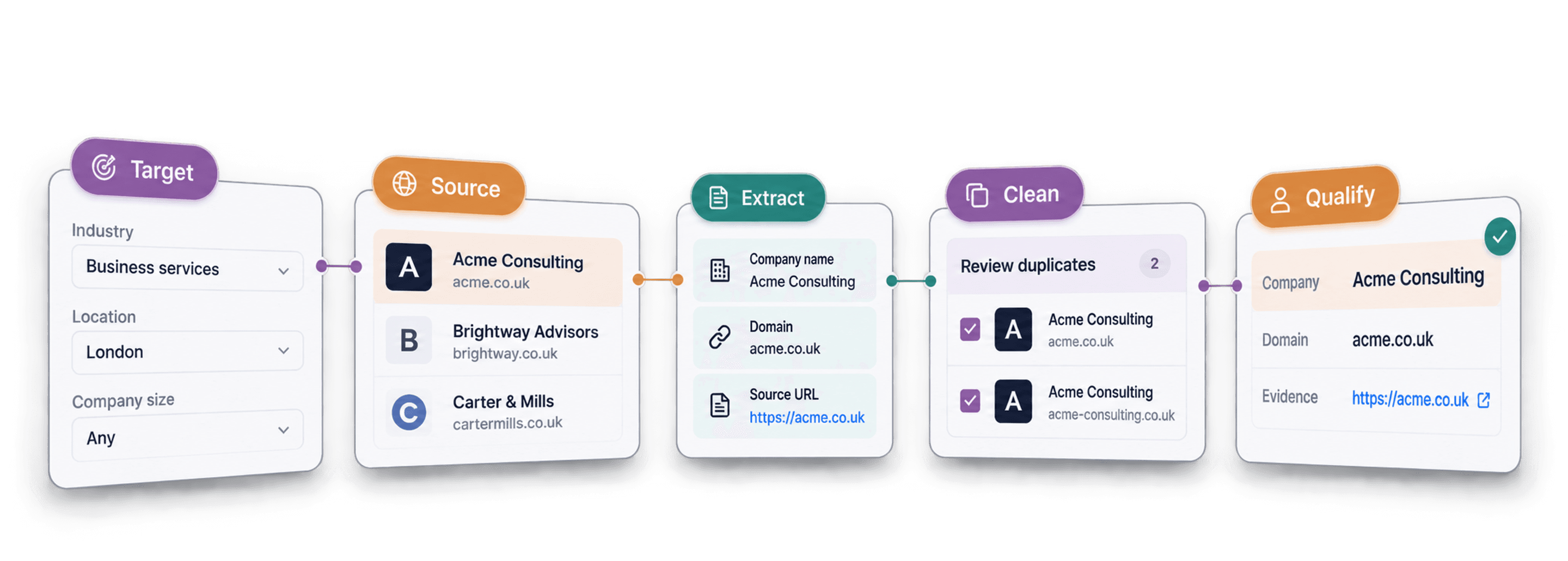
Most advice on how to scrape leads starts with a tool or a site to scrape. You search, you land on a scraper, and you start pulling records before you have decided what list you actually need.
The better starting point is the list itself, and the source that already holds it. Get that order right and the scrape is the easy part; get it wrong and you end up with a raw, unqualified export from the wrong place.
The rest is a straight line: what lead scraping is, how to pick the source that matches your target customer, how to run a light scrape, and how to clean, research, and qualify what you pull, all inside one no-code platform.
📌 Summary For Those In a Rush
What this article covers: How to scrape leads end to end, plus the reasoning behind why the order matters.
By the end you will be able to turn a target market into a qualified lead list, and understand why the right source, not the flashiest tool, decides how good that list is.
- Input: a target market and a clear idea of the customer you want to reach
- Output: a cleaned, enriched, ready-to-contact lead list
Key idea: a good lead-scraping process starts with the list you need, not the website you want to scrape.
What This Guide Covers
- What lead scraping is and what you can collect
- Why a lead list, not a tool, is the right starting point
- How to choose the source that matches your target market
- The three-step scrape that works on any source
- How to clean, enrich, and qualify the leads you pull
- Common mistakes that turn a scrape into a wasted list
What Lead Scraping Is and What You Can Scrape
Before the process, let me explain briefly what lead scraping is and what data you can actually scrape from public sources.
Lead Scraping Is A Workflow
Lead scraping is pulling contact and company data on potential customers from public online sources, then structuring it into one usable list. A name, a role, a company, a way to reach them, collected from where it already sits in the open.
The part most definitions skip is that scraping is one stage in a workflow, not a product you buy. It hands you the raw list; picking the source, then qualifying what comes back, is what turns that list into pipeline.
You Can’t Scrape Everything
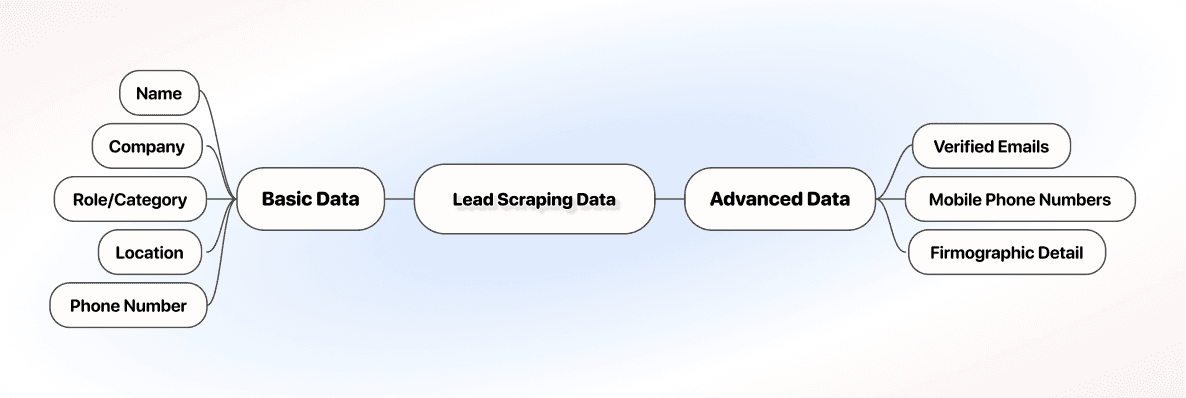
A scrape typically returns what the source shows on the page: a name, a company, a role or category, a location, and sometimes a phone number. That's plenty to start a list, but it's rarely the full picture.
Verified emails and deeper firmographic detail almost never come straight off the source; they get added later, through data enrichment. Setting that expectation now keeps the raw scrape from feeling like a finished list before it's ready to be one.
Why Your Lead Scraping Process Should Start With the Source
The instinct is to find a scraper first. It is the wrong first move, and it is the reason so many lead lists come out unusable.
The Mistake of Picking a Scraper Before a Source
A good way to scrape leads is to start with the list you need, not the website you want to scrape. The tool is a detail you settle once you know the source, and the source is a detail you settle once you know the customer.
Pick a scraper first and you inherit its limits: a LinkedIn tool won't touch Google Maps, so you end up scraping wherever the tool reaches instead of wherever your customer actually is.
The Five-Stage Lead Scraping Workflow
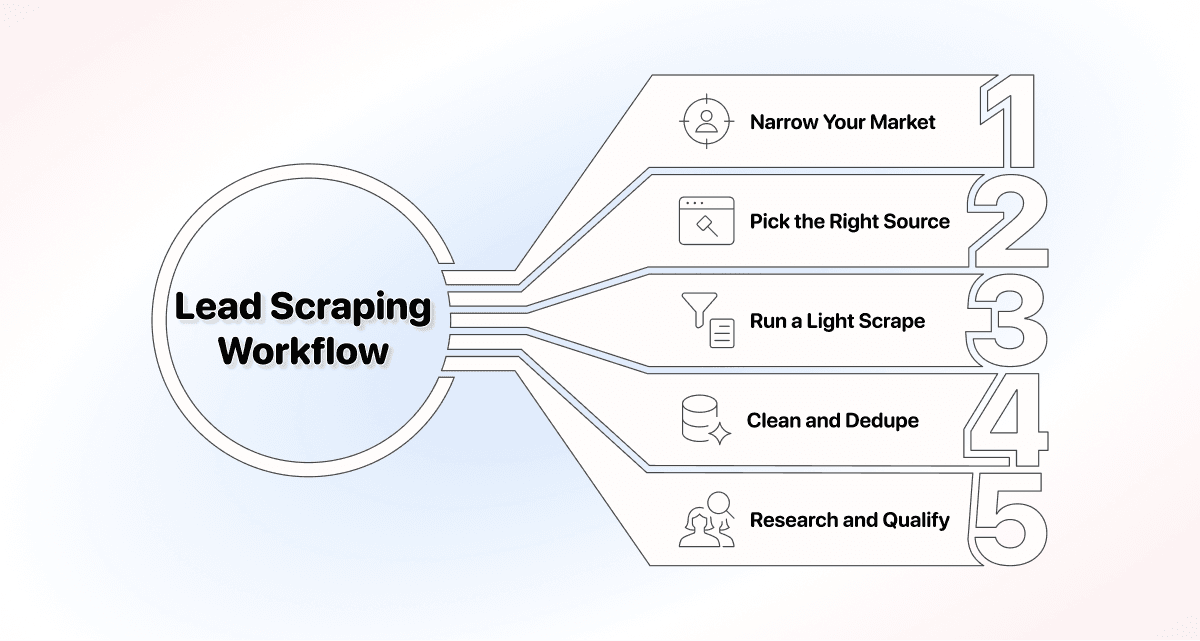
Once the order is right, the whole process fits into five stages, and the rest of this guide follows them in turn.
- Narrow your target market: decide who you are trying to reach before you touch a tool.
- Pick the right source: match where you scrape to where that customer is already listed.
- Run a light scrape: set your filters, set your limit, start the scrape.
- Clean and dedupe: merge duplicates and drop unusable records before you spend enrichment credits on them.
- Research and qualify: enrich the raw list, then score each lead against your criteria.
How to Choose the Right Lead Source to Scrape Leads in Your Target Market
Pick the source by where your target customer is already listed, not by which tool has the slickest homepage; that single rule does more for list quality than any tool setting you will ever touch.
Match the Lead Source to Your Target Customer
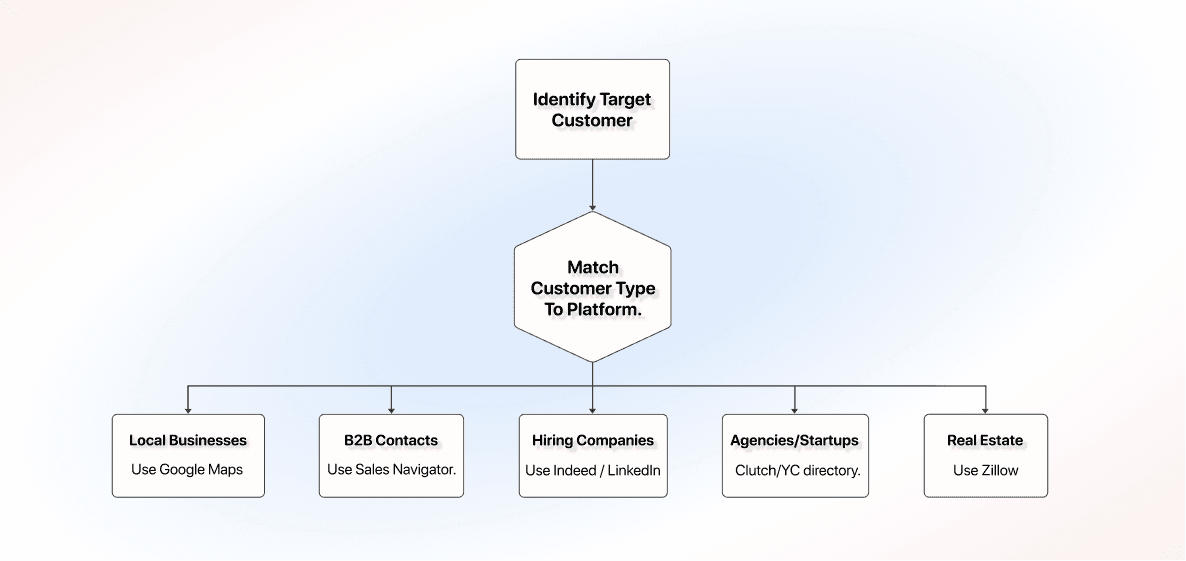
Name the customer and the source usually follows: local businesses point to Google Maps, B2B roles to LinkedIn and Sales Navigator, hiring companies to Indeed and job boards, and so on.
The reason this matters for scraping specifically is that reaching all of these usually means a different tool per source, unless you use a platform that covers them all. That removes the problem, so moving from Google Maps to Sales Navigator becomes a change of source, not a change of software.
Say you sell scheduling software to dental clinics. Your customer is a local business, so Google Maps is the obvious source; you would not open the Y Combinator directory, where no dental clinic will ever appear.
All Lead Sources Worth Scraping
- LinkedIn: individual professionals with role, company, and seniority.
- Sales Navigator: the same B2B data with deeper filters for account and prospect targeting.
- Google Maps: local businesses with location, category, phone, and rating.
- Indeed and job boards: companies actively hiring, a proxy for growth and spend.
- Clutch: agencies and service providers, filterable by specialization.
- The Y Combinator directory: well-funded startups, useful for reaching early-stage companies fast.
- Zillow: property listings and agents for real estate outreach.
How to Scrape Leads in Three Steps: Set Filters, Set Limit, Start Scrape
The scrape itself is the part people overthink. Across sources it comes down to three moves: set your filters, set your limit, start your scrape. What changes from one source to the next is the filters on offer, not the shape of the process.
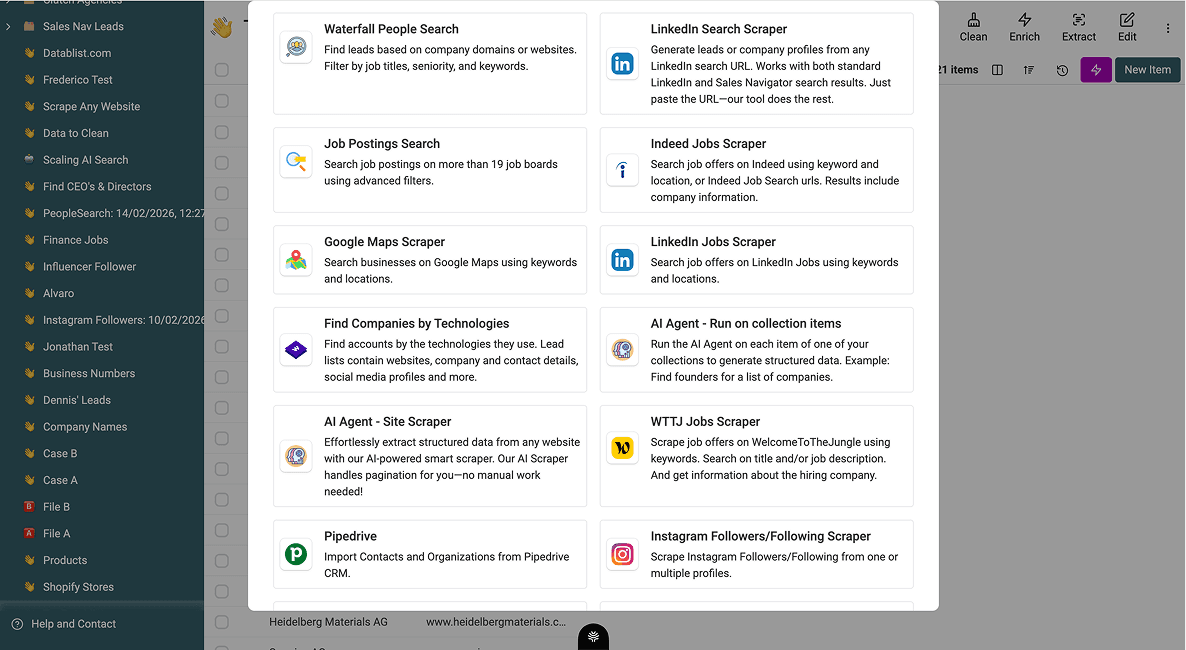
Inside Datablist, each source is a built-in scraper you run without code. The LinkedIn Scraper pulls public profiles and companies, the Sales Navigator Scraper works from your Sales Navigator searches, and the Google Maps Scraper collects local business listings by location and category.
You point one at a source, set what you want, and it writes the results into a list. Keeping the scrapers in one place is the point: you go from a raw target market to a cleaned, enriched, ready-to-contact list in one platform instead of stitching five tools together.
💡 What Datablist Is
Datablist is the AI spreadsheet where you source, clean, and enrich lead data without code. For scraping, that means the source, the scrape, and the qualification all happen on one list, so a target market becomes a ready-to-contact list without moving between tools.
Step 1: Set Your Filters
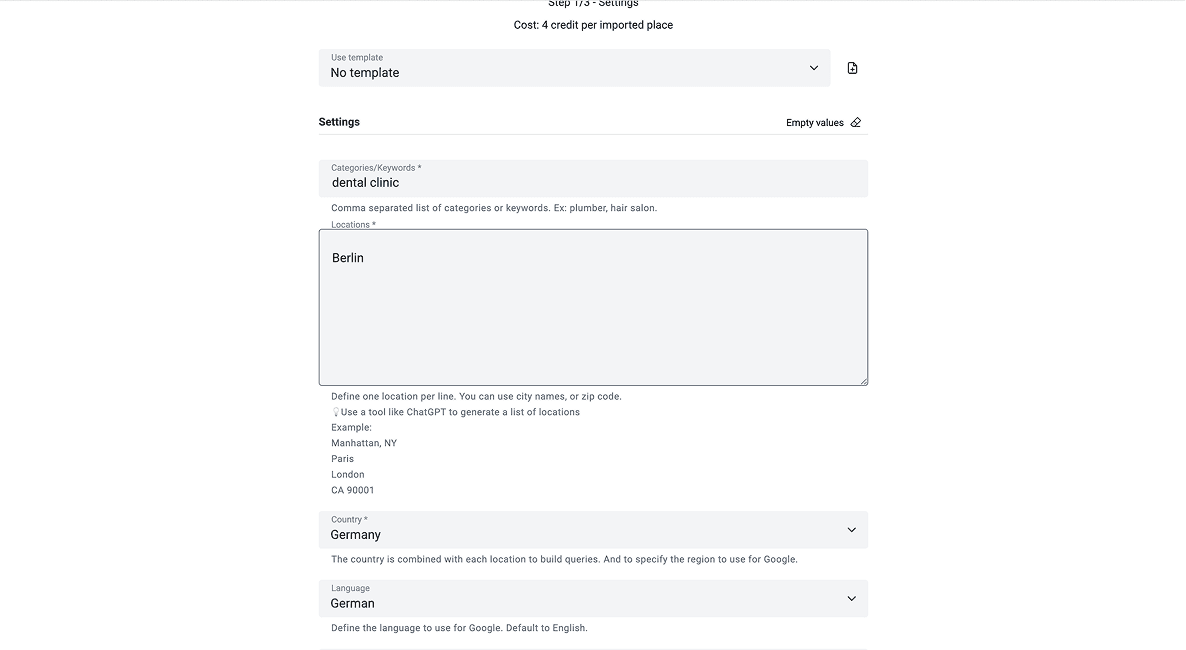
Open the source you picked and narrow it to the customer you defined earlier. On Sales Navigator that means title, seniority, and company size; on Google Maps it means location and category. Tight filters here keep junk off the list later.
Take the dental-clinic example from earlier: on Google Maps that means filtering to the dental clinic category in the cities you sell into, not every local business nearby.
Step 2: Set Your Limit
Decide how many records to pull in this run. Starting small, a few hundred rather than the whole result set, lets you check quality before you commit credits to the full job.
For the dental-clinic search, pulling 200 clinics in one city is enough to check the fields look right before you scale to every territory you sell into.

Step 3: Start Your Scrape
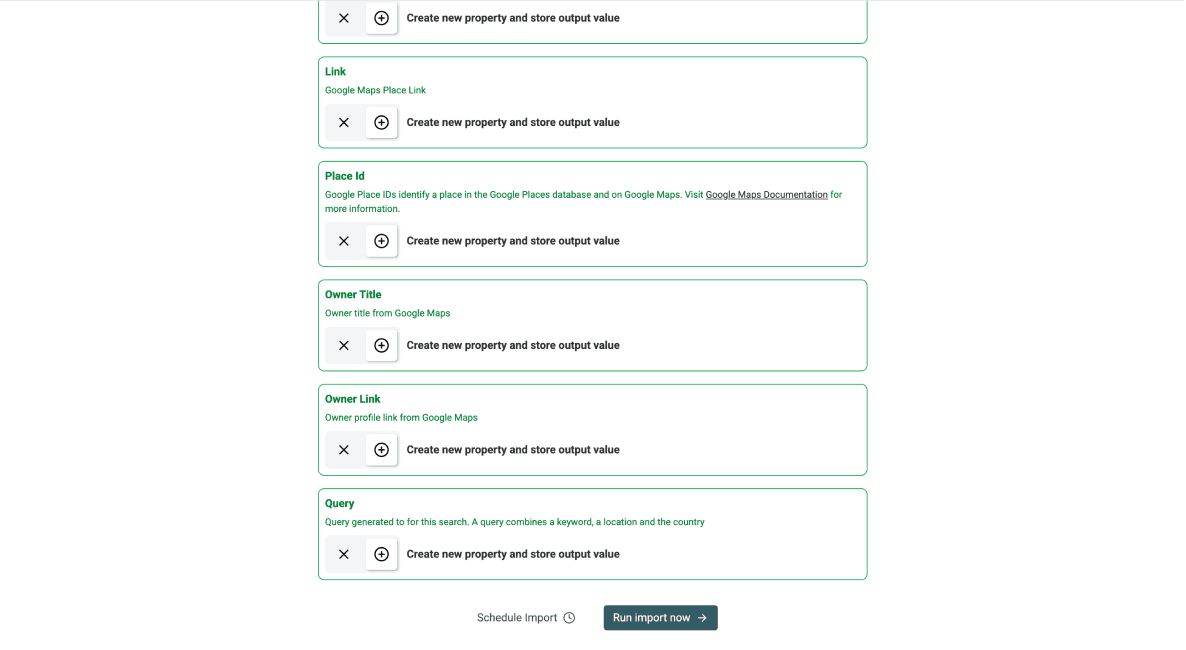
Start the scrape and let it run. The results land as rows in your list, one lead per row, with the public fields the source exposed, and it looks almost the same whether you began on LinkedIn, Google Maps, or a job board.
For the dental-clinic search, that run comes back as rows of name, address, phone, and category, ready for the next stage.
Scraping Leads Is Only the First Phase of the Process
A raw scrape gets you first and last names, company names, and sometimes domains, but most of these records are not complete. Turning that into a list worth working takes three more phases:
- Deduplicating and cleaning
- Research and qualification
- Enriching qualified leads
Clean and Deduplicate the Raw Scrape
A raw scrape is rarely clean on the first pass. The same business can show up twice under a slightly different name, a chain lists every branch as its own row, and a few records come back missing a field the source just didn't have.
Run a quick pass to merge duplicates and drop the unusable rows before you enrich. It is a small step, but skipping it means paying to enrich the same lead twice and reaching out to the same contact more than once.
For the dental-clinic pull from the scrape step, that pass usually catches a clinic listed once under its own name and again under a chain's umbrella, and merges the two into a single row before enrichment.
Qualify Scraped Leads With an AI Research Agent
Qualification comes first because it needs less. A domain and a linked URL, fields a scrape already returns, are enough for the AI Research Agent to open the page, pull the text it needs, and score the lead against your criteria before you have spent anything on contact data.
Point the AI Research Agent at each lead and it researches them against the criteria you set, then scores the fit, so the list you move forward with is qualified rather than just collected.
For the dental-clinic list, that might mean scoring fit on clinic size, if they mention specific treatments on their website, and how recently they opened, so a rep only works the clinics worth a call.
Enrich Qualified Leads With Verified Contact Data
Save phone numbers and emails for after qualification, using the Email Finder to fill in verified contact fields. Enriching every scraped row before you know which ones are worth contacting means paying for contact data on leads you are about to drop.
For the cleaned dental-clinic list, that means enriching records you’ve already qualified with a verified email and phone number, so that your reps talk only to high-value prospects.
💡 Lead Qualification and Enrichment Are Connected Steps
Enrichment and qualification are not a one-way handoff; they feed back into each other. A lead that scores well is worth the enrichment spend, and detail an enrichment pass turns up, like a second location or a live booking page, can send a lead back through qualification with sharper criteria.
Common Mistakes When Scraping Leads
Most bad lead lists trace back to one of a handful of bad habits. Knowing them ahead of time is cheaper than fixing them after you have already scraped, enriched, and pitched a list that never converts.
- Scraping too broad: pulling every record a source offers instead of filtering to the customer you actually defined, which buries good leads in noise.
- Chasing volume over fit: judging a lead scrape by row count instead of how many lead match your avatar, so a bigger list ends up doing less.
- Skipping qualification: treating enrichment as the finish line and handing sales a list that was never scored against real fit criteria.
- Letting the list go stale: scraping once and reusing the same list for months, even after the underlying source has moved on.
- Not deduplicating: re-scraping the same source later and merging the results without checking for repeats, so the same contact gets pitched twice.
Each of these is really the same mistake in a different spot: treating scraping as a one-off task instead of a repeatable process with a source, a scrape, a clean, and a qualification step every time.
Wrapping Up: A Repeatable Process to Scrape Leads Beats a One-Off Attempt
The lesson underneath all of this is that lead scraping is a process, not a purchase. The list you need comes first, the source comes from the customer, and the tool is the last thing to settle.
Run it that way once, choose the source, scrape light, then enrich and qualify, and you have a repeatable workflow that turns any target market into a ready-to-contact list, instead of a one-off export you never quite trust.
Key takeaways:
- The source decides list quality more than the tool does, so pick it by customer, not popularity.
- A scrape is a starting point, not a finished list; clean, enrich, and qualify it before anyone works it.
- Run the same process every time and a lead list becomes repeatable, not a one-off you have to redo from scratch.
Frequently Asked Questions About Scraping Leads
How Much Does It Cost to Scrape Leads With Datablist?
Scraping runs on credits inside Datablist.com. Paid plans start at $25 per month on the Starter plan with 5,000 credits, or $50 per month on the Growth plan with 20,000 credits, and yearly billing adds a 20% discount. European customers are billed in euros.
How Many Leads Can I Scrape at Once?
There is no fixed cap; it depends on the source and the limit you set for the run. A practical habit is to scrape in batches, check a small sample for quality, then scale the volume once the fields look right.
Do You Need Coding Skills to Scrape Leads?
No. No-code scrapers handle the common sources through a simple interface, so you set filters and a limit rather than write and maintain a script. For a sales rep or founder without a developer on hand, that is the faster and more reliable path.
Can I Scrape Leads From LinkedIn and Sales Navigator With Datablist?
Yes. The LinkedIn Scraper pulls public profile and company data, and the Sales Navigator Scraper works from your Sales Navigator searches for tighter B2B targeting. Both write results straight into a list you can then enrich and qualify in the same place.
Can I Scrape Leads From Google Maps?
Yes. The Google Maps Scraper collects local business listings by location and category, returning details like name, address, phone, and rating. It is the strongest source when your target customer is a local business rather than a B2B role.
How Do I Qualify Scraped Leads With an AI Research Agent?
Point the AI Research Agent at your scraped list and give it the criteria that define a good fit. It researches each lead against those criteria and scores them, so you can sort a raw scrape into leads worth contacting and leads to drop.
How Long Does It Take to Scrape a Lead List?
Most of the time goes into the decisions, not the scrape. Choosing the source and setting filters takes the thought; the scrape itself usually runs in minutes for a few hundred records, then enrichment and qualification add a short pass on top.
What Data Can You Get When You Scrape Leads?
Scraping collects the public fields a source exposes: names, roles, company, location, and often a phone number or category. Verified emails and deeper firmographic detail usually come from enrichment afterward, not from the raw scrape.
Is Lead Scraping Legal?
Scraping public business data is generally the safe side, as long as you respect each source's own limits on how much you pull and how fast. Gated data behind a login or paywall carries more risk, so verify the rules for your source and use case before you scale.
What's the Difference Between Scraping Leads and Buying a Lead List?
Scraping builds a fresh list from a source you choose, so it reflects who is listed right now and matches your targeting. A bought list is pre-compiled, shared with every other buyer, and starts aging the day it is sold.
Which Lead Sources Are Best to Scrape for B2B?
For B2B, LinkedIn and Sales Navigator are usually the strongest, since you can filter by title, seniority, and company before you pull a record. Job boards add a growth signal by showing which companies are hiring.
What Are the Best Lead Scraping Tools?
The best fit is whichever tool covers your source and lets you enrich and qualify without exporting to other software. Our scored comparison of the best lead scraping tools breaks down exactly where each tool wins, and shows why a platform like Datablist that handles sourcing, cleaning, enrichment, and qualification in one place beats stitching a separate scraper, email finder, and cleaner together.