
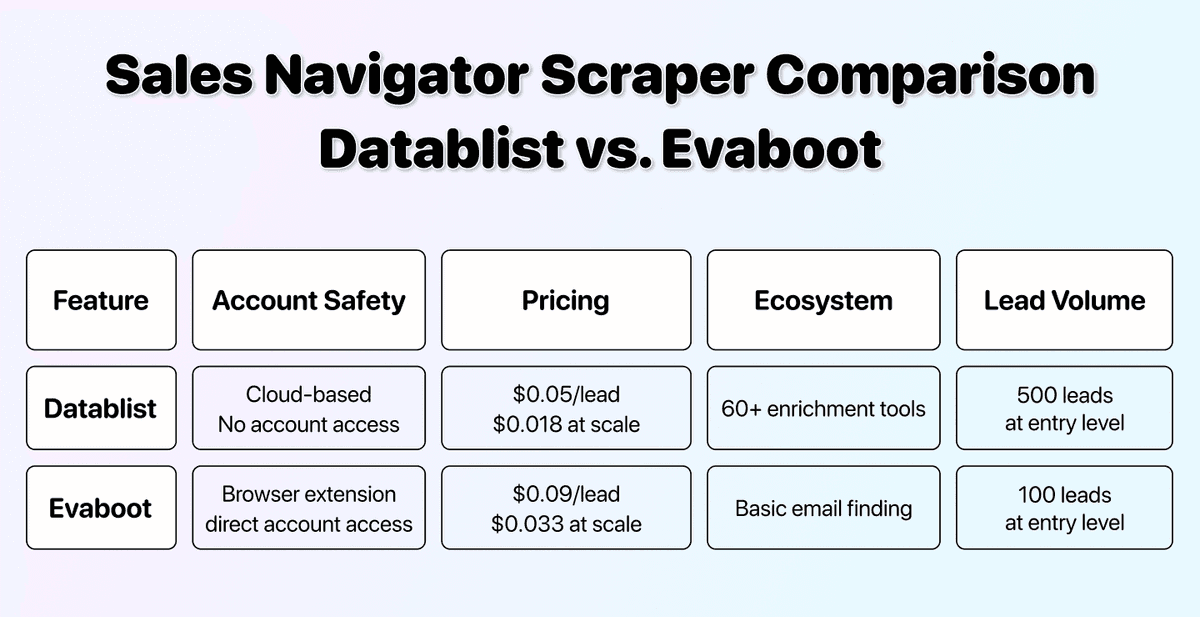
The most popular LinkedIn scraping tool doesn’t help anymore when your account gets banned.
Here's the thing: Evaboot is a Chrome extension. That means it uses your LinkedIn account directly. And that comes with risks most people don't think about until it's too late.
In this article, I'm putting Datablist and Evaboot head-to-head on three critical factors: account safety, pricing, and ecosystem. By the end, you'll see exactly why Datablist is the smarter choice for scraping LinkedIn Sales Navigator in 2026.
📌 Summary For Those In a Rush
This article compares Datablist and Evaboot for scraping LinkedIn Sales Navigator. Here's what you need to know:
Account Safety
- Evaboot is a browser extension that operates through your LinkedIn account (risky)
- Datablist never touches your account, cookies, or credentials (zero risk)
Pricing
- Evaboot: $9/month for 100 leads = $0.09 per lead
- Datablist: $25/month for 250 leads. Then top ups starting $20 for 1000 leads ≈ $0.03 per lead
Ecosystem
- Evaboot: Scraper + basic email finder
- Datablist: Scraper + 60+ enrichment tools, email finder, AI agents, waterfall enrichment & more
Bottom line: Datablist gives you more value, better pricing, and zero risk to your account.
What This Article Covers
- Account Safety: Why Evaboot Puts Your LinkedIn at Risk
- Pricing Breakdown: Entry Price and Cost Per Lead
- Ecosystem Comparison: AI Capabilities and Enrichment Tools
- The Verdict: Three Reasons to Choose Datablist Over Evaboot
- Frequently Asked Questions About Sales Navigator Scrapingssss
Account Safety: The Most Important Factor For a Sales Navigator Scraper
Before we talk about features or pricing, let's address the elephant in the room: what happens if LinkedIn bans your account?
Your LinkedIn profile isn't just a social network. It's your professional identity. Your connections, conversations, recommendations, and reputation live there. Losing access means losing years of relationship building. On the surface, it’s not worth much, but actually, it does, right?
And here's where Evaboot becomes a problem.
How Browser Extensions Put Your Account at Risk
Evaboot is a Chrome extension. That sounds convenient, but it comes with serious risks that most people overlook.
Here's how browser extensions work:
- They operate directly through your LinkedIn session
- They use your cookies and credentials
- Every action they take is linked to your account
- LinkedIn sees all automated activity as coming from you
LinkedIn's detection systems are designed to spot this kind of automation[4]. When they do, they don't ask questions. They restrict or ban your account.
And here's the worst part: Evaboot's Terms of Service puts all the risk on you[1]. If your account gets banned, that's your problem, not theirs.
❗️ What Evaboot's Terms of Service Say
Like most browser extension Sales Navigator scraper, Evaboot makes it clear that you're responsible for any consequences to your LinkedIn account. They provide the tool. You accept the risk.
Why Datablist Doesn't Need Your Account
Datablist takes a completely different approach. We never ask for your cookies, credentials, or session data.
Here's all you need to do:
↳ Copy your Sales Navigator search URL
↳↳ Paste it into Datablist
↳↳↳ Get your results
That's it. Your LinkedIn account is never involved in the scraping process. LinkedIn has no way to trace the activity back to you because there's no connection between you and it.
The result: You get the same lead data, but with zero risk to your account.
📘 Datablist's Safety Advantage
Datablist's Sales Navigator scraper is cloud-based and operates independently from your personal account. No cookies. No credentials. No connection to your LinkedIn[2].
Read our guide on how to scrape LinkedIn Sales Navigator without risking a ban 👈🏽
Pricing: Getting More For Your Money
Now let's talk about what you're actually paying for. Spoiler: Datablist gives you significantly more value per dollar spent[3]
Entry Price Comparison
Both tools have subscription-based pricing, but the amount of value you get is very different.
Evaboot's Entry Plan
- Price: $9/month
- Leads included: 100
- What you get: Unsafe Sales Navigator scraper + basic email finder
Datablist's Starter Plan
- Price: $25/month
- Leads included: 250 (via 5,000 credits). Then top ups starting $20 for 1000 leads.
- What you get: Safe LinkedIn Search Scraper + full platform access with 60+ enrichment tools
At first glance, Evaboot looks cheaper. But let's look at what you're actually getting.
Cost Per Lead Breakdown
Evaboot:
- $9 for 100 leads = $0.09 per lead
- To scrape 1,000 leads, you'd need the $49/month plan
- That's still $0.04 per lead (and you're risking your account)
Datablist:
- $25 for 250 leads = $0.10 per lead
- Add a $20 credit top-up, and you can scrape 1,250 leads for $45 total
- That's $0.036 per lead at scale
Let me make this clear: With Datablist, you pay less per lead, AND you don't risk getting banned from LinkedIn.
| Factor | Evaboot | Datablist |
|---|---|---|
| Entry Price | $9/month | $25/month |
| Leads at Entry | 100 | 250 |
| Cost Per Lead | $0.09 | $0.10 |
| Account Risk | 🔴 High | 🟢 Zero |
Learn how to create a lead list with emails using LinkedIn and Datablist 👈🏽
Ecosystem: More Than Just a Scraper
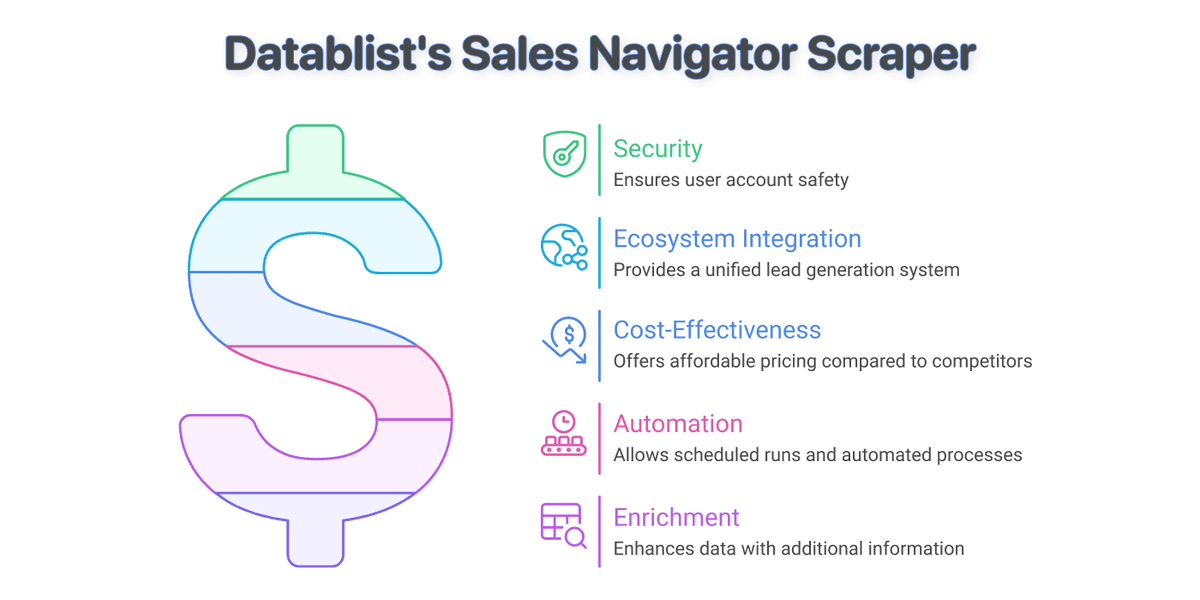
Here's where Datablist really pulls ahead. Evaboot is a basic Sales Navigator scraper. Datablist is an entire lead generation platform with a safe Sales Navigator scraper (big difference).
AI Capabilities
Evaboot's AI Features:
- Data cleaning (removes emojis and symbols from names)
- That's about it
Datablist's AI Features:
- AI Research Agent for automated prospect research
- AI Scraping Agent for extracting data from any website
- AI Assistant for data processing and personalization
- AI-powered email personalization at scale
- and more….
With Datablist, you can automate the entire research process. Want to find out if a prospect recently raised funding? Or what technology stack a company use? With Datablist, you can.
The key difference here: Evaboot gives you raw data, while Datablist gives you intelligence.
Enrichment Tools
Once you have your leads, what do you do with them? This is where the ecosystem difference becomes impossible to ignore.
Evaboot's Enrichment:
- Basic email finder
- That's the entire offering
Datablist's Enrichment:
- Waterfall Email Finder (checks multiple data sources for maximum coverage)
- Waterfall Phone Finder (mobile numbers, not landlines)
- Technology Finder (see what tools companies use)
- Company Enrichment (firmographics, employee count, revenue)
- LinkedIn Profile Enrichment
- Website Finder
- And many more tools….
60+ enrichment tools vs. 1. The comparison isn't even close since Datablist is built for building lead lists while Evaboot is just a basic scraper.
📘 What Waterfall Enrichment Means For You
Waterfall enrichment checks multiple data vendors in sequence. If the first source doesn't have an email, we check the second. Then the third, and so on[5]. This dramatically improves your find rate and data quality compared to single-source tools like Evaboot.
With Datablist, you don't need to export your data and import it into another tool for email finding. You don't need a separate service for phone numbers. Everything happens on one platform; this is what efficiency is all about.
The Verdict: Make Smart Choices
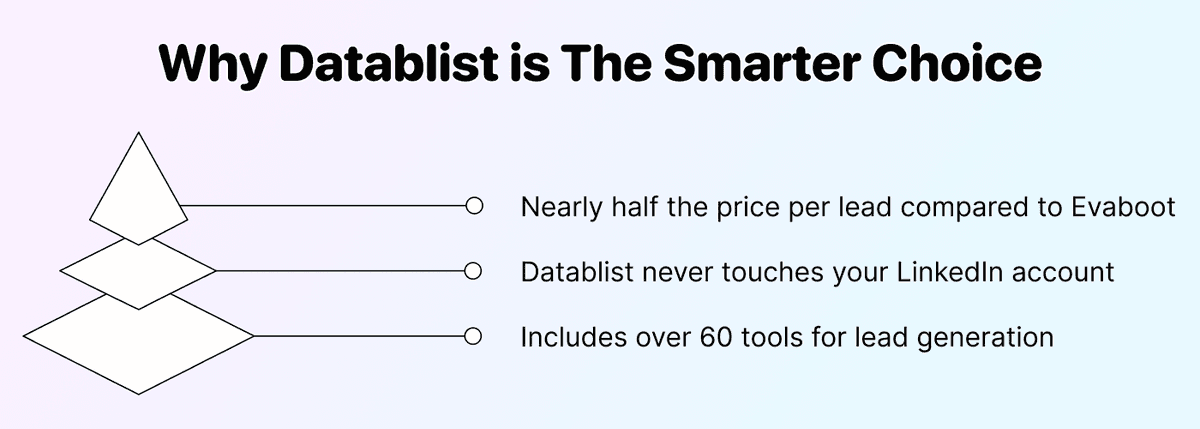
Let's bring it all together. After comparing both tools on account safety, pricing, and ecosystem, here are the three reasons you should choose Datablist over Evaboot:
Reason 1: Your LinkedIn Account Is Too Valuable to Risk
Evaboot is a browser extension that operates through your personal LinkedIn account. If LinkedIn detects the automated activity (and they're actively looking for it), you could lose access to years of connections and opportunities. Datablist never touches your account.
Reason 2: You Get More Value For Less Money
At $0.05 per lead compared to Evaboot's $0.09, Datablist is nearly half the price per lead. At scale, the savings become even more significant. And you're getting access to an entire platform, not just a basic scraper.
Reason 3: 60+ Tools vs. Just a Scraper
Evaboot scrapes leads and finds basic emails. That's it. Datablist gives you AI agents, waterfall enrichment, phone finders, technology lookup, and 60+ other tools. You get an entire lead generation ecosystem in one subscription.
The choice is clear. Why pay more, risk your account, and get less functionality?
Frequently Asked Questions About Datablist vs. Evaboot
What Is the Main Difference Between Evaboot and Datablist?
The main difference is how they operate. Evaboot is a Chrome extension that scrapes through your LinkedIn account, putting it at risk of bans. Datablist is a cloud-based platform that never requires your account credentials, cookies, or any connection to your personal profile.
What Is the Best Evaboot Competitor?
Datablist is the best Evaboot competitor for three reasons: it doesn't risk your LinkedIn account, it costs less per lead, and it includes 60+ enrichment tools instead of just a scraper with basic email finding.
Should I Use Evaboot to Scrape Sales Navigator?
If you value your LinkedIn account, no. Evaboot operates as a browser extension that uses your account directly, which violates LinkedIn's Terms of Service. LinkedIn is actively cracking down on automation tools, and getting caught means losing access to your profile.
What Features Does Datablist Have That Evaboot Doesn't?
Datablist offers a lot of features that Evaboot doesn't have:
- AI Research and Scraping Agents
- Waterfall Email and Phone Finders
- Technology Finder for tech stack analysis
- Company enrichment and firmographic data
- Data cleaning and deduplication tools
- Scheduled automations and workflows
- and many more
What Is the Safest Option to Scrape LinkedIn Sales Navigator?
Datablist is the safest option because it never connects to your LinkedIn account. You simply paste a search URL, and Datablist handles the scraping independently. Your account credentials and cookies are never involved, making it impossible for LinkedIn to trace the activity back to you.
Is Evaboot Safe for My LinkedIn Account?
No. Evaboot is a browser extension that operates through your LinkedIn session. LinkedIn's detection systems can identify automated activity, and using tools like Evaboot puts your account at risk of restrictions or permanent bans. Their Terms of Service explicitly state that you accept this risk.
How Much Does Evaboot Cost vs Datablist?
Evaboot starts at $9/month for 100 leads ($0.09 per lead). Datablist starts at $25/month for 250 leads ($0.10 per lead). At higher volumes, Datablist's pricing advantage increases. For example, scraping 1,250 leads with Datablist costs $45 total ($0.036 per lead).
Can I Find Emails With Datablist After Scraping Sales Navigator?
Yes. Datablist includes a Waterfall Email Finder that checks multiple data vendors to maximize your email find rate. Unlike single-source tools, waterfall enrichment significantly improves coverage. You can also find phone numbers, company data, and much more without leaving the platform.