
🔍 Quick Overview For Those in a Rush
As always, we advise you to read the full article to get the most out of it since context matters a lot, but if you're in a rush, here's a 30-second summary:
Based on my analysis, there are approximately 449,000 websites that use Wix, though absolute verification would require direct confirmation.
This article shows you several methods on how to find companies using Wix, step-by-step for each one. We've included both free and paid options to suit different needs and budgets:
Paid methods (best for building lead lists):
Free methods (best for manual checkups):
While all methods can help you identify companies using Wix, Datablist is the best solution for lead list building at scale. The free methods are excellent for manual verification or smaller research projects.
Feel free to jump directly to the content most relevant to your specific needs.
How To Find Companies Using Wix: The Datablist Method
The Datablist method is pretty simple, fast, accurate, and most importantly, it’s affordable; not like BuiltWith, aka. designed to make you poor, which charges $295/month.
Why You Want to Choose Datablist to Find Companies Using Wix
Before I explain to you why Datablist is the best choice to find companies using Wix, let me tell you what Datablist is:
Datablist is an all-in-one platform for lead list building, workflow automation, data enrichment, and cleaning, offering over 50 lead generation tools, including a Technology Finder, Waterfall Email Finder, Sales Navigator scraper, AI agents, LLM processors, and more.
Price Isn't Everything But Still Important
- Datablist’s plans start at $25/month
- The most affordable plan allows you to find 1000 companies using Wix
- You can get pay-as-you-go credits, which allow you to find more companies using Wix without committing to higher plans
Not Just More Data But Also More Accurate Data Than Other Tools
- Datablist’s Technology Finder is powered by Wappalyzer data, which is known for being the most accurate technographic data provider on the market[1]
- Datablist’s Technology Finder allows you to get the version numbers of many technologies, which is useful for launching target growth campaigns
Can Detect Any Website Facing Technology
- Free methods like Google Search Operators & MyIP.ms work only for hosting providers, which limits your opportunities
- Datablist detects any technology (including Wix) since it scans the source code, headers, scripts, and more
An Entire Lead Generation Ecosystem
We don’t just give you an account list; we give you the ability to work with it. This means once you get a list of companies using Wix, you could:
- Enrich the accounts with live LinkedIn data
- Run in-depth research (at scale) about the companies using Datablist’s AI research agent
- Filter your account lists for maximum relevance
- Find leads within those accounts
- Find qualified emails & mobile phone numbers using Waterfall Enrichment
I could list 10 things more to give you an idea of why Datablist is the best option for finding companies that use Wix, but I think you get the point, which is: If it’s for lead list building purposes, Datablist is the way to go.
That’s it with the pitch (was a very good one), now let me show you how to find companies using Wix step-by-step.
Finding Companies Using Wix: The Step-by-Step Guide
This will probably be the easiest step-by-step guide you've ever seen. I split the process into two phases, which you can click through in about 2 minutes, yes, 2 minutes!
- Signing up & creating a collection in Datablist
- Using the Technology Finder to search for companies using Wix
(Yes, that's how easy it is)
Phase 1 of Creating a List of Companies Using Wix: Preparation
The preparation phase is very easy, so easy that it is done with just a few clicks.
To get started, go to Datablist.com and sign up.
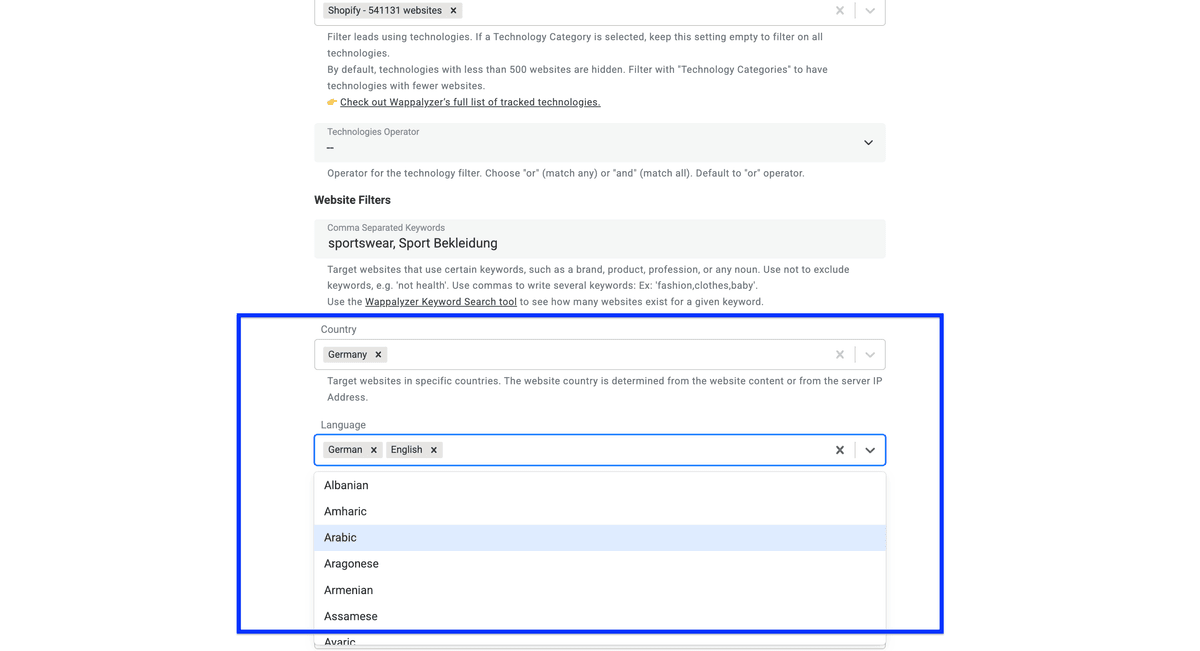
Now I’ll show you how I use those filters to find sportswear brands from Germany.
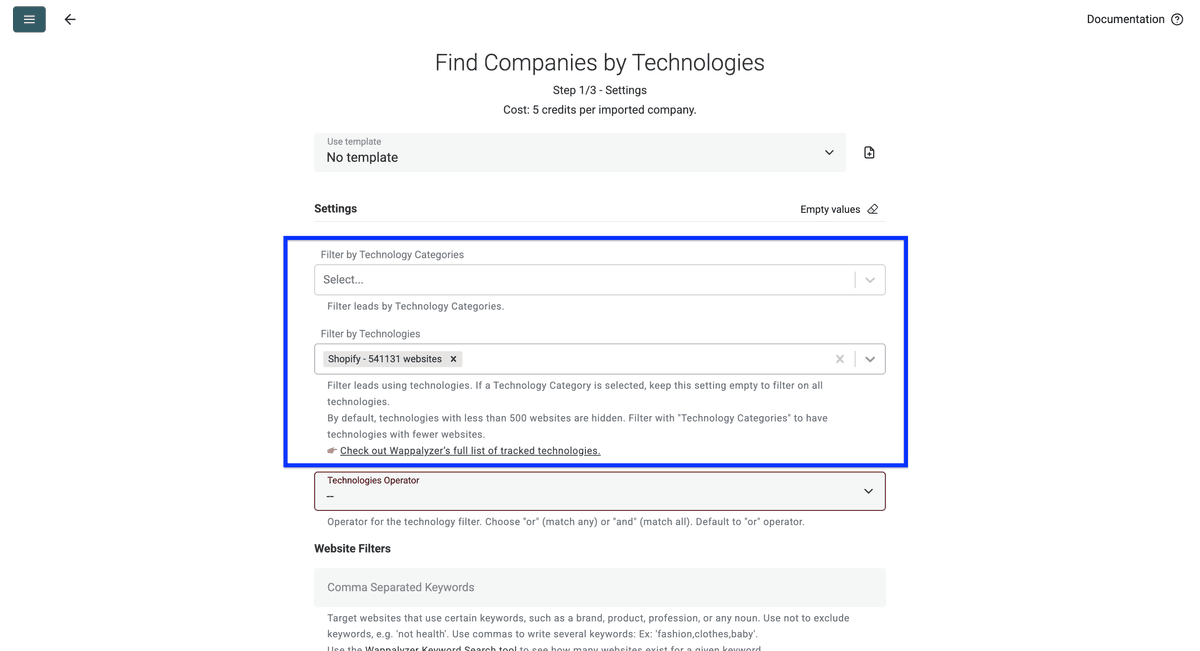
Step 1: Using the technology filter
The first filter is a technology category, which I’ll skip, and use the second one to filter by a specific technology: Wix.
👉 Check out Wappalyzer's full list of tracked technologies.
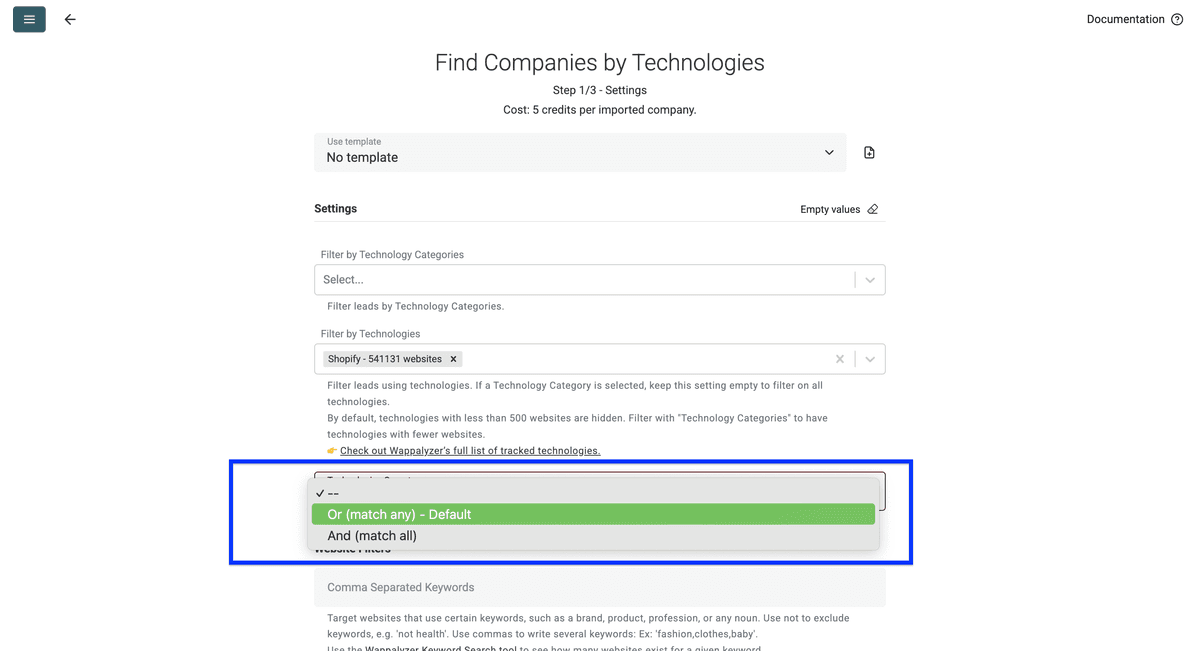
For my example, this setting is not important, so I’ll skip it.
Tip 1: Test your keywords first - Wappalyzer doesn't match every keyword, and many return no results. Verify your keyword using the Wappalyzer Keyword Search tool before building your list.
Tip 2: Focus on homepage content - Only use keywords likely to appear on homepages (brands, product categories, industry terms). Avoid searching for specific details like shipping policies or product specifications.
Now, select the countries you want to target
Then, select the languages of the website. If you select more than one language, Datablist will return websites available in one of the languages you selected.
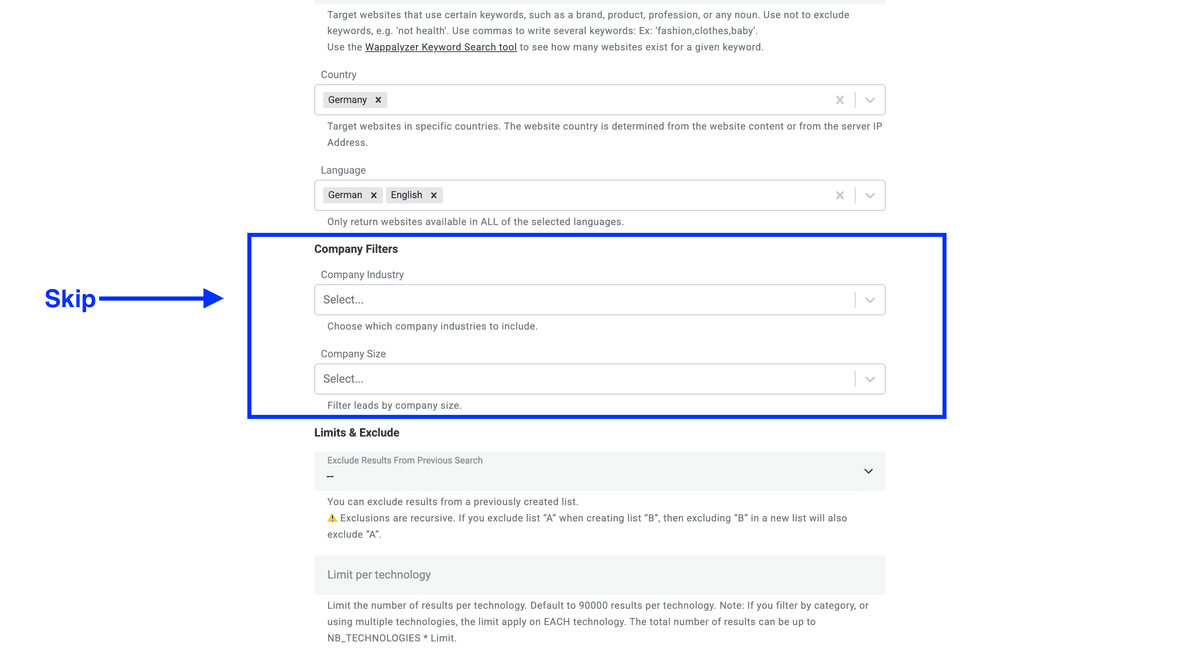
Company Data
Company Name, Inferred Company Name, Industry, About Company, Company Size, Company Type, Founded Year, Total Funding (USD), Funding Rounds, Employees, Countries, Languages, Locations
Contact Information
Phone Numbers, Email Addresses, Unverified Email Addresses, WhatsApp Numbers, LinkedIn, Facebook, Twitter, Instagram
Alternative Methods To Find Companies Using Wix
Like with everything in life, many roads lead to Rome, and so it is also with finding companies that use Wix. Some of the outlined methods can trace any technology, others are limited to certain technology categories.
Methods include:
Finding Companies Using Wix with Google Search Operators
Google search operators offer a free method for discovering companies using certain technologies. This approach works by exploiting the visible footprints that some technologies leave on websites: text in footers, URL patterns, or specific page structures that Google indexes.
How Google Search Operators Work
When you use Google search operators like inurl:, intitle:, and intext:, you're essentially asking Google to filter its massive index based on specific criteria:
inurl:searches for specific text within URLs (e.g.,inurl:Wixfinds pages with "Wix" in the web address)intitle:searches for text in page titles (e.g.,intitle:jewelryfinds pages with "jewelry" in the title tag)intext:searches for text anywhere in the page content (e.g.,intext:"Powered by Wix"finds pages displaying this phrase)
You can combine these operators to narrow your results, such as intitle:fashion intext:"Powered by Wix" to find fashion-related sites.
The Critical Limitation: This Only Works for Hosting Providers
Google search operators can only find technologies that leave visible, public traces on websites. This makes the method effective primarily for:
- Hosting platforms like Shopify, Wix, Squarespace, and WordPress.com
- Website builders that include branding or specific URL structures
- Platforms that encourage or require visible attribution
However, this method completely fails for technologies like Wix that operate as:
- Backend services or APIs (no visible footprint)
- Self-hosted software (deployed on customer infrastructure)
- Embedded tools that don't modify URLs or display branding
The fundamental reason is simple: Google can only index what it can see in the HTML, URLs, and publicly visible content. Technologies that run server-side, integrate via API, or are deliberately hidden from public view remain invisible to Google's search operators.
Now that you understand how Google search operators work, let's look at the specific techniques you can use to apply this method.
Alternative 1: Google Search Operators - The Step-By-Step
The good thing about Wix is that it's one of the few technologies that can be traced through Google, and the process is very easy. Just go to Google and use the search operators I listed below.
Google Search Operators Technique 1: Basic Search
- site:wixsite.com - Finds companies using the Wix default domain before setting up a custom domain. Most are new or preparing for launch.
- inurl:Wix - Finds pages that have "Wix" in their URL
- intext:"Powered by Wix" - Many Wix sites display this text in their footer
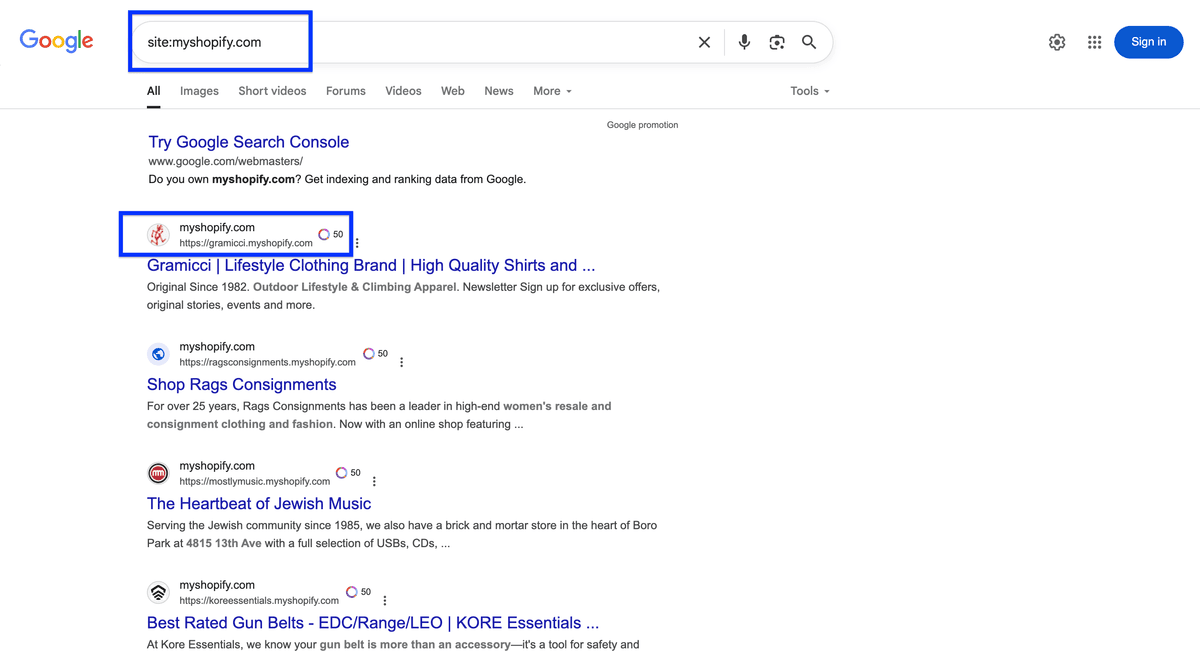
- intext:"Powered by Wix" + intext:[product type] - To find sites with specific keywords on their homepage. For example: "intext:'Powered by Wix' intext:jewelry"
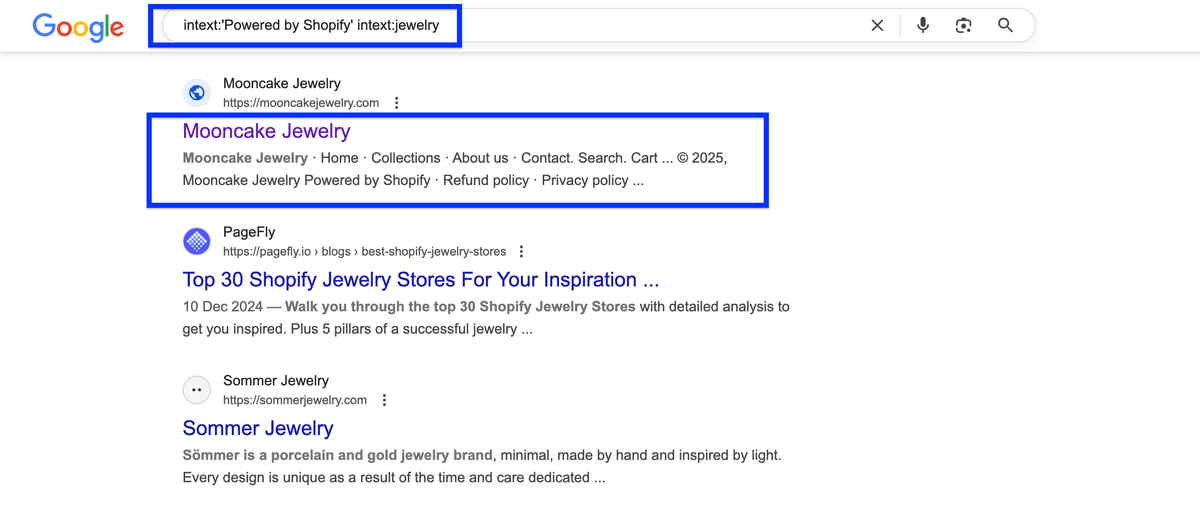
- intitle:[niche] + intext:"Powered by Wix" - To find Wix sites with specific keywords in their title. For example: "intitle:jewelry intext:'Powered by Wix'"
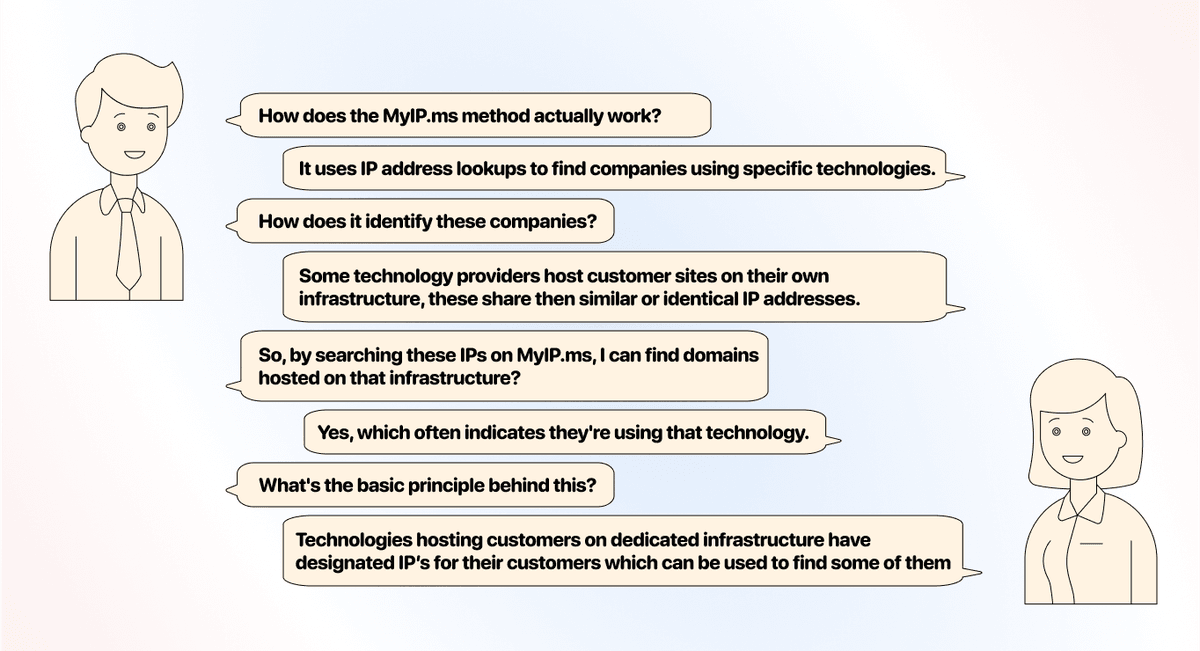
- Customer websites point their DNS to the technology provider's IP addresses
- The technology uses dedicated IP ranges for its hosting infrastructure
- All customer traffic flows through the provider's servers
❌ This method DOESN'T WORK when:
- The technology is self-hosted software that customers install on their own servers (like WooCommerce, Magento Open Source)
- The service operates as an API or backend integration (like Klaviyo, Stripe, Google Analytics)
- Customers deploy the technology on their own infrastructure or third-party hosting
- The tool is an embedded widget or plugin that runs alongside other services
The Fundamental Rule
If the customer's visitor directly connects to the vendor's infrastructure to access the primary service, IP discovery works. If the vendor provides backend services or software deployed elsewhere, it doesn't.
Finding Companies using Wix by checking IP addresses
How To Find Out If The Tool Has a Designated IP
Before investing time in the MyIP.ms method, you need to verify that the technology you want to trace actually has designated IPs. In the case of Wix, the answer is: Yes.
Below are some methods to determine this:
nslookup or dig commands)
3. Check IP ownership via WHOIS lookup
4. If the IPs belong to the tool → the method works
5. If the IPs belong to AWS/Oracle/Google/etc. → the method fails
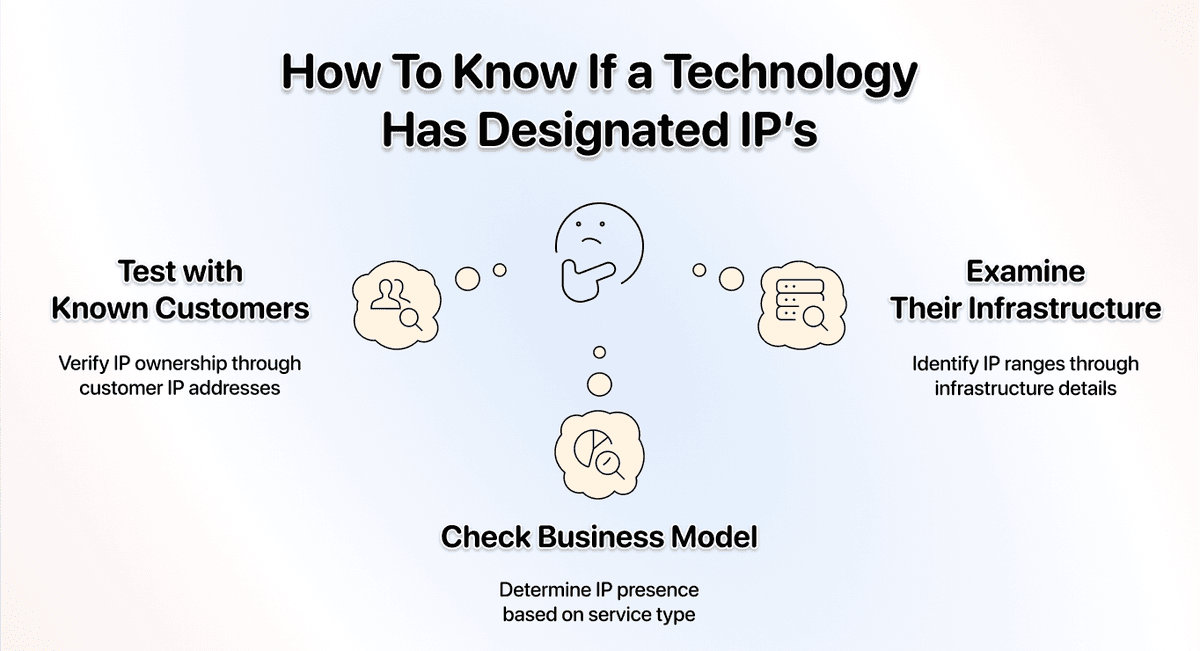
Method 2: Check the Business Model
- Visit the tools website
- Look for "hosting" vs "software" vs "API/integration" language
- Hosted platform = likely has dedicated IPs
- Self-hosted/plugin = definitely no dedicated IPs
- API/SaaS tool = probably no dedicated IPs
Method 3: Examine DNS & Infrastructure
- Use online tools to inspect the tool’s DNS records
- Check if they publish IP ranges in their documentation
- Look for patterns in customer domain DNS settings
- Search their technical documentation for infrastructure details
💡 Watch Out For These Edge Cases
Many companies have both hosted and non-hosted/self-hosted services when using the MyIP.ms method, you should always know what part of the technology you want to trace.
For example, you can trace some companies using HubSpot CMS through IP methods because those sites are hosted on HubSpot's infrastructure. However, HubSpot CRM users can't be detected this way
Other tools with similar edge cases include:
- WordPress.com vs WordPress.org (hosted vs self-hosted)
- Wix (hosted) vs Wix ADI (partially hosted)
- Squarespace (hosted) vs Squarespace extensions (integrated)
- Salesforce Commerce Cloud (hosted) vs Salesforce API integrations (non-hosted)
- Zendesk (offers both hosted help centers and integration widgets)
The key takeaway: detection methods depend entirely on whether the technology hosts the customer's website or just integrates with it.
Step-by-Step: Using MyIP.ms to Find Wix Sites
If you want to find companies using Wix using the MyIP.ms method, here are the IP addresses I know of: 199.15.160.0 - 199.15.163.255, 64.7.220.0 - 64.7.220.255, 65.38.108.0 - 65.38.108.255, 70.42.116.0 - 70.42.116.255, 64.95.157.0 - 64.95.157.255
Getting Started
1. Visit the MyIP.ms website: Navigate to MyIP.ms in your browser.
2. Use the IP address search function: Enter one of the Wix IP addresses in the search bar
3. View the hosted domains: After searching for an IP, MyIP.ms will show you a list of websites hosted on that particular IP address.
4. Analyze the results: Review the list of domains to identify potential Wix sites. You can click on each domain to get more detailed information.
5. Export the data (optional): MyIP.ms allows you to export the list of domains, but this is where the process becomes extremely time-consuming.
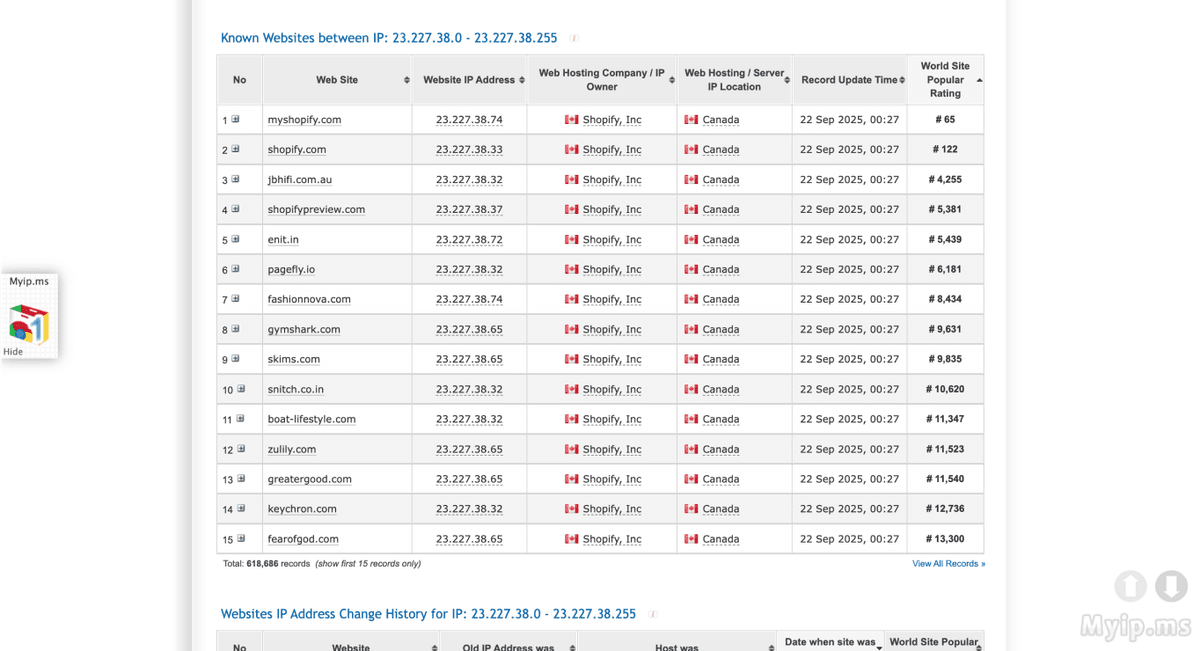
- Manual verification of each domain is required to confirm the site is from a company using Wix
- Exporting and filtering the full list could take days or even weeks
- The data isn't enriched with business information
Alternative 3: Checking If a Company Uses Wix with WhatRuns
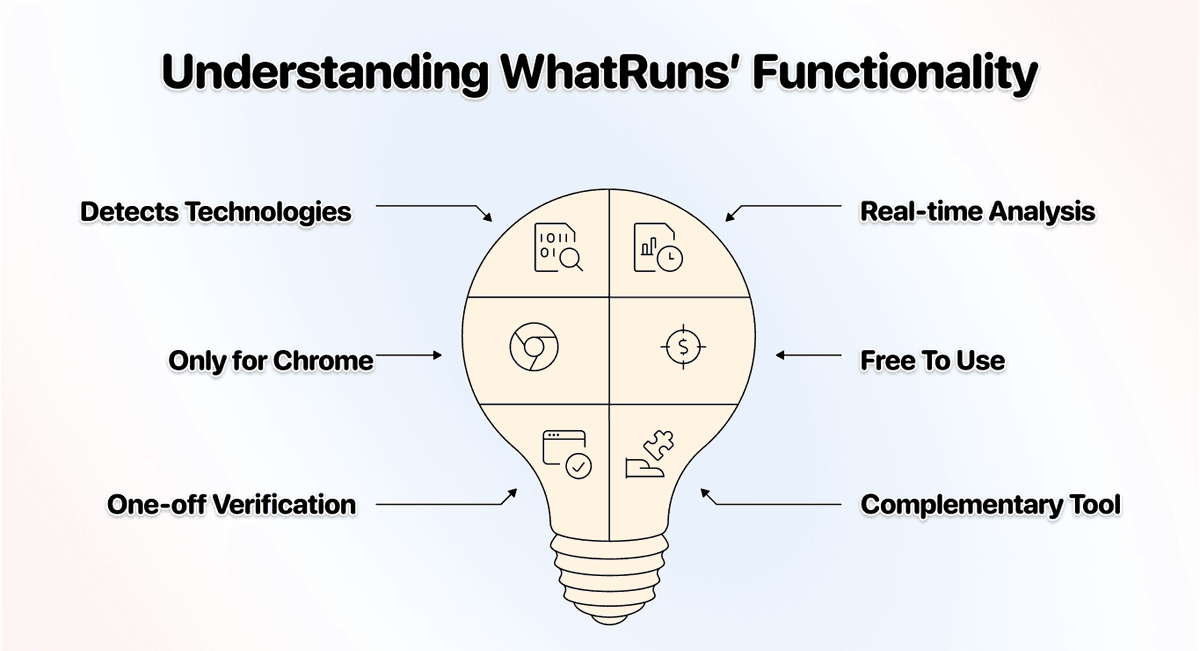
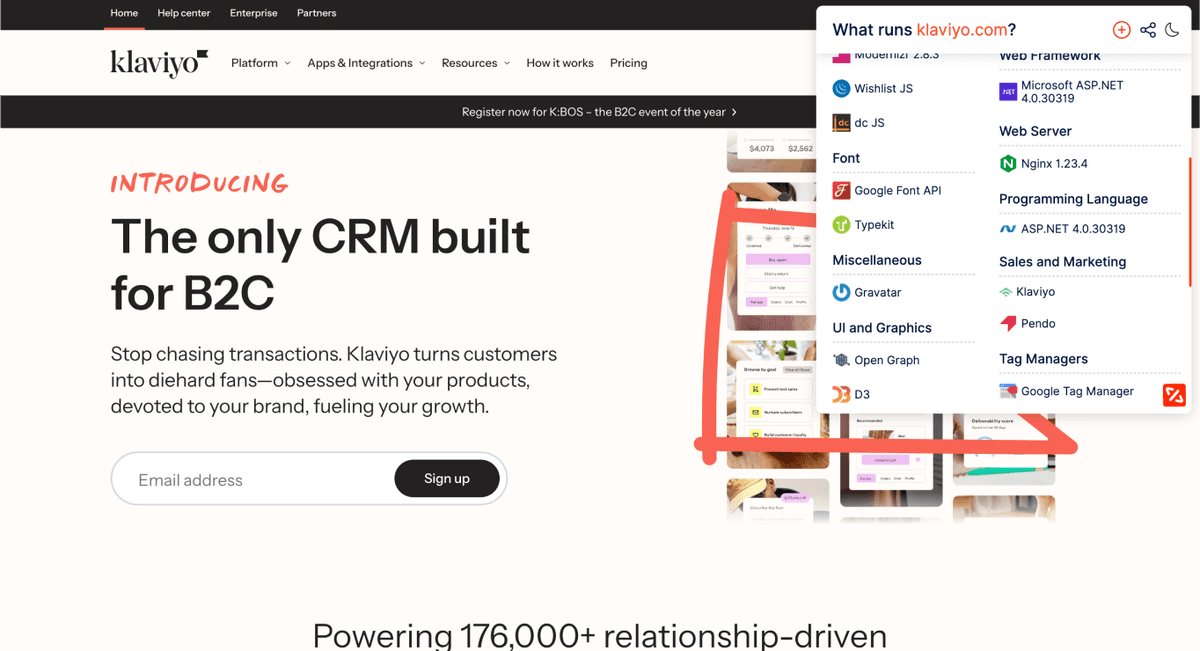
WhatRuns is a browser extension that detects technologies running on websites you visit. Unlike Datablist or other methods that help you build lists of companies, WhatRuns is designed for one-off verification - checking if a specific website uses a particular technology.
🔍 Using WhatRuns for Wix
Note: This method works for verifying if a company is using a technology, but it's not suited for building lead lists. We included it anyway because:
- It's perfect for quick verification when you need to confirm a technology on a specific site
- It's completely free - just install the browser extension
- It works for almost any technology, including frontend, backend, and hosting services
- It complements list-building methods by letting you verify findings from other sources
How WhatRuns Works
WhatRuns operates as a browser extension (available only for Chrome) that analyzes websites in real-time as you browse. When you visit a website and click the WhatRuns icon, it:
- Scans the page source code to identify JavaScript libraries, frameworks, and CMS platforms
- Analyzes HTTP headers to detect server-side technologies and hosting providers
- Inspects loaded resources like CSS frameworks, analytics tools, and third-party services
- Identifies marketing tools such as email marketing platforms, CRM integrations, and advertising pixels
The extension displays all detected technologies in an organized, easy-to-read format, categorized by type (CMS, analytics, frameworks, etc.).
- Confirming findings from Datablist or other detection methods
- Quick tech stack research on a handful of target companies
- Learning what technologies power websites you admire
However, this method completely fails when you need to:
- Build lists of hundreds or thousands of companies using a specific technology
- Automate technology detection across many websites
- Export and analyze data about multiple companies
- Filter companies by location, industry, or other criteria
The fundamental reason is simple: WhatRuns is designed for manual, one-site-at-a-time inspection, not scalable lead generation. It's a research tool, not a prospecting tool.
Step-by-Step: Using WhatRuns to Check If a Site Uses Wix
This is probably the easiest method you'll see in this guide - literally just three steps!
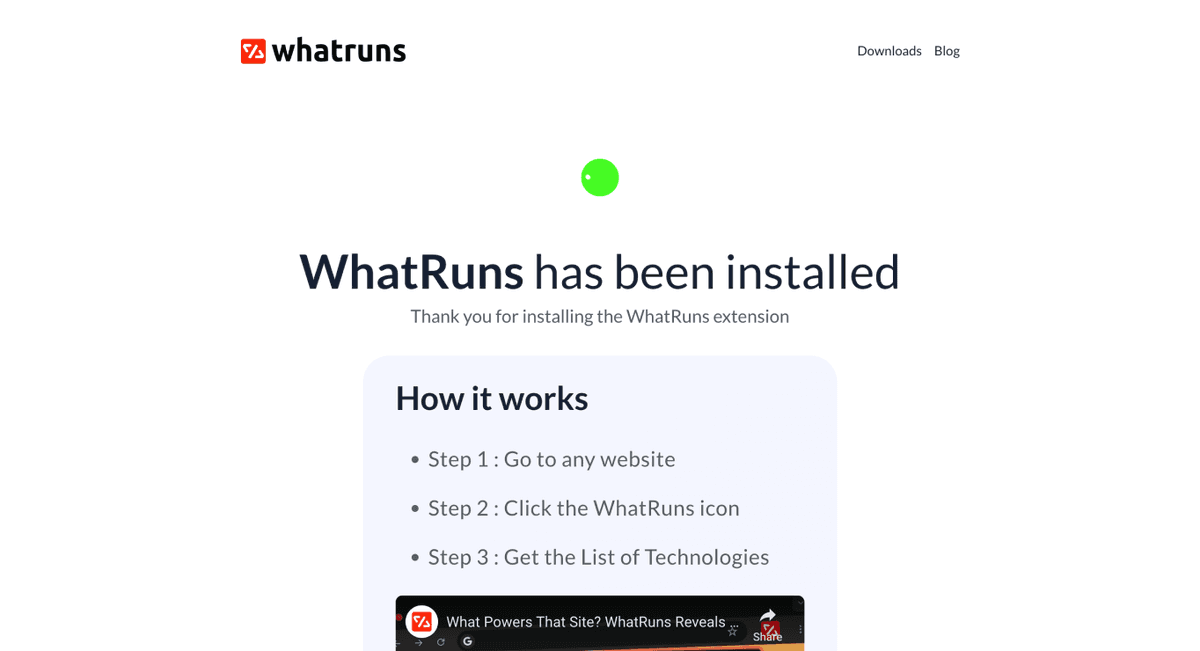
Step 1: Install the WhatRuns Browser Extension
1. Visit the WhatRuns website: Navigate to whatruns.com in your browser
2. Choose your browser: Click on the appropriate download link for Chrome, Firefox, or Edge
3. Install the extension: Follow your browser's standard extension installation process
4. Pin the extension: (Optional but recommended) Pin WhatRuns to your browser toolbar for easy access
- No list building - Results aren't saved or exported in a usable format for prospecting
- Time-consuming at scale - Checking 100+ sites would take hours of manual clicking
- No filtering or segmentation - Can't filter by industry, location, company size, etc.
- No contact data - Provides zero information about decision-makers or contact details
- No automation - Every check requires manual intervention
Bottom line
WhatRuns is perfect for answering "Does this specific company use Wix?" but terrible for answering "How do I get a list of companies using Wix?"
When to Use WhatRuns vs. Datablist
Here's a simple decision framework:
Use WhatRuns when you:
- Need to verify technology on 1-10 specific websites
- Want to quickly check a competitor's tech stack
- Are doing qualitative research on technology choices
- Need to confirm findings from other methods
- Don't need contact information or firmographic data
Use Datablist when you:
- Need to find hundreds or thousands of companies using a specific technology
- Want to build a lead list for outreach
- Need filtering by location, industry, or company size
- Require contact information and company data
- Want to automate the discovery process
- Need to export data for your CRM or outreach tools
Think of WhatRuns as a magnifying glass, perfect for close inspection. Think of Datablist as a telescope, designed to scan a bigger landscape and identify many targets at once.
Conclusion: Finding Companies Using Wix Is Easy
After exploring multiple methods for finding companies using Wix, here's what we've covered:
This article contains multiple methods for fairness, educational purposes, and to give those who don’t want to invest in tools some ideas on how they can get technographic data for 0$.
But if you ask me personally, I’d always recommend people to try Datablist if they’re looking to create a list of companies using Wix, not because it’s our tool, but because Datablist:
- Is easy to use
- Doesn’t make you poor
- Is easy to scale
- Has accurate data (Powered by Wappalyzer)[2]
- Offers an entire lead generation suite
…..and much more
The Bottom Line: If you need to build comprehensive lead lists with accurate technographic data in an affordable, scalable way, Datablist offers the most user-centric solution.

Is There a Tool That Helps Me Create a List of Companies Using Wix
Yes, Datablist is specifically designed for creating lists of companies using particular technologies. Unlike manual methods, Datablist offers a comprehensive Technology Finder that allows you to quickly build lead lists based on technology usage, with additional filtering options for location, industry, and company size.
Is a Technology Finder Free to Use?
While there are free methods like Google Search Operators, MyIP.ms lookups, and the WhatRuns browser extension, these are manual and time-intensive. Professional technology finders like Datablist offer more comprehensive data and automation capabilities, but typically require a subscription for full functionality.
How Can I Know If a Company Is Using a Specific Tool?
There are several ways to verify if a company uses a specific technology. For individual websites, you can use the WhatRuns browser extension to detect technologies in real-time. For more comprehensive verification, Datablist provides technology detection with high accuracy. Other methods include checking the website source code or using Google search operators, though these are less reliable.
Is There a Cheaper Way to Create a List of Companies Using a Technology than BuiltWith?
Yes, Datablist offers a cost-effective alternative to BuiltWith for creating technology-based company lists. While free methods exist (Google search operators, MyIP.ms, WhatRuns), they're extremely time-consuming for large-scale lead generation. Datablist combines accuracy, reasonable pricing, with automation and Data enrichment capabilities, making it an attractive option for businesses seeking technology-based leads without the exaggerated price tag of BuiltWith.
Can I Find Companies Using Wix For Free?
Yes, there are a few Technology Lookup methods available for free, including the Google Search Operators method, the MyIP.ms method, and the WhatRuns method. However, they’re all manual and time-intensive. For fast, accurate, and scalable Technology Lookup, you can try Datablist.com
Can ChatGPT help me find companies using Wix
Yes, ChatGPT could do this, but it's limited to only a few websites. The method that ChatGPT would use is checking the website source code for snippets like WhatRuns and conducting an extra verification step by the MyIP.ms / Whois lookup method. If you need to find companies using Wix at scale, you can check out Datablist's Technology Finder.