
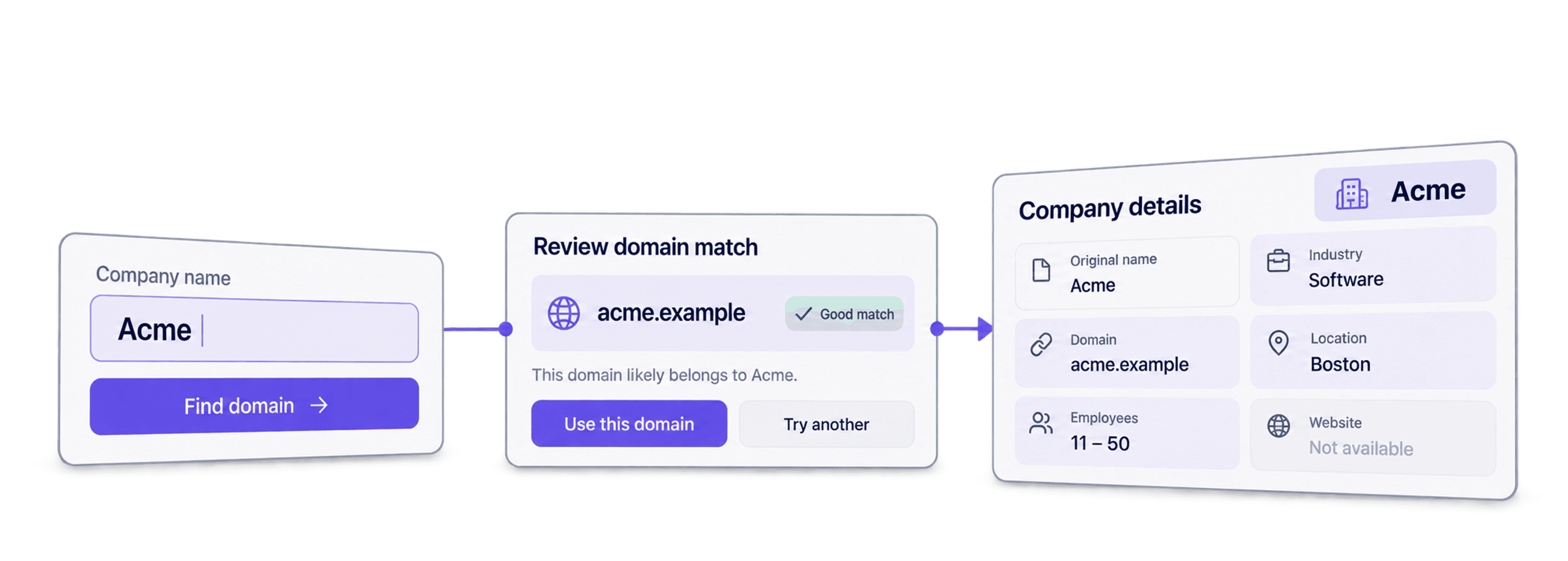
To enrich company data from company names, find the matching company domain first, check the match, then run Company Enrichment to add available industry, location, employee range, and LinkedIn fields.
If you only need websites for a handful of companies, start with the free name-to-domain tool. It accepts up to ten names per run. Check each returned domain before using it as the input for company enrichment.
If you already have company domains, skip the website lookup. Import your domain list and go straight to the company enrichment workflow. I would keep an original company name and row ID beside each domain so you can review the results before exporting them.
📌 Choose the route for your input
- Company names only: find domains, inspect match confidence, then enrich the reviewed domains.
- Company domains already available: select the domain input in Company Enrichment and map your domain column.
- Company LinkedIn URLs: select the LinkedIn URL input and map those URLs instead.
Start with basic data when you need firmographics. Choose the LinkedIn scraping option when you need its additional profile fields. Neither route guarantees that every field will be present.
What This Guide Covers
- What enriching company data means and who it's for
- What data you need to get started (just company names)
- Step-by-step: Finding company websites from company names
- Step-by-step: Enriching company data from company domains
- Cost breakdown and FAQ
The Essentials of Enriching Company Data
To enrich company data starting from just company names, you need two enrichments:
- The first one finds the company website from a company name.
- The second one takes a website and returns the available company fields.
Both enrichments run directly inside Datablist, both are no-code, and both follow the same simple 6-step process.
💡 What Is Datablist?
Datablist is a platform for automating lead generation workflows that allows sales, marketing, and recruiting folks to find, clean, and enrich data using data sources and enrichments from AI Agents to Email Finders, data cleaning tools, and more.
If you need to find, clean, or enrich data for your lead lists, Datablist keeps everything in one platform, so you don't have to juggle 5 different subscriptions.
Who Benefits From Enriching Company Data
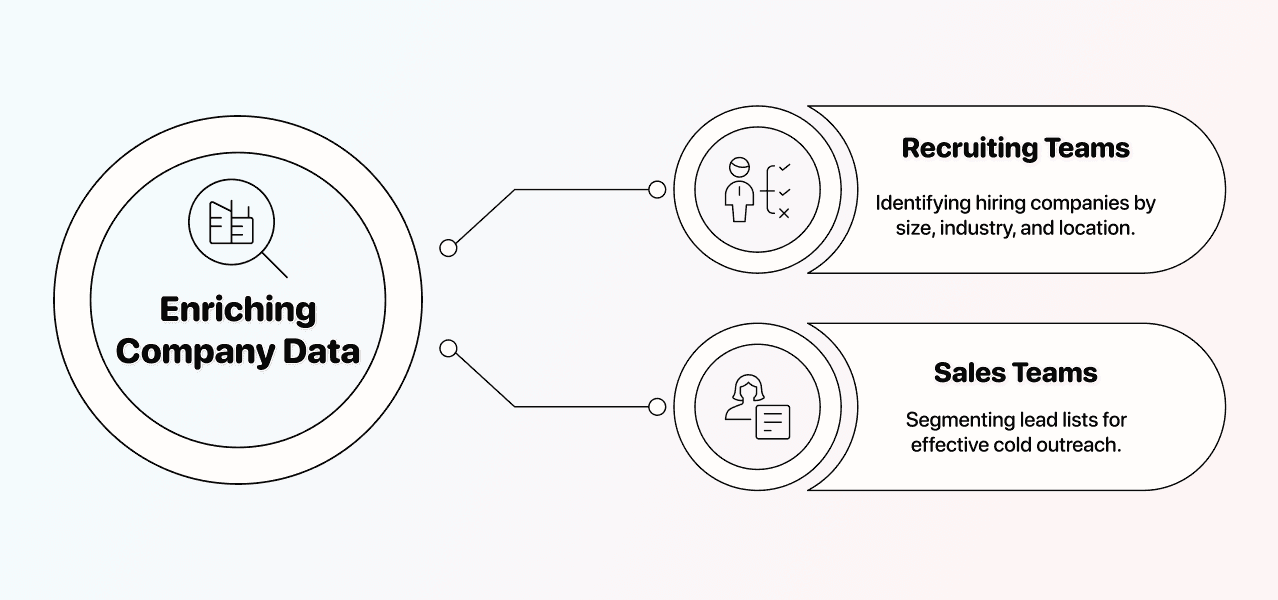
Different teams use enriched company data in different ways. Below are the two examples:
Recruiting teams use enriched company data to identify hiring companies by size, industry, and location. If you're sourcing candidates, knowing whether a company has 50 or 5,000 employees changes your entire approach.
Sales teams running cold outreach need company data to segment their lead lists properly. When you enrich company data, you can filter by industry, region, or employee range before you ever send the first cold email. Better targeting, fewer wasted messages.
The Data You Need
To enrich company data, you'd usually need the company's website domain or LinkedIn company page URL. But in this guide, I'll show you how to start from just company names and get to available company fields.
If you already have company domains or LinkedIn URLs, skip to the company data enrichment step.
For a domain list, keep one company per row with a Company Domain column, such as datablist.com, and your original identifier. Remove blank inputs and check that the domain belongs to the intended company. A directory profile or a social-media URL is not a company domain.
I would keep the source columns and add enrichment results in new columns. This makes it easier to spot a wrong company match or a headquarters location that differs from the branch you originally collected.
What Does Datablist's Company Enrichment Return
Once you run the company enrichment, Datablist returns a structured set of data points for each company in your lead list. Here's what you get back:
| Category | Data Points |
|---|---|
| Company Identity | Company Name, LinkedIn URL |
| Company Details | Industry, Founded Year, Employee range, when available |
| Location | Headquarter City, Region, Country |
| Status | success, not_found, or invalid_data |
The LinkedIn scraping option adds outputs for description, specialties, slogan, LinkedIn ID, and follower count when those values are available.
- Basic data costs 1 credit per enrichment.
- The LinkedIn scraping option costs 5 credits per enrichment.
I would start with basic data for industry, location, employee range, and founded year. Choose the LinkedIn option when its additional fields serve your task. Data from a public profile can be incomplete or stale; scraping it does not independently verify its accuracy.
Getting Started With Enriching Company Data
The following section shows two different step-by-step workflows:
- The first finds company websites from company names.
- The second uses the reviewed domains to add available company fields.
↳ Start with your company names
↳↳ Run the Website Finder to get company domains
↳↳↳ Run the Company Enrichment to get industry, employee range, and more
Both enrichments follow a 6-step process, and if you've used one Datablist enrichment before, the other will feel familiar.
📘 Before We Start
If you already have company domains or LinkedIn URLs, skip to the second enrichment. The first enrichment is only needed when you're starting from company names alone.
The Step-by-Step for Getting a Company Website From a Company Name
This enrichment takes your company names and finds the matching company website. It costs between 1 and 2.5 credits per company, depending on the search method you choose.
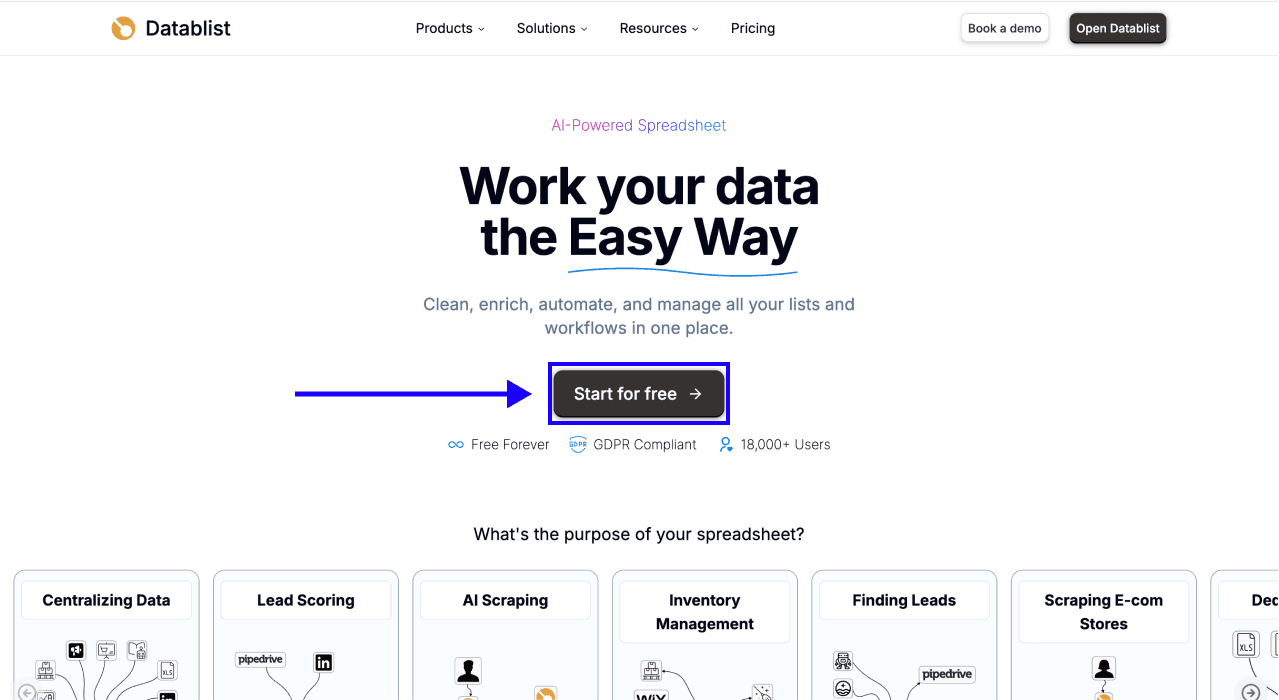
Step 1: Sign Up & Upload Your Data
First, Sign up for Datablist.com
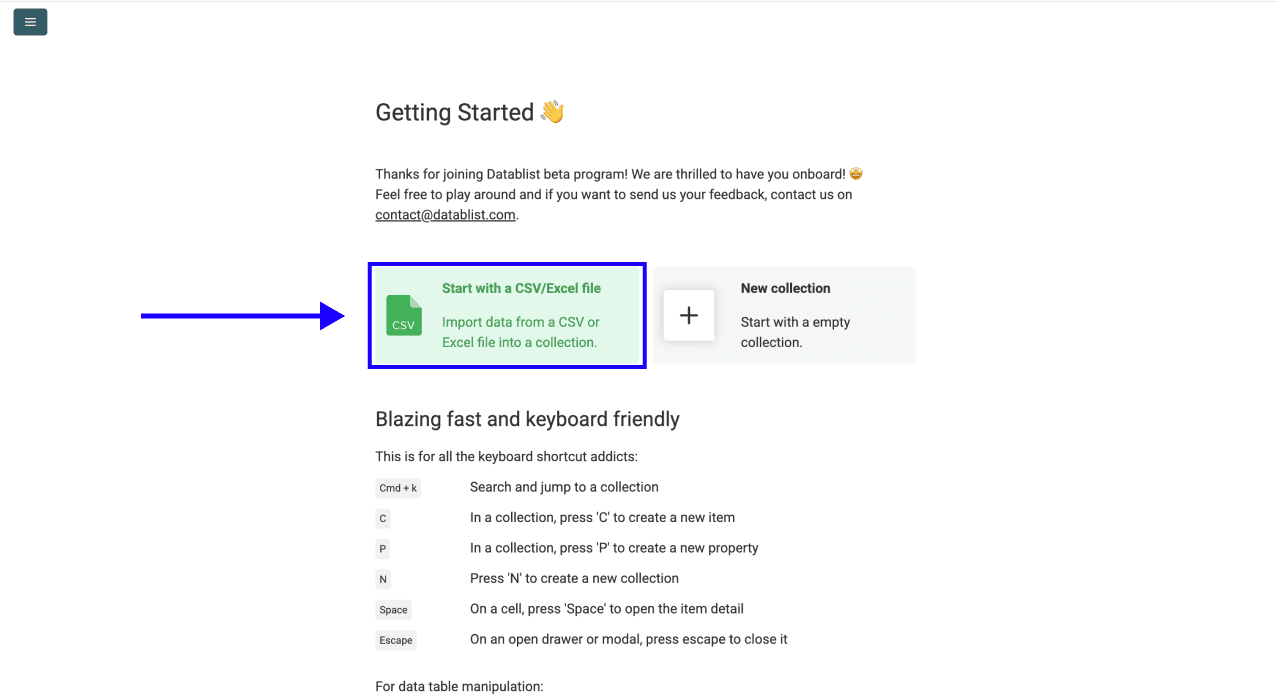
Then, Upload your CSV or Excel file with your list of company names
Step 2: Navigate to the Enrichment
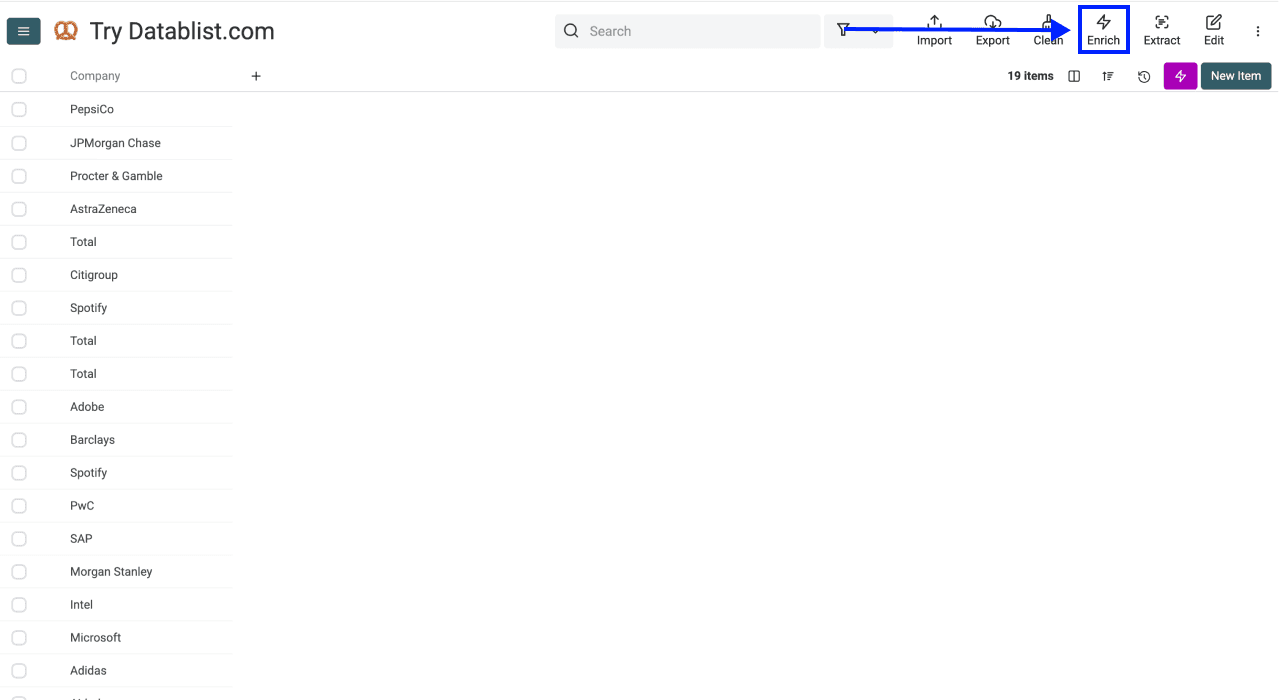
- Click on Enrich in the top menu
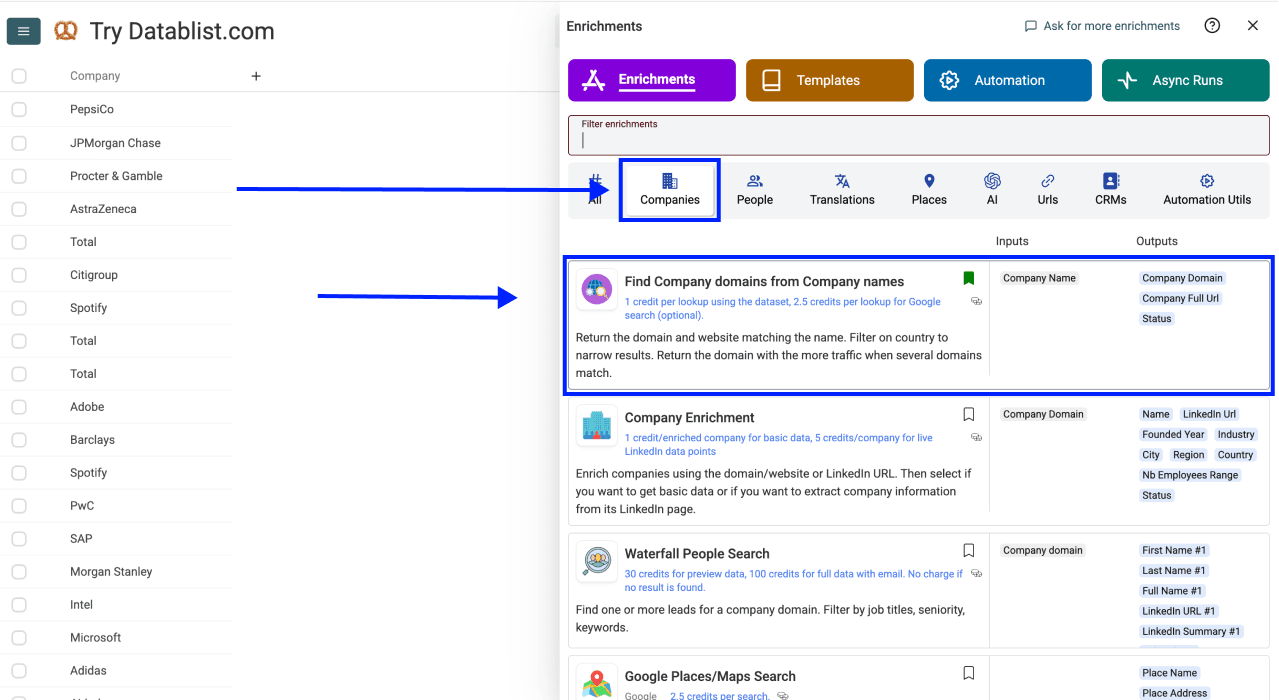
- Go to the Companies tab
- Select Find Company domains from Company names
Step 3: Set Up the Enrichment
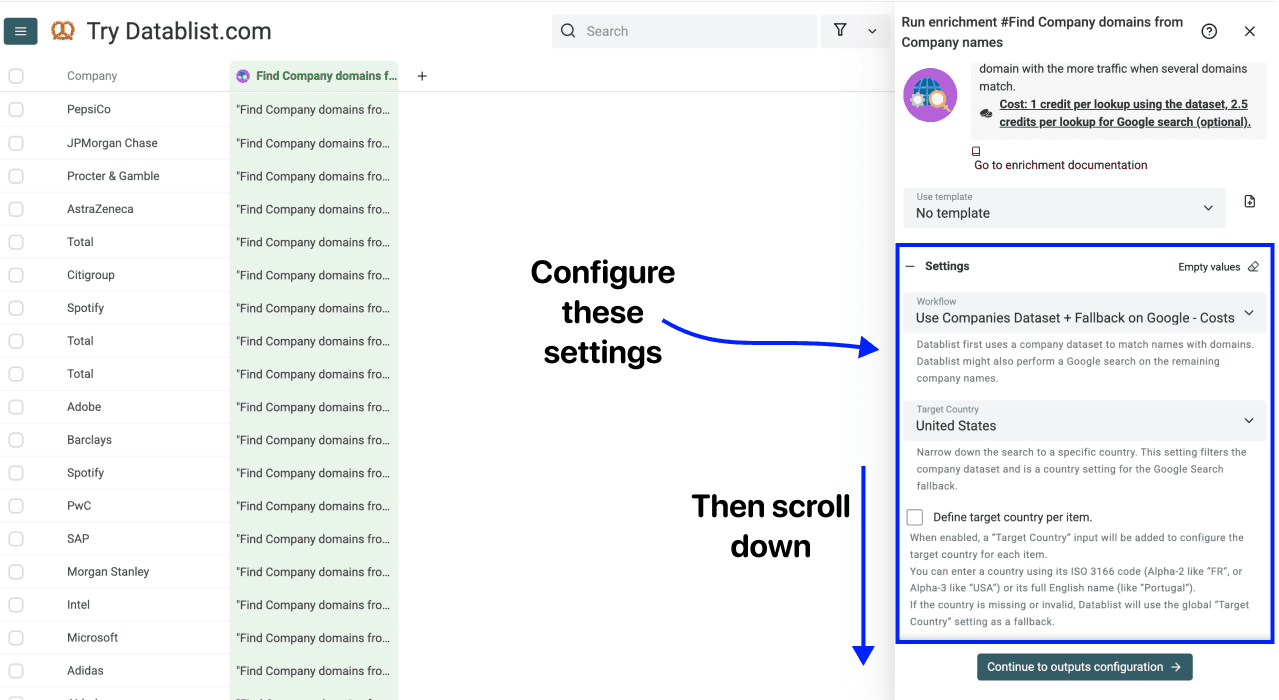
You'll see the following settings:
- Workflow: the default checks the companies dataset and falls back to Google. You can also choose dataset-only or Google-only lookup. The displayed charges are 1 credit for a successful dataset lookup and 2.5 credits when Google is used.
- Target Country: narrow the match to the intended country.
- Define target country per item.: enable this when you have a country column to map for each row.
- Skip following domains: add directory or other domains you do not want returned as company websites.
For companies hosted on another platform, inspect Accept non root websites. Enable it only when such a hosted page is an acceptable website for your task. The screenshots show an earlier interface; follow the current labels in the enrichment.
Once you’re done with the above, scroll down to configure your inputs
Step 4: Configure Your Inputs
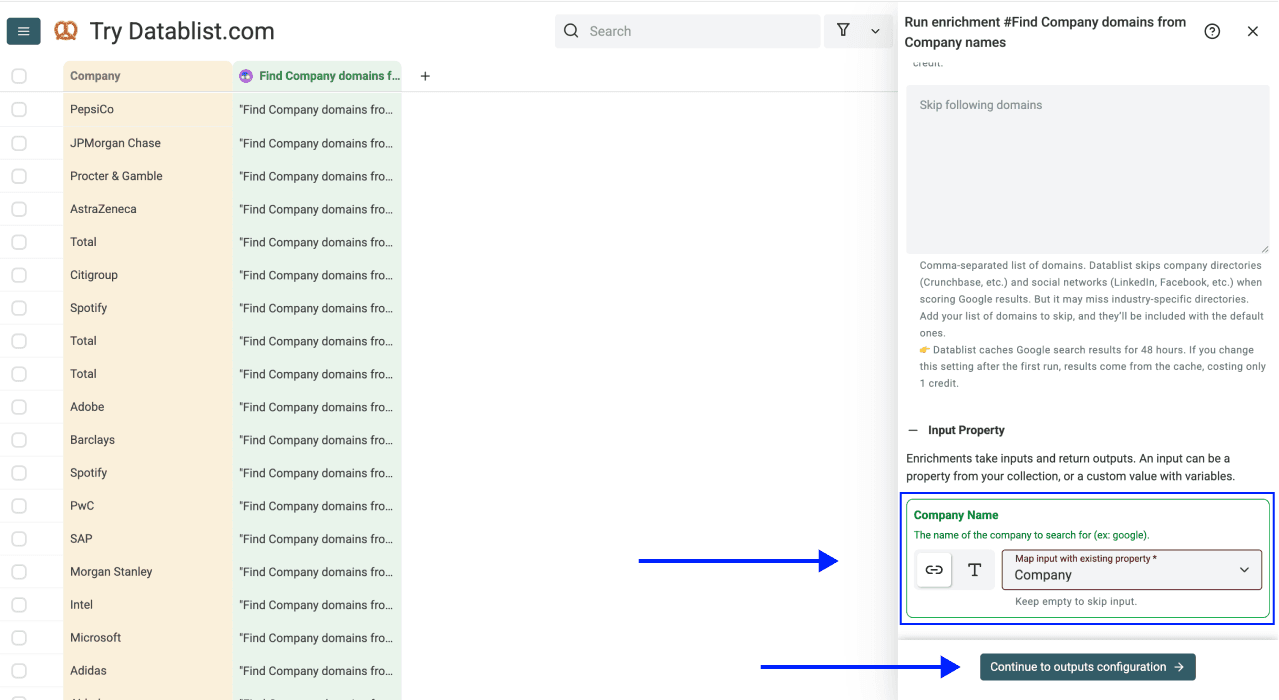
Map the column containing your company names as the Input Property
Then click Continue to outputs configuration
Step 5: Select Outputs
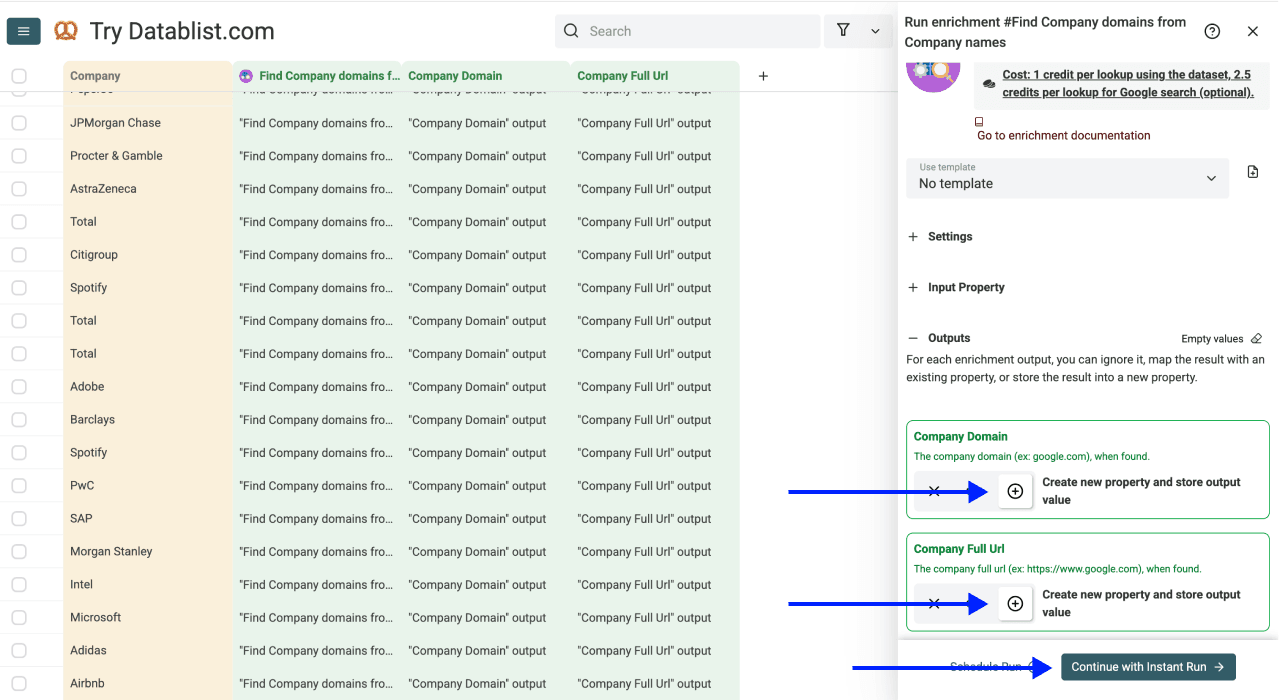
Add these outputs for a reviewable website lookup:
- Company Domain: the matched domain, such as datablist.com.
- Company Full Url: the full matched website URL.
- Domain Confidence: High, Medium, Low, or Very Low.
- Status: success, not_found, or empty_name.
I would review low-confidence matches and similarly named companies before sending their domains to another enrichment. Confidence helps prioritize review; it does not replace checking the actual site.
Click the ⊕ Icons to add them to your collection, then click Instant Run
Step 6: Run the Enrichment
Finally, configure your run settings by clicking on the chevron on the right side of the button. This will allow you to choose between the following options:
- Run on first 10 items: Good for checking results before committing
- Run on first 100 items: Useful if you want to validate larger samples
- Run on first {X} items: Lets you choose how many items you want to process
- Run on all view items: Process your entire list (or view if you’ve enabled filters)
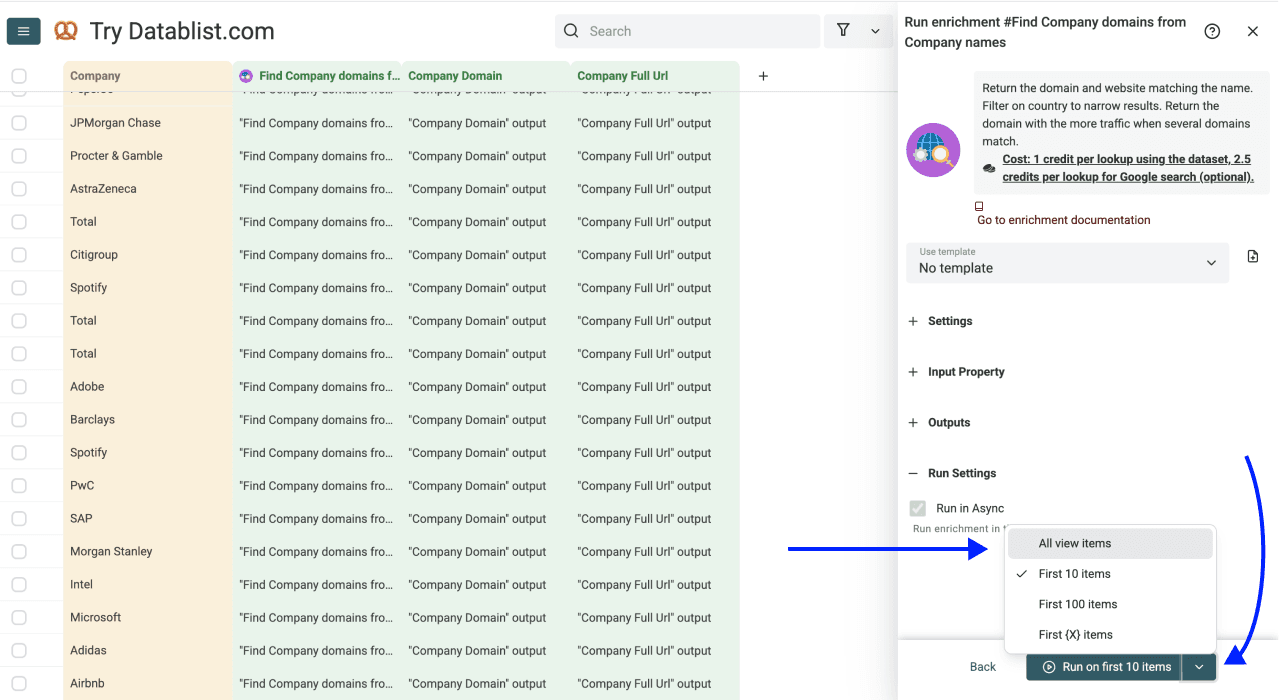
Once you have chosen your preferred option, click Run on X items
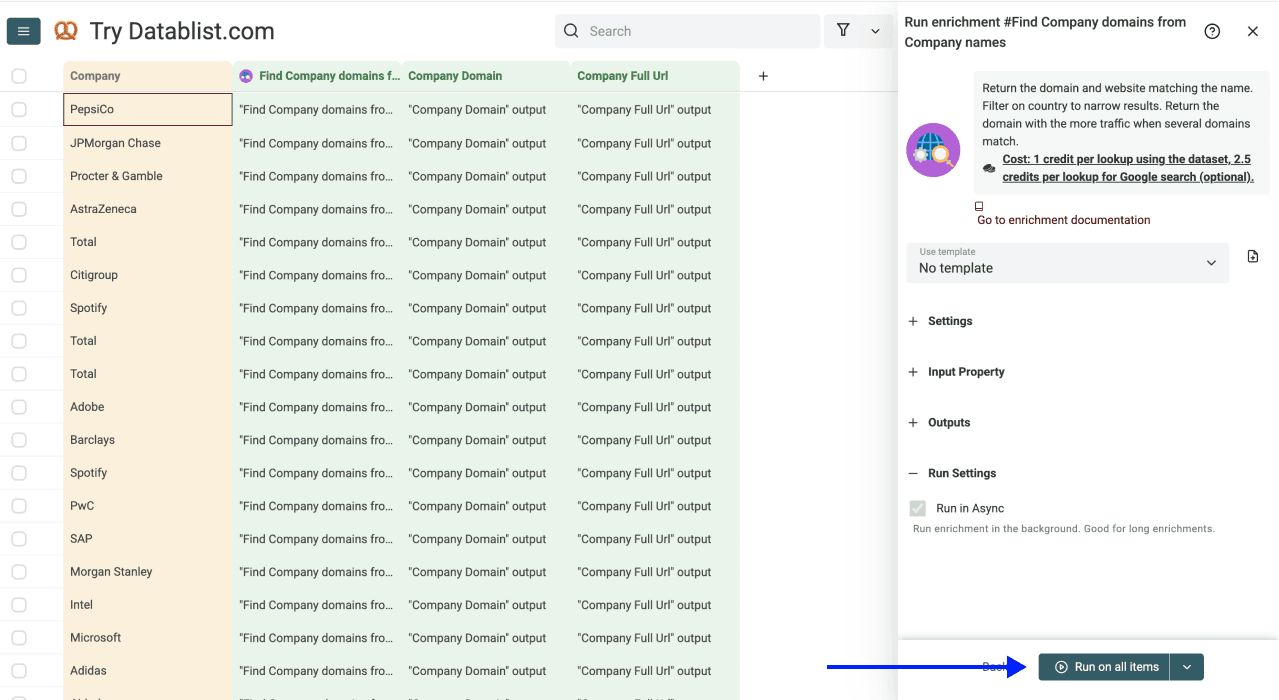
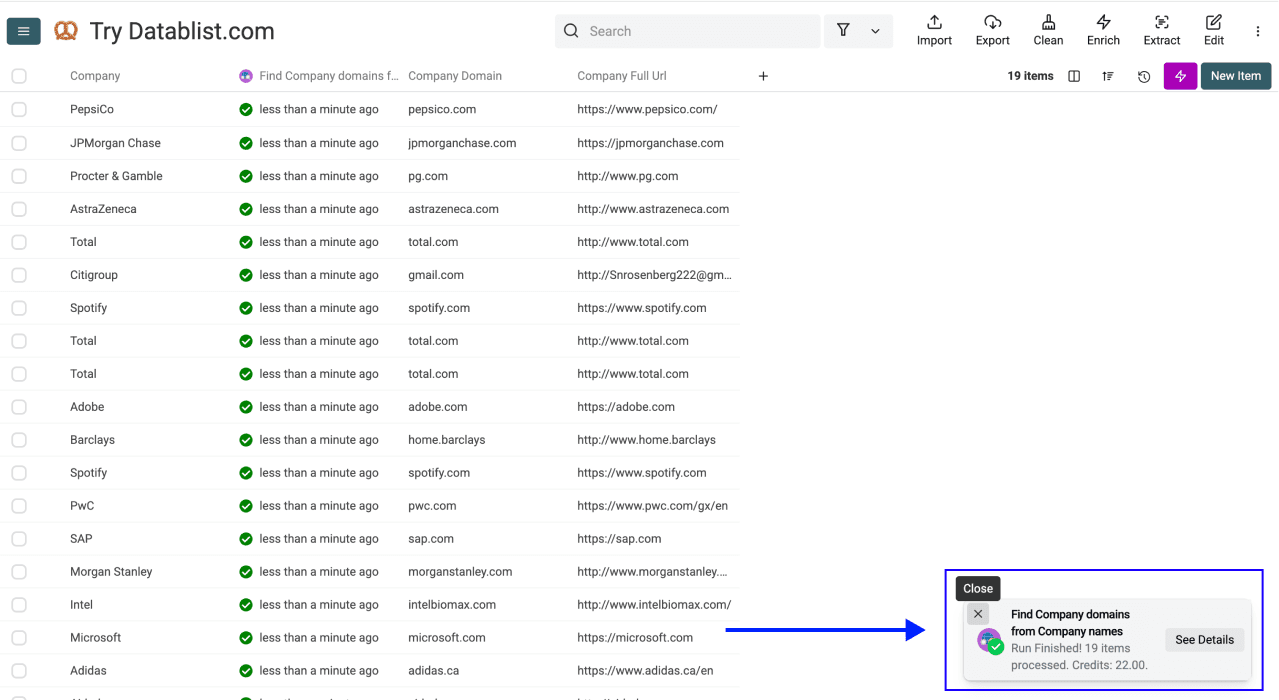
Check the sample domains against the company names and countries. Correct wrong matches, keep unresolved names separate, and continue with the reviewed domains.
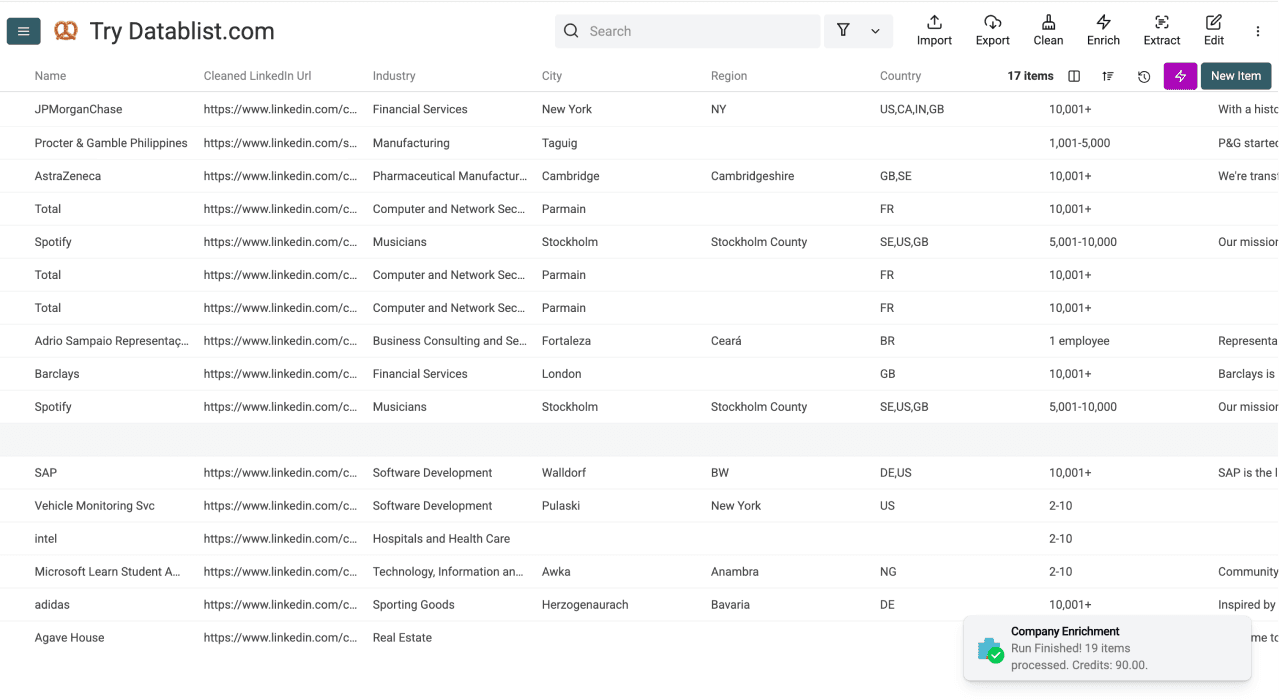
Datablist will also show you a little notification displaying the status of the task and the number of credits it consumed.
For a deeper breakdown of the full website-finding waterfall, including AI Agent search, see how to find a company website from its name. 👈🏽
The Step-by-Step for Enriching Company Data
With company domains ready, add the company fields you need. Basic data costs 1 credit per enrichment; the LinkedIn scraping option costs 5 credits.
Step 1: Your Data Is Already Ready
If you just ran the Website Finder, your company domains are already in your collection. No new upload needed. Just continue in the same collection.
If you're starting fresh with a list that already has company domains, upload your CSV or Excel file with the company websites.
Step 2: Navigate to the Enrichment
- Click on Enrich in the top menu
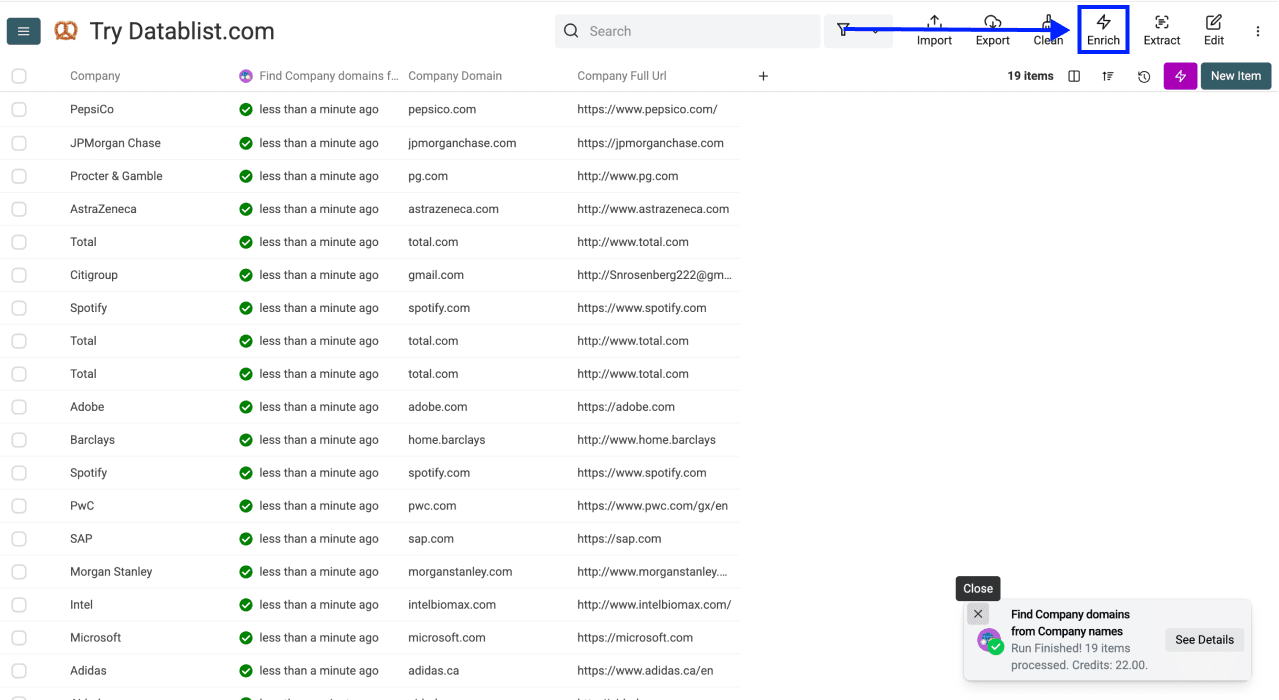
- Go to the Companies tab
- Select Company Enrichment
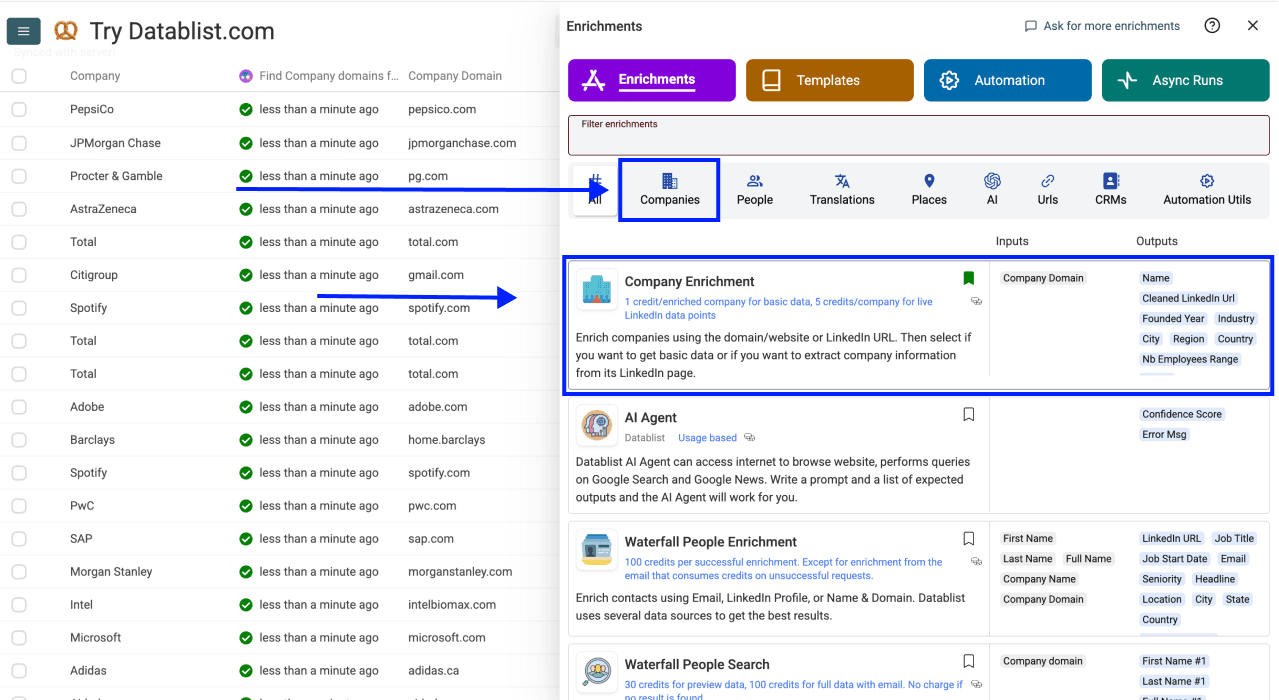
Step 3: Set Up the Enrichment
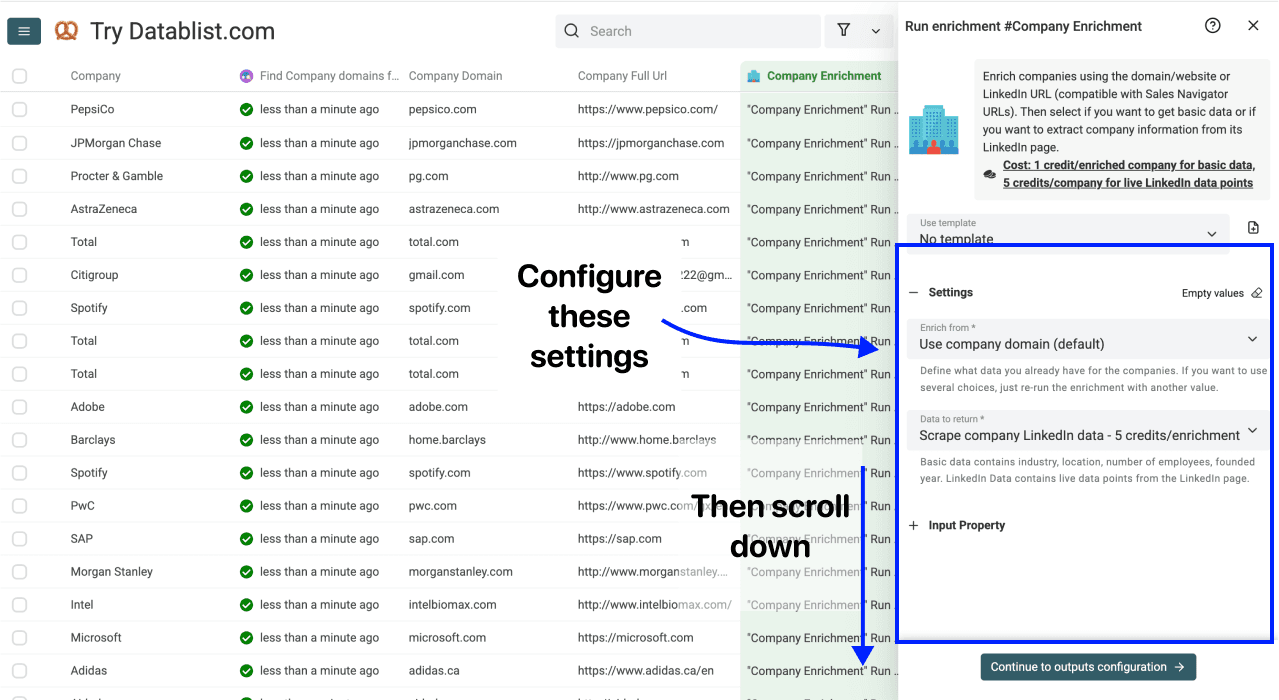
You'll see the following settings:
- Enrich from: choose Use company domain (default) for a domain list, or Use company LinkedIn Url for LinkedIn company pages.
- Data to return: choose Basic data (default) - 1 credit/enrichment for firmographics, or Scrape company LinkedIn data - 5 credits/enrichment for the additional profile fields.
The setup is straightforward. Pick your options and scroll down to configure your inputs.
Step 4: Configure Your Inputs
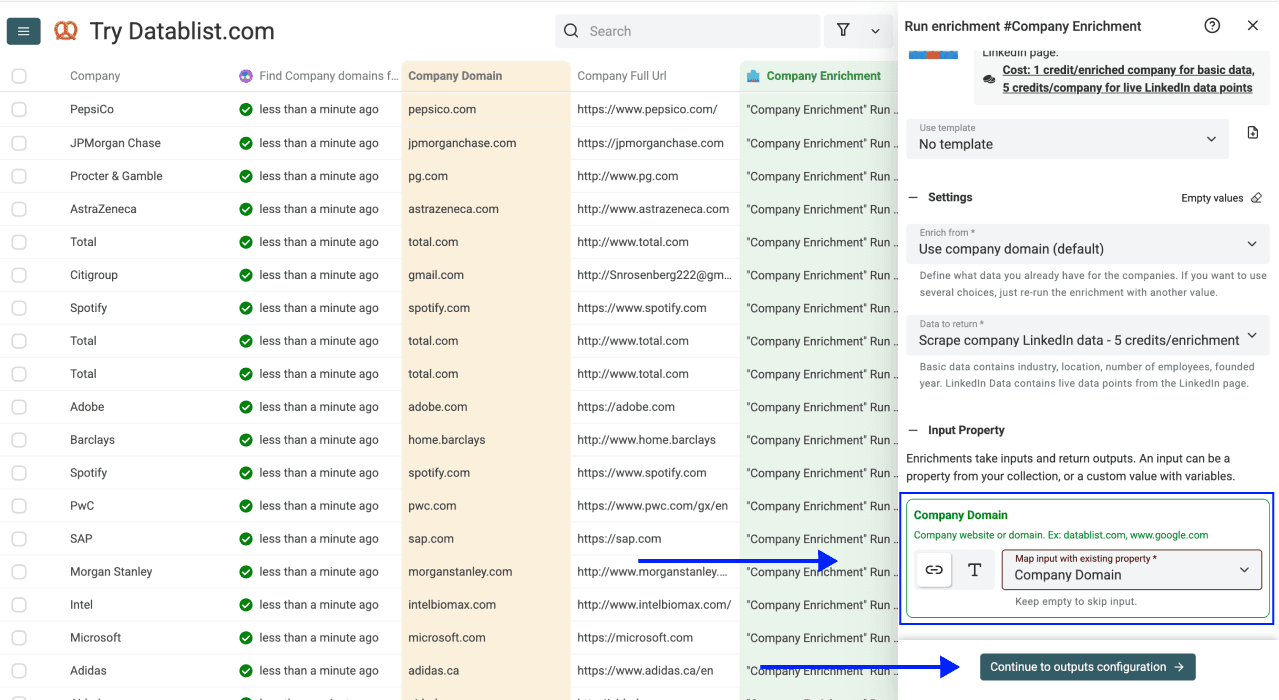
For the domain route, map your column to Company Domain. For the LinkedIn route, map it to Company LinkedIn Url. Check a sample input to confirm you selected the correct column.
Then click Continue to outputs configuration
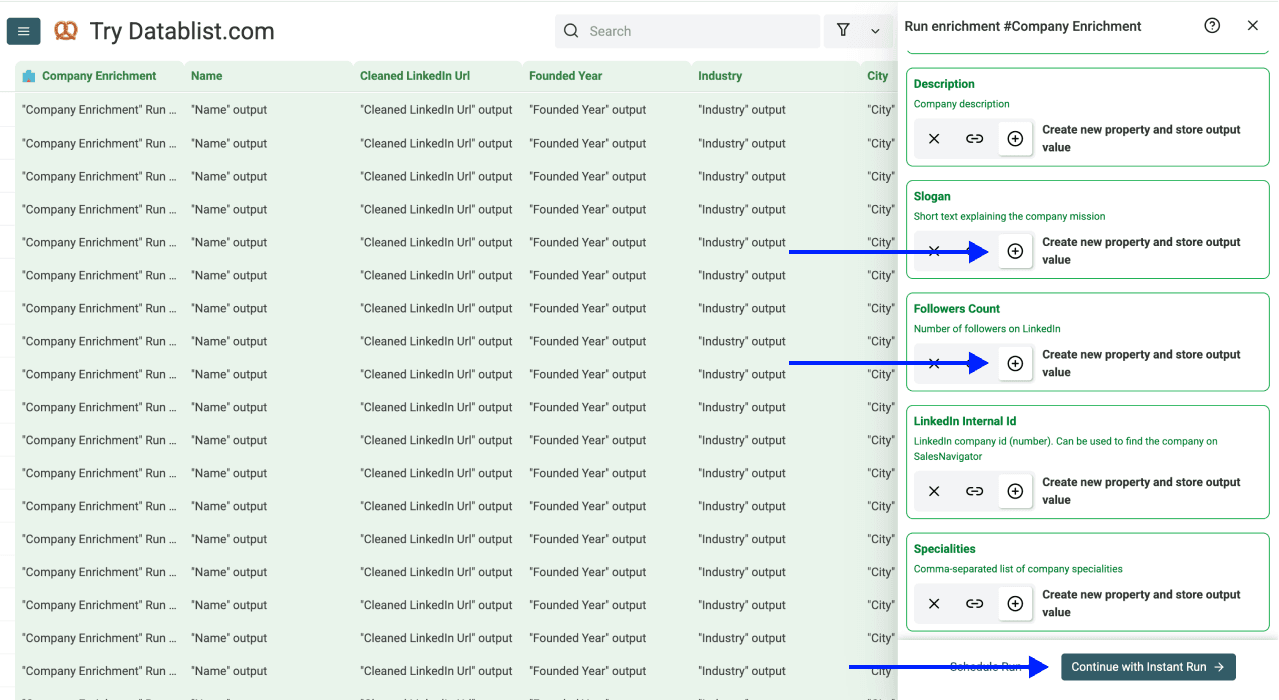
Step 5: Select Outputs
Add the fields you need, including Name, Industry, Country, Nb Employees Range, and Status. Keep the original company name beside the returned Name so you can inspect identity matches.
Employee range is a size band, not a verified exact headcount. Location fields describe headquarters when available; they may differ from a local office in your source list. Click the add icons for the outputs you want.
Once you've selected your outputs, click Instant Run
Step 6: Run the Enrichment
Finally, configure your run settings by clicking on the chevron on the right side of the button. This will allow you to choose between the following options:
- Run on first 10 items: Good for checking results before committing
- Run on first 100 items: Useful if you want to validate larger samples
- Run on first {X} items: Lets you choose how many items you want to process
- Run on all view items: Process your entire list (or view if you’ve enabled filters)
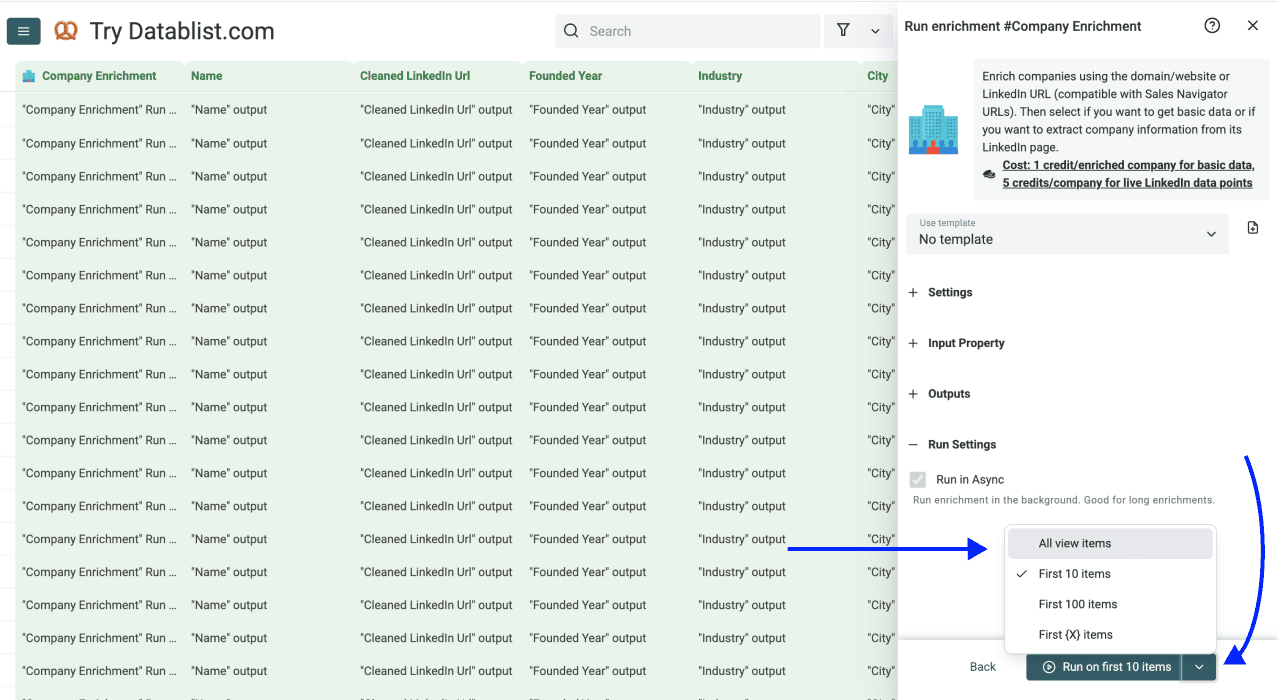
Once you have chosen your preferred option, click Run on X items
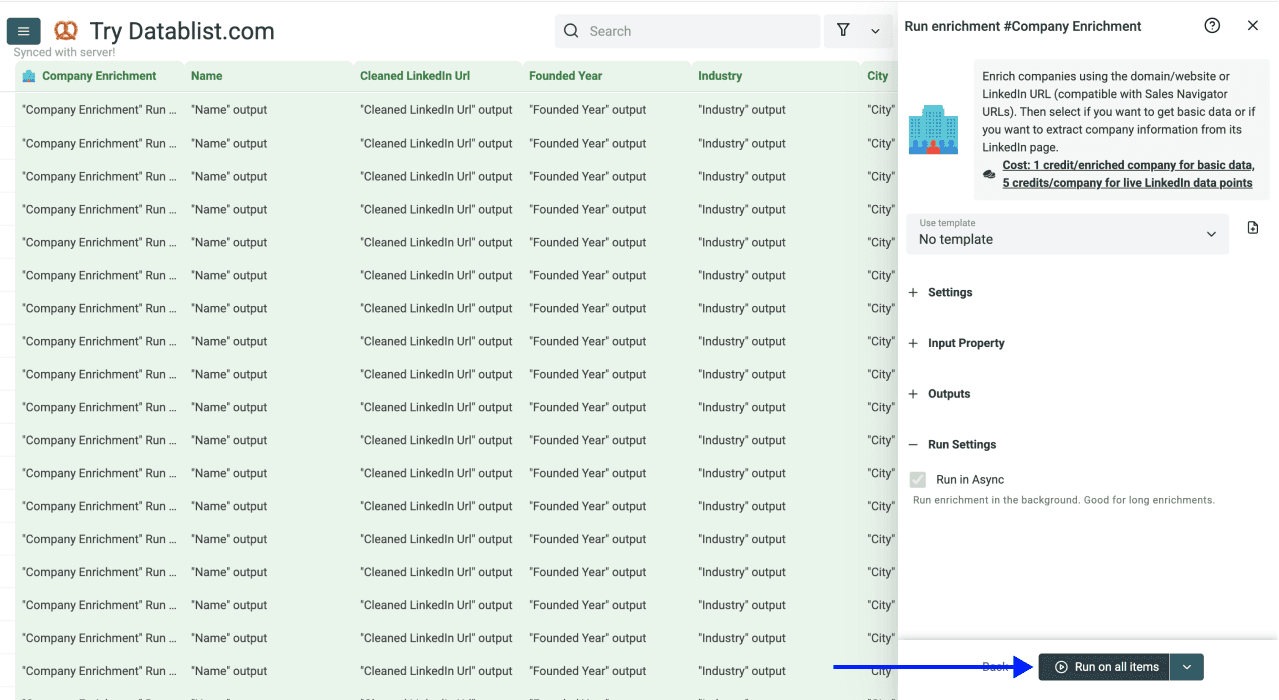
Review the result before running the remaining rows:
- success: compare the returned name, LinkedIn page, industry, and location with the intended company. Success does not mean every output is filled.
- not_found: keep the row unresolved. Check its domain or try an appropriate alternate input before rerunning it.
- invalid_data: correct the input format first.
Do not interpret a missing employee range as zero employees. Keep missing values empty and separate unresolved records from the reviewed list you export. You can then use AI data enrichment to assess fit from the collected facts, with evidence kept beside the assessment.
Key Takeaway: Enriching Company Data is Easy
Enriching company data from company names is a two-step process, and both steps are simple:
- Use the Website Finder to get company domains from company names (1-2.5 credits per company)
- Use Company Enrichment to add available company fields from those domains (1 credit per company for basic data)
Budget for both steps when you start from names. If you already have domains, you only need the company enrichment step. Check the run credit usage and current plan allowances before scaling.
Datablist Also Helps With Other Tasks
Enriching company data is just one part of building a complete lead list. Once you have your company records, Datablist can help you with the next steps:
Build on your company data
- Find decision makers with Waterfall People Search
- Scrape job posting from the companies you just enriched
- Get verified email addresses with Waterfall Email Finder
- Find phone numbers for cold calling campaigns
Clean and organize your data
All within one platform.
Frequently Asked Questions (FAQ) About Enriching Company Data
How Much Does It Cost to Enrich Company Data With Datablist?
Company Enrichment costs 1 credit per enrichment for basic data or 5 credits for the LinkedIn scraping option. Basic outputs include industry, location, employee range, and founded year when available.
If you need websites first, the lookup adds 1 credit for a successful dataset match or 2.5 credits when Google is used. Check the current enrichment settings and your credit allowance. A list that already contains domains does not need that first lookup.
How Long Does It Take to Enrich 500 Companies With Datablist?
Duration depends on the chosen enrichments, provider responses, and unresolved inputs. Run a small sample to check the output and credit usage, then process the remaining rows. I would also allow time to review ambiguous company matches; completion of a run is not the same as completion of data review.
Is There a Limit on the Number of Companies I Can Enrich With Datablist?
Collection capacity, run scope, and available credits are separate constraints. Check your plan and the current run settings. For a large list, validate a sample, use a clear company identifier, and keep unresolved rows identifiable before running another batch.
What Data Does Datablist's Company Enrichment Return?
The basic enrichment returns: Company Name, LinkedIn URL, Industry, Founded Year, Headquarters City, Region, Country, and Employee Range. The LinkedIn data option returns additional data points scraped directly from the company's LinkedIn page, such as: The company’s description, their specialities, their slogan, their LinkedIn ID, and the number of followers they have on LinkedIn.
Do I Need Technical Skills to Enrich Company Data With Datablist?
No. Datablist is a 100% no-code platform. You upload a file, select an enrichment, map your columns, and click run. No code, no APIs, no technical setup needed.
Can I Enrich Company Data and Find Emails in the Same Platform?
Yes. After you enrich company data, you can immediately use Datablist's Waterfall Email Finder to find email addresses for contacts at those companies. Everything stays in one platform, so there's no need to export and re-import between tools.
I Have a List of Company Names. How Do I Enrich This Data?
Upload your list to Datablist, run the Website Finder to get company domains, then run the Company Enrichment to get the available company fields. Review domain matches between the two steps so the second enrichment uses the intended company.
What Does "Enrich Company Data" Actually Mean?
To enrich company data means to take a basic company record (like just a company name) and add missing information to it: industry, employee range, location, LinkedIn URL, and more. It's the process of adding useful fields to the records for your lead lists.
Can I Enrich Company Data From Just a Company Name?
Yes, and that's exactly what this guide covers. You use two enrichments: first, to find the company website from the name, then to pull the available company fields from that website. Check the website matches before enriching them; otherwise you may add accurate fields for the wrong company.
What's the Difference Between Scraping and Enriching Company Data?
Scraping is a sub-task of enriching. Scraping means extracting data from a source (like a website or job board). Enriching means adding new data points to an existing record, which may involve scraping, database lookups, or API calls behind the scenes. When you enrich company data with Datablist, it handles all of that automatically.
Where's the Best Place to Find Fresh Company Data?
Choose the source according to the fields you need. Basic Company Enrichment returns available firmographics; the LinkedIn option adds profile fields. Inspect the underlying company identity and supporting page when accuracy matters. A profile can be outdated, and no enrichment guarantees that every company fact is current.
What's the Difference Between Company Data Enrichment and a Company Database?
A company database is a static collection of company records that you search through. Company data enrichment is a process that takes your existing list and adds missing data to it.
The key difference: with a database, you search for companies. With enrichment, you start with companies you already have and fill in the gaps. When you enrich company data with Datablist, you keep your original list and simply add new columns of information.