
Need to collect page titles, meta descriptions, canonical URLs, and keywords from a list of websites?
Datablist's Fetch Meta Data from URLs enrichment reads URLs from a CSV or Excel file and extracts common SEO metadata in bulk. It also tells you whether the website is reachable.
Use it for SEO audits, lead qualification, website cleanup, content inventories, competitor research, and CRM enrichment.
Step-by-step guide
Step 1: Load your CSV or Excel file on Datablist
Create a free account and import your data file. Datablist is a CSV editor built for large lists, so you can process URLs without scripts or browser extensions.
Create a new collection and import your file.
Step 2: Select the "Fetch Meta Information" enrichment
Click on the "Enrich" button, and search for "Fetch Meta Information".
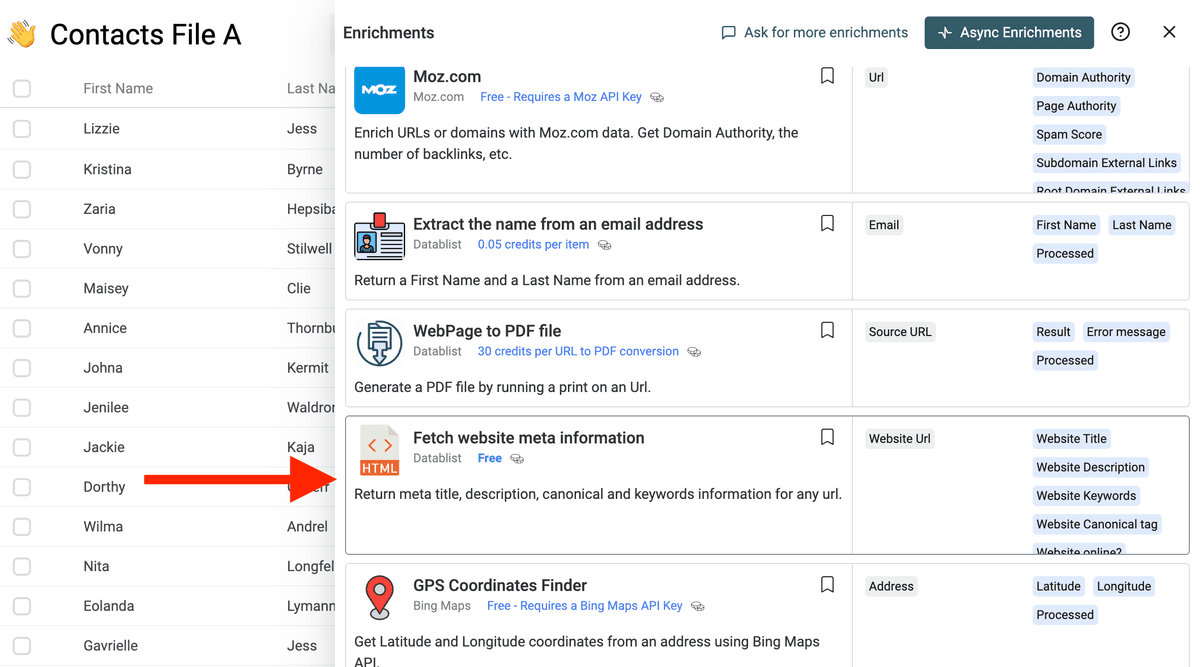
Step 3: Map the Website URL Input
Connect Website Url to the column that contains your URLs.
Datablist accepts raw domains and URLs. It cleans the input before fetching the page.
Step 4: Choose Outputs
The enrichment can return:
- Website Title - The page title.
- Website Description - The meta description.
- Website Keywords - The meta keywords tag, when present.
- Website Canonical tag - The canonical URL.
- Website online? - Whether the page is reachable.
Rows with invalid or empty URLs are marked in the run status.
Step 5: Configure Fetching Options
The enrichment includes optional scraping settings:
- Use Proxy when needed - Helps with protected pages, rate limits, or CAPTCHA pages. Disabled by default.
- Proxy Policy - Use proxy only on error, or always use proxy.
- Disable cached data - Datablist caches fetched page content for 7 days. Disable the cache when you need a fresh fetch.
Step 6: Preview and Run
Run a preview on a few URLs. Check that the title, description, and canonical URL look right.
Then run the enrichment on the full list.
Common Use Cases
SEO Metadata Audit
Export a list of pages from your CMS or sitemap, then collect titles and descriptions. Use Datablist filters to find missing, duplicated, or short metadata.
Lead Qualification
Enrich company domains with page titles and descriptions. This helps you understand what a company does before sending the list to sales.
Content Inventory
Build a content inventory from URLs. Add metadata columns, then group pages by topic, canonical URL, or missing description.
Competitor Research
Collect titles and descriptions from competitor pages to compare positioning, keywords, and landing page structure.
Domain Cleanup
Check whether URLs are online before using them in campaigns, directories, or partner lists.
Cost Examples
Basic scraping costs 0.20 credits per URL.
Proxy scraping costs 0.60 credits per URL.
Cached URLs cost 0.05 credits per cached URL when page content is already available in the 7-day cache.
Examples:
- 1,000 basic URL fetches cost 200 credits.
- 1,000 proxy URL fetches cost 600 credits.
- 1,000 cached URL fetches cost 50 credits.
The action processes up to 50 URLs per run batch.
Tips for Better Results
- Keep the original URL column and write metadata to new columns.
- Enable proxy only when regular fetching misses too many pages.
- Disable cache when you need the latest metadata after a website update.
- Use the canonical output to detect duplicate pages.
- Filter rows where Website online? is false before running downstream enrichments.
What SEO Metadata Helps You Check
Fetch Meta Data from URLs is useful when you need a quick inventory of webpage metadata from a list of URLs.
Use it to check:
- Page titles
- Meta descriptions
- Canonical URLs
- Meta keywords when present
- Whether a website is reachable
This helps SEO teams, agencies, and marketers audit large URL lists without opening each page.
FAQ
Can I extract meta titles and descriptions from a CSV of URLs?
Yes. Import your URL list into Datablist, map the URL column, choose the metadata outputs, and run the enrichment in bulk.
Can I use this for SEO audits?
Yes. Use it to find missing titles, duplicate descriptions, unexpected canonicals, unreachable pages, or outdated metadata across many URLs.
Does it check whether a website is reachable?
Yes. The page says the enrichment also tells you whether the website is reachable, which helps separate metadata issues from dead or blocked pages.
What should I do after fetching metadata?
Filter rows by missing or weak metadata, export the audit, or send the page text and metadata to an AI enrichment for classification or rewrite ideas.