
Need to pull names, companies, or places out of messy text fields?
Datablist's Entity Name Extraction enrichment scans a text column and extracts three entity types: person names, organization names, and locations. It works in bulk on CSV and Excel files, so you can structure thousands of rows without regex, formulas, or manual copy-paste.
Use it for support tickets, resumes, scraped pages, sales notes, event data, CRM notes, news snippets, and survey answers.
The enrichment uses an AI named entity recognition model, but it does not call an expensive LLM for each row. This keeps the cost low: 0.05 credits per processed row. As a reference, 1,000 credits cost around $1.
Why Use This Entity Extractor?
Use it when your text contains names but not clean columns.
- Cheap at scale - 10,000 rows cost 500 credits, around $0.50.
- Built for big lists - Run it on large CSV and Excel files inside Datablist.
- AI extraction without LLM pricing - The model finds entities locally, without sending each row to a large generative model.
- Fixed row cost - Text length does not change the price.
- No regex setup - It handles natural text where names appear in different positions.
- Works with messy text - Use it on notes, snippets, bios, tickets, form answers, or scraped pages.
- Resumable runs - Each processed row gets a status, so you can run large lists in several passes.
- Free trial friendly - New accounts get 500 credits, around $0.50 in credits, enough to process up to 10,000 rows.
Step-by-step guide
Step 1: Load your CSV or Excel file on Datablist
Create a free account and import your data file. Datablist is a CSV editor built for large lists, so you can turn text columns into structured data without code.
Create a new collection and import your file.
Step 2: Select the "Entity Name Extraction" enrichment
Click on the "Enrich" button, and search for "Entity Name Extraction".
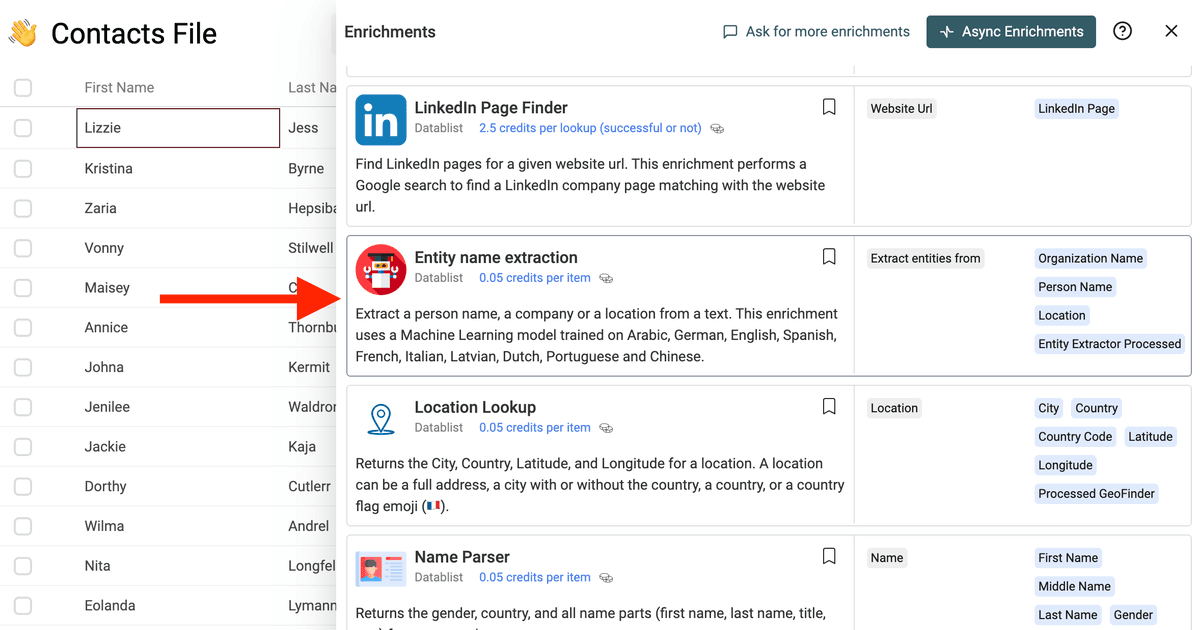
Step 3: Map the Text Column
Connect Extract entities from to the column that contains your source text.
Examples:
- A job description
- A customer message
- A LinkedIn or Instagram bio
- A company description
- A scraped paragraph
- A CRM note
Step 4: Choose the Output Columns
The enrichment can return:
- Organization Name - Company or organization names found in the text.
- Person Name - Person names found in the text.
- Location - Places found in the text.
- Entity Extractor Processed - A checkbox used to track processed rows.
When several names are found, Datablist joins them in the same output column.
Entity Extraction Examples
Here are a few examples of text you can process in bulk.
| Source Text | Person Name | Organization Name | Location |
|---|---|---|---|
| Ben Misner works at Aryeo in Denver. | Ben Misner | Aryeo | Denver |
| Agathe is a Customer Success Expert at lemlist in Paris. | Agathe | lemlist | Paris |
| Sarah Chen joined Notion after working in San Francisco. | Sarah Chen | Notion | San Francisco |
| We met Elena García from Stripe during a fintech event in Madrid. | Elena García | Stripe | Madrid |
| Acme Robotics is hiring field engineers across Berlin and Munich. | Acme Robotics | Berlin, Munich |
Step 5: Pick a Delimiter
You can choose how multiple entities are joined:
- Space
- Comma
- Hyphen
- Semicolon
Comma is the default option. Use semicolon when your extracted values may contain commas.
If you later need one extracted entity per CSV row, use the CSV Rows Splitter to expand the delimited values.
Step 6: Choose the Extraction Mode
The enrichment has three extraction modes:
- Balanced - Default mode. Good for most lists.
- Strict - Fewer false positives. Use it when you prefer missing weak names over adding wrong names.
- Recall - Finds more entities. Use it when you plan to review results after the run.
Step 7: Preview and Run
Run a preview on rows with different text lengths. Check the delimiter, extraction mode, and output columns.
Then run the enrichment on the full collection.
Datablist writes a processed status for every row. If your list is large, you can run part of it, stop, filter, then continue later without processing the same rows again.
Common Use Cases
Extract Companies from Text
Pull company names from scraped webpages, news snippets, CRM notes, or form submissions.
Example: extract companies from a list of LinkedIn bios, then run Company Enrichment on the result.
Extract People from Notes
Find person names in meeting notes, support tickets, recruiting messages, or event attendee descriptions.
Example: parse sales notes to recover people mentioned by account executives.
Extract Locations from Text
Extract cities, countries, or places from job ads, product reviews, travel data, or customer messages.
Example: pull cities from job descriptions before filtering by region.
Prepare Data for Another Enrichment
Use the extracted organization or location as input for another Datablist enrichment, such as Company Enrichment or Location Lookup.
Clean Unstructured CRM Fields
Turn long notes into structured fields before filtering, exporting, or syncing the data to another tool.
Structure Survey Answers
Extract brands, people, and places from open survey answers without reading each response by hand.
Analyze Scraped Web Pages
Scraped pages often contain names, companies, and locations in the same paragraph. Use this enrichment to split them into columns before filtering or deduplicating your list.
Workflows with Other Datablist Enrichments
Entity extraction often works best after a scraper. The scraper collects messy text. This enrichment turns that text into clean columns.
Extract Companies and Locations from Instagram Bios
Use the Instagram Profile Scraper to collect Instagram bios, categories, websites, follower counts, and public contact details.
Then run Entity Name Extraction on the Bio column to extract:
- Company names mentioned in creator or local business bios
- Places mentioned in travel, restaurant, real estate, coaching, or local service profiles
- Person names mentioned in agency, founder, or team bios
This helps when a bio says Founder at Acme Studio - Paris but the company and location are not separate fields.
If you build Instagram lead lists from Google searches, see the guide on searching and scraping Instagram profiles by keyword. After scraping profiles, use this enrichment to structure the bio text.
Extract Companies from Facebook Group Member Bios
Facebook group member exports often include a short bio. The bio may contain work, school, city, or company information in one field.
After following the guide to scrape Facebook group members and enrich them with LinkedIn profiles, run Entity Name Extraction on the Bio column to find company and location signals.
This is useful before LinkedIn lookup. A name plus a company or city makes profile matching easier than a name alone.
Prepare Inputs for Company Enrichment
When you extract organization names from notes, bios, or scraped text, you can pass those names into Company Enrichment or another company lookup workflow.
This turns unstructured text into a company list you can enrich with domains, websites, LinkedIn data, or firmographic data.
Supported Languages
The underlying model supports several languages, including Arabic, German, English, Spanish, French, Italian, Latvian, Dutch, Portuguese, and Chinese.
It works best when the source text includes enough context around the names.
What Is an AI NER Model?
NER means Named Entity Recognition.
An AI NER model reads text and marks words that represent real-world entities. For this enrichment, the model looks for:
- People - Names such as
Sarah ChenorBen Misner. - Organizations - Company and organization names such as
StripeorAcme Robotics. - Locations - Places such as
Paris,Denver, orSan Francisco.
This is different from keyword search. A keyword search only finds exact words you define. A NER model uses context to decide whether a word is a name, a company, or a place.
For example, Paris can be a location in one sentence and part of a person name in another. The model uses nearby words to make that decision.
NER is useful when your data comes from natural language: CRM notes, bios, resumes, scraped pages, survey answers, and support tickets.
How It Compares to ChatGPT Extraction
You can ask ChatGPT to extract entities from text, but that is often overkill for this task.
Entity Name Extraction is made for one job: find people, companies, and locations. It uses an AI NER model, so it costs less than running a large language model on every row.
Use this enrichment when you need fast, low-cost extraction across thousands of rows. Use a ChatGPT enrichment when you need reasoning, custom rules, summaries, or complex classification.
Why Fixed Pricing Matters for Long Text
LLM extraction usually depends on token count. A long bio, page snippet, support ticket, or scraped paragraph costs more than a short sentence because the model reads more input tokens.
Entity Name Extraction has a fixed row price. A short note and a longer text field both cost 0.05 credits when processed. Since 1,000 credits cost around $1, this is about $0.00005 per row.
This matters when you process large text columns:
- Instagram bios and profile descriptions
- Facebook member bios
- CRM notes
- Job descriptions
- Scraped web page snippets
- Survey answers
For long text at scale, the cost gap with LLM extraction grows fast.
Cost Examples
Entity Name Extraction costs 0.05 credits per processed row. 1,000 credits cost around $1.
Examples:
- 1,000 rows cost 50 credits, around $0.05.
- 10,000 rows cost 500 credits, around $0.50.
- 100,000 rows cost 5,000 credits, around $5.
New accounts get 500 free credits on signup, around $0.50 in credits, which covers up to 10,000 rows with this enrichment.
Empty rows are skipped without credits. Rows with text are processed and cost 0.05 credits, about $0.00005, even when no entity is found.
Rows with no extracted entity are marked as no result. Empty inputs are marked as empty data, so you can filter them after the run.
Questions This Tool Answers
People often look for this enrichment when they ask:
- How can I extract company names from a text column?
- How can I extract people and locations from a CSV file?
- How can I turn CRM notes into structured fields?
- How can I extract companies from Instagram bios?
- How can I extract companies from Facebook member bios?
- How can I run named entity recognition on an Excel file?
- How can I extract entities without paying LLM token costs?
If your source is a spreadsheet with free-text fields, this enrichment gives you a direct workflow: import the file, map the text column, choose outputs, preview, and run.
FAQ
Does text length change the price?
No. The enrichment costs 0.05 credits per processed row, about $0.00005 with 1,000 credits around $1. A longer text field does not cost more than a short one.
Can I process a large list in several runs?
Yes. The enrichment returns an Entity Extractor Processed status. You can run part of a list, stop, filter, and continue later while skipping rows already processed.
Can I use it after scraping Instagram profiles?
Yes. Run the Instagram Profile Scraper, then map the bio or description column into Entity Name Extraction. This can extract companies, people, and locations mentioned in bios.
Can I use it after scraping Facebook group members?
Yes. Facebook member bios often include a company, school, or city. Use this enrichment on the bio column before LinkedIn matching or manual review.
Should I use this or ChatGPT?
Use this enrichment for low-cost extraction of people, companies, and locations. Use ChatGPT when you need custom reasoning, custom fields, classification, rewriting, or summaries.
Tips for Better Results
- Use a source column with natural text, not isolated keywords.
- Choose semicolon as delimiter if you plan to split values later.
- Keep the original text column for review.
- Run a preview with short and long text examples.
- Use Strict mode when false positives are costly.
- Use Recall mode when you want to catch more entities and review later.
- Chain the output with other enrichments when you need more structured data.
Can I extract several entity types from the same text column?
Yes. Map one text column and choose the outputs you need, such as people, organizations, and locations. Datablist writes each entity type into its own output column.